
dradman
Add option to not close the undocked console when machine is restarted or shutdown
Nope. That option was already on (also a default, in application settings). But it was not on for all machines. I now turned it on for all of the ones I have running, but it still did not help.
The window gets closed and opened at the moment the machine is running and RDM is able to connect to it.
In the case of manual connect, right after I click it.
In case of the automatic option, soon as it connects.
Add option to not close the undocked console when machine is restarted or shutdown
I do have this option turned on, but if I choose either "connect" or "connect when available", the window still closes, then reopens, which causes the order of windows to still change.
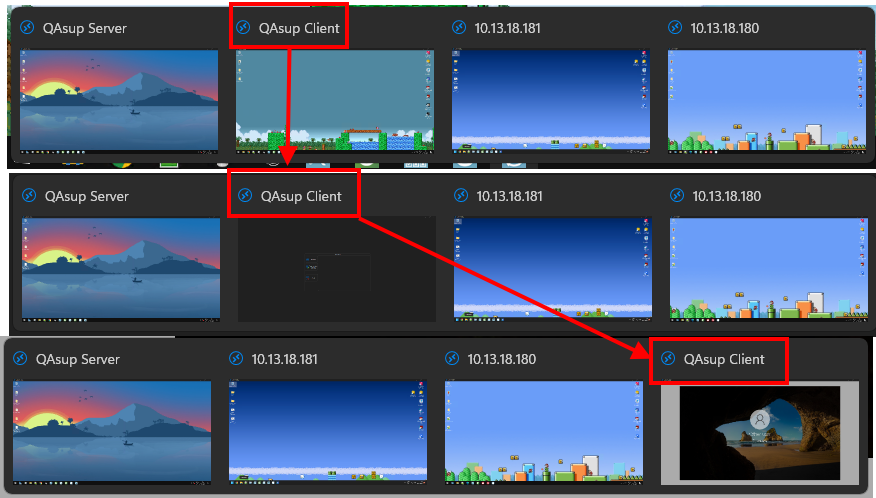
Add option to not close the undocked console when machine is restarted or shutdown
I have such a workflow where I am using undocked consoles for my machines, and I want them in specific order in the windows taskbar/thumbnails.
Currently, when I now restart the machine, the console closes.
I would prefer if the console remained alive, even when the machine is shutdown. And when I start it up (using vSphere for that), that it works.
As it is, if I want specific order of machines (specific functions and tasks are running on each, and I have to juggle all the time, and muscle memory helps), I then have to close all, and open consoles in order again.
If this can work, it could simply be an option.
It is entirely possible this is already one of the options in the advanced tab, but I can't find it..
Mouse Jiggler function no longer works.
Hello
@dradman Thanks for the log file; I see nothing strange there (the API hooks are being loaded and configured, and I see the mouse jiggler enabled). Do you have better results if you change the mouse jiggler method to "function key" instead of "mouse move"?
Thanks and kind regards,
@Richard Markiewicz
No, it does not work with either method.
Is it possible that it is due to something in GP?
I checked now, and there is a rule "Interactive logon: Machine inactivity limit: 900 sec".
Mouse Jiggler function no longer works.
I will jump in here just to report I too am experiencing this, as well as 3 of my colleagues.
2025.2.14.0 64-bit (JIT), connections are to Windows Server 2022 21H2 and Windows 10 22H2.
I open all connections with:
Display: Undocked
Screen sizing mode: Dynamic Resolution