Mouse Jiggler function no longer works.

Although all of my saved connections have Mouse Jiggler enabled, the connected sessions still switch to a lock screen after a default timeout period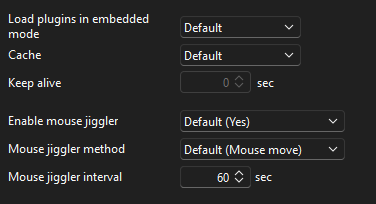
Is it possible that this is no longer working since version 2025.2.16.0?
Regards
07e8452e-7a87-43b1-a6ee-0d69fd67b750.png
All Comments (51)
Hello,
I attempted to recreate the issue on my end but was not able to reproduce the behavior.
Would it be possible for you to try recreating the entry to see if the issue still occurs?
If the issue does persist, could you please let us know which data source you are using? This information will help us narrow down the potential cause.
Best regards,
Carl Marien
Hello Carl
I have created a new entry as you have suggested, but the screen on the remote server has just locked after its default timeout.
The data source for all of the my connections is a local file (...\AppData\Local\Devolutions\RemoteDesktopManager\Connections.db)
I have tried this with multiple servers running Windows Server 2019, including devices that haven't been patched with the June 'Cumulative Update for Windows Server 2019 (KB5060531)' update.
The device still locks.
So it seems that the Mouse Move / Mouse jiggler doesn't work.
Regards
Richard
Let me know if I can provide any more information.
Hello
This is a client-side feature so the server OS should not matter.
Can you enable logging for the API hook as shown in my screenshot below? You'll need to adjust the logging directory path for your system, of course. Save the changes and relaunch RDM; and then reproduce the issue (you can just launch a session and let it idle for the timeout period or a bit longer, long enough that the mouse jiggler should have kicked in).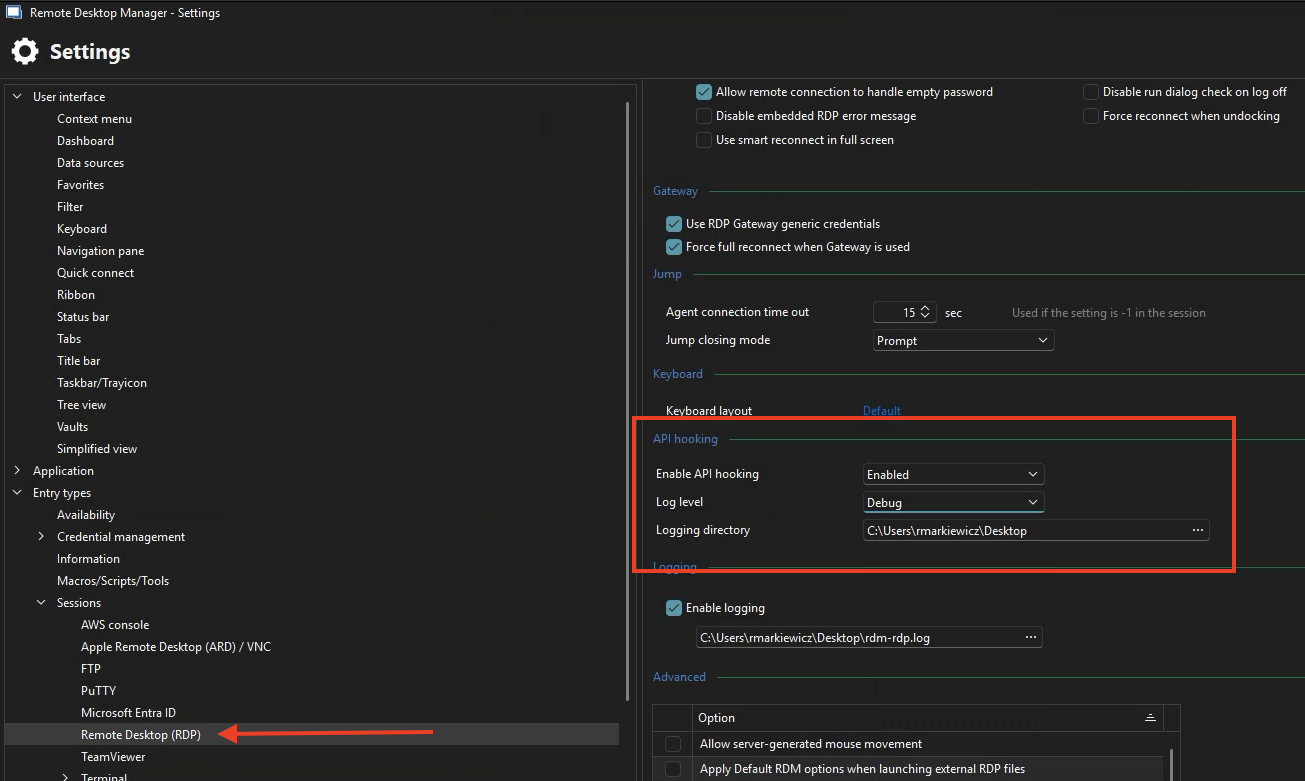
You'll find a log file in the configured directory named "MsRdpEx_RDM.log" which you can share with us - you should share it privately, either send to me by PM or to service@devolutions.net (mentioning this forum thread).
Afterwards please disable the logging again (switch it to "Off").
Please let me know if you have any questions
Kind regards,
Richard Markievicz
Screenshot 2025-06-19 at 14.20.44.png
Hello
This is a client-side feature so the server OS should not matter.
Can you enable logging for the API hook as shown in my screenshot below? You'll need to adjust the logging directory path for your system, of course. Save the changes and relaunch RDM; and then reproduce the issue (you can just launch a session and let it idle for the timeout period or a bit longer, long enough that the mouse jiggler should have kicked in).
You'll find a log file in the configured directory named "MsRdpEx_RDM.log" which you can share with us - you should share it privately, either send to me by PM or to service@devolutions.net (mentioning this forum thread).
Afterwards please disable the logging again (switch it to "Off").
Please let me know if you have any questions
Kind regards,
@Richard Markiewicz
Thanks Richard
Log file has been sent via PM.
I only mentioned the Server patching in case MS had somehow 'ignored' the mouse-move in one of their updates.
Regards
Richard
Hello
Thanks for your message; I've sent you a reply by PM so please check your inbox.
Thanks and kind regards,
Richard Markievicz
Hello
Thanks for your message; I've sent you a reply by PM so please check your inbox.
Thanks and kind regards,
@Richard Markiewicz
Hi Richard
Do you mean the PM about the log level set to Trace?
If so, I replied to that message yesterday and included the log file.
If there is a different PM from today then I don't see it in my inbox, sorry
Regards
Richard
Hello
My bad - I hadn't seen the notification. I've replied to you again just now. Sorry for the inconvenience.
Kind regards,
Richard Markievicz
Hi @Richard Markiewicz
I have uninstalled RDM, rebooted my device, installed RDM version 2025.2.16.0, rebooted again.
I have opened a new session and the server still locks after 10 minutes. I am intrigued why you can't recreate this.
Does this mean that I have another component outside of RDM that is causing this to stop working?
Regards
Richard
Hello
I'm replying here for visibility, but thanks for the patient correspondence by PM.
Overall I'm confused; we see that RDM is properly passing the options to mstsc but something appears to be wrong on that side because I don't see it working with the corresponding properties. I can't reproduce it on my side but I doubt there is anything missing from your environment.
I've referred the issue to my colleague who maintains this part of the software, and is expert in RDP internals so I would like to get his opinion before trying anything else. He is out at a conference this week but I expect to get back to you within the next few days.
Thanks a lot for your patience
Kind regards,
Richard Markievicz
Hello again
Can I know your exact Windows version, including the build number? A screenshot of winver (Start > Run > winver.exe) should be sufficient.
I'd also like to know the version of the RDP DLL on your system. Can you locate the file %systemroot%\System32\mstscax.dll, right-click and choose Properties > Details, and share the version information?
Do you have NetSupport Manager or a related NetSupport product installed?
Thanks and kind regards,
Richard Markievicz
Hi Richard
Thanks for the reply - obviously it isn't causing a major headache - I'm just keen to understand why it no longer works :)
As requested, my WinVer: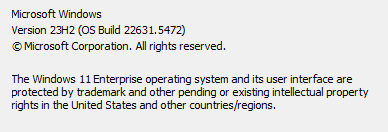
mstscax: 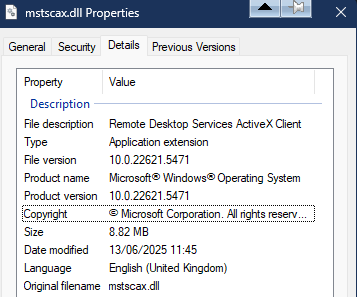
I do have NetSupport installed but don't use it very often.
Regards
Richard
ed7bd3a8-e3e1-4b0c-8f3f-b0a2f4f0ebae.png
681e204b-3107-4752-b30c-6d8b4511040a.png
Hello
Thanks for that. I've passed the info on to my colleague.
With regard to NetSupport, the reason I ask about is that we can see it is injecting a DLL into the RDM process. The name of the DLL "winsthooks64.dll" strongly implies that it is doing some form of API hooking. This feature - the mouse jiggler - also depends on API hooking; and when two sets of hooks are applied on top of a process they may be incompatible. It's hard to say precisely because I don't know what NetSupport is doing here.
Now, I say it's suspicious, but also you noted that this broke on an RDM update so there may be no correlation there. But I do wonder if NetSupport was also recently updated and maybe something changed on their side? It could be worth temporarily uninstalling it. Another thing to check would be; does the feature work again if you go back to an older RDM version? You could download a portable copy of an older version for testing. Your current version has an "Update History" list in the Help > About menu that could help guide you to your last version; otherwise possible just try the final 2025.1.x release. Older downloads are available here.
Thanks and kind regards,
Richard Markievicz
Hi Richard
ok, my steps yesterday were:
- uninstalled NetSupport Manager
- uninstalled RDM
- rebooted
My version history was this: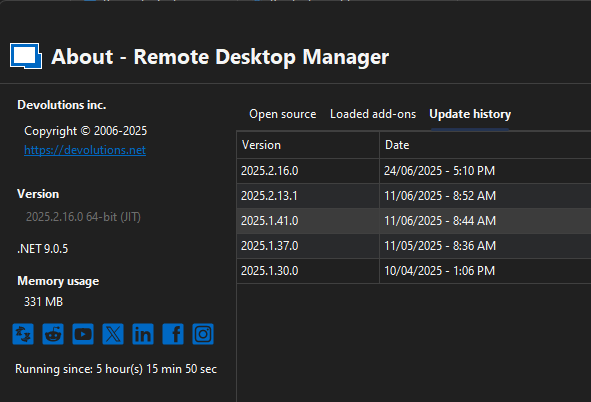
So I installed RDM version 2025.1.30.0 and rebooted.
I have opened a new session and the server still locks after 10 minutes.
This implies that either something else has changed on my device OR there is something remaining after uninstalling RDM that has been corrupted / reconfigured.
Are there other folders I need to remove after an Uninstall to make sure RDM is fully removed?
Regards
Richard
9bfbee22-6781-4aff-8ae9-cdcc9847fd4a.png
Hi trikster,
Try changing the value in “Mouse jiggler method” from “Default (Mouse move)” or “Mouse move” to “Function key”.
This should work.
Hi trikster,
Try changing the value in “Mouse jiggler method” from “Default (Mouse move)” or “Mouse move” to “Function key”.
This should work.
@januszkoniuszko91
Thanks - this actually worked
I will now update RDM back to the latest version and then change the default Mouse Jiggler method to 'Function Key' - hope it still works.....
Hello
Thanks @januszkoniuszko91 for the help!
Overall I'm really surprised that this changed something. As you wrote @trikster the results imply that something has changed environmentally; but if function key is working for you then please let us know if that's the case on the latest version.
Thanks and kind regards,
Richard Markievicz
Hello
Thanks @januszkoniuszko91 for the help!
Overall I'm really surprised that this changed something. As you wrote @trikster the results imply that something has changed environmentally; but if function key is working for you then please let us know if that's the case on the latest version.
Thanks and kind regards,
@Richard Markiewicz
Hi Richard
Unfortunately, it seemed to be a one-off.
Every connection session since has locked after 10 minutes.
Myself and a colleague are currently testing every permutation of the RDM Setting vs. the Session setting, to see if any of them work.
Regards
Richard
Sorry @januszkoniuszko91 it seems that I celebrated success too early. The switch to Function Key did not work for me either.
@Richard Markiewicz I have upgraded back to the latest version (2025.2.16.0) and we have tested all of these permutations with no success (target machine locks after 10 minutes):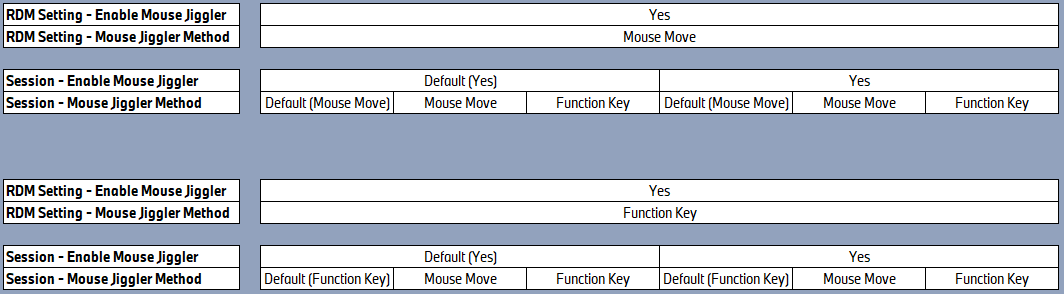
As I commented previously, maybe something has been corrupted on my device (however, both of my colleagues also have the same experience now - mouse move no longer works) that is not removed during RDM uninstallation process.
As 3 of us (my colleagues) now have the same issue, that implies that something external to RDM has been updated / corrupted which prevents the Mouse Jiggle function from working.
Regards
Richard
c047190f-88d3-4f39-b17c-a61ad61b4572.png
Hello
Yes, this is very strange. To answer your earlier question, there's no other files to remove to clean RDM completely from the machine.
At a high-level, we see that the API hooks are getting loaded as evidenced by your log file, but the log file also looks strange to me. I've forwarded this information to my colleague who will be back next week.
What data source are you using in RDM? For shared datasources, there is a data source setting (Administration > System Settings > Application > Type Settings > Remote Desktop (RDP)) that disables the mouse jiggler. There is also a group policy that can disable the mouse jiggler, as well as another group policy that broadly disables API hooking. Can you check that none of these settings have been applied in your environment?
Thanks and kind regards,
Richard Markievicz
Hello
Yes, this is very strange. To answer your earlier question, there's no other files to remove to clean RDM completely from the machine.
At a high-level, we see that the API hooks are getting loaded as evidenced by your log file, but the log file also looks strange to me. I've forwarded this information to my colleague who will be back next week.
What data source are you using in RDM? For shared datasources, there is a data source setting (Administration > System Settings > Application > Type Settings > Remote Desktop (RDP)) that disables the mouse jiggler. There is also a group policy that can disable the mouse jiggler, as well as another group policy that broadly disables API hooking. Can you check that none of these settings have been applied in your environment?
Thanks and kind regards,
@Richard Markiewicz
Hi Richard
The data source is a local RDM file.
I have uninstalled RDM this morning and also removed the C:\Users\xxxxx\AppData\Local\Devolutions\RemoteDesktopManager folder.
I rebooted and then reinstalled version 2025.2.16.0.
Unfortunately, the sessions still lock after 10 minutes.
Regards
Richard
Hello trikster,
Try this :
- Log out from remote server( log out instead of just closing the connection).
- Change “Mouse jiggler methot” to a different value than it is currently set.
- Now log in and see if it worked.
I tested this(RDM v2025.2.16.0) and noticed that if:
- I have an active and disconnected session on the server and change "Mouse jiggler method"
or
- I am currently logged into the server and I change "Mouse jiggler method" and disconnect
Then when I log back into the server the jiggler usually stops working until I log out of the server and log back in.
Even restarting RDM doesn't help in this case, only logging out helps
If several people connect to the same account on the server then they should have “Mouse jiggler method” set to the same value to avoid problems
Well done @januszkoniuszko91 !!!!
You are correct :)
I have 'Enable mouse jiggler' set to Yes and 'Mouse jiggler method' set to Mouse move in the RDM settings.
Each of my saved sessions in my data source are using the Default - i.e. as above.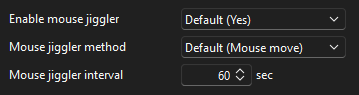
I have opened connections to two servers that were previously logged off..... the screens do not lock 
This explains why your initial suggestion worked for me, but then I couldn't repeat it... because I connected to a new server and didn't logoff afterwards.
Unfortunately, some of the servers I do connect to, we deliberately don't logoff because they are executing long running operations.... which is why it is annoying that the screen is locked when you return to it.
@Richard Markiewicz I hope the information from @januszkoniuszko91 gives you some clues to work with ....
Regards
Richard
ae3043fd-e762-449f-9c0b-5fb2b4935ab6.png
30d3be02-b983-4ab7-8346-0da233fb9a21.png
Hello
Thank you @januszkoniuszko91 for the helpful tip.
From my side, things still sound really strange, because the mouse jiggler is a client-side feature and the state of the server session should not matter.
I will forward this information to my colleague who works on that and ask his opinion.
Thanks and kind regards,
Richard Markievicz
Hello
Thank you @januszkoniuszko91 for the helpful tip.
From my side, things still sound really strange, because the mouse jiggler is a client-side feature and the state of the server session should not matter.
I will forward this information to my colleague who works on that and ask his opinion.
Thanks and kind regards,
@Richard Markiewicz
Hi Richard
Maybe it is also something strange like, 'the mouse jiggler is only valid whilst the RDP session is in focus, but as soon as you navigate to another window on your desktop and then return to the RDP session, the jiggler has become inactive'.... just an idea, but maybe way off target....
Regards
Richard
Hi @Richard Markiewicz , do you have any updates from your colleague on this?
Regards
Richard
Hello
We see from the log file that the API hooking is not initializing properly, which is really strange. It's odd because this obviously isn't generally broken - we haven't had any other reports like this. It's likely we'll need to add some more diagnostics to the library to troubleshoot this.
That said - can you let me know the result if you set the RDP session(s) to open "Embedded" rather than "External"? It can give an important clue if it's only the "External" mode that isn't working properly.
Thanks and kind regards,
Richard Markievicz
Hello
We see from the log file that the API hooking is not initializing properly, which is really strange. It's odd because this obviously isn't generally broken - we haven't had any other reports like this. It's likely we'll need to add some more diagnostics to the library to troubleshoot this.
That said - can you let me know the result if you set the RDP session(s) to open "Embedded" rather than "External"? It can give an important clue if it's only the "External" mode that isn't working properly.
Thanks and kind regards,
@Richard Markiewicz
Hi @Richard Markiewicz
I can confirm that running a session as Embedded works and the screen does not lock after the 10 minute timeout.
Let me know if there is anything else I can test / experiment with.
Regards
Richard
Hello
Thanks for the update. This is really weird because normally with things like this; the external mode is more reliable (because you get a new process for every RDP session, instead of a lot of shared state with multiple sessions inside one process). And to reiterate, we haven't seen any other reports of this. There is an error shown in the log you provided but the cause is not clear.
At this point we're wondering if something else isn't injecting code into mstsc.
First, now that you've uninstalled NetSupport; could you re-follow the logging steps we did earlier and produce a new log file and send it to me? I'd like to see if something is different.
Second, launch an external session from RDM and run the following PowerShell:Get-Process mstsc | select -expand modules
And send me the output. It would be helpful if the external session that is running; is the only open copy of mstsc on your machine; because I didn't write any logic to select a specific instance of mstsc in case of multiple instances.
Please, let me know if something isn't clear or you have some questions
Kind regards,
Richard Markievicz
I will jump in here just to report I too am experiencing this, as well as 3 of my colleagues.
2025.2.14.0 64-bit (JIT), connections are to Windows Server 2022 21H2 and Windows 10 22H2.
I open all connections with:
Display: Undocked
Screen sizing mode: Dynamic Resolution
Hello
Thanks for the update. This is really weird because normally with things like this; the external mode is more reliable (because you get a new process for every RDP session, instead of a lot of shared state with multiple sessions inside one process). And to reiterate, we haven't seen any other reports of this. There is an error shown in the log you provided but the cause is not clear.
At this point we're wondering if something else isn't injecting code into mstsc.
First, now that you've uninstalled NetSupport; could you re-follow the logging steps we did earlier and produce a new log file and send it to me? I'd like to see if something is different.
Second, launch an external session from RDM and run the following PowerShell:
Get-Process mstsc | select -expand modules
And send me the output. It would be helpful if the external session that is running; is the only open copy of mstsc on your machine; because I didn't write any logic to select a specific instance of mstsc in case of multiple instances.
Please, let me know if something isn't clear or you have some questions
Kind regards,
@Richard Markiewicz
Hi Richard
Files sent by PM.
Regards
Hello
@trikster Thanks for the files, I've shared them with my colleague and we will take a look.
@dradman Since you're using the embedded (undocked) mode and @trikster is only having an issue with the external mode, your issue is likely something different. Can you follow these diagnostic steps for me?
- In File > Settings > Entry Types > Sessions > Remote Desktop (RDP) > API Hooking
- First, verify that API hooking is enabled. It should be.
- Set the "Log Level" to "Trace"
- Provide a path to a directory where we can write logs files
- Apply the changes, and relaunch RDM
- Connect to a session where you expect the mouse jiggler to be enabled and working; let the session idle for at least the mouse jiggler timeout.
- Now, find the log file in the directory you provided earlier (it should be named like "MsRdpEx_RDM.log"). You can send it to me by PM on the forum or to service@devolutions.net, mentioning this forum thread.
- Finally, reverse the steps above to switch logging back to "Off", saving changes and restart RDM. Logging has a non-zero impact on performance.
Please, let me know if something isn't clear or you have further questions
Kind regards,
Richard Markievicz
Hello
@trikster I know you wrote that you uninstalled NetSupport; but your log files and the loaded module list still show their hooking library being injected in mstsc.
We're a bit confounded by this - we've tried installing NetSupport on our side and it doesn't do that by default, and we can't see what's needed to make it do that; but regardless it is happening on your system. We can't support our own API hooks when another process is also hooking the same executable.
Something you can try is to delete or rename the hooking library at C:\Program Files (x86)\Common Files\NSL\winsthooks64.dll. If it works; that's great, but if not please provide a further log file after deleting or renaming that file (to prevent it from being loaded).
Please let me know if you have some questions or something isn't clear
Kind regards,
Richard Markievicz
Hello
@trikster I know you wrote that you uninstalled NetSupport; but your log files and the loaded module list still show their hooking library being injected in mstsc.
We're a bit confounded by this - we've tried installing NetSupport on our side and it doesn't do that by default, and we can't see what's needed to make it do that; but regardless it is happening on your system. We can't support our own API hooks when another process is also hooking the same executable.
Something you can try is to delete or rename the hooking library at C:\Program Files (x86)\Common Files\NSL\winsthooks64.dll. If it works; that's great, but if not please provide a further log file after deleting or renaming that file (to prevent it from being loaded).
Please let me know if you have some questions or something isn't clear
Kind regards,
@Richard Markiewicz
Files sent by PM
Hello
@trikster I know you wrote that you uninstalled NetSupport; but your log files and the loaded module list still show their hooking library being injected in mstsc.
We're a bit confounded by this - we've tried installing NetSupport on our side and it doesn't do that by default, and we can't see what's needed to make it do that; but regardless it is happening on your system. We can't support our own API hooks when another process is also hooking the same executable.
Something you can try is to delete or rename the hooking library at C:\Program Files (x86)\Common Files\NSL\winsthooks64.dll. If it works; that's great, but if not please provide a further log file after deleting or renaming that file (to prevent it from being loaded).
Please let me know if you have some questions or something isn't clear
Kind regards,
@Richard Markiewicz
Files sent by PM
Hello
@dradman Thanks for the log file; I see nothing strange there (the API hooks are being loaded and configured, and I see the mouse jiggler enabled). Do you have better results if you change the mouse jiggler method to "function key" instead of "mouse move"?
Thanks and kind regards,
Richard Markievicz
Hello
@trikster Thanks for sending that through.
Fundamentally nothing is changed in the log file, the hooks are still failing to attach to the mstsc window. I do see that the file is now absolutely spammed with calls to load the winsthooks64.dll which implies that the rename worked (i.e. it can't find the DLL, so it repeatedly tries to load it). But something must be going on at a higher level for mstsc to even _try_ to load the DLL; there must be some remnant of NetSupport - or perhaps a malware posing as NetSupport - that is injecting itself somehow into mstsc. Perhaps a device driver, system service, registry based injection or maybe group policy or some enterprise management. I'm really not sure.
We're continuing to investigate this on our side but the cause is still not clear.
Do you have a somewhat "clean" virtual machine that you could install RDM and see if the issue occurs there? I'm convinced this is environmental but it's extremely hard to see the root cause.
Please, let me know if something isn't clear or you have other questions
Kind regards,
Richard Markievicz
Hello
@dradman Thanks for the log file; I see nothing strange there (the API hooks are being loaded and configured, and I see the mouse jiggler enabled). Do you have better results if you change the mouse jiggler method to "function key" instead of "mouse move"?
Thanks and kind regards,
@Richard Markiewicz
No, it does not work with either method.
Is it possible that it is due to something in GP?
I checked now, and there is a rule "Interactive logon: Machine inactivity limit: 900 sec".
Hello
@trikster Thanks for sending that through.
Fundamentally nothing is changed in the log file, the hooks are still failing to attach to the mstsc window. I do see that the file is now absolutely spammed with calls to load the winsthooks64.dll which implies that the rename worked (i.e. it can't find the DLL, so it repeatedly tries to load it). But something must be going on at a higher level for mstsc to even _try_ to load the DLL; there must be some remnant of NetSupport - or perhaps a malware posing as NetSupport - that is injecting itself somehow into mstsc. Perhaps a device driver, system service, registry based injection or maybe group policy or some enterprise management. I'm really not sure.
We're continuing to investigate this on our side but the cause is still not clear.
Do you have a somewhat "clean" virtual machine that you could install RDM and see if the issue occurs there? I'm convinced this is environmental but it's extremely hard to see the root cause.
Please, let me know if something isn't clear or you have other questions
Kind regards,
@Richard Markiewicz
Hi Richard
New files sent.
RDP session from different laptop running RDM version 2024.3.18.0
Session does not lock.
NetSupport Manager is not installed on this device. The folder C:\Program Files (x86)\Common Files\NSL does not exist.
Should I update RDM to the latest version or are there more things I can test first?
Regards
Richard
Hello
@dradman Thanks for the log file; I see nothing strange there (the API hooks are being loaded and configured, and I see the mouse jiggler enabled). Do you have better results if you change the mouse jiggler method to "function key" instead of "mouse move"?
Thanks and kind regards,
@Richard Markiewicz
No, it does not work with either method.
Is it possible that it is due to something in GP?
I checked now, and there is a rule "Interactive logon: Machine inactivity limit: 900 sec".
Hi @dradman
It's possible but I would think the mouse jiggler should circumvent this policy. Does it work as expected if you use the "External" mode to open your session (open in mstsc)?
Thanks and kind regards,
Richard Markievicz
Hello
@trikster Thanks for sending that through.
Fundamentally nothing is changed in the log file, the hooks are still failing to attach to the mstsc window. I do see that the file is now absolutely spammed with calls to load the winsthooks64.dll which implies that the rename worked (i.e. it can't find the DLL, so it repeatedly tries to load it). But something must be going on at a higher level for mstsc to even _try_ to load the DLL; there must be some remnant of NetSupport - or perhaps a malware posing as NetSupport - that is injecting itself somehow into mstsc. Perhaps a device driver, system service, registry based injection or maybe group policy or some enterprise management. I'm really not sure.
We're continuing to investigate this on our side but the cause is still not clear.
Do you have a somewhat "clean" virtual machine that you could install RDM and see if the issue occurs there? I'm convinced this is environmental but it's extremely hard to see the root cause.
Please, let me know if something isn't clear or you have other questions
Kind regards,
@Richard Markiewicz
Hi Richard
New files sent.
RDP session from different laptop running RDM version 2024.3.18.0
Session does not lock.
NetSupport Manager is not installed on this device. The folder C:\Program Files (x86)\Common Files\NSL does not exist.
Should I update RDM to the latest version or are there more things I can test first?
Regards
Richard
Hi @trikster
Thanks for the follow up. So; from my side, your log file now looks "normal" - the API hooks are properly created and the mouse jiggler settings are being passed through. This is not what we saw before; the other hook DLL was being loaded (or trying to be loaded) and we were not able to attach our code to the mstsc window.
You wrote "Session does not lock" - so, does that mean this is working as expected on that laptop?
If you update RDM to the latest version - you could try a portable copy if you don't want to upgrade the machine - do you still get the expected result?
Thanks and kind regards,
Richard Markievicz
Hello
@trikster Thanks for sending that through.
Fundamentally nothing is changed in the log file, the hooks are still failing to attach to the mstsc window. I do see that the file is now absolutely spammed with calls to load the winsthooks64.dll which implies that the rename worked (i.e. it can't find the DLL, so it repeatedly tries to load it). But something must be going on at a higher level for mstsc to even _try_ to load the DLL; there must be some remnant of NetSupport - or perhaps a malware posing as NetSupport - that is injecting itself somehow into mstsc. Perhaps a device driver, system service, registry based injection or maybe group policy or some enterprise management. I'm really not sure.
We're continuing to investigate this on our side but the cause is still not clear.
Do you have a somewhat "clean" virtual machine that you could install RDM and see if the issue occurs there? I'm convinced this is environmental but it's extremely hard to see the root cause.
Please, let me know if something isn't clear or you have other questions
Kind regards,
@Richard Markiewicz
Hi Richard
New files sent.
RDP session from different laptop running RDM version 2024.3.18.0
Session does not lock.
NetSupport Manager is not installed on this device. The folder C:\Program Files (x86)\Common Files\NSL does not exist.
Should I update RDM to the latest version or are there more things I can test first?
Regards
Richard
Hi @trikster
Thanks for the follow up. So; from my side, your log file now looks "normal" - the API hooks are properly created and the mouse jiggler settings are being passed through. This is not what we saw before; the other hook DLL was being loaded (or trying to be loaded) and we were not able to attach our code to the mstsc window.
You wrote "Session does not lock" - so, does that mean this is working as expected on that laptop?
If you update RDM to the latest version - you could try a portable copy if you don't want to upgrade the machine - do you still get the expected result?
Thanks and kind regards,
@Richard Markiewicz
Hi Richard
You are correct - 'Session does not lock' means that the mouse jiggler is working as expected.
I will try the portable copy option and let you know.
Regards
Richard
Hello
@trikster Thanks for sending that through.
Fundamentally nothing is changed in the log file, the hooks are still failing to attach to the mstsc window. I do see that the file is now absolutely spammed with calls to load the winsthooks64.dll which implies that the rename worked (i.e. it can't find the DLL, so it repeatedly tries to load it). But something must be going on at a higher level for mstsc to even _try_ to load the DLL; there must be some remnant of NetSupport - or perhaps a malware posing as NetSupport - that is injecting itself somehow into mstsc. Perhaps a device driver, system service, registry based injection or maybe group policy or some enterprise management. I'm really not sure.
We're continuing to investigate this on our side but the cause is still not clear.
Do you have a somewhat "clean" virtual machine that you could install RDM and see if the issue occurs there? I'm convinced this is environmental but it's extremely hard to see the root cause.
Please, let me know if something isn't clear or you have other questions
Kind regards,
@Richard Markiewicz
Hi Richard
New files sent.
RDP session from different laptop running RDM version 2024.3.18.0
Session does not lock.
NetSupport Manager is not installed on this device. The folder C:\Program Files (x86)\Common Files\NSL does not exist.
Should I update RDM to the latest version or are there more things I can test first?
Regards
Richard
Hi @trikster
Thanks for the follow up. So; from my side, your log file now looks "normal" - the API hooks are properly created and the mouse jiggler settings are being passed through. This is not what we saw before; the other hook DLL was being loaded (or trying to be loaded) and we were not able to attach our code to the mstsc window.
You wrote "Session does not lock" - so, does that mean this is working as expected on that laptop?
If you update RDM to the latest version - you could try a portable copy if you don't want to upgrade the machine - do you still get the expected result?
Thanks and kind regards,
@Richard Markiewicz
Hi Richard
You are correct - 'Session does not lock' means that the mouse jiggler is working as expected.
I will try the portable copy option and let you know.
Regards
Richard
@Richard Markiewicz
Ok, I have downloaded the portable (binary file) version of 2025.2.20.0.
It requires .NET 9.0 Desktop Runtime which I cannot install at the moment as I don't have Admin privileges on the other laptop.
As soon as I have installed this, I will let you know if this works or not.
Regards
Richard
@Richard Markiewicz
Hi Richard
Ok, some observations:
Other Laptop is running Windows 11 22H2.
The MSTSC.exe version was 10.0.22621.4391
RDM 2024.3.18.0 worked fine and mouse jiggler worked as expected.
I attempted to run RDM version 2025.2.20.0 but it required .NET 9.0 runtime.
I downloaded and installed .NET 9.0 and upgraded RDM to 2025.2.21.0.
The laptop also applied Windows Updates which I could not disable. As a result MSTSC.exe is now 10.0.22621.5471.
Mouse Jiggler no longer works :(
So is it .NET 9, the new RDM version or the newer MSTSC version that is breaking this?
Is it worth me uninstalling anything to try and isolate the root cause?
Regards
Richard
Hello
Thanks for the details.
So we seem to be narrowing things down here; I strongly suspect it's the mstsc version. I'd like to try and recreate that specific environment on my side and see if it reproduces.
In the meantime - and thanks for your patience with this - can you recreate the log file for me one more time in this setup? I'd like to see first if something stands out as obviously wrong.
Thanks and kind regards,
Richard Markievicz
Hello
Thanks for the details.
So we seem to be narrowing things down here; I strongly suspect it's the mstsc version. I'd like to try and recreate that specific environment on my side and see if it reproduces.
In the meantime - and thanks for your patience with this - can you recreate the log file for me one more time in this setup? I'd like to see first if something stands out as obviously wrong.
Thanks and kind regards,
@Richard Markiewicz
Hi Richard
Updated log files have been sent to you.
Regards
Richard
Hello
Thanks for your patience.
I did successfully reproduce the problem on my side. I've installed a Windows 22H2 release inside a new virtual machine; as part of the install process it automatically updated to 23H2 giving me the same mstsc.exe version as you. Inside that environment I can reproduce the issue both with RDM 2024.3.x and 2025.2.x. The problem does not occur on my workstation, 24H2 with the same RDM and corresponding .NET versions.
The implication is that there is something about that version of mstsc that is causing an issue here.
I've asked my colleague to investigate this, it may be time consuming as this is tricky work based on reverse engineering - this feature is not built on top of any official API or third-party integration; rather, it's build by studying the structure of mstsc and it's DLLs and injecting code to alter their behaviour.
We'll post back here once we have some more news.
Thanks and kind regards,
Richard Markievicz
Hello
Thanks for your patience.
I did successfully reproduce the problem on my side. I've installed a Windows 22H2 release inside a new virtual machine; as part of the install process it automatically updated to 23H2 giving me the same mstsc.exe version as you. Inside that environment I can reproduce the issue both with RDM 2024.3.x and 2025.2.x. The problem does not occur on my workstation, 24H2 with the same RDM and corresponding .NET versions.
The implication is that there is something about that version of mstsc that is causing an issue here.
I've asked my colleague to investigate this, it may be time consuming as this is tricky work based on reverse engineering - this feature is not built on top of any official API or third-party integration; rather, it's build by studying the structure of mstsc and it's DLLs and injecting code to alter their behaviour.
We'll post back here once we have some more news.
Thanks and kind regards,
@Richard Markiewicz
Hi Richard
I'm glad that you have managed to reproduce the issue - at least that means it wasn't unique to the environment on my machine.
Let me know if there is anything I can test
Regards
Richard
Hello
Thanks for your patience.
We've identified and fixed an issue preventing the API hooks from working with that version of Windows/mstsc. I'm surprised that this wasn't noticed earlier, so thanks for bringing it to our attention and for the patient troubleshooting.
I'm afraid the fix has missed the upcoming 2025.2.22 release but it should be in 2025.2.23 within the next couple of weeks. Once the update is released, please try this again and let me know if you still have any problems or questions.
Thanks and kind regards,
Richard Markievicz
Hello
Thanks for your patience.
We've identified and fixed an issue preventing the API hooks from working with that version of Windows/mstsc. I'm surprised that this wasn't noticed earlier, so thanks for bringing it to our attention and for the patient troubleshooting.
I'm afraid the fix has missed the upcoming 2025.2.22 release but it should be in 2025.2.23 within the next couple of weeks. Once the update is released, please try this again and let me know if you still have any problems or questions.
Thanks and kind regards,
@Richard Markiewicz
Hi Richard, no problem. I am glad you have identified the issue.
Regards
Richard
I have installed 2025.2.22.0 today and this now works as designed :)
Regards
Richard
Hello
Excellent news! Thank you for your patient troubleshooting.
Please don't hesitate with further questions or comments.
Best regards,
Richard Markievicz