
chrisclaxton
Favorites pane entries for Server and Username and Password entries does not allow editing & saving - 2026.02.13
Greetings Sam,
I also posted a ticket about the Favorites pane not refreshing statuses under "Favorites pane not refreshing connection status consistently 2026.02.13 and older" which Carl has responded to. I provided a screen shot there of an example on that. I will have to get time and setup the ability to do a recording since much of my screen information is quite confidential. :-)
Thought perhaps those notes and screen shot could be helpful. In setting up for the screen shot, I noticed editing a connection entry also did not save from the Favorites pane just like my Credentials entry.
Thank you,
Christopher
Favorites pane not refreshing connection status consistently 2026.02.13 and older
Greetings Carl,
This occurs with any connection in my favorites, old or new, if I open it from the primary list or I open it from the Favorite shortcuts, or log off/close the session, it does not update the connection status or description on the Favorites pane. (Screen shot is Favorites pane on top, primary pane on the bottom.)
I will note, I often keep my RDM application locked and do have to unlock the RDM Session, and then unlock the vault. Upon unlocking the vault, the statuses are also refreshed in the Favorites pane.
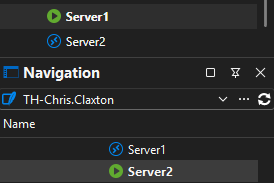
It would happen over time and if I locked and unlocked, but I realized if I click the "Refresh Connection" icon above the primary section, it would refresh their statuses in the Favorites section.
I also realized that if I try to Edit an entry in the Favorites pane, it acts like it is editing, but it does not actually update the primary entry on RDP connection, or a Credentials entry. (See also my ticket opened as "Favorites pane entries for Server and Username and Password entries does not allow editing & saving - 2026.02.13"
Sam asked for a video there, so I will review trying to setup to make one soon for that ticket since everything I have around it will be confidential. Hopefully the screen shot above is informative.
Thank you,
Christopher
Favorites pane entries for Server and Username and Password entries does not allow editing & saving - 2026.02.13
In the most recent RDM versions, the Favorites pane entries for (at least) Username and Password Credential Management and RDP Sessions, the Favorites panel does not allow editing the linked entry. It will open the panel for editing and saving, let you edit the entry to say update the password (ours are updated daily) and it looks like it saves but it does not, and history tracking confirms no changes. I have to scroll down my primary pane to edit the entry. (No point in having my daily password entry to change available in Favorites like this. :-) )
Currently on RDM version 2026.02.13, but I think the last build version (or two ?) had this problem also.
Thank you,
Christopher
Favorites pane not refreshing connection status consistently 2026.02.13 and older
The favorites pane for a good number of previous versions is not refreshing connection status consistently. For a while of previous versions, if I clicked on the Favorites pane entry, it would refresh, now the only time I (seem to) get their status to refresh is if I lock the RDM application and unlock it again. Currently on version 2026.02.13
Thank you,
Christopher
Favorites Connection Status does not refresh until clicking inside the Favorites panel
The status colors of a connection has not refreshed in the Favorites section until you click into the Favorites section for the last several versions. Any adjustment that causes a refresh of the Favorites panel immediately updates all
My current version as of posting: 2025.1.41.0 64-bit (JIT)
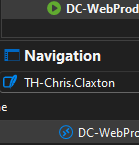
(Same server in Favorites on top and list on the bottom of the screen shot just after logging off. )
~Christopher