
ryangillespie
RDM stuck in offline mode
Hello,
Yes I am able to access that. on another computer I have no issues accessing my portal either.
RDM stuck in offline mode
Hello,
I just updated RDM from 2026.1 to 2026.2.140
It still showing as offline.
Ryan
RDM stuck in offline mode
Hello,
When I delete %localappdata%\Devolutions\RemoteDesktopManager and then reopen RDM it goes though the new user setup. I sign in and select my data source of Devolutions Personal Cloud. Upon closing and reopening RDM it goes back to giving me the error
HTTP Response:

<!DOCTYPE html>
<html lang="en">
<head>
    <meta charset="UTF-8">
    <meta name="viewport" content="width=device-width, initial-scale=1">
    <title>Devolutions Cloud workspace not found</title>
    <link rel="stylesheet" href="assets/index.css">
</head>
<body>
    <div class="error-page-header">
        <a href="https://devolutions.net" class="devolutions-logo-link">
            <img src="assets/images/devolutions-logo-large.png" alt="Devolutions logo" class="logo">
        </a>
    </div>
    <div class="container">
        <img src="assets/images/page-not-found-sysadminotaur.png" alt="404 illustration" class="illustration">
        <h1>404 – Devolutions Cloud workspace not found</h1>
        <p>The workspace you’re looking for could not be found.</p>
        <p><a href="https://portal.devolutions.com/products">See your workspaces</a></p>
    </div>
</body>
</html>


Devolutions.Hub.Clients.ApiException: The HTTP status code of the response was not expected (404).

Status: 404
Response:
<!DOCTYPE html>
<html lang="en">
<head>
    <meta charset="UTF-8">
    <meta name="viewport" content="width=device-width, initial-scale=1">
    <title>Devolutions Cloud workspace not found</title>
    <link rel="stylesheet" href="assets/index.css">
</head>
<body>
    <div class="error-page-header">
        <a href="https://devolutions.net" class="devolutions-logo-link">
            <img src="assets/images/devolutions-logo-large.png" alt="Devolutions logo" class="logo">
        </a>
    </div>
    <div class
   at Devolutions.Hub.Clients.HubClient.GetServerConfigurationAsync(CancellationToken cancellationToken)
   at Devolutions.Hub.Clients.HubClient.<GetServerConfiguration>b__524_0()
   at Devolutions.Hub.Clients.HubClient.GetServerConfiguration()
at Devolutions.RemoteDesktopManager.Business.DataSources.HubConnectionDataSource.Login()RDM stuck in offline mode
I deleted the full appdata folder and it went though as a fresh install
RDM stuck in offline mode
I was able to go to file-My account - sign in without any issues but it still stuck in offline mode.
RDM stuck in offline mode
Hello,
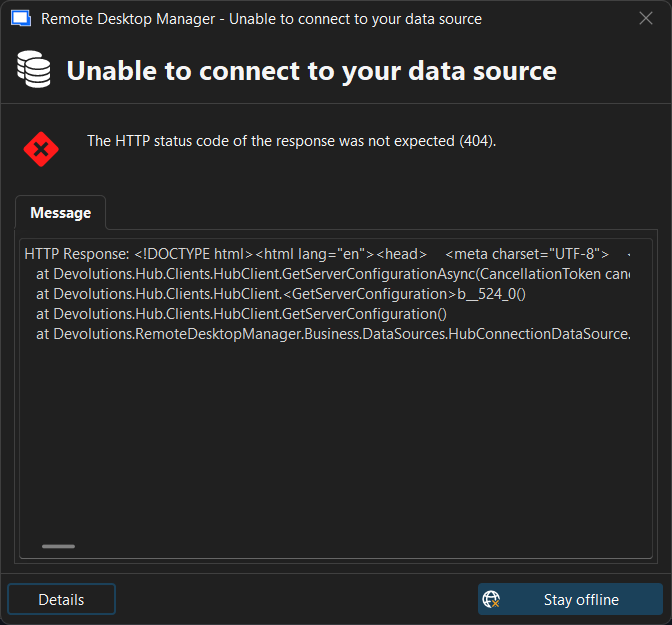
My RDM is stuck in offline mode. making it so I can not access my vault. when i try to unlock or go online I get this message.
Close Tab Group
Hello David,
Thanks let me know if this can be implemented. It would be handy to close all session with a task. Ie Server updates for a site.
Let me know.
Ryan
Close Tab Group
Hello,
I was wondering if there is a way to close all session in a tab group but leave other sessions open that are not in the group.
Thanks,
Ryan
Web browser though ssh tunnel
Hey Jacob,
Not at the moment, You been a great help. I will let you know if have any more questions or issues.
Thank you!
Ryan
Web browser though ssh tunnel
I had time on Friday and did some testing and troubleshooting myself, I did manage to resolve that issue by recreating the ssh tunnel object. I am now seeing "Listening on 127.0.0.1:3390 D"
With Website set to default(MS Edge), Allow any Additional Host with Devolutions Gateway and Use over secure gateway will connect but only on URL address local host with a random port. I have noticed with this some links in UI do not work. It is also slow to load at times.
With Web Browser set to google chrome and Use Over secure gateway will connect via proper URL and DNS works but it seems like CSS does not work fully.
I did just try and relaunch them and the Chrome option is working now. Not sure what changed from Friday to today.
Web browser though ssh tunnel
version 2025.1.41.0 with .NET 9.0.5.
my data source is the Devolutions Hub Personal.
Web browser though ssh tunnel
Hey Jacob,
I tried those options with ssh link and session link. both times the website times out.
I tried changing the browser from default to chrome but it is still using edge. I am not sure if this has something to do with it not working.
Web browser though ssh tunnel
Hello,
I tried changing it to SSH link but did not notice any changes. I checked the "Use over secure gateway" and it does connect for the 1 site I have in the properties but shows it only by localhost: [PORT]
This seems to work for accessing the URL setup in the properties, but some links do not work since only the 1 site URL works.
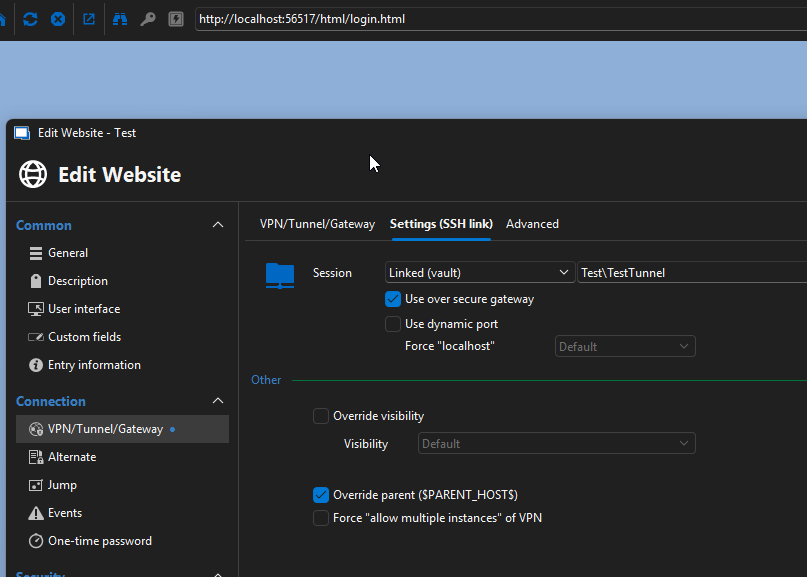
I looked into the Proxy Tunnel but I have two option listed.
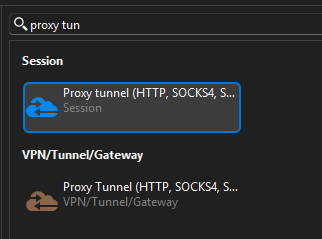
I tried some different setting with the VPN/Tunnel/Gateway one but they never connected.
Web browser though ssh tunnel
I recreated the session object and now it is showing listening on 127.0.0.1:3390 D
I recreated also the website session object but it is still just timing out.
Web browser though ssh tunnel
I enabled logging with Custom and Verbos - 4 but am not seeing any additional logs information. No changes.
[5/30/2025 10:59:54 AM] Sending kex init
[5/30/2025 10:59:54 AM] Received kex init
[5/30/2025 10:59:54 AM] Selected algorithms: curve25519-sha256(strict), ssh-ed25519, chacha20-poly1305@openssh.com, chacha20-poly1305@openssh.com, implicit by cipher, implicit by cipher, none, none
[5/30/2025 10:59:54 AM] Sending Ed25519 kex init
[5/30/2025 10:59:54 AM] Received Ed25519 kex reply
[5/30/2025 10:59:54 AM] Successfully authentified server
[5/30/2025 10:59:54 AM] Sending new keys message
[5/30/2025 10:59:54 AM] Received new keys message
[5/30/2025 10:59:54 AM] Sending userauth service request
[5/30/2025 10:59:54 AM] Received extension info message
[5/30/2025 10:59:54 AM] Server accepts public key types: ssh-ed25519,sk-ssh-ed25519@openssh.com,ecdsa-sha2-nistp256,ecdsa-sha2-nistp384,ecdsa-sha2-nistp521,sk-ecdsa-sha2-nistp256@openssh.com,webauthn-sk-ecdsa-sha2-nistp256@openssh.com,ssh-dss,ssh-rsa,rsa-sha2-256,rsa-sha2-512
[5/30/2025 10:59:54 AM] Received service accepted message
[5/30/2025 10:59:54 AM] Sending userauth init request
[5/30/2025 10:59:54 AM] Received userauth failure: publickey,password
[5/30/2025 10:59:54 AM] Starting password authentication
[5/30/2025 10:59:54 AM] Sending userauth password request
[5/30/2025 10:59:54 AM] Received userauth success
[5/30/2025 10:59:54 AM] User authenticated successfuly by password
[5/30/2025 10:59:54 AM] Unable to resolve address for tunnel: 127.0.01:3390:?:0
[(11001L) No such host is known.]
[5/30/2025 10:59:54 AM] Received global request: hostkeys-00@openssh.com , no need to reply
The only time I got it show 127.0.0.1:3389 is when option is when I set it to local with 127.0.0.1 as the options.
Unable to resolve address for tunnel: 127.0.01:8000:127.0.0.1:3389 It still did not connect.
I am able to run
ssh -D 8000 [USERNAME]@[IP-ADDRESS]
and set Windows 11 sock proxy and access the webui just fine.
Web browser though ssh tunnel
Something else I noticed is I have the website to use chrome, but it is opening with edge.
Web browser though ssh tunnel
Hi Jacob,
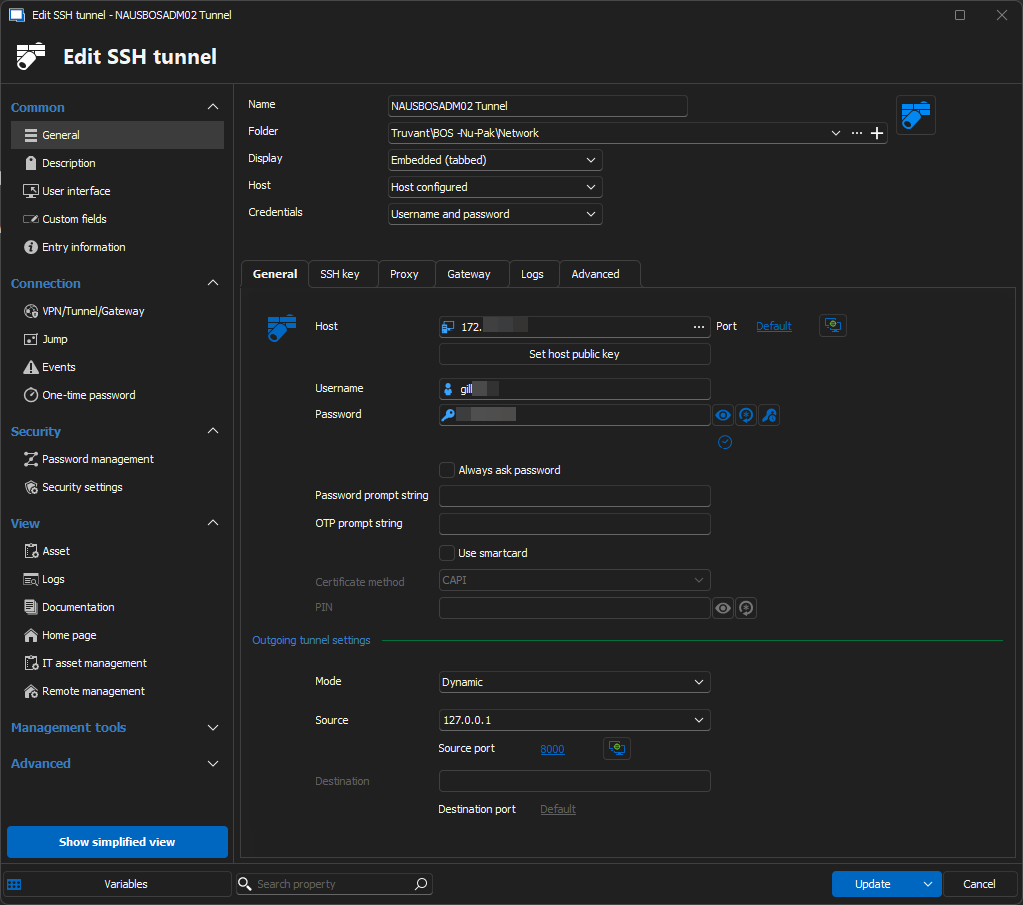
I am able to launch the tunnel session, and it does connect and show Dynamic port forwarding.
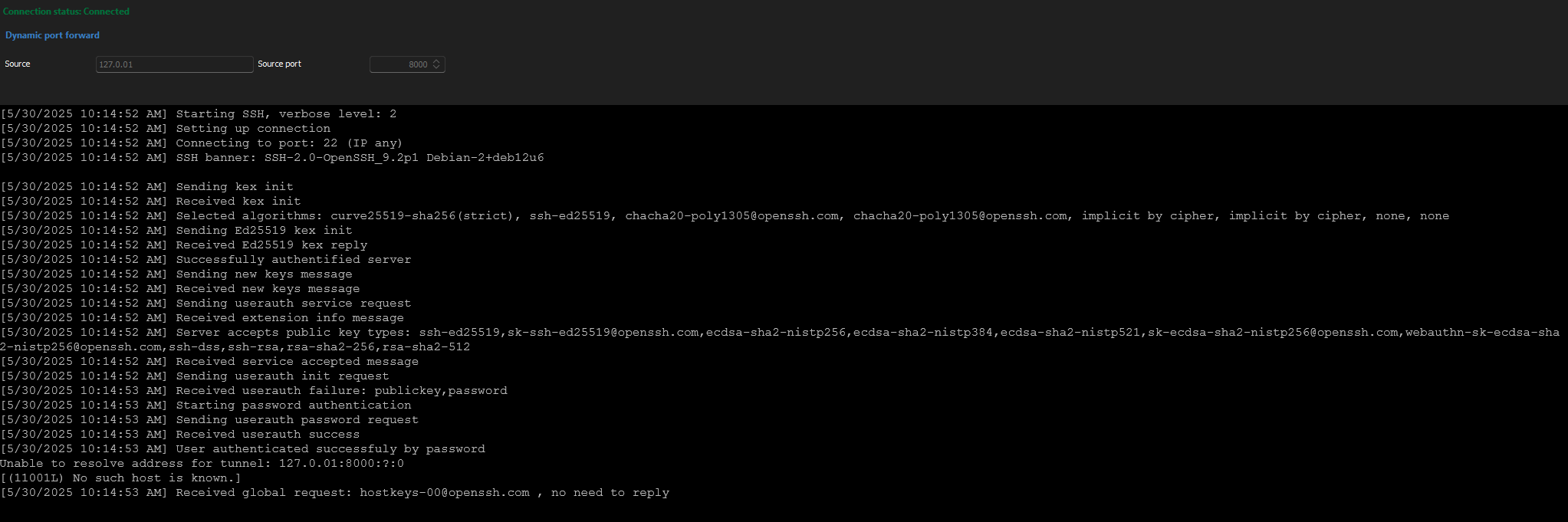
The website says connection timeout. When I go to ifconfig.me I get my Public IP and not the Public IP where the VM is located. I am not sure what 3rd party tool I would need to use to test it?
Web browser though ssh tunnel
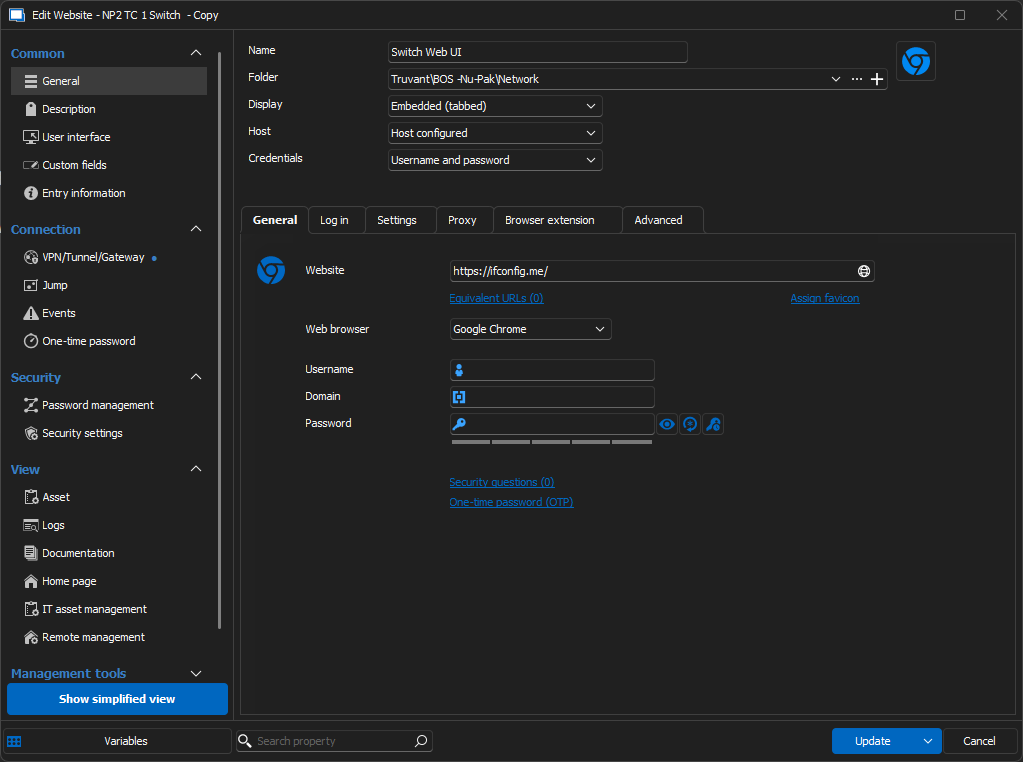
Hello, I am trying to get a web browser to go through a ssh SOCK5 tunnel. The goal is to be able to use a Linux VM to access all web portal, SSH and RDP on our management vlan via a single tunnel session. I have not had any luck getting this to work.
Website Setting:
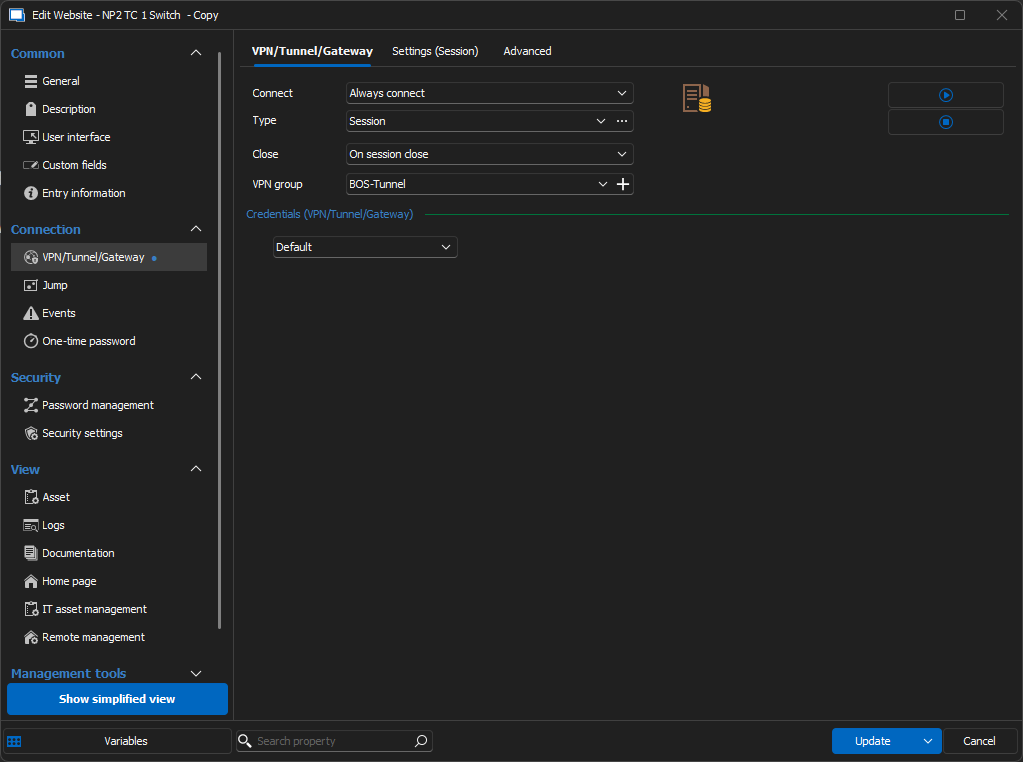
Website VPN/Tunnel/Gateway Settings:
Tunnel Settings:
Am I missing a setting or have something misconfigured?