RDM stuck in offline mode

Hello,
My RDM is stuck in offline mode. making it so I can not access my vault. when i try to unlock or go online I get this message. 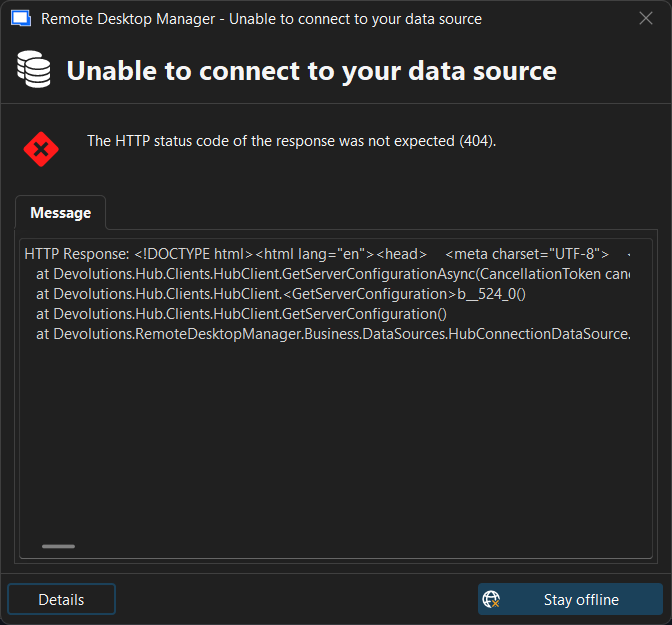
5fda3140-bd31-43bb-83c9-8243d6ff0aa6.png
All Comments (9)
I was able to go to file-My account - sign in without any issues but it still stuck in offline mode.
I deleted the full appdata folder and it went though as a fresh install
Hello,
Thank you for reaching out about this matter.
Could you please confirm whether deleting the %localappdata%\Devolutions\RemoteDesktopManager folder resolved the issue on your side?
If the issue persists, could you also confirm which workspace type you are using (Local, Devolutions Server, Devolutions Cloud, or SQL), as well as your RDM version?
I look forward to your reply.
Best regards,
Jacob Lafrenière
Hello,
When I delete %localappdata%\Devolutions\RemoteDesktopManager and then reopen RDM it goes though the new user setup. I sign in and select my data source of Devolutions Personal Cloud. Upon closing and reopening RDM it goes back to giving me the error
HTTP Response:

<!DOCTYPE html>
<html lang="en">
<head>
    <meta charset="UTF-8">
    <meta name="viewport" content="width=device-width, initial-scale=1">
    <title>Devolutions Cloud workspace not found</title>
    <link rel="stylesheet" href="assets/index.css">
</head>
<body>
    <div class="error-page-header">
        <a href="https://devolutions.net" class="devolutions-logo-link">
            <img src="assets/images/devolutions-logo-large.png" alt="Devolutions logo" class="logo">
        </a>
    </div>
    <div class="container">
        <img src="assets/images/page-not-found-sysadminotaur.png" alt="404 illustration" class="illustration">
        <h1>404 – Devolutions Cloud workspace not found</h1>
        <p>The workspace you’re looking for could not be found.</p>
        <p><a href="https://portal.devolutions.com/products">See your workspaces</a></p>
    </div>
</body>
</html>


Devolutions.Hub.Clients.ApiException: The HTTP status code of the response was not expected (404).

Status: 404
Response:
<!DOCTYPE html>
<html lang="en">
<head>
    <meta charset="UTF-8">
    <meta name="viewport" content="width=device-width, initial-scale=1">
    <title>Devolutions Cloud workspace not found</title>
    <link rel="stylesheet" href="assets/index.css">
</head>
<body>
    <div class="error-page-header">
        <a href="https://devolutions.net" class="devolutions-logo-link">
            <img src="assets/images/devolutions-logo-large.png" alt="Devolutions logo" class="logo">
        </a>
    </div>
    <div class
   at Devolutions.Hub.Clients.HubClient.GetServerConfigurationAsync(CancellationToken cancellationToken)
   at Devolutions.Hub.Clients.HubClient.<GetServerConfiguration>b__524_0()
   at Devolutions.Hub.Clients.HubClient.GetServerConfiguration()
at Devolutions.RemoteDesktopManager.Business.DataSources.HubConnectionDataSource.Login()Hello,
Thank you for the follow-up.
Could you please confirm which version of RDM you are currently using?
Since Devolutions Hub Personal has been migrated to Devolutions Cloud Free, I believe you may be attempting to connect to Devolutions Cloud using an outdated version of RDM.
I look forward to your reply.
Best regards,
Jacob Lafrenière
Hello,
I just updated RDM from 2026.1 to 2026.2.140
It still showing as offline.
Ryan
Hello,
Thank you for your follow-up.
Could you please let me know if you are able to access your Devolutions Cloud workspace through a web browser from the same workstation where Remote Desktop Manager is unable to connect properly?
If you already have your workspace URL, please try opening it directly in your browser. If you do not have the URL, you can sign in to the Devolutions Portal at https://portal.devolutions.com, navigate to My Workspace, and select the appropriate workspace to obtain the correct URL.
I look forward to your reply.
Best regards,
Jacob Lafrenière
Hello,
Yes I am able to access that. on another computer I have no issues accessing my portal either.
Hello,
Thank you for the follow-up.
Now that you're running 2026.2.14.0, could you please try recreating your workspace connection in RDM?
To do so, navigate to File > Workspaces, delete your current workspace connection, and create a new one. When selecting Devolutions Cloud, enter the email address associated with your Devolutions Cloud account. For the URL field, click the three dots (...) to the right of the field. This will open a menu where you can select the appropriate Devolutions Cloud instance to connect to.
I suspect the initial workspace connection may not have been created correctly or may not have worked properly. By recreating it using the latest version, I'm hoping this will resolve the issue.
If you're still in offline mode afterward, could you try clicking the globe icon in the bottom-right corner of RDM to resume online operations? Alternatively, you can go to File > Go Online.
Please let me know if you still encounter any error messages after completing these steps.
Best regards,
Jacob Lafrenière