
Arnoud Lugtenburg
Unable to save the entry - Edit - User specific settings
Hi Jacob,
The DPM version is: 2026.2.1.3
A lot of weeks we use this Devolutions Password Manager extension to save web entry's to DVLS and works very well :-D
But if:
I want to save to RDM the message appears:
Unable to save the entry
No template is available for this entry type. Creating entries is restricted to templates only.
I want to save to DVLS the message appears:
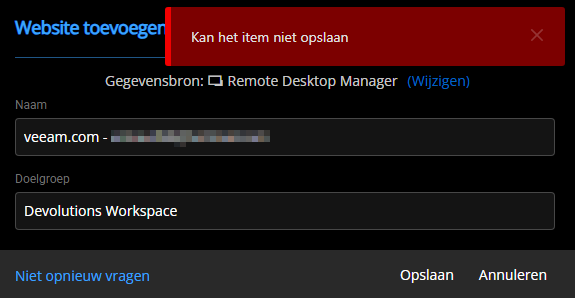
Can't save the item (or something like that in English)
--------
I will be on vacation for the next 3 weeks and will not be responding.
Thanks in advance
Unable to save the entry - Edit - User specific settings
Hello Jacob,
Thank you for your response. I'm glad you were able to reproduce the issue. We look forward to a fix.
I have also discovered another issue. When using the Workspace Extension in Chrome, it is not possible to save new entries to RDM or Devolutions Server (DVLS). It is possible that these two issues are related.
Best regards,
Arnoud Lugtenburg
Unable to save the entry - Edit - User specific settings
When I create an entry in RDM (workspace Devolutions Server) select a template and create an entry. There is no problem.
RDM
When I select the entry (in RDM) en click on User-specific settings select the Override credentials checkbox and select the credential from mij Linked (user vault).
Then hit the Save button and a error occurs:
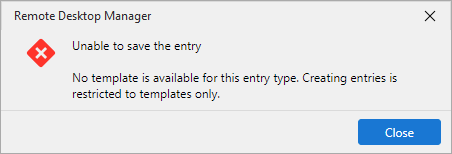
Unable to save the entry
No template is available for this entry type. Creating entries is restricted to templates only.
DVLS
When I do the same action in DVLS no problem, no error..
RDM version: 2026.2.14.0
DVLS version: 2026.2.12.0
High CPU usage after Update tor Version 2026.1.12.0
Last Friday, I upgraded our environment (Devolutions Server and RDM) to the latest release. Following the upgrade, we observed increased CPU usage on our jump server (RDS). After installing Agent 2026.2.12, the issue appears to be resolved.
Thank you!
Duo MFA link existing devices
Hello!
Thanks for your patience; we had a good discussion around this.
We identified mainly 2 possible improvements on the DUO integration
1. Allow configurable username mapping
Let the user (or their admin) choose what username is sent to Duo
This makes the process more flexible and removes the need for managing aliases in Duo.
2. Use the Duo user_id instead of the username
This one may show more challenges, but would likely prevent issues related to username changes in the long run.
We're not excluding the development of both solutions as fallback options.
Thoughts?
Best regards,
@Alexandre Bélisle
The first option fits for now. The most flexible option is number 2. And more sustainable.
Thanks for your reply.
Duo MFA link existing devices
We have the same problem. The solution workaround is: add an alias in DUO with only the first part of the UPN (without @domainname.com).
Is there maybe a solution for this problem in DUO? It appears that the entire UPN isn't being sent to DUO.