Unable to save the entry - Edit - User specific settings

When I create an entry in RDM (workspace Devolutions Server) select a template and create an entry. There is no problem.
RDM
When I select the entry (in RDM) en click on User-specific settings select the Override credentials checkbox and select the credential from mij Linked (user vault).
Then hit the Save button and a error occurs: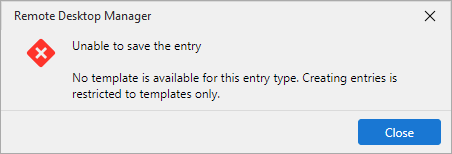
Unable to save the entry
No template is available for this entry type. Creating entries is restricted to templates only.
DVLS
When I do the same action in DVLS no problem, no error..
RDM version: 2026.2.14.0
DVLS version: 2026.2.12.0
8702eacc-1c41-4eaf-bddb-1f7a31e5f336.png
All Comments (6)
Hello,
Thank you for reaching out regarding this matter.
I was able to reproduce the behavior you described, and I believe it is unintended. I have reported it as a bug to our development team, who will investigate the issue and work on a fix as soon as possible.
At this time, the best workaround is to modify the affected entries through the Devolutions Server web interface until a permanent fix is available.
Thank you for your patience and understanding.
Best regards,
Jacob Lafrenière
Hello Jacob,
Thank you for your response. I'm glad you were able to reproduce the issue. We look forward to a fix.
I have also discovered another issue. When using the Workspace Extension in Chrome, it is not possible to save new entries to RDM or Devolutions Server (DVLS). It is possible that these two issues are related.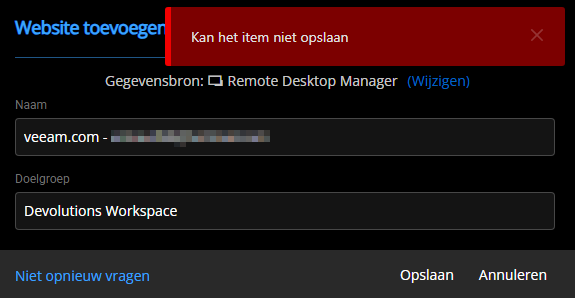
Best regards,
Arnoud Lugtenburg
2d0c9f11-90d8-473d-9b0a-ac5d8dd358ce.png
Hello,
Thank you for the follow-up.
I researched this on my side, performed additional testing, and discussed the behavior with the DVLS and DPM Web Extension development team. Based on our findings, this is currently expected behavior when creating entries without a template.
From what I understand, this limitation exists because the DPM Web Extension does not currently support templates. I was also unable to identify a previous version in which this configuration behaved differently.
If you are able to provide the version(s) where this setup worked as expected, I would be happy to verify the behavior and, if confirmed, report it as a bug.
Otherwise, this would fall under a feature request. If that's the case, I can move your post to the appropriate forum section so it can be reviewed by our product team for future consideration.
I look forward to your reply.
Best regards,
Jacob Lafrenière
Hi Jacob,
The DPM version is: 2026.2.1.3
A lot of weeks we use this Devolutions Password Manager extension to save web entry's to DVLS and works very well :-D
But if:
I want to save to RDM the message appears:
Unable to save the entry
No template is available for this entry type. Creating entries is restricted to templates only.
I want to save to DVLS the message appears:
Can't save the item (or something like that in English)
--------
I will be on vacation for the next 3 weeks and will not be responding.
Thanks in advance
Hello,
Thank you for the follow-up.
At this time, this behavior would be considered a feature request. The Devolutions Password Manager web extension does not currently support templates. As a result, enabling the Template Only entry creation setting effectively prevents entry creation from the DPM web extension.
I recommend submitting this request on our Feature Request Forum section. Our Product and Development teams regularly review these submissions when evaluating future enhancements, and they can consider adding support for this scenario in a future release.
In the meantime, I will keep this topic open to continue tracking the initial issue you reported.
Please let me know if you have any questions.
Best regards,
Jacob Lafrenière
Hello,
Thank you for being so patient!
I am pleased to inform you that the issue has been resolved in the latest Devolutions server version (2026.2.16.0):
https://docs.devolutions.net/server/getting-started/installation/upgrade-server
We also recommend that you first perform the update in a staging/test environment:
https://docs.devolutions.net/server/kb/how-to-articles/create-server-staging-instance
We also offer free upgrade sessions, during which we will update your Devolutions Server instance together. If you are interested in this, please send an email to service@devolutions.net
If the problem persists after the update, please let us know so we can inform our development team.
Best regards,
Maxim Robert