
servicedesk4
Add "Connect using" functionality for created playlists via connected PAM (CyberArk Dasboard)
Hi, I think I described it quite clearly...in our department we use a synchronization task to AD where we all share RDP objects...it is not desirable for anyone to change the settings on these objects for PVWA connections...the requirement is clear...enable (after logging into the CyberArk dashboard) the option on the custom playlist created the property "connect using" as in the shared list of RDP objects. There is document at the beginning of this request which describe the request very clearly I think "Connect_using_CyberArk.docx". Thank you very much.
Add "Connect using" functionality for created playlists via connected PAM (CyberArk Dasboard)
Hi, we are using Devolutions Server for saved playlists. So from there as you can see bellow.
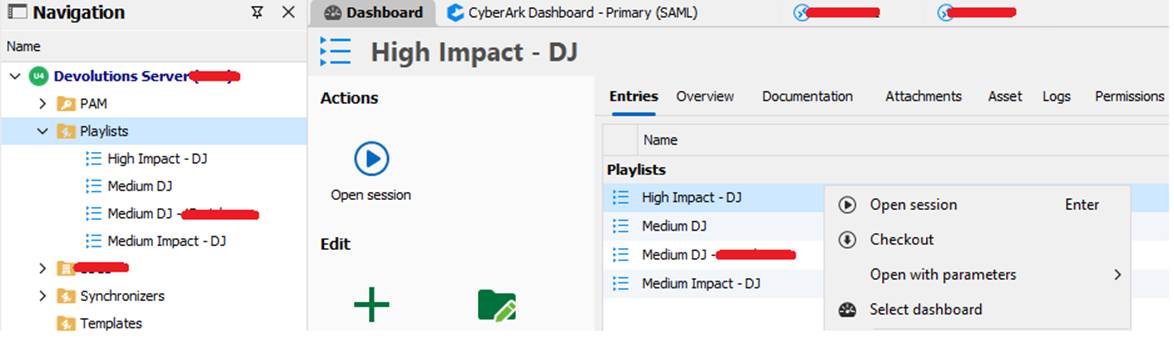
Sure…let’s open all sessions in created playlist for CyberArk Dashboard selected priviledged account as bellow.

Many thanks for your effort!
btw...any news about this feature?
Issue with CyberArk Dashboard intergration in RDM after update to 2025.1.24.0
That's great! We are awaiting the new version soon. Thanks.
Issue with CyberArk Dashboard intergration in RDM after update to 2025.1.24.0
Many thanks for help!
Issue with CyberArk Dashboard intergration in RDM after update to 2025.1.24.0
The connection to CyberArk infrastructure works normally with ability to choose priviledge account in personal safe....but when we try to "Connect using" option with selected priviledged account via RDP to our servers, the message show.
Issue with CyberArk Dashboard intergration in RDM after update to 2025.1.24.0
Hello, we have a urgent issue with our RDM version 2025.1.24.0 after update. There is CyberArk integration issue below, where we are unable to connect using CyberArk via RDP protocol to our servers.
NullReferenceException - Object reference not set to an instance of an object.
at Devolutions.RemoteDesktopManager.Managers.CyberArkDashboardManager.CreatePVWAConnection(ConnectionEngine engine, CyberArkAccountV10& account, CyberArkContext context, String& connectionComponent, CyberArkDomainSearchMethod domainSearchMethod, CyberArkDomainField domainField, String domainCustomField, Boolean hasOverride, ConnectionUserNameFormat usernameFormat, String hostName, Connection originalConnection)
at Devolutions.RemoteDesktopManager.Managers.CyberArkDashboardManager.CreatePVWAConnection(ConnectionEngine engine, Connection connection, CyberArkAccountV10& account, CyberArkContext context, String& connectionComponent, ConnectionUserNameFormat usernameFormat, String hostName, Connection originalConnection)
at Devolutions.RemoteDesktopManager.Managers.CyberArkDashboardManager.ConnectPVWA(ConnectionEngine engine, Connection connection, CyberArkAccountV10 account, CyberArkContext context, String connectionComponent, ConnectionUserNameFormat usernameFormat, OpenConnectionMode openConnectionMode, String hostName, Connection originalConnection)
at Devolutions.RemoteDesktopManager.Managers.SessionMenuManager.CyberArkComponent_ItemClick(Object sender, EventArgs e)
at Devolutions.RemoteDesktopManager.Controls.EnhancedBarButtonItem.OnClick(BarItemLink link)
at DevExpress.XtraBars.BarItemLink.OnLinkClick()
at DevExpress.XtraBars.BarButtonItemLink.OnLinkAction(BarLinkAction action, Object actionArgs)
at DevExpress.XtraBars.ViewInfo.BarSelectionInfo.ClickLink(BarItemLink link)
at DevExpress.XtraBars.ViewInfo.BarSelectionInfo.UnPressLink(BarItemLink link)
at DevExpress.XtraBars.Controls.CustomLinksControl.OnMouseUp(MouseEventArgs e)
at DevExpress.XtraBars.Controls.CustomPopupBarControl.OnMouseUp(MouseEventArgs e)
at System.Windows.Forms.Control.WmMouseUp(Message& m, MouseButtons button, Int32 clicks)
at System.Windows.Forms.Control.WndProc(Message& m)
at DevExpress.XtraBars.Controls.CustomControl.WndProc(Message& msg)
at System.Windows.Forms.NativeWindow.Callback(HWND hWnd, MessageId msg, WPARAM wparam, LPARAM lparam)
------------------------ extended stack ------------------------
at Devolutions.RemoteDesktopManager.Forms.FrmErrorMessage.ShowErrorMessage(ConnectionEngine engine, Exception exception, String message, String title)
at Devolutions.RemoteDesktopManager.Forms.FrmErrorMessage.ShowErrorMessage(ConnectionEngine engine, Exception exception, String title)
at Devolutions.RemoteDesktopManager.Managers.LogManager.OnThreadException(Object sender, ThreadExceptionEventArgs t)
at System.Windows.Forms.Application.ThreadContext.OnThreadException(Exception ex)
at System.Windows.Forms.NativeWindow.Callback(HWND hWnd, MessageId msg, WPARAM wparam, LPARAM lparam)
at Windows.Win32.PInvoke.DispatchMessage(MSG* lpMsg)
at System.Windows.Forms.Application.LightThreadContext.FPushMessageLoop(msoloop uReason)
at System.Windows.Forms.Application.LightThreadContext.RunMessageLoop(msoloop reason, Boolean fullModal)
at System.Windows.Forms.Application.ThreadContext.RunMessageLoopInner(msoloop reason, ApplicationContext context)
at System.Windows.Forms.Application.ThreadContext.RunMessageLoop(msoloop reason, ApplicationContext context)
at Devolutions.RemoteDesktopManager.Program.Main(String[] args)
Add "Connect using" functionality for created playlists via connected PAM (CyberArk Dasboard)
Hi guys, we would like to ask you to add functionality that will allow us to use the "Connect using" option in the created RDP playlists when connecting through the CyberArk Dashboard to priviledge user safe. In normal RDP sessions, this option is available...but not in the playlists of saved RDP sessions. Many thanks.