
jonhobbssmith
Simple way to run a powershell script against all open sessions?
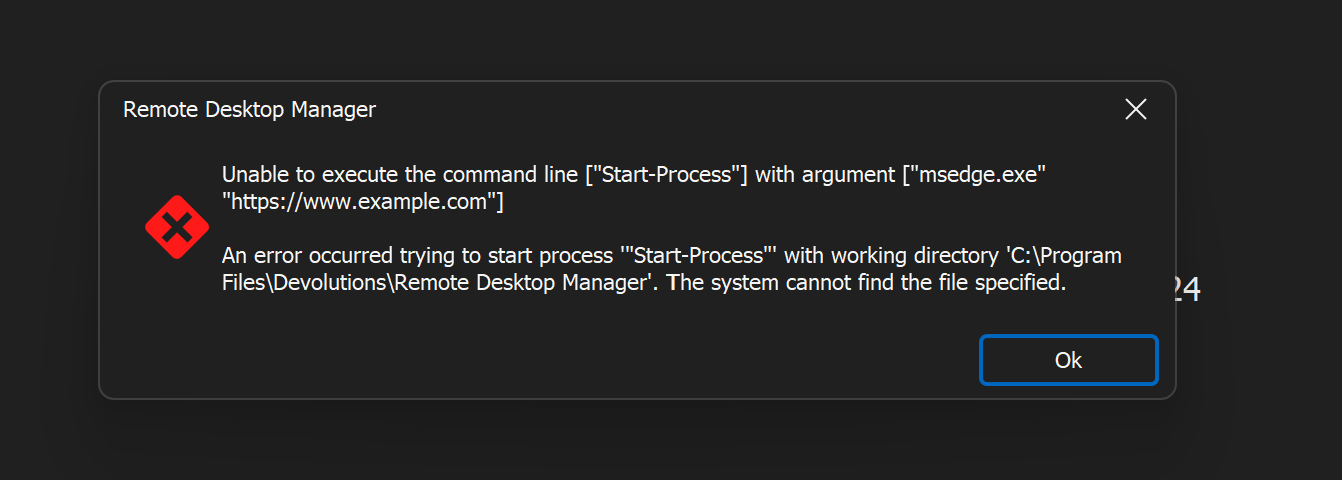
Unfortunately I get this error:
I'm not sure this would work for me though because this is what I need to do...
I have 48 servers and I need to have a browser and web page open on all of them. I have a powershell script that would open up a broswer on each one with a name and then allow me to run another script which will tell each browser to navigate to a new page.
So I need to be able to run scripts after the session opens but also while the session is running.
Also, I need to run it at group level because setting this up separately on 48 servers would take forever.
Simple way to run a powershell script against all open sessions?
I'm looking for a simple way to run an incredibly simple script against all my open sessions.
Start-Process "msedge.exe" "https://www.example.com"
If I right click the folder I get the option to "Execute script vie RDP Jump" which doesn't seem to be right as I have to install something on every server to do that.
I have also tried setting it up as a "PowerShell Script (remote)" and running it against the folder but that opened PowerShell on my local machine (once for each session) and gave me a tonne of connection errors and also wanted software installed on the server.
Is there a simple way of running a script from a window within RDM against all open sessions?
Importing Credentials using json import
I couldn't work out how to do it with a csv file to be honest. However I have found the information I needed here.
https://docs.devolutions.net/powershell/rdm-powershell/xml-information/
I would never have guessed that I needed to use a GUID though, it would seem much more sensible to use a human readable value. It's working though.
Ribbon bar missing
Thanks, for now I discovered the live thumbnails feature which is almost exactly what I needed anyway.
Importing Credentials using json import
Hi,
I am trying to use a json file to import a bunch of server details. They import fine but I can't seem to get the credentials to import. I have tried everything - username and password fields, setting it to inherit from the parent, setting it to get it from my personal credentials. Here's an example of some of the things I've tried in my import.json file:
{
"Connections": [
{
"ScreenSize": 18,
"Url": "xxx.xxx.xxx.xxx",
"ConnectionType": 1,
"Group": "MyGroup",
"ID": "1",
"Name": "server1",
"OpenEmbedded": true,
"credentials": {
"Username": "Administrator",
"Password": "mypassword123"
},
"Username": "Administrator",
"Password": "mypassword123",
"CredentialsMode": "Link", // I also tried "Linked"
"CredentialID": "creds",
"RDP": {}
}
]
}
Ideally, I'd like to to set all my servers to link to "creds" so I can set the same username and password for all of them. That way when I import 50 servers I don't have to go into each one and set different passwords. I realise this is not very secure but they'll only be up for an hour or two.
Ribbon bar missing
Thanks, it wasn't set to ribbon, which was confusing because I had set the "ribbon" to show under the window menu. I also had to work out that I had to set it to "classic ribbon" to get it showing properly. I think this is all very confusing and I don't understand why there can't just be a simple toggle in the UI to switch between ribbon and normal menu?
I now have access to the "window layouts" function but I still can't work out how to show my windows in a simple grid. I can see how to tile vertically or horizontally but not both.
Ribbon bar missing
Hi Maurice,
That was actually something I already tried. I have never actually seen the ribbon bar as it wasn't there when I used it for the first time earlier.
When I click WIndow > Layout > Top Pane all that happens is that I lose the top menu entirely.
Jon
Ribbon bar missing
I'm new to Remote Desktop Manager, I just started using it tonight, but a lot of options seem to be missing.
I've seen lots of screenshots on here with a home button and a ribbon bar. I don't have either and I think the option I am looking at (grid layouts) might be in the ribbon bar as I can't find it in the top menu.
I've attached a screenshot of what I see.
Jon
