
delongj
Trouble Connecting Using Azure Bastion
That's great, thank you so much for the help! It's all working as expected now
Trouble Connecting Using Azure Bastion
That gave me an idea and I think I figured it out somewhat. I'm able to connect to VMs in the same resource group as the Bastion with no problem.
The other VMs, some are in the same vNet, some in other vNets that have a peering. But they're all in different resource groups from the Bastion.
I didn't realize the resource group mattered if there was a vNet peering... is there a way for it to connect to other resource groups?
Trouble Connecting Using Azure Bastion
I just ran the debug again with both the working and non-working connections and this seems to be the line of difference:
working VM:
[Devolutions.Az][Debug][2024-10-11 09:11:05Z] AZB Tunnel xxxxxxxx client connected
[Devolutions.Az][Debug][2024-10-11 09:11:05Z] POST xxxxxxxxxxxxxxxxx HTTP/1.1
[Devolutions.Az][Debug][2024-10-11 09:11:06Z] HTTP/1.1 OK
non-working VM:
[Devolutions.Az][Debug][2024-10-11 09:10:35Z] AZB Tunnel xxxxxxxxxxxxxxxxx client connected
[Devolutions.Az][Debug][2024-10-11 09:10:35Z] POST xxxxxxxxxxxxxxxxx HTTP/1.1
[Devolutions.Az][Debug][2024-10-11 09:10:36Z] HTTP/1.1 Forbidden
[Devolutions.Az][Debug][2024-10-11 09:10:36Z] System.AggregateException: One or more errors occurred. (Exception of type 'Devolutions.Az.AzHttpException' was thrown.)
Trouble Connecting Using Azure Bastion
So the first VM that's working, it seems I can connect to that regardless. Any other VMs don't work though, even after re-opening. So regardless of the order of connect, the one VM works and the others don't. Though I can launch Bastion for all of those other VMs through the Azure Portal with no problem.
Trouble Connecting Using Azure Bastion
I had it set to RD Gateway, so I just changed to TCP Tunnel. Similar results though. Here's what the debug log said (with specifics removed). I'm not seeing anything obvious here though, do you?
Resolved Azure Resource ID: /subscriptions/xxxxxxxxxxxxxxxxxxxxxxxxxx/resourceGroups/xxxxxx/providers/Microsoft.Compute/virtualMachines/xxxxxxxx
[Devolutions.Az][Debug][2024-10-11 08:33:56Z] GET xxxxxxxxxxxxxxxxxxxxxxx HTTP/1.1
[Devolutions.Az][Debug][2024-10-11 08:33:57Z] HTTP/1.1 OK OK
[Devolutions.Az][Debug][2024-10-11 08:33:57Z] AZB Tunnel xxxxxxxxxxxxxxxxxxxxxx to Bastion initializing
[Devolutions.Az][Info][2024-10-11 08:33:57Z] AZB Tunnel xxxxxxxxxxxxxxxxxxxxxx listening at 127.0.0.1:42172
OpenVPN: Result is Not Null
OpenVPN: Calling AfterVPNOpen
OpenVPN: Returning result
rdpClientAdvancedSettings4.AuthenticationLevel:0
rdpClientAdvancedSettings6.EnableCredSspSupport:True
[Devolutions.Az][Debug][2024-10-11 08:33:57Z] AZB Tunnel xxxxxxxxxxxxxxxxxxxxxx client connected
[Devolutions.Az][Debug][2024-10-11 08:33:57Z] POST xxxxxxxxxxxxxxxxxxxxxx HTTP/1.1
[Devolutions.Az][Debug][2024-10-11 08:33:57Z] HTTP/1.1 Forbidden
[Devolutions.Az][Debug][2024-10-11 08:33:57Z] System.AggregateException: One or more errors occurred. (Exception of type 'Devolutions.Az.AzHttpException' was thrown.)
---> Devolutions.Az.AzHttpException: Exception of type 'Devolutions.Az.AzHttpException' was thrown.
at Devolutions.Az.Utilities.EnsureSuccessStatusCode(HttpResponseMessage response, HttpStatusCode[] extraSuccessCodes, String resourceId)
at Devolutions.Az.Utilities.EnsureSuccessStatusCode(HttpResponseMessage response, String resourceId)
at Devolutions.Az.Bastion.Client.CreateTunnelAuthToken(Host bastionHost, VirtualMachine virtualMachine, Int32 remotePort, TunnelAuthToken authToken, CancellationToken cancellationToken)
at Devolutions.Az.Bastion.BaseWebSocketConnection.Connect(CancellationToken cancellationToken)
at Devolutions.Az.Bastion.ClientWebSocketConnection.Connect(CancellationToken cancellationToken)
--- End of inner exception stack trace ---
at System.Threading.Tasks.Task.ThrowIfExceptional(Boolean includeTaskCanceledExceptions)
at System.Threading.Tasks.Task.Wait(Int32 millisecondsTimeout, CancellationToken cancellationToken)
at System.Threading.Tasks.Task.Wait()
at Devolutions.Az.Bastion.WebSocketProxy.OnAcceptTcpClient(IAsyncResult ar)
Trouble Connecting Using Azure Bastion
I've been trying out Remote Desktop Manager for a week or so now, trying to evaluate if it's right for my team. For our Azure servers, I set up a Bastion, and now I'm trying to use that to connect through instead of public IP in RDM.
I successfully set up the Bastion in RDM, and set up one initial VM. That one is working fine. But when I set up any additional VMs (in the same vNet) in RDM, I get this error:
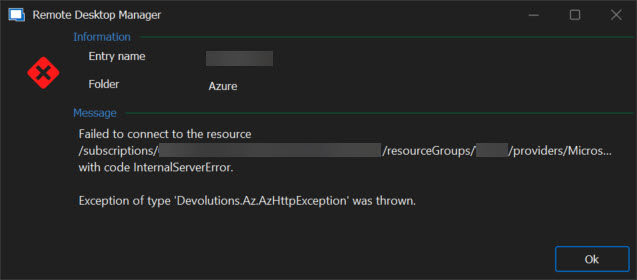
I checked over and over again that the settings on this and the other VM are the same. Is there any reason this might be working for one but not another? Anything I should be checking?