Trouble Connecting Using Azure Bastion

I've been trying out Remote Desktop Manager for a week or so now, trying to evaluate if it's right for my team. For our Azure servers, I set up a Bastion, and now I'm trying to use that to connect through instead of public IP in RDM.
I successfully set up the Bastion in RDM, and set up one initial VM. That one is working fine. But when I set up any additional VMs (in the same vNet) in RDM, I get this error: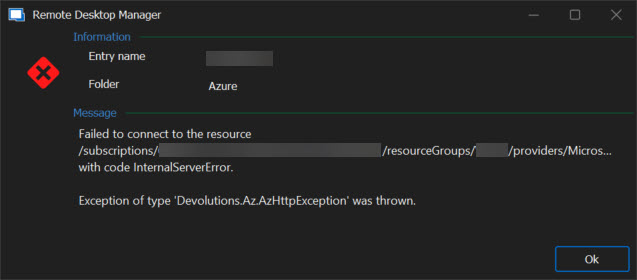
I checked over and over again that the settings on this and the other VM are the same. Is there any reason this might be working for one but not another? Anything I should be checking?
rdmerror.jpg
All Comments (19)
Hello
Sorry to hear about the trouble and for the inconvenience. Internal server error is certainly strange, but I'll need a bit more context to be able to troubleshoot it.
First, I'd like to know which call is failing. If you got to Help > Profiler, and switch to the "Debug Only" tab and set "Debug level" to "1". Then, leaving the profiler window open, try to connect again. I think the log in that profiler window will offer some additional context.
Second, in your Azure Bastion connection settings, what do you have for "Connection mode"? If it's "RD Gateway", please try switching to "TCP Tunnel" and trying again.
Please, let me know if something isn't clear or you have further questions
Kind regards,
Richard Markievicz
I had it set to RD Gateway, so I just changed to TCP Tunnel. Similar results though. Here's what the debug log said (with specifics removed). I'm not seeing anything obvious here though, do you?
Resolved Azure Resource ID: /subscriptions/xxxxxxxxxxxxxxxxxxxxxxxxxx/resourceGroups/xxxxxx/providers/Microsoft.Compute/virtualMachines/xxxxxxxx
[Devolutions.Az][Debug][2024-10-11 08:33:56Z] GET xxxxxxxxxxxxxxxxxxxxxxx HTTP/1.1
[Devolutions.Az][Debug][2024-10-11 08:33:57Z] HTTP/1.1 OK OK
[Devolutions.Az][Debug][2024-10-11 08:33:57Z] AZB Tunnel xxxxxxxxxxxxxxxxxxxxxx to Bastion initializing
[Devolutions.Az][Info][2024-10-11 08:33:57Z] AZB Tunnel xxxxxxxxxxxxxxxxxxxxxx listening at 127.0.0.1:42172
OpenVPN: Result is Not Null
OpenVPN: Calling AfterVPNOpen
OpenVPN: Returning result
rdpClientAdvancedSettings4.AuthenticationLevel:0
rdpClientAdvancedSettings6.EnableCredSspSupport:True
[Devolutions.Az][Debug][2024-10-11 08:33:57Z] AZB Tunnel xxxxxxxxxxxxxxxxxxxxxx client connected
[Devolutions.Az][Debug][2024-10-11 08:33:57Z] POST xxxxxxxxxxxxxxxxxxxxxx HTTP/1.1
[Devolutions.Az][Debug][2024-10-11 08:33:57Z] HTTP/1.1 Forbidden
[Devolutions.Az][Debug][2024-10-11 08:33:57Z] System.AggregateException: One or more errors occurred. (Exception of type 'Devolutions.Az.AzHttpException' was thrown.)
---> Devolutions.Az.AzHttpException: Exception of type 'Devolutions.Az.AzHttpException' was thrown.
at Devolutions.Az.Utilities.EnsureSuccessStatusCode(HttpResponseMessage response, HttpStatusCode[] extraSuccessCodes, String resourceId)
at Devolutions.Az.Utilities.EnsureSuccessStatusCode(HttpResponseMessage response, String resourceId)
at Devolutions.Az.Bastion.Client.CreateTunnelAuthToken(Host bastionHost, VirtualMachine virtualMachine, Int32 remotePort, TunnelAuthToken authToken, CancellationToken cancellationToken)
at Devolutions.Az.Bastion.BaseWebSocketConnection.Connect(CancellationToken cancellationToken)
at Devolutions.Az.Bastion.ClientWebSocketConnection.Connect(CancellationToken cancellationToken)
--- End of inner exception stack trace ---
at System.Threading.Tasks.Task.ThrowIfExceptional(Boolean includeTaskCanceledExceptions)
at System.Threading.Tasks.Task.Wait(Int32 millisecondsTimeout, CancellationToken cancellationToken)
at System.Threading.Tasks.Task.Wait()
at Devolutions.Az.Bastion.WebSocketProxy.OnAcceptTcpClient(IAsyncResult ar)
Hello
Thanks for the information. Here's what's happening: before we can open the websocket to the Bastion, we need to request an auth token based on the resource you're connecting to, the protocol, port as well as your OAuth token from the Azure login. That call is returning is 403 ("Forbidden") so this indicates an issue with authentication.
It is possible that something has changed on the Azure side, and it wouldn't be the first time we see such a change affect only a subset of users (Azure tend to roll out updates and changes across different regions on different schedules).
However - I'm not sure that's the case - you wrote above that the connection to the initial VM works, but subsequent connections (to other VMs) fail. Perhaps you can try a test for me: if you close RDM and relaunch it (to ensure we have a cold credential cache), does the first connection work regardless of the host you connect to? So, start from cold, and connect to a VM that isn't the initial VM you mention above. Does it work? But then any other VM fails in this manner? What about that initial VM? Are you able to reconnect to it?
Please, let me know if something isn't' clear or you have additional questions; and sorry for the inconvenience
Kind regards,
Richard Markievicz
So the first VM that's working, it seems I can connect to that regardless. Any other VMs don't work though, even after re-opening. So regardless of the order of connect, the one VM works and the others don't. Though I can launch Bastion for all of those other VMs through the Azure Portal with no problem.
I just ran the debug again with both the working and non-working connections and this seems to be the line of difference:
working VM:
[Devolutions.Az][Debug][2024-10-11 09:11:05Z] AZB Tunnel xxxxxxxx client connected
[Devolutions.Az][Debug][2024-10-11 09:11:05Z] POST xxxxxxxxxxxxxxxxx HTTP/1.1
[Devolutions.Az][Debug][2024-10-11 09:11:06Z] HTTP/1.1 OK
non-working VM:
[Devolutions.Az][Debug][2024-10-11 09:10:35Z] AZB Tunnel xxxxxxxxxxxxxxxxx client connected
[Devolutions.Az][Debug][2024-10-11 09:10:35Z] POST xxxxxxxxxxxxxxxxx HTTP/1.1
[Devolutions.Az][Debug][2024-10-11 09:10:36Z] HTTP/1.1 Forbidden
[Devolutions.Az][Debug][2024-10-11 09:10:36Z] System.AggregateException: One or more errors occurred. (Exception of type 'Devolutions.Az.AzHttpException' was thrown.)
Hello
Thanks for the information! So, we have a problem caching the OAuth token from the initial Azure login. I'm surprised because this hasn't been reported by anyone else, so I need to figure out what's special in this case.
Can you please share the full configuration of the Azure Bastion in RDM? The general and authentication settings; obviously obfuscating any sensitive information. You can also send to me by PM if you prefer.
Do the VMs exist in the same subscription and resource group as the Bastion?
Do you have multiple Azure tenants associated with your login?
Please, let me know if something isn't clear or you have other questions
Kind regards,
Richard Markievicz
That gave me an idea and I think I figured it out somewhat. I'm able to connect to VMs in the same resource group as the Bastion with no problem.
The other VMs, some are in the same vNet, some in other vNets that have a peering. But they're all in different resource groups from the Bastion.
I didn't realize the resource group mattered if there was a vNet peering... is there a way for it to connect to other resource groups?
Hello
Yes, this is possible. When an entry is configured to use Azure Bastion as a VPN, you'll get some extra options in the VPN configuration tab that let you specify the subscription and/or resource group for the resource.
"Default" means "this is the same as the Bastion", but you can also add a custom value or inherit from a parent. Note that variables are also supported, so what some users do is create a folder structure reflecting the layout in Azure and use, for example, $FOLDER_NAME$ here.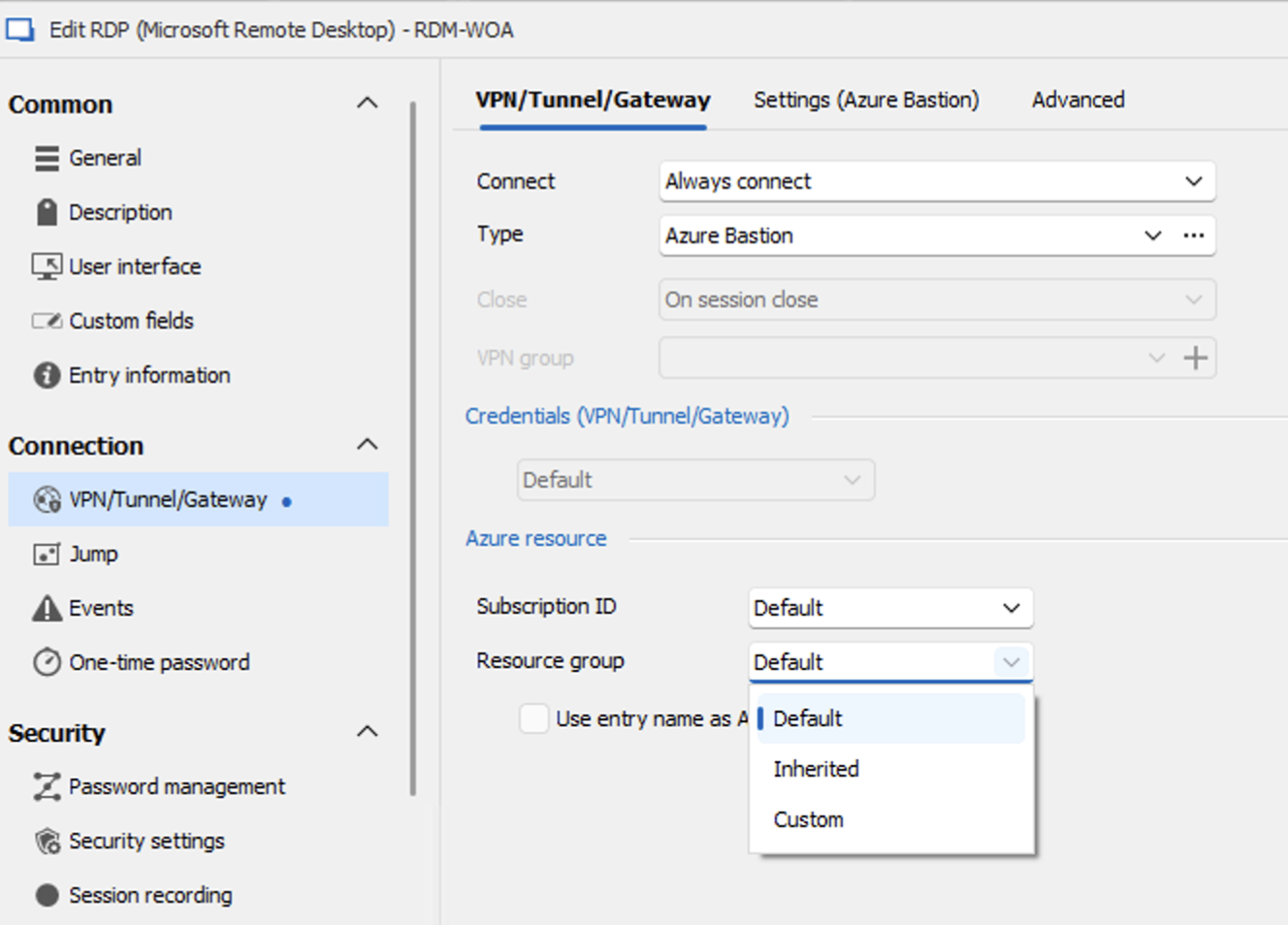
Let me know if this helps.
Thanks and kind regards,
Richard Markievicz
Screenshot 2024-10-11 at 09.50.12.png
That's great, thank you so much for the help! It's all working as expected now
Hello
Good news! I'm glad it's working for you. Sorry that was trickier than necessary to figure out, I'm not sure why we got those errors back from the API. But mainly I'm just pleased that it works now.
Please don't hesitate with further questions or comments
Kind regards,
Richard Markievicz
Hello
Yes, this is possible. When an entry is configured to use Azure Bastion as a VPN, you'll get some extra options in the VPN configuration tab that let you specify the subscription and/or resource group for the resource.
"Default" means "this is the same as the Bastion", but you can also add a custom value or inherit from a parent. Note that variables are also supported, so what some users do is create a folder structure reflecting the layout in Azure and use, for example, $FOLDER_NAME$ here.
Let me know if this helps.
Thanks and kind regards,
As of at least 2025.1.24.0, when you select 'Custom' in this dropdown there is no longer a box to manually enter a ResourceGroup name. Is this a bug, or was it intentional for some reason?
Thanks
Hi
I just checked on my side and you appear to be correct; this is not intentional and I'm looking into that.
Thank you for raising the issue, I'll get back to you ASAP with my findings.
I apologize for the inconvenience.
Kind regards,
Richard Markievicz
Hello
This is a UI bug - some unrelated changes in the parent dialog box adjusted the layout in a way that prevented the text boxes from being shown. I've fixed that and it will be available in the next release (2025.1.26).
Sorry for the inconvenience. I don't have a workaround other than to use an older version of RDM or wait for the fix. However, if you're blocked on this, let me know - it should be possible to edit the entry without using the UI (e.g. via PowerShell) and I could provide instructions for that.
Please let me know if you have any questions
Kind regards,
Richard Markievicz
Hi Richard,
Thank you for the fast response. That's great to know that this will be resolved in the next release.
If you can share the Powershell it would be greatly appreciated.
Thanks,
Andrew
Hello
I'm sorry I was mistaken - the fields we need (AzureResourceInfo) are not exposed in PowerShell.
You could run a portable, older version of RDM to edit the entry(ies) but that depends on your data source and if it's compatible or not.
The only other suggestion I have is to manually edit the .xml; but this is not really viable if you have lots of sessions. If you have a handful it could work.
- Right-click the entry and choose Clipboard > Copy
- Be sure to choose to generate a new entry ID
- Switch to a text editor and paste. You'll get the XML structure of the entry.
- The relevant fields are highlighted in my screenshot below, edit them as you need
- Save the XML with the file extension ".rdm"
- Reimport the file into RDM (right-click - choose Import > Import in Vault (.rdm)...)
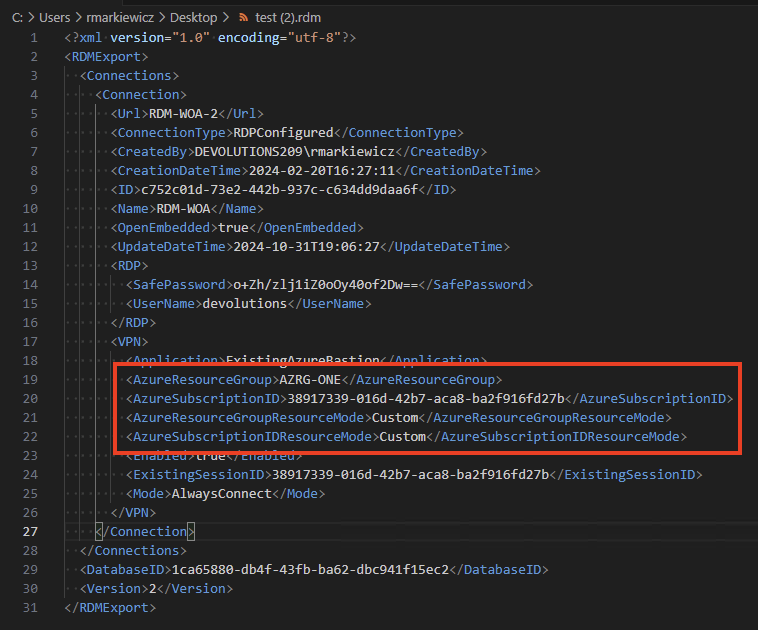
Once again, I do apologize for the inconvenience
Kind regards,
Richard Markievicz
Screenshot 2025-03-19 at 11.20.16.png
Thanks for the steps Richard. I will try this out. This is really only an issue for adding new connections, as existing connections are still working fine as the value of the ResourceGroup is still set.
Hello again
Ok, sorry about that. For your information the 2025.1.26 version will have the fix, and it should be built and sent to QA this morning. So all being well I'd expect to see that released in a few days time.
Kind regards,
Richard Markievicz
Hello
Just an update that the fix has been released. Please let me know if you still have a problem after updating.
Kind regards,
Richard Markievicz
Hi Richard,
I can confirm the issue is resolved on the latest version. Thanks for getting in this fix to quickly!