
kb1
User defined keyboard shortcut not wirking any more
Hi Kai,
We tried to reproduce the issue on our side, but the shortcuts are working correctly for us.
First, could you let us know which data source you are using?
Second, could you try with a portable version of RDM to see whether the issue is related to the local installation?
You can follow the procedure here:
https://docs.devolutions.net/rdm/kb/how-to-articles/portable-rdm-installation/
Third, if the problem is still happening after that, could you send us a clipboard diagnostic?
Here is the procedure:
Also, as an additional question, are you using any clipboard manager?
We look forward to your feedback.
Best regards,
@Alexis Geller Peiro
It seems to relate to the 'Mode' in the Keyboard settings.
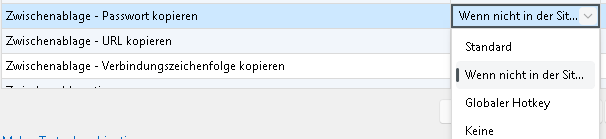
Standard mode does not work (anymore).
'Not in session' and 'Global Hotkey' modes work, the latter one needs an app restart.
So for now I can live with the mode switch.
As far as I can see in the forums, there are quite a few people having problems with keyboard shortcuts after recent updates.
User defined keyboard shortcut not wirking any more
Hi,
after upgrading RDM from 2025.3.30 to 2026.1.14 my user defined shortcut for copying a password to the clipboard, Ctrl-Q, is not working any more.
Changing it to some other Ctrl shortcut did not help.
The predefined CTRL-Shift-B is also not working, though it is shown in the context menu:

The context menu itself works.
Thanks in advance.
Cannot delete folder
Anyway, I was so annoyed that I just deleted the ghost entry from dbo.Connections in SQL.
Now the folders don't show up anymore.
Cannot delete folder
I have a folder inside RDM that will not delete.
When trying to delete the folder it shows that it contains a folder - but this subfolder is not visible.
Confirming the deletion then does nothing, there is no error.
RDM 2024.2.11 with MSSQL datasource
Cache Mode is disabled
Data source diagnostics showed 4 duplicate folders which I already cleaned. It now only shows 15 virtual folders.
One of the virtual folders is meant to be inside the folder i want to delete - but it does not show anywhere.
Converting the virtual folders via script as outlined here fails with not recognizing GET-RDMVault as Cmdlet:
https://docs.devolutions.net/rdm/mac/kb/rdm-windows/knowledge-base/delete-virtual-folders/
Thanks for helping.