User defined keyboard shortcut not wirking any more

Hi,
after upgrading RDM from 2025.3.30 to 2026.1.14 my user defined shortcut for copying a password to the clipboard, Ctrl-Q, is not working any more.
Changing it to some other Ctrl shortcut did not help.
The predefined CTRL-Shift-B is also not working, though it is shown in the context menu: The context menu itself works.
Thanks in advance.
e910d0a0-88db-4ff5-b527-35880cc35d12.png
All Comments (3)
Hi Kai,
We tried to reproduce the issue on our side, but the shortcuts are working correctly for us.
First, could you let us know which data source you are using?
Second, could you try with a portable version of RDM to see whether the issue is related to the local installation?
You can follow the procedure here:
https://docs.devolutions.net/rdm/kb/how-to-articles/portable-rdm-installation/
Third, if the problem is still happening after that, could you send us a clipboard diagnostic?
Here is the procedure:
https://docs.devolutions.net/rdm/kb/troubleshooting-articles/clipboard-diagnostic/#sending-the-diagnostic-to-support
Also, as an additional question, are you using any clipboard manager?
We look forward to your feedback.
Best regards,
Alexis Geller Peiro
Hi Kai,
We tried to reproduce the issue on our side, but the shortcuts are working correctly for us.
First, could you let us know which data source you are using?
Second, could you try with a portable version of RDM to see whether the issue is related to the local installation?
You can follow the procedure here:
https://docs.devolutions.net/rdm/kb/how-to-articles/portable-rdm-installation/
Third, if the problem is still happening after that, could you send us a clipboard diagnostic?
Here is the procedure:
https://docs.devolutions.net/rdm/kb/troubleshooting-articles/clipboard-diagnostic/#sending-the-diagnostic-to-support
Also, as an additional question, are you using any clipboard manager?
We look forward to your feedback.
Best regards,
@Alexis Geller Peiro
It seems to relate to the 'Mode' in the Keyboard settings.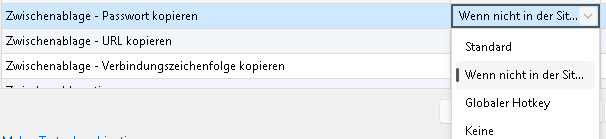
Standard mode does not work (anymore).
'Not in session' and 'Global Hotkey' modes work, the latter one needs an app restart.
So for now I can live with the mode switch.
As far as I can see in the forums, there are quite a few people having problems with keyboard shortcuts after recent updates.
bf3b634e-2bfb-42a0-a87a-a52666cbaf6f.png
Hi Kai,
Thank you for the clarification. With the new details you provided, we now better understand what you were referring to.
Yes, this is a known bug, and our team is already working on a fix as soon as possible.
Best regards,
Alexis Geller Peiro