
rwn2
Does Microsoft login have to open a browser?
Hi
I've submitted a change to the RDM team that should add this. Assuming everything is good with my changes, that would be released in the first 2025.2 version (scheduled for June 2nd).
The setting is in File > Settings > Advanced > General > "Use MSAL embedded web view". Since it's somewhat buried, I'll add some screenshots:


Since the last few week I've found a more official way to achieve this functionality, but it involves quite a lot of work on our side. So we'll stick with what we have for now, but I'll rely on you to report any issues you have in future releases that will help us prioritize further investment here.
And as always, don't hesitate to post back with further questions or issues.
Kind regards,
@Richard Markiewicz
Hi Richard,
Thank you for the guide. A couple of people at my company have now enabled it through the UI and it works as expected. It also registers correctly as already set for those of us who enabled it directly in the config. I have sent the guide to all RDM users at my company and will of course let you know if we encounter any issues in the future.
- River
RDM doesn't register closed RDPs correctly
Hello,
This is a known issue and we have fix coming really soon (expected tomorrow). I have a workaround. You can open the file remotedesktopmanager.cfg located in %localappdata%\Devolutions\RemoteDesktopManager and add this Xml line:
<RefreshOpenedConnectionInterval>5000</RefreshOpenedConnectionInterval>
Please make sure backup you file before.
Regards
Hi David,
Thank you for the quick reply and the great news that this is already getting fixed. With a fix coming so soon I think we'll just let people restart RDM when the issue occurs, but I'll add the workaround to my toolbox just in case.
- River
RDM doesn't register closed RDPs correctly
Hi,
Recently multiple individuals at my company have notified me of an issue they started having with RDM not registering when they disconnect or sign out from an RDP opened through RDM. It doesn't appear to happen 100% of the time, even on the same connection but right now I have been able to reproduce the error myself with a very basic RDP connection. I signed out on the remote server 10 minutes ago and RDM still thinks it's open.
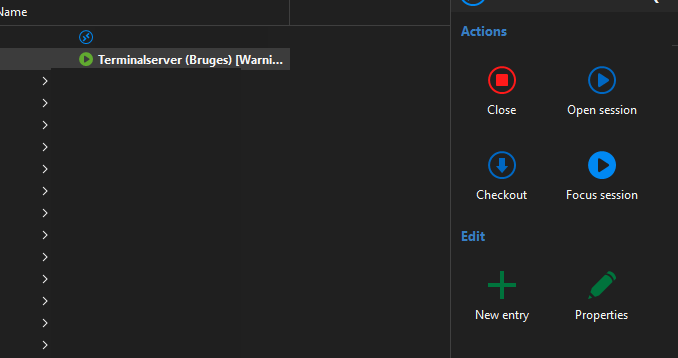
The RDP is using all defaults except for the following:
Name
Display: External
Credentials: Linked (vault), Prompt on connection (Basefolder\Same folder as RDP\Users) the users are all of the username and password credential type
Host: IP + port
Other useful info:
Devices run Windows 11 Enterprise 23H2 or 24H2
RDM version: 2025.1.38.0 64-bit
DataSource is Microsoft Azure SQL using Active Directory Interactive (with MFA support) as login method
Issue occurs both with and without use of VPN
The issue occurs both on PCs where we edited the <UseMsalEmbeddedWebView> in the config and on PCs that are running unedited configs
So far our only solution is to restart RDM, so I was hoping you guys had some clues as to why this might occur?
- River
Does Microsoft login have to open a browser?
Hi Sam
It's not possible to push the change, unless you did it out-of-band (perhaps remotely executing a PowerShell script on the staff machines to close RDM and modify the .cfg).
That said, this was a no-UI option because I considered it experimental, but so far things have been pretty successful. I can go ahead and make a ticket to add this to the settings UI? Then it can be as easy as telling staff "open file > settings, go here, check this box, save and restart". What do you think?
Let me know if something's not clear
Kind regards,
Hi Richard,
I can't speak for Sam, but at my company we would love a UI option.
It's still running perfectly fine for the people it has been enabled for via the cfg file, so I would feel comfortable with letting all users have the option to easily enable this on their own.
- River
Does Microsoft login have to open a browser?
Hello
Just checking in if you had chance to try these changes on the latest version of RDM. Please don't hesitate to post back with problems or questions.
Kind regards,
Hi,
I have set it up with 5 people at my company and confirmed that it worked. Everyone has been instructed to inform me if they noticed even the slightest issue, and so far I haven't heard anything. It has been working flawlessly for me as well, so for now I don't think there are any issues to report.
- River
Does Microsoft login have to open a browser?
Hello
I wanted to share some progress here. I've added an experimental option to RDM that should allow the Azure SQL login to use the embedded web view instead of the system browser. Assuming QA finds nothing outrageous, this should be available in the 2025.1.28 release (which will not be for a couple of weeks, I'm afraid).
This is an opt-in and has some caveats.
This option adds around 5s to the RDM startup time. I know startup time is already a pain point for some users, and if this initial implementation works out, we might be able to optimize further. But for now, that is the cost.
I haven't evaluated this on ARM64 systems (I expect it to work) or on the Ready2Run builds (I expect it not to work). I doubt either of these situations apply to you.
This might be inherently unstable: updates to the underlying MSAL library might break this feature unexpectedly on RDM updates; which would require us to adapt the implementation.
I did test this with other code using the MSAL library and everything seemed to be working fine, but YMMV. I'd encourage you to report any bugs or issues that you find (I don't know what other Azure features you are using in RDM).
To opt-in, once you've updated to 2025.1.28:
Close RDM
Locate your .cfg file (for a typical installation that's in %localappdata%/Devolutions/RemoteDesktopManager/RemoteDesktopManager.cfg)
Before the closing </Option> tag, add the following line
<UseMsalEmbeddedWebView>true</UseMsalEmbeddedWebView>
Save the file and relaunch RDM
Again, if this pans out and works well we could look at making that a UI level setting. But for now, this is considered experimental and how we move forward depends on if this works in the real world or if there are issues we can't resolve.
Thanks for your patience on this, and please don't hesitate if you have further questions or comments
Kind regards,
Thank you for taking the time to look into this.
I will be testing this as soon as 2025.1.28 comes out.
Does Microsoft login have to open a browser?
Hi again,
Thanks for the info, that explains it.
I really appreciate you guys looking into it, and even if it isn't solved right away I now have something to report back to my team when they ask.
Does Microsoft login have to open a browser?
I'm not surprised to hear that it's controlled by Microsoft, but I was hoping that Microsoft would have left you guys some options to use the popup style login screen.
From a user standpoint the actual login screen works the exact same way, now it just takes up the whole screen and doesn't close itself post sign in like it used to.
We can't do much about Microsoft's decisions but thank you for looking into it.
Does Microsoft login have to open a browser?
Hi,
We're all using RDM Enterprise 2024.2.11.0 64-bit on Windows 11 Enterprise 23H2
I can't find a specific database version, but it should be the most recent as we did the upgrade that accompanied version 2024.2.8.0
Our data source is set up as Microsoft Azure SQL with Active Directory Interactive (with MFA support) as our login mode.
Does Microsoft login have to open a browser?
In one of the more recent updates there seems to have been a change to how the Microsoft login works when opening RDM.
In the past we got a pop up on top of RDM where we selected our user and then it disappeared and RDM opened.
Now instead of a small pop up a full browser opens with the Microsoft login prompt and after selecting a user, instead of closing again it just displays the message "Authentication complete. You can return to the application. Feel free to close this browser tab."
This is a very minor annoyance but something that's been brought up by several people on my team, so I was wondering if there was a way to change this behavior or if it's something Microsoft controls?