RDM doesn't register closed RDPs correctly

Hi,
Recently multiple individuals at my company have notified me of an issue they started having with RDM not registering when they disconnect or sign out from an RDP opened through RDM. It doesn't appear to happen 100% of the time, even on the same connection but right now I have been able to reproduce the error myself with a very basic RDP connection. I signed out on the remote server 10 minutes ago and RDM still thinks it's open.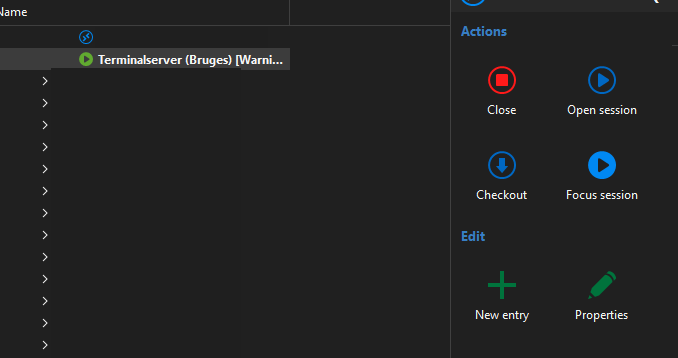
The RDP is using all defaults except for the following:
- Name
- Display: External
- Credentials: Linked (vault), Prompt on connection (Basefolder\Same folder as RDP\Users) the users are all of the username and password credential type
- Host: IP + port
Other useful info:
- Devices run Windows 11 Enterprise 23H2 or 24H2
- RDM version: 2025.1.38.0 64-bit
- DataSource is Microsoft Azure SQL using Active Directory Interactive (with MFA support) as login method
- Issue occurs both with and without use of VPN
- The issue occurs both on PCs where we edited the <UseMsalEmbeddedWebView> in the config and on PCs that are running unedited configs
So far our only solution is to restart RDM, so I was hoping you guys had some clues as to why this might occur?
- River
Skærmbillede 2025-05-21 091311.png
All Comments (21)
Hello,
This is a known issue and we have fix coming really soon (expected tomorrow). I have a workaround. You can open the file remotedesktopmanager.cfg located in %localappdata%\Devolutions\RemoteDesktopManager and add this Xml line:
<RefreshOpenedConnectionInterval>5000</RefreshOpenedConnectionInterval>
Please make sure backup you file before.
Regards
David Hervieux
Hello,
This is a known issue and we have fix coming really soon (expected tomorrow). I have a workaround. You can open the file remotedesktopmanager.cfg located in %localappdata%\Devolutions\RemoteDesktopManager and add this Xml line:
<RefreshOpenedConnectionInterval>5000</RefreshOpenedConnectionInterval>
Please make sure backup you file before.
Regards
Hi David,
Thank you for the quick reply and the great news that this is already getting fixed. With a fix coming so soon I think we'll just let people restart RDM when the issue occurs, but I'll add the workaround to my toolbox just in case.
- River
Was this fixed and released today? I did not see it when opening RDM. I am going to apply the workaround, but looking forward to the fix for this.
Hello,
RDM 2025.1.39.0 is available since this morning. You can download this latest release here
https://devolutions.net/remote-desktop-manager/download/
Best regards,
Jeff Dagenais
What about the 2025.2 release branch? That is the one I am on, and I cannot revert back to this one since my data source was updated.
Hello,
The fix will indeed be included in the next beta release, which should be out soon.
Best regards,
Jeff Dagenais
Hello,
The fix will indeed be included in the next beta release, which should be out soon.
Best regards,
Soon as in tomorrow, next week?
Hello,
If everything goes well, we should have this available tomorrow.
If not, at the beginning of next week a new beta version will be available.
Best regards,
Jeff Dagenais
I have been having this issue, finally checked here and noticed an update was released today so I went ahead and updated RDM but after updating the issue persists:
Connect RDP to a server from RDM, entry show in bold, disconnect and the entry in RDM does not refresh and remains bold so I'm unable to connect to that server again... 10 min later still bold...
Current RDM Version 2025.1.39.0
OS: Windows 11 Version 24H2 (OS Build 26100.4061)
Hello,
If everything goes well, we should have this available tomorrow.
If not, at the beginning of next week a new beta version will be available.
Best regards,
Another quick question I hope - if I am using SQL for my RDM connections - can I remove 2025.2 Beta and go back to the PROD release without any issues? If that is the case I might look to revert to the PROD release channel instead of Beta.
I have been having this issue, finally checked here and noticed an update was released today so I went ahead and updated RDM but after updating the issue persists:
Connect RDP to a server from RDM, entry show in bold, disconnect and the entry in RDM does not refresh and remains bold so I'm unable to connect to that server again... 10 min later still bold...
Current RDM Version 2025.1.39.0
OS: Windows 11 Version 24H2 (OS Build 26100.4061)
If I close RDM and add the workaround above (RefreshOpenedConnectionInterval in the cfg file) and re-open RDM the problem seems to get fixed but after a few min it starts happening again, check the cfg file and the setting is getting removed...
I have to say, this bug should be high priority, it renders RDM unusable for us, let me know if you need any info or logs, etc.
I have been having this issue, finally checked here and noticed an update was released today so I went ahead and updated RDM but after updating the issue persists:
Connect RDP to a server from RDM, entry show in bold, disconnect and the entry in RDM does not refresh and remains bold so I'm unable to connect to that server again... 10 min later still bold...
Current RDM Version 2025.1.39.0
OS: Windows 11 Version 24H2 (OS Build 26100.4061)
If I close RDM and add the workaround above (RefreshOpenedConnectionInterval in the cfg file) and re-open RDM the problem seems to get fixed but after a few min it starts happening again, check the cfg file and the setting is getting removed...
I have to say, this bug should be high priority, it renders RDM unusable for us, let me know if you need any info or logs, etc.
Check the CFG file again as it looked like it disappeared on me but the program moved it to the bottom of the file and mine is still there, but it seems to make no difference for the connection issue not releasing after logoff or disconnect. :(
Hello,
It's high priority. I'm unable to reproduce it, but I will make sure to roll back the changes we made between version 2025.1.37 and .38. I hope to release this soon. For now, you can roll back to version .37 if the latest version does not solve your issue.
David Hervieux
Hello,
We have made another version, not in download yet but available here. This should resolve the issue and it also contains an improvement to immediately refresh the UI if you press Close
https://cdn.devolutions.net/download/Setup.RemoteDesktopManager.2025.1.40.0.exe
Regards
David Hervieux
Hello,
We have made another version, not in download yet but available here. This should resolve the issue and it also contains an improvement to immediately refresh the UI if you press Close
https://cdn.devolutions.net/download/Setup.RemoteDesktopManager.2025.1.40.0.exe
Regards
This link points to the .39 version installer not the .40 as noted. FYI
Hello,
I've fixed the link. Sometime the url and the text is not sync:
https://cdn.devolutions.net/download/Setup.RemoteDesktopManager.2025.1.40.0.exe
David Hervieux
This new version seems to be working fine for me. I'll report if I have any problem but so far so good...
Thanks a lot David for the quick solution!
Installed the .40 release and so far it is working great. No more looking like it is connected still in RDM and it is fast to update the UI. Great work team.
Hello,
The fix will indeed be included in the next beta release, which should be out soon.
Best regards,
Is a newer beta release coming out with this thread fix in it? I see .7 is still the only one available so I am staying on the .1.x release for now until the beta contains the fix.
@cchilderhose We're not planning to release any additional beta version of 2025.2 as we are planning to release the stable version next week. This issue will be fixed on that version.
Regards,
Hubert Mireault
@cchilderhose In the end we decided to make a final beta release. It should be live right now. We are still planning to make the non-beta release next week, but in case it doesn't happen, this beta version will have the external RDP entry fix (and multiple other ones).
Regards,
Hubert Mireault