
james3
Waypipe on Windows and macOS
Ended up not using this for Windows clients in the end as they preferred RDP.
But it would probably be as simple as installing WSL, installing waypipe, and running a command like this in RDM:
wsl --exec wapipe ssh user@remote program
Waypipe on Windows and macOS
Hi Hubert,
I was just about to mention that I got Waypipe working in WSL!
Thanks for the pointer. I'll see if I can get this working in RDM too.
Waypipe on Windows and macOS
Hi Hubert,
Fair enough!
I didn't know what went into X2Go support. I don't think Waypipe has much interest in creating macOS/Windows clients. Though I do wonder whether WSL would be worth looking into.
Waypipe on Windows and macOS
I've got a Linux server running applications on Wayland. I've found Waypipe's performance to be much better X forwarding, XVNC, and GNOME Remote Desktop while keeping server load low.
Problem is, I need a Linux client to run Waypipe on.
But Waypipe is essentially X2Go for Wayland, and I found this post about Devolutions getting X2Go working for Windows and macOS clients, so I thought—hey, maybe it's possible to get Waypipe working on Windows and macOS clients too?
It would be very cool to have this feature somehow.
The way you run Waypipe generally is over an SSH tunnel like so:
waypipe ssh user@server firefoxCan't connect to GNOME Remote Desktop session on Windows 10/11 (client sends wrong credentials on redirection)
Hi,
Here are the details on a Windows 11 computer that can't open the connection except in fullscreen:
Session: Embedded (tabbed)
Screen sizing mode: Default
Remote desktop size: Default
Zoom: 100%
OS Settings
Windows 11
Scale: 200%
Display resolution: 2560 x 1600 (Recommended)
Incidentally, changing the Remote desktop size to 1920x1080 works too.
Can't connect to GNOME Remote Desktop session on Windows 10/11 (client sends wrong credentials on redirection)
I just tested today with "Default" resolution and it looks like you were right, "invalid monitor layout":
Jun 26 10:42:06 fedora-remote gnome-remote-de[1221]: [RDP] Received invalid monitor layout from client: Invalid monitor dimensions, closing connection
Jun 26 10:42:06 fedora-remote gnome-remote-desktop-daemon[1221]: [10:42:06:864] [1221:00010479] [ERROR][com.freerdp.core.peer] - [rdp_peer_handle_state_demand_active]: [CONNECTION_STATE_CAPABILITIES_EXCHANGE_DEMAND_ACTIVE] freerdp_peer::Capabilities() callback failed
Jun 26 10:42:06 fedora-remote gnome-remote-desktop-daemon[1221]: [10:42:06:864] [1221:00010479] [ERROR][com.freerdp.core.transport] - [transport_check_fds]: transport_check_fds: transport->ReceiveCallback() - STATE_RUN_FAILED [-1]
Jun 26 10:42:06 fedora-remote gnome-remote-de[1221]: Unable to check file descriptor, closing connection
Jun 26 10:42:16 fedora-remote gnome-remote-desktop-daemon[1221]: [10:42:16:252] [1221:000104c2] [ERROR][com.winpr.sspi.NTLM] - [ntlm_fetch_ntlm_v2_hash]: Error: Could not find user in SAM database
Jun 26 10:42:16 fedora-remote gnome-remote-desktop-daemon[1221]: [10:42:16:253] [1221:000104c2] [WARN][com.winpr.sspi] - [winpr_AcceptSecurityContext]: AcceptSecurityContext status SEC_E_INTERNAL_ERROR [0x80090304]
Jun 26 10:42:16 fedora-remote gnome-remote-desktop-daemon[1221]: [10:42:16:253] [1221:000104c2] [ERROR][com.freerdp.core.auth] - [credssp_auth_authenticate]: AcceptSecurityContext failed with SEC_E_INTERNAL_ERROR [0x80090304]
Jun 26 10:42:16 fedora-remote gnome-remote-desktop-daemon[1221]: [10:42:16:253] [1221:000104c2] [ERROR][com.freerdp.core.transport] - [transport_accept_nla]: client authentication failure
Jun 26 10:42:16 fedora-remote gnome-remote-desktop-daemon[1221]: [10:42:16:253] [1221:000104c2] [ERROR][com.freerdp.core.peer] - [peer_recv_callback_internal]: CONNECTION_STATE_NEGO - rdp_server_accept_nego() fail
Jun 26 10:42:16 fedora-remote gnome-remote-desktop-daemon[1221]: [10:42:16:253] [1221:000104c2] [ERROR][com.freerdp.core.transport] - [transport_check_fds]: transport_check_fds: transport->ReceiveCallback() - STATE_RUN_FAILED [-1]
Jun 26 10:42:16 fedora-remote gnome-remote-de[1221]: Unable to check file descriptor, closing connection
It works in Fullscreen though. So I'll just use that.
And I've only run into the error on Windows 11 machines so far.
Can't connect to GNOME Remote Desktop session on Windows 10/11 (client sends wrong credentials on redirection)
Will do some more testing tomorrow, but I just tried on my physical Windows 10 installation with the newest version of RDM, and it connected fine even with Default resolution instead of Fullscreen. I don't have a Windows 11 machine of my own to test, but it works in a virtual machine...
The three other people were using a Windows 11 machine. I'll see if I can do some more testing tomorrow and look for logs on the server side.
Can't connect to GNOME Remote Desktop session on Windows 10/11 (client sends wrong credentials on redirection)
Hi, I'm back.
I did all my testing on my Windows 10 and 11 VMs and RDM works fine there. However, when it came to other people trying it out on their Windows 11 computers, RDM just drops the connection silently with no error.
When I looked in the logs, I found this:
[25/06/2024 2:02:27 PM - 2024.2.10.0 - 64-bit] Info: RDP - Fatal Error:5I don't know if that's much to go on.
Notably, if they change the entry to display in Fullscreen, it works. But with Default resolution, it doesn't work.
Edit: Oh, and it works perfectly fine on two of my Macs.
Can't connect to GNOME Remote Desktop session on Windows 10/11 (client sends wrong credentials on redirection)
in this case I'm not even sure which certificate(s) get presented to the client
GRD doesn't yet create TLS certificates for you; I used FreeRDP's winpr-makecert -rdp command to accomplish that. They're looking into using the same library to generate the certs in the future.
That's about as far as I know.
Can't connect to GNOME Remote Desktop session on Windows 10/11 (client sends wrong credentials on redirection)
Thank you for your help; enabling that "Use redirection server" option worked!
As for the "by default" comment, I was referring to this:
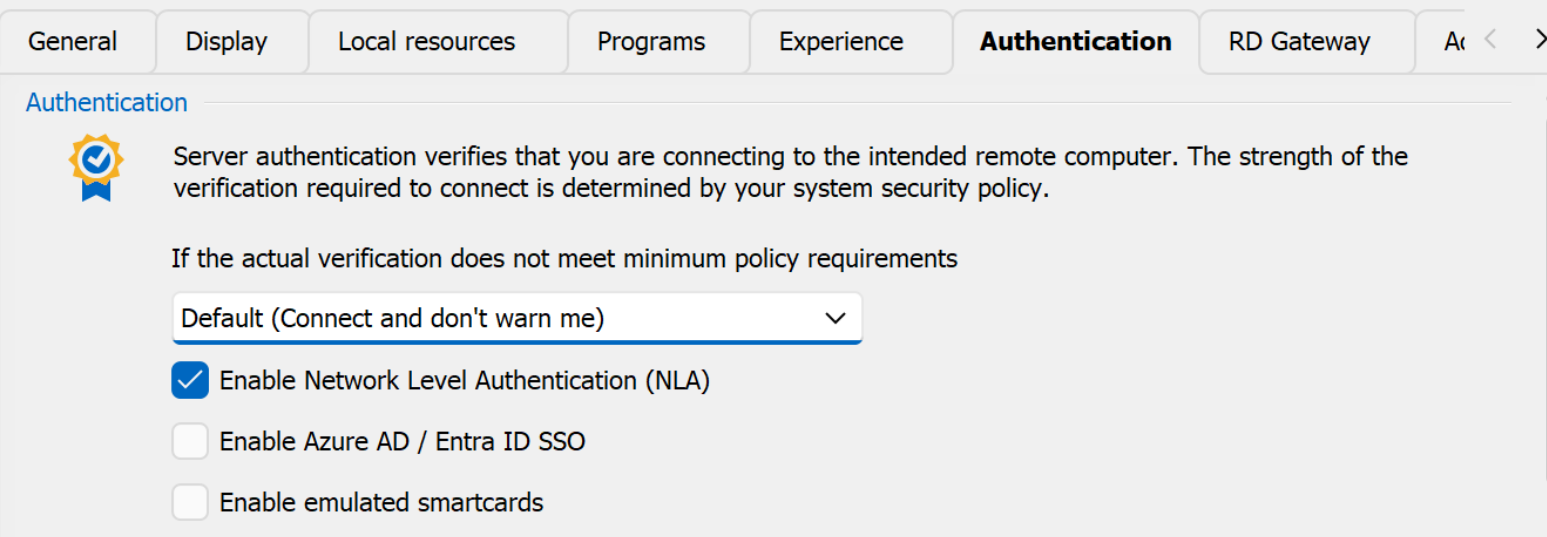
I wonder if it's possible to change the Default in Devolutions and this is something I did several years ago and forgot about.
I checked the registry path in regedit, but there is no Servers folder inside Terminal Server Client. mstsc pops up the certificate warnings, and I've installed them, but it never seems to do anything...
Can't connect to GNOME Remote Desktop session on Windows 10/11 (client sends wrong credentials on redirection)
If it helps, here's my working .rdp file that opens correctly in Remote Desktop Connection (with full address:s:xxx.xxx.xxx.xxx being replaced with my actual server IP):
screen mode id:i:2
use multimon:i:0
desktopwidth:i:2560
desktopheight:i:1600
session bpp:i:32
winposstr:s:0,3,0,0,800,600
compression:i:1
keyboardhook:i:2
audiocapturemode:i:0
videoplaybackmode:i:1
connection type:i:7
networkautodetect:i:1
bandwidthautodetect:i:1
displayconnectionbar:i:1
username:s:rdpuser
enableworkspacereconnect:i:0
disable wallpaper:i:0
allow font smoothing:i:0
allow desktop composition:i:0
disable full window drag:i:1
disable menu anims:i:1
disable themes:i:0
disable cursor setting:i:0
bitmapcachepersistenable:i:1
full address:s:xxx.xxx.xxx.xxx
audiomode:i:0
redirectprinters:i:1
redirectcomports:i:0
redirectsmartcards:i:1
redirectwebauthn:i:1
redirectclipboard:i:1
redirectposdevices:i:0
drivestoredirect:s:
autoreconnection enabled:i:1
authentication level:i:2
prompt for credentials:i:0
negotiate security layer:i:1
remoteapplicationmode:i:0
alternate shell:s:
shell working directory:s:
gatewayhostname:s:
gatewayusagemethod:i:4
gatewaycredentialssource:i:4
gatewayprofileusagemethod:i:0
promptcredentialonce:i:0
gatewaybrokeringtype:i:0
rdgiskdcproxy:i:0
kdcproxyname:s:
enablerdsaadauth:i:0
use redirection server name:i:1Can't connect to GNOME Remote Desktop session on Windows 10/11 (client sends wrong credentials on redirection)
Hi Alexandre,
It was already set to "No change". I tried changing it to every option on the list but all of them failed.
Can't connect to GNOME Remote Desktop session on Windows 10/11 (client sends wrong credentials on redirection)
I've setup a Fedora server with GNOME Remote Desktop. I can connect to it from Remote Desktop Manager on Linux computers, but not on Windows 10/11 computers.
I can connect to the server using Microsoft's Remote Desktop Connection program. I initially thought it was a bug with GNOME Remote Desktop, but when I reported it here, they told me it was a bug in the Devolutions client.
They said this:
>
[ERROR][com.winpr.sspi.NTLM] - [ntlm_fetch_ntlm_v2_hash]: Error: Could not find user in SAM database
The client sends wrong credentials (which is the error here). FreeRDPs clients, Remmina, and mstsc work fine here, and that also does not seem to contradict your experience here.
Considering that Devolutions RDM is a third party client (not an official Microsoft one), you should bring that issue to them, as it's a client error to send the wrong credentials on redirection (the client got one-time credentials via the Server Redirection PDU).
Please also tell them to also enable RDSTLS on Server Redirection, as clearly the client does not advertises it here (otherwise we wouldn't have here the NTLM part in the handover daemon log).