Can't connect to GNOME Remote Desktop session on Windows 10/11 (client sends wrong credentials on redirection)
Can't connect to GNOME Remote Desktop session on Windows 10/11 (client sends wrong credentials on redirection)

I've setup a Fedora server with GNOME Remote Desktop. I can connect to it from Remote Desktop Manager on Linux computers, but not on Windows 10/11 computers.
I can connect to the server using Microsoft's Remote Desktop Connection program. I initially thought it was a bug with GNOME Remote Desktop, but when I reported it here, they told me it was a bug in the Devolutions client.
They said this:
>[ERROR][com.winpr.sspi.NTLM] - [ntlm_fetch_ntlm_v2_hash]: Error: Could not find user in SAM database
The client sends wrong credentials (which is the error here). FreeRDPs clients, Remmina, and mstsc work fine here, and that also does not seem to contradict your experience here.
Considering that Devolutions RDM is a third party client (not an official Microsoft one), you should bring that issue to them, as it's a client error to send the wrong credentials on redirection (the client got one-time credentials via the Server Redirection PDU).
Please also tell them to also enable RDSTLS on Server Redirection, as clearly the client does not advertises it here (otherwise we wouldn't have here the NTLM part in the handover daemon log).
All Comments (14)
Hello James,
Thanks for contacting us on the matter.
This could be more complicated than I suggest, but it's a good start nonetheless.
Can you change the Username format setting in an RDP entry > Properties > Advanced > Advanced, Username Format.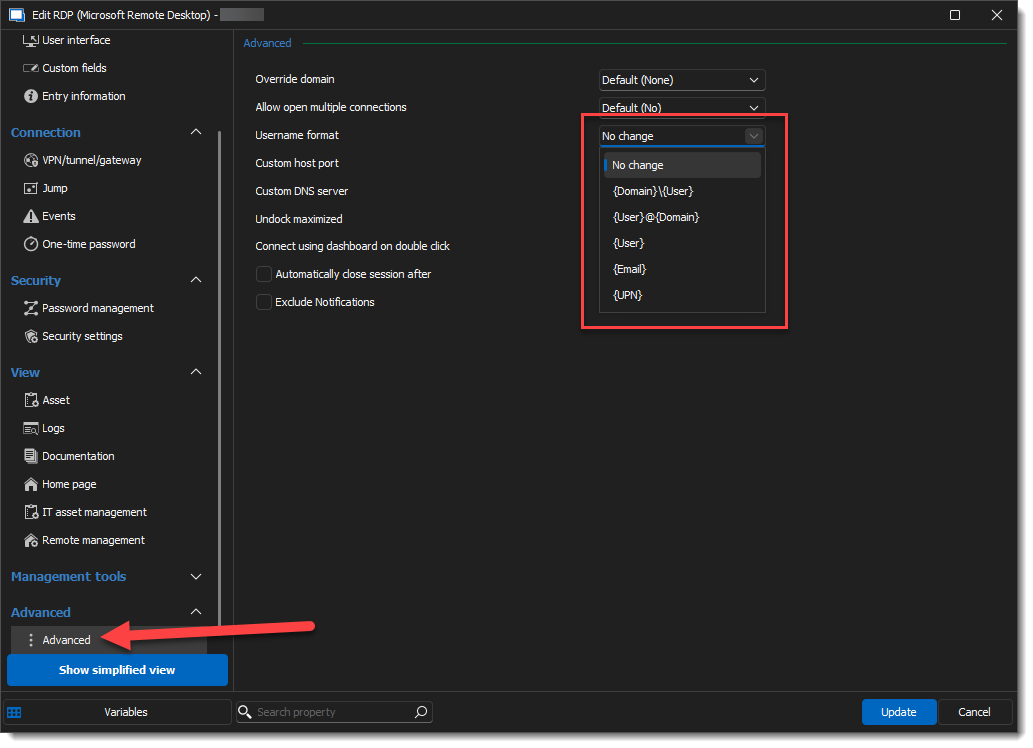
Thanks for letting us know if this helps.
Regards,
Alex Belisle
dcb124d7-f482-4864-a368-297fca354c57.png
Hi Alexandre,
It was already set to "No change". I tried changing it to every option on the list but all of them failed.
If it helps, here's my working .rdp file that opens correctly in Remote Desktop Connection (with full address:s:xxx.xxx.xxx.xxx being replaced with my actual server IP):
screen mode id:i:2
use multimon:i:0
desktopwidth:i:2560
desktopheight:i:1600
session bpp:i:32
winposstr:s:0,3,0,0,800,600
compression:i:1
keyboardhook:i:2
audiocapturemode:i:0
videoplaybackmode:i:1
connection type:i:7
networkautodetect:i:1
bandwidthautodetect:i:1
displayconnectionbar:i:1
username:s:rdpuser
enableworkspacereconnect:i:0
disable wallpaper:i:0
allow font smoothing:i:0
allow desktop composition:i:0
disable full window drag:i:1
disable menu anims:i:1
disable themes:i:0
disable cursor setting:i:0
bitmapcachepersistenable:i:1
full address:s:xxx.xxx.xxx.xxx
audiomode:i:0
redirectprinters:i:1
redirectcomports:i:0
redirectsmartcards:i:1
redirectwebauthn:i:1
redirectclipboard:i:1
redirectposdevices:i:0
drivestoredirect:s:
autoreconnection enabled:i:1
authentication level:i:2
prompt for credentials:i:0
negotiate security layer:i:1
remoteapplicationmode:i:0
alternate shell:s:
shell working directory:s:
gatewayhostname:s:
gatewayusagemethod:i:4
gatewaycredentialssource:i:4
gatewayprofileusagemethod:i:0
promptcredentialonce:i:0
gatewaybrokeringtype:i:0
rdgiskdcproxy:i:0
kdcproxyname:s:
enablerdsaadauth:i:0
use redirection server name:i:1
Hello
First, if I can pick up on a small detail, you wrote "RDM by default ignores the certificate warning and continues anyway". I'm not sure that this is true, RDM will display certificate warnings by default. Is it possible that you already accepted and saved the certificate in this case at an earlier time? MS RDP saves known certificate hashes in the registry: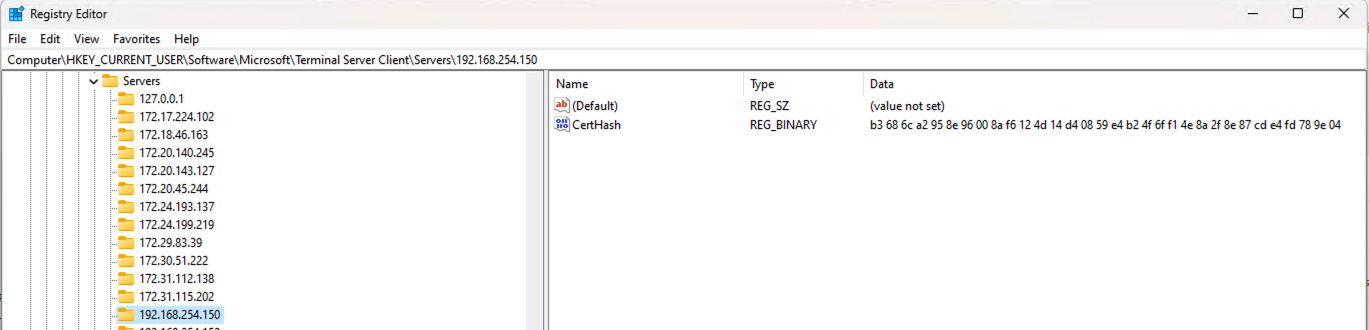
On to the main issue: the option that Pascal mentions is here: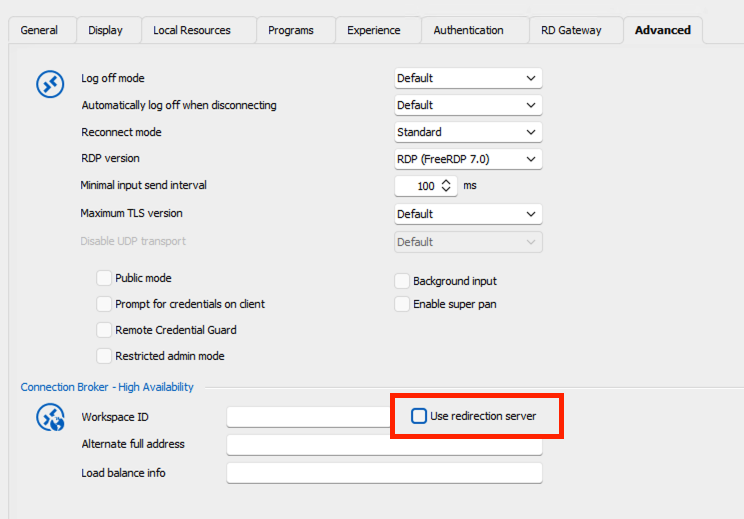
Can you try enabling that? If you're still unsuccessful after that, can you let me know if you have NLA enabled?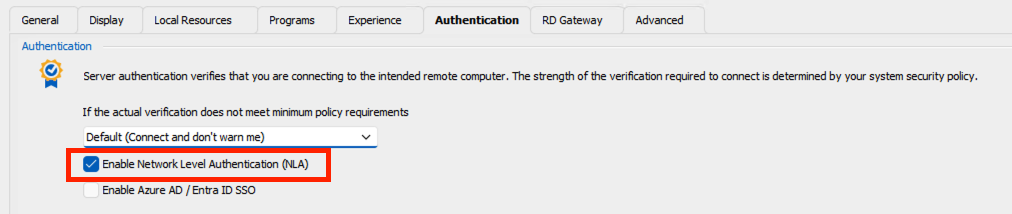
Please, don't hesitate to post back if you have questions or something ins't clear
Thanks and kind regards,
Richard Markievicz
Screenshot 2024-06-24 at 09.52.00.png
Screenshot 2024-06-24 at 09.51.49.png
Screenshot 2024-06-24 at 09.51.30.png
Thank you for your help; enabling that "Use redirection server" option worked!
As for the "by default" comment, I was referring to this: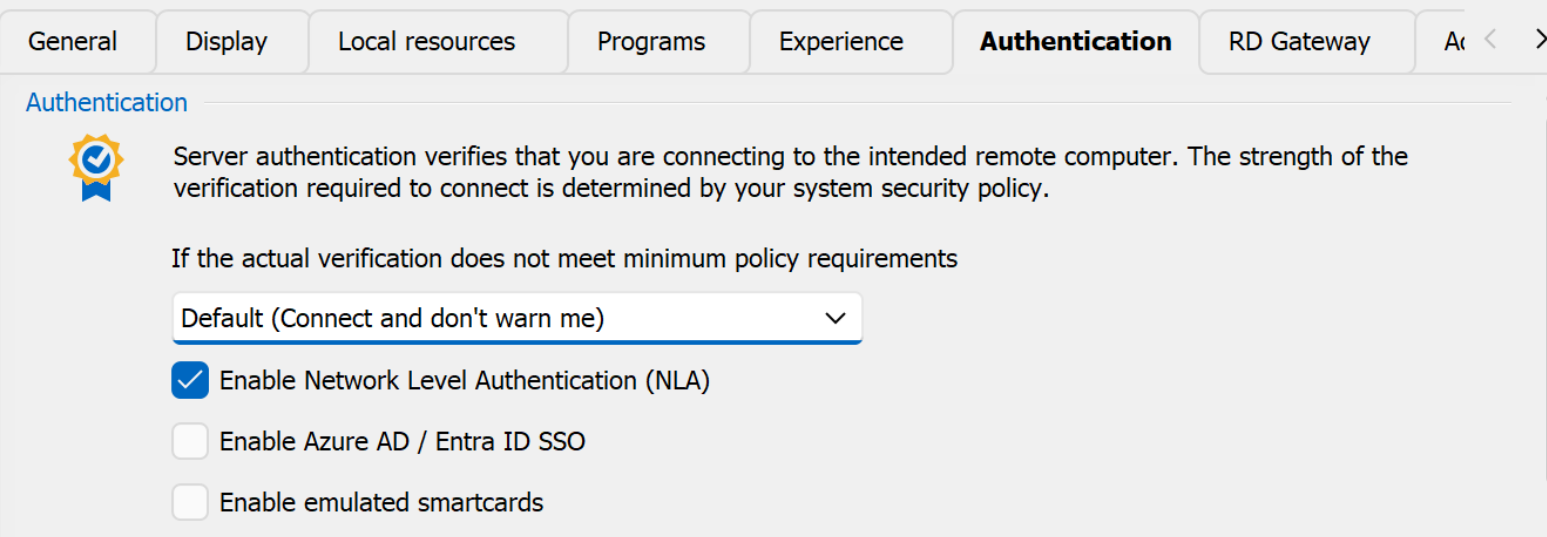
I wonder if it's possible to change the Default in Devolutions and this is something I did several years ago and forgot about.
I checked the registry path in regedit, but there is no Servers folder inside Terminal Server Client. mstsc pops up the certificate warnings, and I've installed them, but it never seems to do anything...
80d0c1e9-2d7f-4091-9a7b-602240ad9cd4.png
Hello
Great, I'm glad this worked!
I'll have to check on the authentication level setting: there is a global option for the default in Options > Types > Sessions > Remote Desktop, but what you have does appear to be the default. However there's some additional logic in there for if NLA is used or not, so I'll check in with the team about what's expected here from a security posture.
I'm not sure why installing the certificate(s) doesn't do anything; in this case I'm not even sure which certificate(s) get presented to the client. I'm just not sure how these kind of sessions are implemented in GRD.
Thanks and kind regards,
Richard Markievicz
in this case I'm not even sure which certificate(s) get presented to the client
GRD doesn't yet create TLS certificates for you; I used FreeRDP's winpr-makecert -rdp command to accomplish that. They're looking into using the same library to generate the certs in the future.
That's about as far as I know.
Hi, I'm back.
I did all my testing on my Windows 10 and 11 VMs and RDM works fine there. However, when it came to other people trying it out on their Windows 11 computers, RDM just drops the connection silently with no error.
When I looked in the logs, I found this:
[25/06/2024 2:02:27 PM - 2024.2.10.0 - 64-bit] Info: RDP - Fatal Error:5
I don't know if that's much to go on.
Notably, if they change the entry to display in Fullscreen, it works. But with Default resolution, it doesn't work.
Edit: Oh, and it works perfectly fine on two of my Macs.
Hello again
Ok, so the logged error refers to this in the Microsoft RDP ActiveX:
"Internal error code 3. This is not a valid state."
Not very helpful, unfortunately.
My gut instinct is that we're either requesting a resolution that GRD doesn't like (unlikely) or perhaps it's related to the screen sizing mode.
Is there anything logged on the GRD side that yields more information?
Thanks and kind regards,
Richard Markievicz
Will do some more testing tomorrow, but I just tried on my physical Windows 10 installation with the newest version of RDM, and it connected fine even with Default resolution instead of Fullscreen. I don't have a Windows 11 machine of my own to test, but it works in a virtual machine...
The three other people were using a Windows 11 machine. I'll see if I can do some more testing tomorrow and look for logs on the server side.
I just tested today with "Default" resolution and it looks like you were right, "invalid monitor layout":
Jun 26 10:42:06 fedora-remote gnome-remote-de[1221]: [RDP] Received invalid monitor layout from client: Invalid monitor dimensions, closing connection
Jun 26 10:42:06 fedora-remote gnome-remote-desktop-daemon[1221]: [10:42:06:864] [1221:00010479] [ERROR][com.freerdp.core.peer] - [rdp_peer_handle_state_demand_active]: [CONNECTION_STATE_CAPABILITIES_EXCHANGE_DEMAND_ACTIVE] freerdp_peer::Capabilities() callback failed
Jun 26 10:42:06 fedora-remote gnome-remote-desktop-daemon[1221]: [10:42:06:864] [1221:00010479] [ERROR][com.freerdp.core.transport] - [transport_check_fds]: transport_check_fds: transport->ReceiveCallback() - STATE_RUN_FAILED [-1]
Jun 26 10:42:06 fedora-remote gnome-remote-de[1221]: Unable to check file descriptor, closing connection
Jun 26 10:42:16 fedora-remote gnome-remote-desktop-daemon[1221]: [10:42:16:252] [1221:000104c2] [ERROR][com.winpr.sspi.NTLM] - [ntlm_fetch_ntlm_v2_hash]: Error: Could not find user in SAM database
Jun 26 10:42:16 fedora-remote gnome-remote-desktop-daemon[1221]: [10:42:16:253] [1221:000104c2] [WARN][com.winpr.sspi] - [winpr_AcceptSecurityContext]: AcceptSecurityContext status SEC_E_INTERNAL_ERROR [0x80090304]
Jun 26 10:42:16 fedora-remote gnome-remote-desktop-daemon[1221]: [10:42:16:253] [1221:000104c2] [ERROR][com.freerdp.core.auth] - [credssp_auth_authenticate]: AcceptSecurityContext failed with SEC_E_INTERNAL_ERROR [0x80090304]
Jun 26 10:42:16 fedora-remote gnome-remote-desktop-daemon[1221]: [10:42:16:253] [1221:000104c2] [ERROR][com.freerdp.core.transport] - [transport_accept_nla]: client authentication failure
Jun 26 10:42:16 fedora-remote gnome-remote-desktop-daemon[1221]: [10:42:16:253] [1221:000104c2] [ERROR][com.freerdp.core.peer] - [peer_recv_callback_internal]: CONNECTION_STATE_NEGO - rdp_server_accept_nego() fail
Jun 26 10:42:16 fedora-remote gnome-remote-desktop-daemon[1221]: [10:42:16:253] [1221:000104c2] [ERROR][com.freerdp.core.transport] - [transport_check_fds]: transport_check_fds: transport->ReceiveCallback() - STATE_RUN_FAILED [-1]
Jun 26 10:42:16 fedora-remote gnome-remote-de[1221]: Unable to check file descriptor, closing connection
It works in Fullscreen though. So I'll just use that.
And I've only run into the error on Windows 11 machines so far.
Hello
Thanks for the follow up. I took a look at the GRD source and the only reference to that error message is here, when constructing a monitor object from the client supplied information: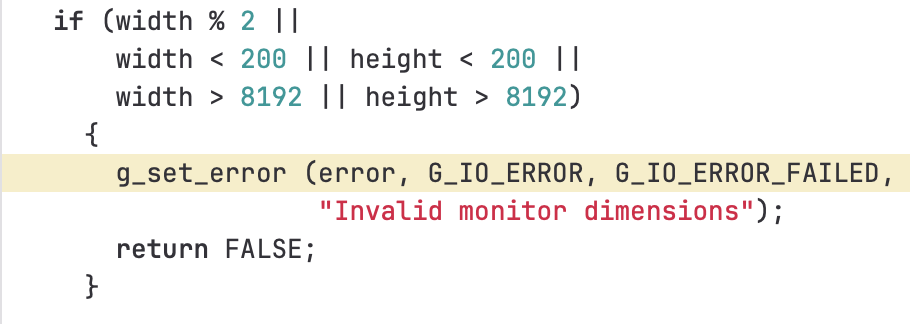
Since full screen works, I don't think it's the size check that's causing this to fail but maybe the requested width is not divisible by 2? This actually could be partly explained by the OS version, where windows borders can (and do) get different sizes. It would be hard to give a certain answer without knowing exactly what you have configured for the session (embedded or undocked), the display settings on the session and the display settings for the OS (resolutions, scale factor, etc).
Please let me know if something isn't clear or you have further questions
Kind regards,
Richard Markievicz
Screenshot 2024-06-25 at 21.08.49.png
Hi,
Here are the details on a Windows 11 computer that can't open the connection except in fullscreen:
Session: Embedded (tabbed)
Screen sizing mode: Default
Remote desktop size: Default
Zoom: 100%
OS Settings
Windows 11
Scale: 200%
Display resolution: 2560 x 1600 (Recommended)
Incidentally, changing the Remote desktop size to 1920x1080 works too.
Hello again
Historically RDP will only support a screen width that's divisible by 2. I know that when using dynamic resolution, if we request an invalid monitor dimension then the server is in no way obligated to give it to us, and might return us a different resolution to use (quietly correcting the issue). I don't recall if it works the same way in the initial monitor information exchange / resolution request in the connection sequence, but I suspect it does.
It's hard for me to say if GRD is off-spec here, or more likely, it's strictly enforcing something that they don't support.
I also find it surprising that the MS RDP ActiveX control actually allows requesting an invalid resolution. In FreeRDP, for example, invalid resolutions like this are quietly fixed before sending them to the server.
That explains why an explicit size works (like 1920x1080). Sadly you'll have to find something that works for you, because there won't be a "one size fits all" answer (the client area of RDP in embedded mode is determined by the size of the RDM window, the width of the connections tree, the height of the ribbon, etc, etc) as well as things like the variable and invisible borders added to the window by Windows.
You might also take this question back to the GRD maintainers. I don't think this is an issue with MS RDP, but perhaps equivalence is not their goal.
Please let me know if something isn't clear or you have further questions!
Kind regards,
Richard Markievicz
