
ryaneiger
I am running Remote Desktop Manager version 2026.1.11.0 and having a problem using Bastion into Windows servers.
Morning Richard. Is this the right format? I will include my TenantId when I run it of course
`Connect-AzAccount -TenantId {id}`
I am running Remote Desktop Manager version 2026.1.11.0 and having a problem using Bastion into Windows servers.
Hey Richard I got more data from the debug window I wanted to share with you in case it might help.

I am running Remote Desktop Manager version 2026.1.11.0 and having a problem using Bastion into Windows servers.
Hey Richard,
I just tried and received this error message below:
Connect-AzAccount -AuthScope https://management.azure.com/
>>
Please select the account you want to login with.
WARNING: Unable to acquire token for tenant 'organizations' with error 'Authentication failed against tenant organizations. User interaction is required. This may be due to the conditional access policy settings such as multi-factor authentication (MFA). If you need to access subscriptions in that tenant, please rerun 'Connect-AzAccount' with additional parameter '-TenantId organizations'.'
Connect-AzAccount: Authentication failed against tenant organizations. User interaction is required. This may be due to the conditional access policy settings such as multi-factor authentication (MFA). If you need to access subscriptions in that tenant, please rerun 'Connect-AzAccount' with additional parameter '-TenantId organizations'.
I am running Remote Desktop Manager version 2026.1.11.0 and having a problem using Bastion into Windows servers.
It was set to that level from another issue in the past. I kept the window open and got the below message:

I am running Remote Desktop Manager version 2026.1.11.0 and having a problem using Bastion into Windows servers.
Remind me again where you set the debug level to 131 please Richard.
I am running Remote Desktop Manager version 2026.1.11.0 and having a problem using Bastion into Windows servers.
I can authenticate just fine to Azure, but when I try both Bastion and RDP, neither will make the connection.
I am running Remote Desktop Manager version 2026.1.11.0 and having a problem using Bastion into Windows servers.
Sorry I wasn't more clear Richard. I can clear the errors, but cannot login at all to the VM's.
I am running Remote Desktop Manager version 2026.1.11.0 and having a problem using Bastion into Windows servers.
After authenticating to Azure via powershell - Connect-AZAccount successfully. I am getting the errrors I will attach with this. I am hoping there is something that can be fixed to get the application happy again.


After latest update, I am unable to remote desktop via Bastion into my Windows servers
Hey Richard,
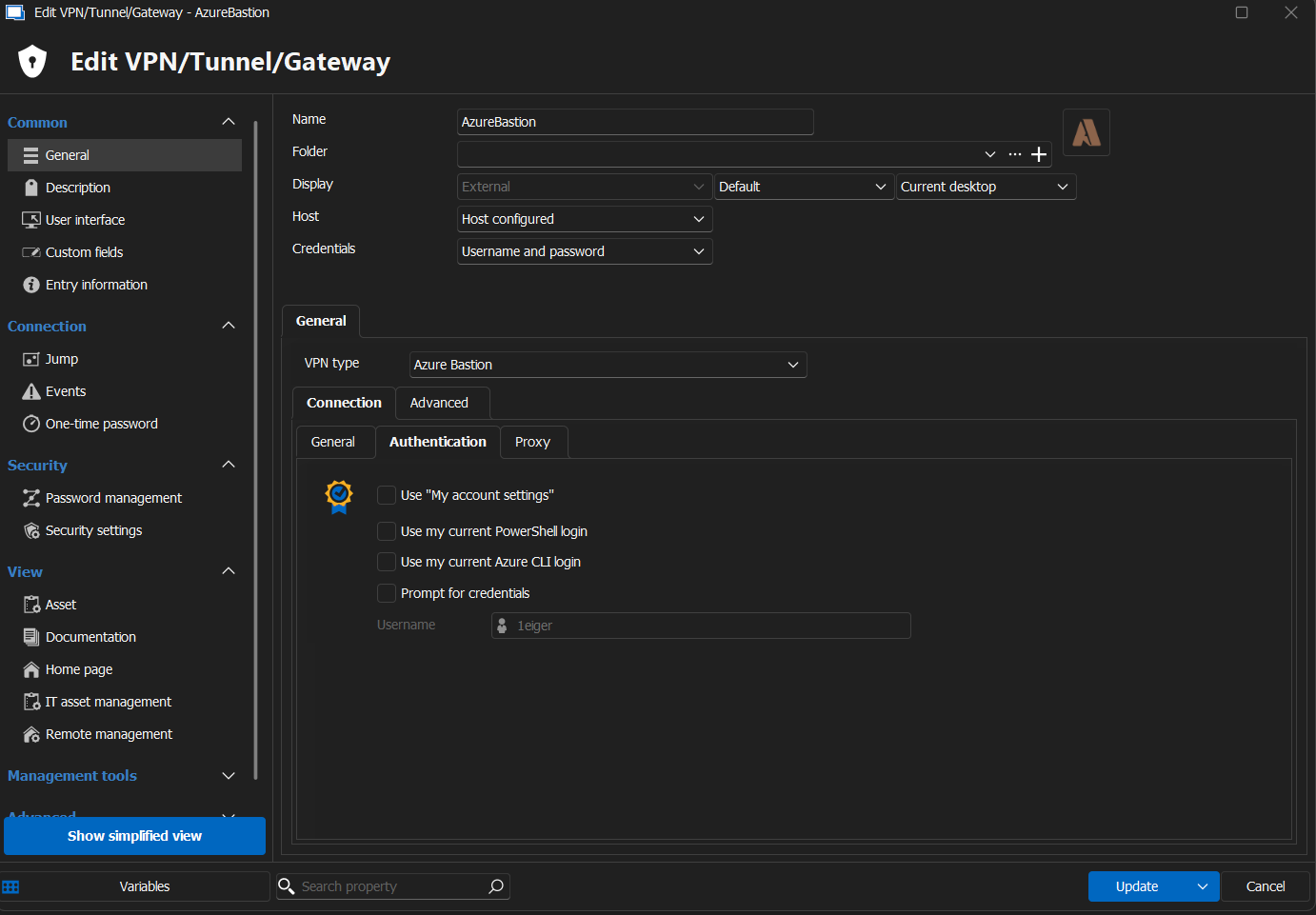
I will attach my authentication method with this reply. I am for sure expecting to use current powershell login and I do not login via browser.

After latest update, I am unable to remote desktop via Bastion into my Windows servers
Hey Richard,
Sorry for the delay. Here is one in the application log to help:
One or more errors occurred. (Unable to retrieve authentication token) (System.AggregateException: One or more errors occurred. (Unable to retrieve authentication token)
---> Devolutions.Az.AzAuthException: Unable to retrieve authentication token
---> Azure.Identity.AuthenticationFailedException: The ChainedTokenCredential failed due to an unhandled exception: Azure PowerShell authentication failed due to an unknown error. See the troubleshooting guide for more information. https://aka.ms/azsdk/net/identity/powershellcredential/troubleshoot #< CLIXML
<Objs Version="1.1.0.1" xmlns="http://schemas.microsoft.com/powershell/2004/04"><S S="Error">_x001B_[31;1mGet-AzAccessToken: _x001B_[0m_x000D__x000A_</S><S S="Error">_x001B_[31;1m_x001B_[36;1mLine |_x001B_[0m_x000D__x000A_</S><S S="Error">_x001B_[31;1m_x001B_[36;1m_x001B_[36;1m 25 | _x001B_[0m $token = _x001B_[36;1mGet-AzAccessToken @params_x001B_[0m_x000D__x000A_</S><S S="Error">_x001B_[31;1m_x001B_[36;1m_x001B_[36;1m_x001B_[0m_x001B_[36;1m_x001B_[0m_x001B_[36;1m | _x001B_[31;1m ~~~~~~~~~~~~~~~~~~~~~~~~~_x001B_[0m_x000D__x000A_</S><S S="Error">_x001B_[31;1m_x001B_[36;1m_x001B_[36;1m_x001B_[0m_x001B_[36;1m_x001B_[0m_x001B_[36;1m_x001B_[31;1m_x001B_[31;1m_x001B_[36;1m | _x001B_[31;1mAuthentication failed against resource https://management.azure.com/. User interaction is required. This may be due to the conditional access policy settings such as multi-factor authentication (MFA). Please rerun 'Connect-AzAccount' with additional parameter '-AuthScope https://management.azure.com/'._x001B_[0m_x000D__x000A_</S></Objs>
---> Azure.Identity.AuthenticationFailedException: Azure PowerShell authentication failed due to an unknown error. See the troubleshooting guide for more information. https://aka.ms/azsdk/net/identity/powershellcredential/troubleshoot #< CLIXML
<Objs Version="1.1.0.1" xmlns="http://schemas.microsoft.com/powershell/2004/04"><S S="Error">_x001B_[31;1mGet-AzAccessToken: _x001B_[0m_x000D__x000A_</S><S S="Error">_x001B_[31;1m_x001B_[36;1mLine |_x001B_[0m_x000D__x000A_</S><S S="Error">_x001B_[31;1m_x001B_[36;1m_x001B_[36;1m 25 | _x001B_[0m $token = _x001B_[36;1mGet-AzAccessToken @params_x001B_[0m_x000D__x000A_</S><S S="Error">_x001B_[31;1m_x001B_[36;1m_x001B_[36;1m_x001B_[0m_x001B_[36;1m_x001B_[0m_x001B_[36;1m | _x001B_[31;1m ~~~~~~~~~~~~~~~~~~~~~~~~~_x001B_[0m_x000D__x000A_</S><S S="Error">_x001B_[31;1m_x001B_[36;1m_x001B_[36;1m_x001B_[0m_x001B_[36;1m_x001B_[0m_x001B_[36;1m_x001B_[31;1m_x001B_[31;1m_x001B_[36;1m | _x001B_[31;1mAuthentication failed against resource https://management.azure.com/. User interaction is required. This may be due to the conditional access policy settings such as multi-factor authentication (MFA). Please rerun 'Connect-AzAccount' with additional parameter '-AuthScope https://management.azure.com/'._x001B_[0m_x000D__x000A_</S></Objs>
at Azure.Identity.AzurePowerShellCredential.RequestAzurePowerShellAccessTokenAsync(Boolean async, TokenRequestContext context, CancellationToken cancellationToken)
at Azure.Identity.AzurePowerShellCredential.GetTokenImplAsync(Boolean async, TokenRequestContext requestContext, CancellationToken cancellationToken)
at Azure.Identity.CredentialDiagnosticScope.FailWrapAndThrow(Exception ex, String additionalMessage, Boolean isCredentialUnavailable)
at Azure.Identity.AzurePowerShellCredential.GetTokenImplAsync(Boolean async, TokenRequestContext requestContext, CancellationToken cancellationToken)
at Azure.Core.Pipeline.TaskExtensions.EnsureCompleted[T](ValueTask`1 task)
at Azure.Identity.AzurePowerShellCredential.GetToken(TokenRequestContext requestContext, CancellationToken cancellationToken)
at Azure.Identity.ChainedTokenCredential.GetTokenImplAsync(Boolean async, TokenRequestContext requestContext, CancellationToken cancellationToken)
--- End of inner exception stack trace ---
at Azure.Identity.ChainedTokenCredential.GetTokenImplAsync(Boolean async, TokenRequestContext requestContext, CancellationToken cancellationToken)
at Azure.Core.Pipeline.TaskExtensions.EnsureCompleted[T](ValueTask`1 task)
at Azure.Identity.ChainedTokenCredential.GetToken(TokenRequestContext requestContext, CancellationToken cancellationToken)
at Devolutions.RemoteDesktopManager.Business.AzureCredential.GetToken(TokenRequestContext requestContext, CancellationToken cancellationToken)
at Devolutions.RemoteDesktopManager.Business.AzureAuthenticator.GetToken(String scope, CancellationToken cancellationToken, TokenAuthenticatorOptions options)
at Devolutions.Az.BaseClient.TryGetToken(String scope, CancellationToken cancellationToken)
--- End of inner exception stack trace ---
at Devolutions.Az.BaseClient.TryGetToken(String scope, CancellationToken cancellationToken)
at Devolutions.Az.Bastion.Client.GetHost(String subscriptionId, String resourceGroupName, String bastionHostName, CancellationToken cancellationToken)
--- End of inner exception stack trace ---
at System.Threading.Tasks.Task.ThrowIfExceptional(Boolean includeTaskCanceledExceptions)
at System.Threading.Tasks.Task`1.GetResultCore(Boolean waitCompletionNotification)
at Devolutions.RemoteDesktopManager.Business.VPNOpeners.VPNAzureBastionOpener.<>c__DisplayClass6_0.<DoOpen>b__0())
Thanks,
Ryan
After latest update, I am unable to remote desktop via Bastion into my Windows servers
Hey Richard,
I am open to suggestion. It could very well be my fault. Here is screenshot for upgrade history:

Here is the connection mode:

Here is the error message:

I will PM you the trace now.
Thanks,
Ryan
After latest update, I am unable to remote desktop via Bastion into my Windows servers
Hello
Sorry for the inconvenience. Just to be explicit - are you talking about Azure Bastion?
Thanks and kind regards,
@Richard Markiewicz
Yes sir. Sorry for not being more clear.
After latest update, I am unable to remote desktop via Bastion into my Windows servers
Hi,
I am running 2025.3.29.0 and I am not long able to connect to my Windows servers via Bastion. I am hoping someone can help with with this issue.
Thanks,
Ryan
Azure Bastion Error trying to connect to server
Easy solution and I cannot complain at all Richard. The application works very well and you and your team do an amazing job at supporting it. Thank you again for your help!!
Azure Bastion Error trying to connect to server
Richard my friend you are a genius sir. Thank you so very much for your quick response and help to fix this. I assume it had to do with the new update and Azure Privileged Identity Management.
Azure Bastion Error trying to connect to server
Hey Richard,
Sorry for sending wrong information. I am hoping this below is what you are looking for.
Thank you!
Ryan
Azure Bastion Error trying to connect to server
Hey Richard,
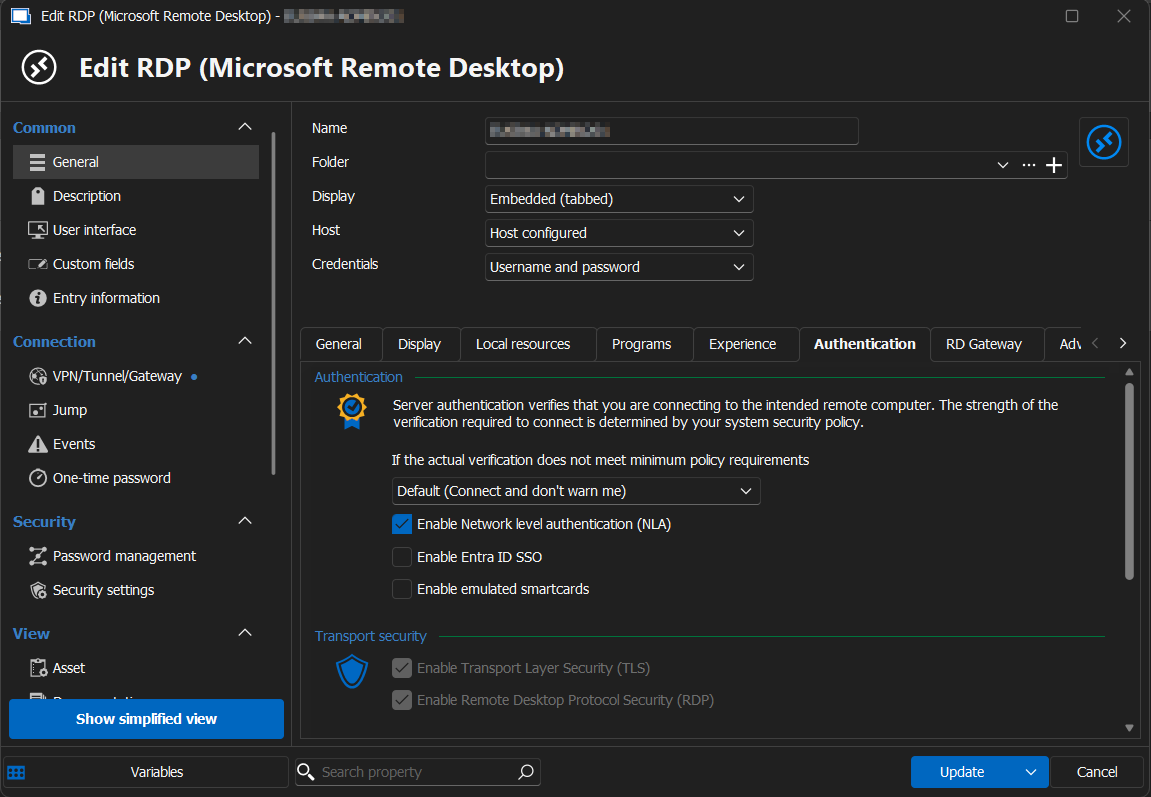
Thanks for the quick reply. Here is a screen shot of the authentication tab you requested.
Azure Bastion Error trying to connect to server
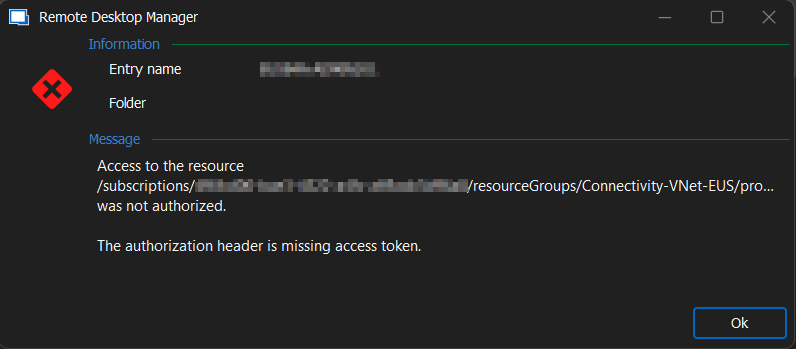
We use Azure Bastion on a number of our servers in another region. After upgrading to 2024.3.18.0 64-bit I am no longer able to connect to any servers via Bastion.
Missing Search Box
Hey Maxim,
The reset layout worked like a charm! I cannot thank you enough for your for help. I will remember where this is for the future.
Have a great rest of your day!
Ryan
Missing Search Box

Hi,
I am sorry to bother you. I am missing my search box in my Navigation window. Can someone please help me add it back?
Thank you!