I am running Remote Desktop Manager version 2026.1.11.0 and having a problem using Bastion into Windows servers.
I am running Remote Desktop Manager version 2026.1.11.0 and having a problem using Bastion into Windows servers.

After authenticating to Azure via powershell - Connect-AZAccount successfully. I am getting the errrors I will attach with this. I am hoping there is something that can be fixed to get the application happy again.

Screenshot 2026-03-12 at 11.36.05 AM.png
Screenshot 2026-03-12 at 11.35.29 AM.png
Recommended Answer
Hello
I do think you need both parameters, soConnect-AzAccount -TenantId {id} -AuthScope https://management.azure.com/
Should be correct, but I don't have a setup to test. If it doesn't work please post back with what the output is.
Thanks and kind regards,
Richard Markievicz
All Comments (13)
Hello
Just to check - is the Azure Bastion integration working, and it's just that you get these errors popping up? Because they are unrelated to Bastion.
To silence these errors, go to Help > Performance Profiling and in the "Debug Only" tab, set the "Debug Level" to 0 (or 1, if 0 is not allowed in that field).
Please let me know if something isn't clear or you have further questions
Kind regards,
Richard Markievicz
Sorry I wasn't more clear Richard. I can clear the errors, but cannot login at all to the VM's.
Hello
Where exactly is the failure happening? Does the Bastion (VPN) connect successfully, if so; can you connect by RDP (assuming you're using RDP)? And then you can't login somehow?
Thanks and kind regards
Richard Markievicz
I can authenticate just fine to Azure, but when I try both Bastion and RDP, neither will make the connection.
Hello
Ok, ignoring the warnings we have above, is there any other error coming up in the UI?
The quicker way to diagnose might be to go back to the profiler window (debug only); set the debug level to "131" and keep that window open while you reproduce the problem. Then forward me the results from that window (you can send by PM).
Thanks and kind regards,
Richard Markievicz
Remind me again where you set the debug level to 131 please Richard.
Hello
Right here: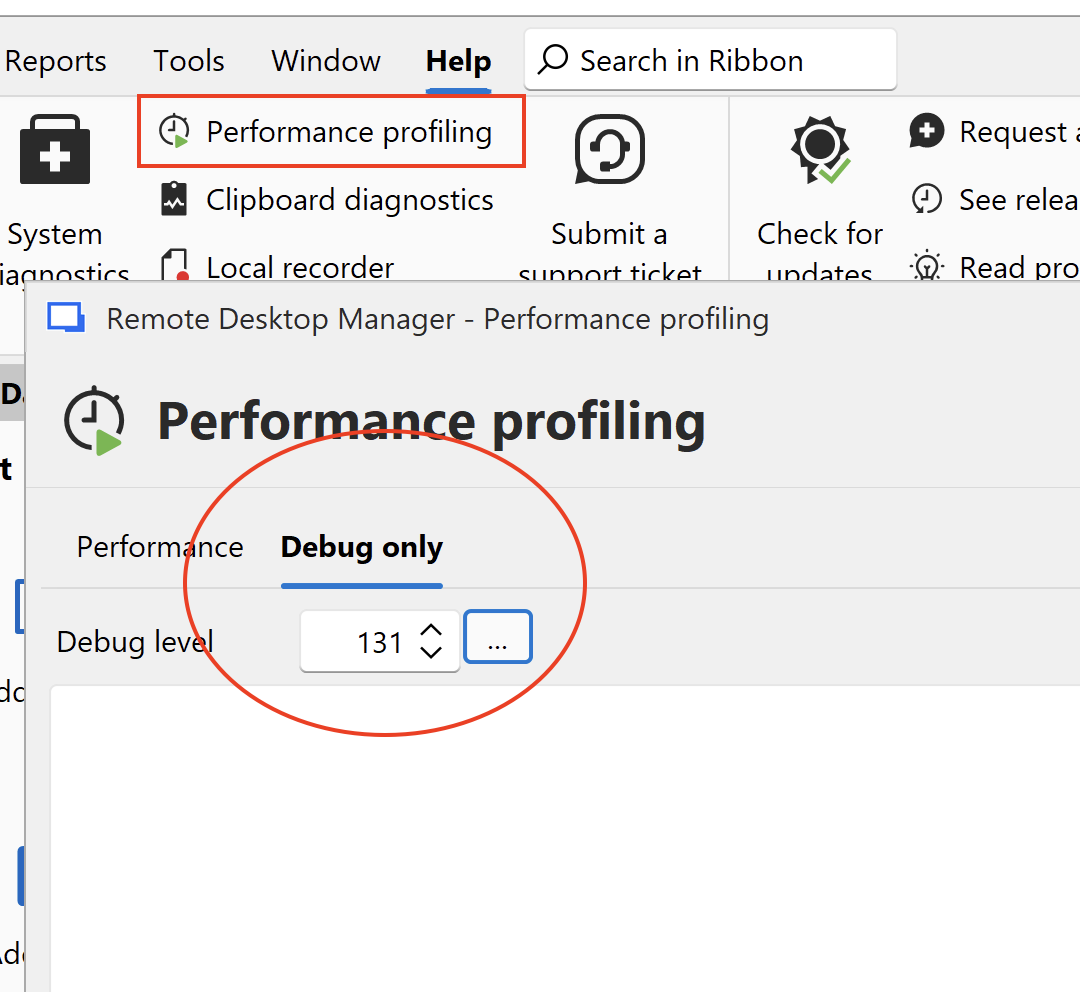
Kind regards,
Richard Markievicz
Screenshot 2026-03-12 at 15.16.35.png
It was set to that level from another issue in the past. I kept the window open and got the below message:
Image 3-12-26 at 12.24 PM.jpeg
Hello
Is the issue resolved if you re-run Connect-AzAccount with the auth scope parameter? Exactly like this:
Connect-AzAccount -AuthScope https://management.azure.com/
Please let me know.
Thanks and kind regards,
Richard Markievicz
Hey Richard,
I just tried and received this error message below:
Connect-AzAccount -AuthScope https://management.azure.com/
>>
Please select the account you want to login with.
WARNING: Unable to acquire token for tenant 'organizations' with error 'Authentication failed against tenant organizations. User interaction is required. This may be due to the conditional access policy settings such as multi-factor authentication (MFA). If you need to access subscriptions in that tenant, please rerun 'Connect-AzAccount' with additional parameter '-TenantId organizations'.'
Connect-AzAccount: Authentication failed against tenant organizations. User interaction is required. This may be due to the conditional access policy settings such as multi-factor authentication (MFA). If you need to access subscriptions in that tenant, please rerun 'Connect-AzAccount' with additional parameter '-TenantId organizations'.
Hey Richard I got more data from the debug window I wanted to share with you in case it might help.
Screenshot 2026-03-12 at 4.17.00 PM 4.png
Hello
This is almost certainly authentication related. We're unable to get the login token from Azure PowerShell. I've already improved the error handling here so in future versions this will be communicated better when it fails.
For now; I get the same results as you: I run `Connect-AzAccount -AuthScope https://management.azure.com/` and after logging in, it comes back with:
WARNING: Unable to acquire token for tenant '{id}' with error 'Authentication failed against tenant {id}. User interaction is required. This may be due to the conditional access policy settings such as multi-factor authentication (MFA). If you need to access subscriptions in that tenant, please rerun 'Connect-AzAccount' with additional parameter '-TenantId {id}'.'
Where 'id' is the tenant I'm needing to access.
If I do as the prompt says and add `-TenantId {id}` to the command, I can re-authenticate but then it asks me for a 2FA which I don't have (this is all inside our main lab environment). I assume that if I follow it through, it will work.
Did you try following what Connect-AzAccount is asking you to do?
Thanks and kind regards,
Richard Markievicz
Morning Richard. Is this the right format? I will include my TenantId when I run it of course
`Connect-AzAccount -TenantId {id}`