
venkat529992
One-Time password not automatically fill my site like username & password
Hi Oliver,
Still the OTP is not automatically detect without giving the 'HTML Control ID'. (Devolutions Workspace Extension)
Pls help me how to detect the OTP without adding 'Control ID'.
Thanks
In RDM the website not shown the saved User name, password & OTP
Hi Carl,
Thanks for your information.
Still the OTP is not automatically detect without giving the 'HTML Control ID'. (Devolutions Workspace Extension)
Pls help me how to detect the OTP without adding 'Control ID'.
Thanks & regards,
Venkat
In RDM the website not shown the saved User name, password & OTP
Hi Carl,
Is it possible to automatically detect the OTP without specifying the 'One Time Password ID'?

Because some user don't know this how to do, is not really good.
Thanks
One-Time password not automatically fill my site like username & password
Hi Oliver,
Is it possible to automatically detect the OTP without specifying the 'One Time Password ID'?
Because some user don't know this how to do, is not really good.
Thanks
In RDM the website not shown the saved User name, password & OTP
Hi Carl,
Thanks for the support.
At the moment we will go with 'Devolution WorkSpace Extension'.
If we need 'RDM.exe' support we comeback to you.
Thanks
In RDM the website not shown the saved User name, password & OTP
Hi Carl,
We have tried manually but it does not work.
NOTE: I have also tried the 'Automatic' Option, this is also not working.
Could you please help us how to proceed further to capture the OTP Automatically.
Thanks.
In RDM the website not shown the saved User name, password & OTP
Hi Carl Marien,
Thanks for your information.
I have followed your article. The username & password filled automatically.
But still the OTP is not filled automatically.
I have attached the Video & the sample project. Please have a look.
Note: Is that possible to add multiple Username for website (Like : TestUser@gmail.com & DummyUser@gmail.com )
Thanks
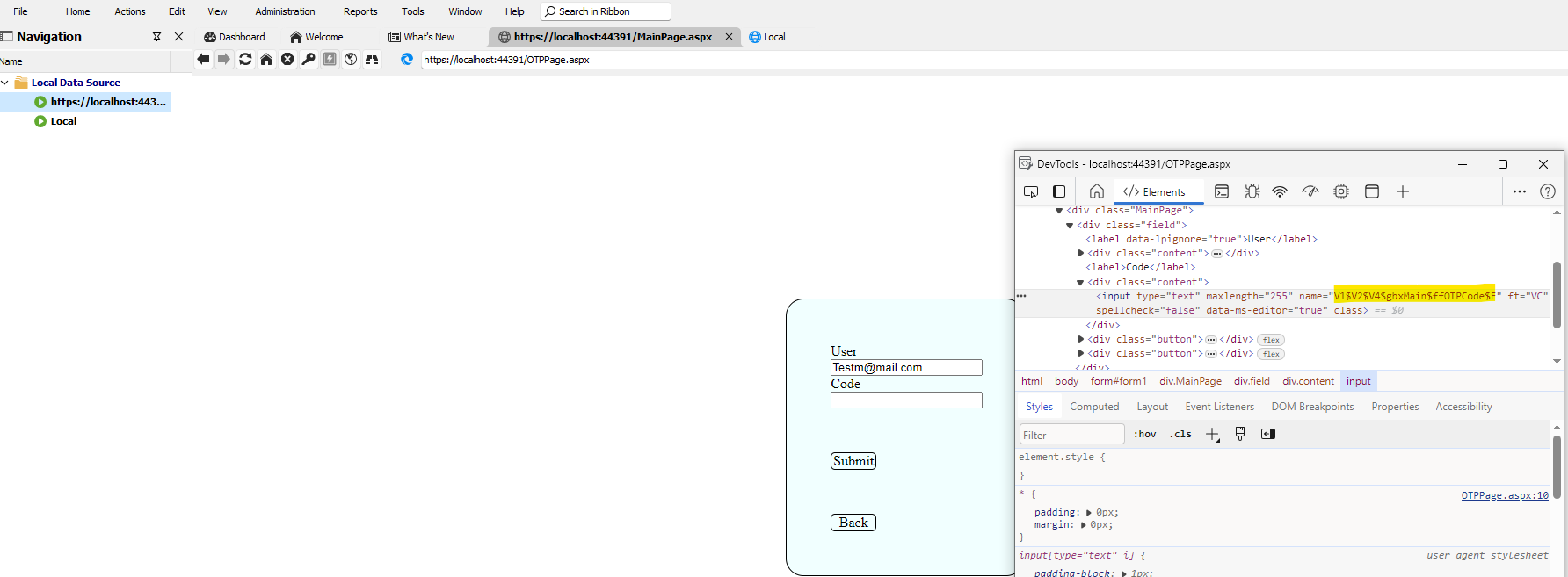
In RDM the website not shown the saved User name, password & OTP
Hi,
I have using the RDM.
I have added local website using the below step

and configured the login details

Also the OneTime Password

Added the OTP key

After saving the above details. I have open the session

After manually enter the user name & pwd the OTP also not filled automatically

But it doesn't shown the username , password & OTP
Please share why it will not shown the credentials or Is there any configuration need.
Thanks
One-Time password not automatically fill my site like username & password
Hi Erica Poirier,
Thanks for the info.
We are waiting for the update.
Thanks & Regards,
Venkat
One-Time password not automatically fill my site like username & password
Hi Olivier ,
Thanks for your info.
Could you please share the opened a ticket?
I will follow the status.
Thanks
One-Time password not automatically fill my site like username & password
Hi Olivier,
Is there any update?
Thanks
One-Time password not automatically fill my site like username & password
Hi Olivier Désalliers,
Thanks for your Info,
I have attached the LastPass demo video.
Please have a look.
Best Regards,
One-Time password not automatically fill my site like username & password
Hi Olivier Desalliers,
Thanks for the info,
The field where the One-Time Password (OTP) has been filled on the website does not automatically update when a new code is generated.
But the newly generated OTP field ID / Name is same what I have configured in the Settings.
Why it will not update?
Is that Devolutions WorkSpace is not support this problem?
FYI:
I have checked some other extensions (LastPass & 1Password) its working. They have change the OTP value every 30seconds & automatically update the OTP field.
Thanks
One-Time password not automatically fill my site like username & password
Hi @Olivier Désalliers,
Thanks for the Info.
It seems there could be JavaScript elements or aspects of the website's design that interfere with the autofill script's execution upon loading, preventing it from functioning correctly.
After changing our javascript it will fill the OTP first time.
But we have another problem the OTP fields value doesn't change every 30 seconds.
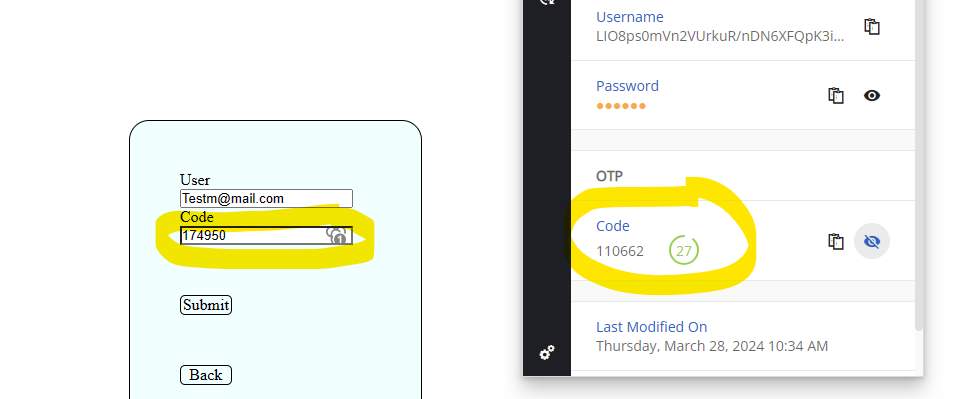
Could you please have a look.
Thanks
One-Time password not automatically fill my site like username & password
Hi @Olivier Désalliers,
Thanks for the Info.
Now I have attached the video steps(both sample & My local site) & the settings details.
Please have look and suggest to resolve this.
Thanks
One-Time password not automatically fill my site like username & password
Hi Olivier Désalliers,
Thanks for your info.
Its worked for the sample (Fill the OTP on “the first time”) as per your suggestion.
Unfortunately for real my website is not working.
I don't know the reason.
Could You please suggest something.
FYI: I have attached the video & log.
After login it go below page
After click enter the otp is not filled automatically.
After refresh the OTP filled
what can I do? to fill first time
Thanks.
One-Time password not automatically fill my site like username & password
Hi Olivier Désalliers,
Thanks for your info.
For the “Nothing to copy to the clipboard” message when copying the OTP- will works after restart the browser.
But the OTP code fields doesn't recognize First Time. If I click the devolution extension and the click the user then the OTP is filled.
Could you please help me first time the OTP field is to fill the code. I have created the Issue steps as Video. Please have a look.
Thanks
One-Time password not automatically fill my site like username & password
Hi @Oliver Desalliers,
Thanks for your reply.
I did the "Automatically fill in credentials on load auto-fill on load" settings but still not detect the OTP.
I have added the sample page with our use case & video steps. Please have a look.
Could you please resolve the problem.
FYI: We use only name for the OTP field. We didn't use ID field for the OTP field.
Thank you!.
One-Time password not automatically fill my site like username & password
Hi Devolutions,
I am using devolutions workspace extension in Microsoft Edge browser. I have saved my username & password in the vault.
Also configured the OTP for the login.
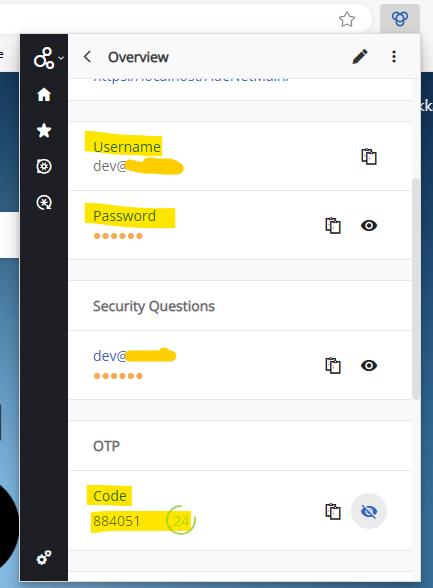
I have login using saved username & password like shown below
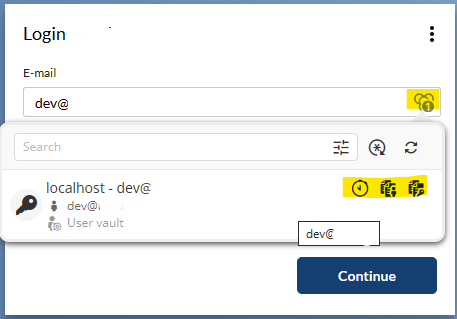
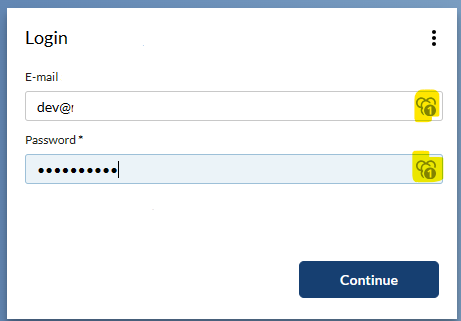
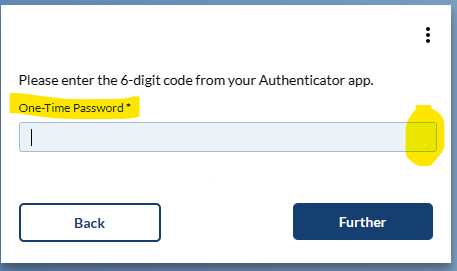
After login there is no icon shown in the One-Time Password field.
So we have added the control Id --> in the HTML control Id
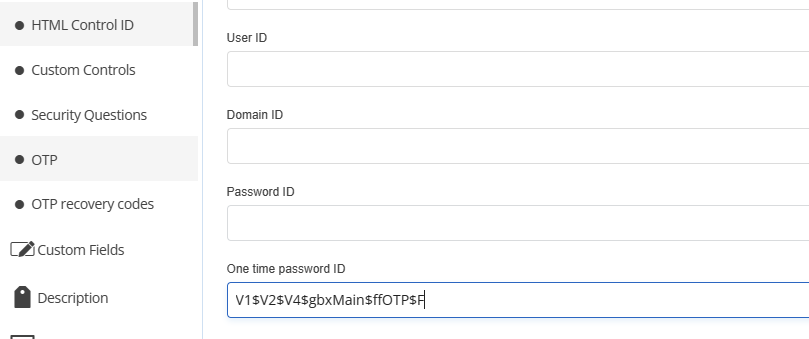
But still this is not automatically fill the otp code.
Please help me.
Thanks