
padi
Find old Information entries and convert
Hi Hubert
Thanks for reply. I think with the advanced search feature we will be able to find the deprecated entries. This was exactly was I was looking for, with this I think we will be able to convert the entries.
Padi
Find old Information entries and convert
Hi folks
We recently changed our portfolio from DPS an RDM to mostly DPS and Workspace. There we find out that the old deprecated "Information" entry has some strange behavior and especially not the same in each product. I don't know if this is a bug.
For example in RDM en "Information" entry can be normal viewed and edited. Also the preview (on the right side) of the entry if I click on it works fine all given informations are shown. If I view the entry on the DPS it's also shown correct. But if I view the same entry in Workspace the entry seems to be empty. Nothing is shown on the right side, only the name is shown. But if I right click on the entry and choose "Copy Password" or "Copy Username" this works. So the entry knows its values but do not shows it in the preview.
This is very irritating and confusing. So that I know there is a function in RDM to convert this "Information" entries to ether simple credentials or webpage entries, I wanna do this. But as lazy as I am, I don't want to look in each folder if there is an "Information" entry which I have to convert. Is there a option to find all this old entries?
Hope was understandable an thanks in advanced.
Padi
Devolutions Password Manager deployment with settings
Hi Dani
Wow thanks for the list perfect!
Padi
Devolutions Password Manager deployment with settings
Hi Dany
Do you know all configuration possibilitys which I can made in the shared_preferences.json?
At the moment I'm stuggling with the "last data source used" settings. I'm testing on diffrent clients but the behavior is not always the same.
I planed to advice our users at first use of the Workspace, to "initial setup" our DVLS instance, so that they have to click on the dashboard or at the left side to the DVLS icon and after the initial setup it should use this DVLS instanc per default. This would be okey.
But now I found out, sometimes when Workspace opens it will connect to DVLS as you can see in my screenshot below, but nothing happens until you click on the icon on lift side (which should already been choosen). What could be the problem here?
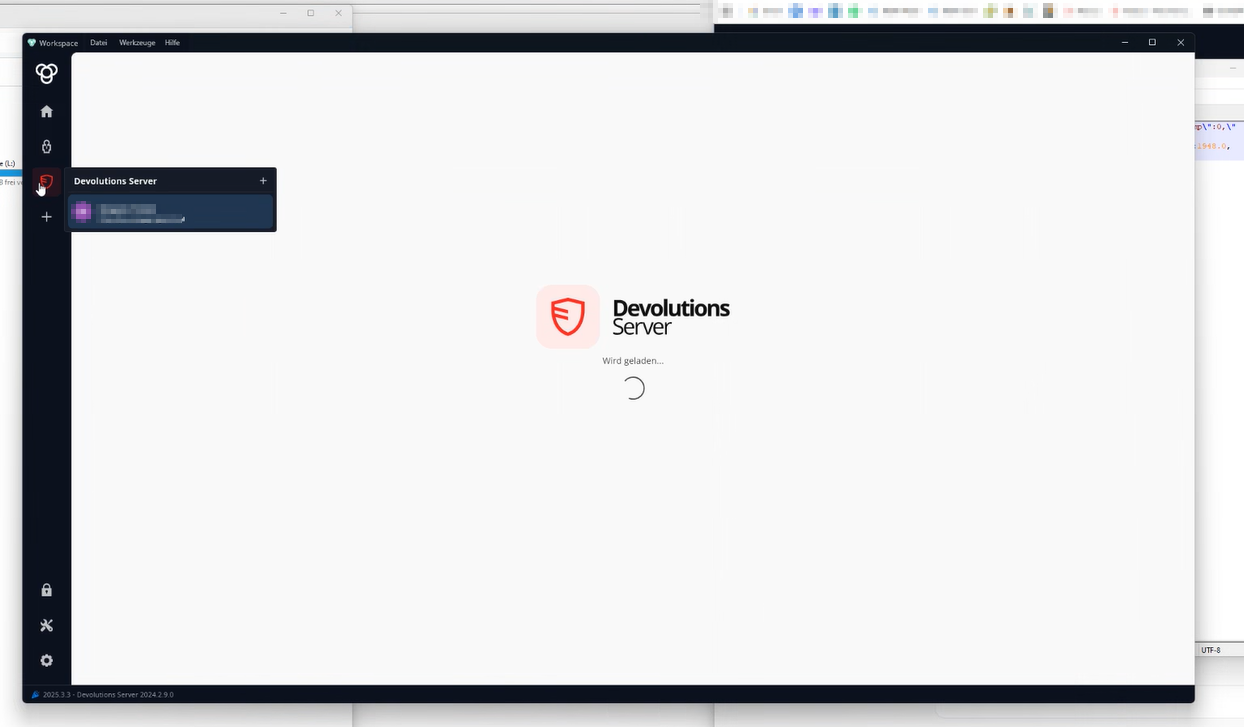
May this could be an problem with the access to the internet, because we saw, the if we open Workspace, the APP will make some connections, for example to Gravatar and so on.
Padi
Devolutions Password Manager deployment with settings
Hi Dany
Okey so that means we already have maxed out the configuration for our needings. I think we will deploy it with this settings.
Anyway it would be nice if there would an option to preconfigure the default datasource for the users.
Padi
Devolutions Password Manager deployment with settings
Hi Dany
I tested some things and figured out that the settings are stored in C:\Users\<username>\AppData\Roaming\net.devolutions\Workspace\shared_preferences.json.
So I made initial config for our deployment which I copy to the users profile:
{
    "flutter.configDone":false,
    "flutter.skipLockedView":false,
    "flutter.firstOpened":false,
    "flutter.lockingOptions":"{\"appIsLocked\":false,\"useBiometric\":false,\"usePIN\":false,\"useWindowsCredentials\":false,\"lockWhenPause\":false,\"lockWhenPauseTimestamp\":0,\"selectedPauseTime\":0,\"lockWhenInactive\":false,\"lockWhenInactiveTimestamp\":0,\"selectedInactiveTime\":0,\"skipLocked\":false,\"promptForBiometricOnSensitive\":false}",
    "flutter.androidNotificationsConfigured":true,
    "flutter.quickAccessWindowId":1,
    "flutter.windowMaximized":false,
    "flutter.startupLandingPage":"xxxx",
    "flutter.languageCode":"de",
    "flutter.countryCode":"",
    "flutter.shareAnonymousData":false,
    "flutter.removeSensitiveFromKeyboard":true
}
And also the Config.cfg, with the connection string to DVLS.
So far It works, the only thing which is not optimal is the "flutter.startupLandingPage" there I wanna have our DVLS instanc. Is this some how possible? I figured out that there is an ID set, but every time I install Workspace the ID is defferent for the same DVLS.
With "offline settings" I mean the option to "Go offline" under Setttings> Security and privacy.
Thanks in advance.
Padi
Devolutions Password Manager deployment with settings
Hi, I'm new to the Workspace app. So far we used RDM for all our users. Now we switched to Workspace for the most of our users, because they don't need the full function set of RDM. I'm wondering now if there is a possibility to preconfigure settings for the Workspace app. As example the language, handling of the landing page, offline settings, usage data, clipboard and so on?
We use DVLS as our data source.
With RDM it was possible to generate custom MSI file and configuration files. But for the Workstation app I can't find any documentation except the URL for DVLS server.
Thanks for every response.
Padi
Create own template for entrys
Hi François
Thanks for your explanations.
I will look with my colleagues, if this works for them. Personally, I hopped, that we can create a complet new entry, with only this fields which are required, for our cases.
Patric
Create own template for entrys
Hi There
We are looking forward if we should store license information from various software in DVLS. I know there is a software license template. But in the most cases we need some special field or fields they are named diffrent, that our users know what fo fill in there. I saw that its possible to create costum entry templates, based on existing entry types, and there we could add some Costume fields. This would be an option but my question ist now, if its possible to remove the unwanted/needed field in my template and make some field mandatory. Or if its possible to create a "blank" new entry template wehere we can say I want only field x,y,z...
So are there any solutions for that to make this true in DVLS in combination with RDM?
Thanks for
Patric