
murraydavis-goff
2020.2.15.0 - No Enterprise license found after adding new license number
Thanks.
Software upgrade fixed the problem.
2020.2.15.0 - No Enterprise license found after adding new license number
Apologies for going quiet on this, but I have finally got back to it.
It is still a problem but I have learned a bit more about the issue.
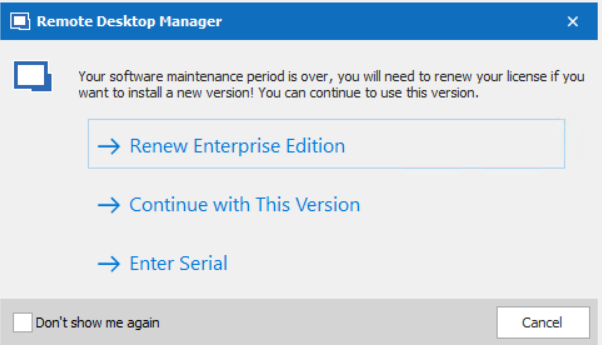
On starting the client, we are presented with a pop-up prompting to either:
Renew Enterprise Edition
Continue with this Version
Enter Serial
If I attempt to enter a new Serial Number, the code I have been supplied with is rejected. The old expired code is accepted, however. This suggests that the new code is not valid.
If I cancel out of the pop-up, I can use RDM. However, if I go to "About" from the menu the pop-up indicates upgrading before Nov, 2023, the expiry date of the previous license. Again suggesting that the license is not valid.
As Administrator I can go the the license page and add the new license OK and see it present. But this may not check the validity of the license.
Also, from the licensing page I can see that no licenses have been assigned to users. If I assign a license then I am locked out. My list of connections disappears and I am presented with a license error.
So can I take up your offer of a remote session, please? I am located in New Zealand so we need to take into account time differences.
2020.2.15.0 - No Enterprise license found after adding new license number
Thanks for the response.
I can connect to the database via the RDM client with a Domain Admin account and with the sa account. The tests for host and database pass OK.
Using the portable version has the same result.
Interestingly, at one point running the RemoteDestopManager64.exe I was prompted to register the app. My new license serial number returned as invalid, while the old one passed. But I still have the same problem with the client showing "No Enterprise license found". Is there a way of removing the new license from the database?
Thanks
2020.2.15.0 - No Enterprise license found after adding new license number
We are currently running RDM Version 2020.2.15.0 64-bit, connected to a SQL Server database. (Yes, planning an upgrade)
I added a new license serial number (without deleting the existing one). Now I have a "No Enterprise license found" error and no list of connections and I am unable to access the licenses configuration tool from the Administrator tab. All options are greyed out.
I can edit my Data Sources which allows me to test the data sources. "Test Host" and "Test Database" functions work OK. Quick Connect also works.
How can I recover from this, please?