2020.2.15.0 - No Enterprise license found after adding new license number
2020.2.15.0 - No Enterprise license found after adding new license number

We are currently running RDM Version 2020.2.15.0 64-bit, connected to a SQL Server database. (Yes, planning an upgrade)
I added a new license serial number (without deleting the existing one). Now I have a "No Enterprise license found" error and no list of connections and I am unable to access the licenses configuration tool from the Administrator tab. All options are greyed out.
I can edit my Data Sources which allows me to test the data sources. "Test Host" and "Test Database" functions work OK. Quick Connect also works.
How can I recover from this, please?
All Comments (6)
Hello,
Please ensure that you are connecting via an administrator account. Additionally, you could try connecting to RDM using the 'sa' account if you have access to it.
If these steps don't resolve your issue, could you attempt to replicate the problem using a portable edition of RDM? Here are the steps to follow:
1. Download the .zip file from this link: https://remotedesktopmanager.com/home/thankyou/rdmbin
2. Create a new folder on your Desktop.
3. Extract the contents of the .zip file into the new folder.
4. After extracting, navigate to this folder and run "remotedesktopmanager.exe."
5. Connect to your data source.
This process will help us determine if the issue is related to your local installation of RDM. We appreciate your assistance in this matter and are here to help if you have any questions or concerns.
Best regards,
Carl Marien
Thanks for the response.
I can connect to the database via the RDM client with a Domain Admin account and with the sa account. The tests for host and database pass OK.
Using the portable version has the same result.
Interestingly, at one point running the RemoteDestopManager64.exe I was prompted to register the app. My new license serial number returned as invalid, while the old one passed. But I still have the same problem with the client showing "No Enterprise license found". Is there a way of removing the new license from the database?
Thanks
Hello,
Would it be possible to arrange a remote session with you to further address your issue?
Please let me know if this works for you, so I can open an internal case and send you a link to schedule the remote session appointment.
Best regards,
Carl Marien
Apologies for going quiet on this, but I have finally got back to it.
It is still a problem but I have learned a bit more about the issue.
On starting the client, we are presented with a pop-up prompting to either:
Renew Enterprise Edition
Continue with this Version
Enter Serial
If I attempt to enter a new Serial Number, the code I have been supplied with is rejected. The old expired code is accepted, however. This suggests that the new code is not valid.
If I cancel out of the pop-up, I can use RDM. However, if I go to "About" from the menu the pop-up indicates upgrading before Nov, 2023, the expiry date of the previous license. Again suggesting that the license is not valid.
As Administrator I can go the the license page and add the new license OK and see it present. But this may not check the validity of the license.
Also, from the licensing page I can see that no licenses have been assigned to users. If I assign a license then I am locked out. My list of connections disappears and I am presented with a license error.
So can I take up your offer of a remote session, please? I am located in New Zealand so we need to take into account time differences. 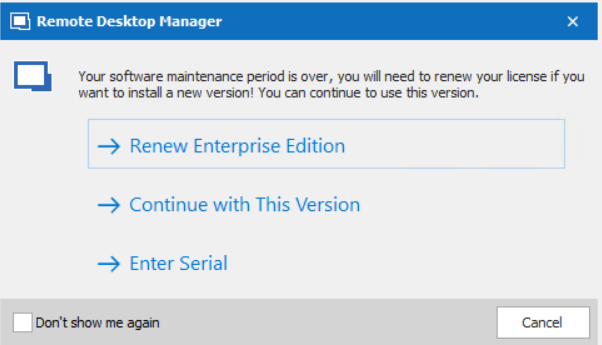
image.png
Hello,
It appears that you are using one of our legacy versions of RDM. The older versions do not use the same key format, which is why the old key is recognized but the new one isn't.
Could you please install the newest version of RDM and try using the new key?
As you are using a SQL server, you will also need to update your data source. For guidance on updating your database, please refer to this link: https://docs.devolutions.net/rdm/windows/installation/database-upgrade/
Best regards,
Carl Marien
Thanks.
Software upgrade fixed the problem.