
hrcpascoal
Instant crash after .net update (KB5036452)
I'm glad to report that the .Net update to 8.0.4 solved the issue whatever it was... both machine are opening RDM without any problem, guess it was a Microsoft problem and not RDM...
Thank you once again for the wonderful support and a wonderful piece of software.
Regards,
Hélder Pascoal
Instant crash after .net update (KB5036452)
Hello!
Just for your information, the latest update 2024.1.21.0 didn't solve this issue.
But still works great with the .NET 8.0.2...
Thank you,
Hélder Pascoal
Instant crash after .net update (KB5036452)
Hi!
The other files that the error logs mention, appear for a split second and desapear in the C:\ProgramData\Microsoft\Windows\WER\Temp folder while the RDM process starts and crashes, the only one that remains after and can be recovered is the Report.wer that I have already attached...
About the antivirus software, I'm only using the Windows Defender, and have made tests with it turned off without any changes... the crash persisted.
Thank you for your efforts!
For now I will keep both machines with .NET 8.0.2... for now RDM is more important to me then the .NET update...
Thank you once again,
Hélder Pascoal
Instant crash after .net update (KB5036452)
Hello!
I have make same tests with the latest version 2024.1.20 but I'm sorry to report that the crash persist if I have the .NET 8.0.3 installed...
Sorry...
Thank you,
Hélder Pascoal
Instant crash after .net update (KB5036452)
Hi again hrcpascoal,
quick message to let you know I was able to reproduce the crash in a test environment. I will keep you up to date regarding any fix or solution to the issue.
Thank you for your patience!
Thank you for your dedication and hard work!!!
Instant crash after .net update (KB5036452)
Hello!
The only thing I can tell you, is that I have download all your binary versions since v2024.1.12.0 until v2024.1.19.0 and they all crash with the 8.0.3 .net version, but all work ok with the 8.0.2 version....
I have updated the installed version today to the RDM v2024.1.19.0 and it also crash...
Any additional info, please just ask.
Regards
Helder Pascoal
Instant crash after .net update (KB5036452)
Hello!!
Firstly I would like to congratulate you for this awesome piece of software.
Now, my problem:
I'm with Remote Desktop Manager 2024.1.18.0 64-bit and after windows updated .NET (2024-03 .NET 8.0.3 Security Update fox x64 Client (KB5036452)), the Remote Desktop Manager instant crashes on startup without any error message, but I found the next messages in the system events (they are in Portuguese because it's my first language):
First error:
Nome do registo:Application
Origem:        .NET Runtime
Data:          20/03/2024 09:01:40
ID do evento:  1023
Categoria de Tarefa:Nenhum
Nível:         Erro
Palavras-chave:Clássica
Utilizador:    N/D
Computador:    ZZZZ
Descrição:
Application: RemoteDesktopManager.exe
CoreCLR Version: 8.0.324.11423
.NET Version: 8.0.3
Description: The process was terminated due to an internal error in the .NET Runtime at IP 0x00007FFD5906C5E4 (0x00007FFD58EE0000) with exit code 0x80131506.

Evento Xml:
<Event xmlns="http://schemas.microsoft.com/win/2004/08/events/event">
  <System>
    <Provider Name=".NET Runtime" />
    <EventID Qualifiers="0">1023</EventID>
    <Version>0</Version>
    <Level>2</Level>
    <Task>0</Task>
    <Opcode>0</Opcode>
    <Keywords>0x80000000000000</Keywords>
    <TimeCreated SystemTime="2024-03-20T09:01:40.8277973Z" />
    <EventRecordID>92457</EventRecordID>
    <Correlation />
    <Execution ProcessID="0" ThreadID="0" />
    <Channel>Application</Channel>
    <Computer>Trinity.Matrix.home</Computer>
    <Security />
  </System>
  <EventData>
    <Data>Application: RemoteDesktopManager.exe
CoreCLR Version: 8.0.324.11423
.NET Version: 8.0.3
Description: The process was terminated due to an internal error in the .NET Runtime at IP 0x00007FFD5906C5E4 (0x00007FFD58EE0000) with exit code 0x80131506.
</Data>
  </EventData>
</Event>
second er ror:
Nome do registo:Application
Origem:        Application Error
Data:          20/03/2024 09:01:41
ID do evento:  1000
Categoria de Tarefa:(100)
Nível:         Erro
Palavras-chave:Clássica
Utilizador:    N/D
Computador:    ZZZZ
Descrição:
Nome da aplicação com falha: RemoteDesktopManager.exe, versão: 2024.1.18.0, carimbo de data/hora: 0x65cd0000
Nome do módulo com falha: coreclr.dll, versão: 8.0.324.11423, carimbo de data/hora: 0x65cd500d
Código de exceção: 0xc0000005
Desvio de falha: 0x000000000018c5e4
ID do processo com falha: 0x11bc
Hora de início da aplicação com falha: 0x01da7aa538f1b523
Caminho da aplicação com falha: C:\Program Files\Devolutions\Remote Desktop Manager\RemoteDesktopManager.exe
Caminho do módulo com falha: C:\Program Files\dotnet\shared\Microsoft.NETCore.App\8.0.3\coreclr.dll
ID do Relatório: cd02ba61-9ca3-452b-afd1-04eebeb5445b
Nome completo do pacote com falha:
ID da aplicação relativa ao pacote com falha:
Evento Xml:
<Event xmlns="http://schemas.microsoft.com/win/2004/08/events/event">
  <System>
    <Provider Name="Application Error" />
    <EventID Qualifiers="0">1000</EventID>
    <Version>0</Version>
    <Level>2</Level>
    <Task>100</Task>
    <Opcode>0</Opcode>
    <Keywords>0x80000000000000</Keywords>
    <TimeCreated SystemTime="2024-03-20T09:01:41.0027974Z" />
    <EventRecordID>92458</EventRecordID>
    <Correlation />
    <Execution ProcessID="0" ThreadID="0" />
    <Channel>Application</Channel>
    <Computer>Trinity.Matrix.home</Computer>
    <Security />
  </System>
  <EventData>
    <Data>RemoteDesktopManager.exe</Data>
    <Data>2024.1.18.0</Data>
    <Data>65cd0000</Data>
    <Data>coreclr.dll</Data>
    <Data>8.0.324.11423</Data>
    <Data>65cd500d</Data>
    <Data>c0000005</Data>
    <Data>000000000018c5e4</Data>
    <Data>11bc</Data>
    <Data>01da7aa538f1b523</Data>
    <Data>C:\Program Files\Devolutions\Remote Desktop Manager\RemoteDesktopManager.exe</Data>
    <Data>C:\Program Files\dotnet\shared\Microsoft.NETCore.App\8.0.3\coreclr.dll</Data>
    <Data>cd02ba61-9ca3-452b-afd1-04eebeb5445b</Data>
    <Data>
    </Data>
    <Data>
    </Data>
  </EventData>
</Event>
third error (as information tag):
Nome do registo:Application
Origem:        Windows Error Reporting
Data:          20/03/2024 09:01:42
ID do evento:  1001
Categoria de Tarefa:Nenhum
Nível:         Informações
Palavras-chave:Clássica
Utilizador:    N/D
Computador:    ZZZZ
Descrição:
Bucket de falhas 1570522023883630706, tipo 4
Nome do Evento: APPCRASH
Resposta: Não disponível
ID do Cab: 0

Assinatura do problema:
P1: RemoteDesktopManager.exe
P2: 2024.1.18.0
P3: 65cd0000
P4: coreclr.dll
P5: 8.0.324.11423
P6: 65cd500d
P7: c0000005
P8: 000000000018c5e4
P9:
P10:

Ficheiros anexados:
\\?\C:\ProgramData\Microsoft\Windows\WER\Temp\WERB065.tmp.dmp
\\?\C:\ProgramData\Microsoft\Windows\WER\Temp\WERB0E3.tmp.WERInternalMetadata.xml
\\?\C:\ProgramData\Microsoft\Windows\WER\Temp\WERB103.tmp.xml
\\?\C:\ProgramData\Microsoft\Windows\WER\Temp\WERB101.tmp.csv
\\?\C:\ProgramData\Microsoft\Windows\WER\Temp\WERB131.tmp.txt

Estes ficheiros podem estar disponíveis aqui:
\\?\C:\ProgramData\Microsoft\Windows\WER\ReportArchive\AppCrash_RemoteDesktopMan_5dbd22be5f3256a9b8a72d49658cb169ccb679_a15dc6d7_94ba8175-b248-42c4-9a8c-813a85263b5e

Símbolo de análise:
A verificar novamente a solução: 0
ID do relatório: cd02ba61-9ca3-452b-afd1-04eebeb5445b
Estado do Relatório: 268435456
Bucket com hash: c91fd21abedee4c565cb9d75b182e872
Guid do Cab: 0
Evento Xml:
<Event xmlns="http://schemas.microsoft.com/win/2004/08/events/event">
  <System>
    <Provider Name="Windows Error Reporting" />
    <EventID Qualifiers="0">1001</EventID>
    <Version>0</Version>
    <Level>4</Level>
    <Task>0</Task>
    <Opcode>0</Opcode>
    <Keywords>0x80000000000000</Keywords>
    <TimeCreated SystemTime="2024-03-20T09:01:42.6607981Z" />
    <EventRecordID>92460</EventRecordID>
    <Correlation />
    <Execution ProcessID="0" ThreadID="0" />
    <Channel>Application</Channel>
    <Computer>Trinity.Matrix.home</Computer>
    <Security />
  </System>
  <EventData>
    <Data>1570522023883630706</Data>
    <Data>4</Data>
    <Data>APPCRASH</Data>
    <Data>Não disponível</Data>
    <Data>0</Data>
    <Data>RemoteDesktopManager.exe</Data>
    <Data>2024.1.18.0</Data>
    <Data>65cd0000</Data>
    <Data>coreclr.dll</Data>
    <Data>8.0.324.11423</Data>
    <Data>65cd500d</Data>
    <Data>c0000005</Data>
    <Data>000000000018c5e4</Data>
    <Data>
    </Data>
    <Data>
    </Data>
    <Data>
\\?\C:\ProgramData\Microsoft\Windows\WER\Temp\WERB065.tmp.dmp
\\?\C:\ProgramData\Microsoft\Windows\WER\Temp\WERB0E3.tmp.WERInternalMetadata.xml
\\?\C:\ProgramData\Microsoft\Windows\WER\Temp\WERB103.tmp.xml
\\?\C:\ProgramData\Microsoft\Windows\WER\Temp\WERB101.tmp.csv
\\?\C:\ProgramData\Microsoft\Windows\WER\Temp\WERB131.tmp.txt</Data>
    <Data>\\?\C:\ProgramData\Microsoft\Windows\WER\ReportArchive\AppCrash_RemoteDesktopMan_5dbd22be5f3256a9b8a72d49658cb169ccb679_a15dc6d7_94ba8175-b248-42c4-9a8c-813a85263b5e</Data>
    <Data>
    </Data>
    <Data>0</Data>
    <Data>cd02ba61-9ca3-452b-afd1-04eebeb5445b</Data>
    <Data>268435456</Data>
    <Data>c91fd21abedee4c565cb9d75b182e872</Data>
    <Data>0</Data>
  </EventData>
</Event>
The report file produced by the system follows as attachment.
I tried everything I could remember:
reinstall Remote Desktop Manager
reinstall .NET 8.0.3 directly (download the install packaged, remove all .net and install 8.0.3)
check for several windows errors:
chkdsk
sfc /scannow
DISM /Online /Cleanup-Image /CheckHealth
Finally, the only way I had to make it work, was to remove all .NET, download the packaged for 8.0.2, install it and stop windows updates.
This is happening only with Remote Desktop Manager in my two machines (tower and portable),
My windows info:
Edição Windows 10 Pro
Versão 22H2
Compilação do SO 19045.4170
Experiência Windows Feature Experience Pack 1000.19054.1000.0
Can you please help me? I don't know what to do...
Thank you!
Regards
Helder Pascoal
RDM Free - no Images Global Tab
Hello,
Thank you very much. I will wait for the update.
regards
RDM Free - no Images Global Tab
Hello,
Thank you for your answer... I have migrated my Vault to the Hub Personal because the iOS App stopped working with the Devolutions Online Drive... so... have custom images or have it in my iPhone...
Regards
RDM Free - no Images Global Tab
Hello!
First of all, I would like to apologize for my bad English, since it is not my native language, secondly, I would like to congratulate you on your fantastic work and for the amazing software.
Since you made the update to the system of the custom images, the tab "Global" does not appear to me and I can't find my custom images anywhere (see print screen)
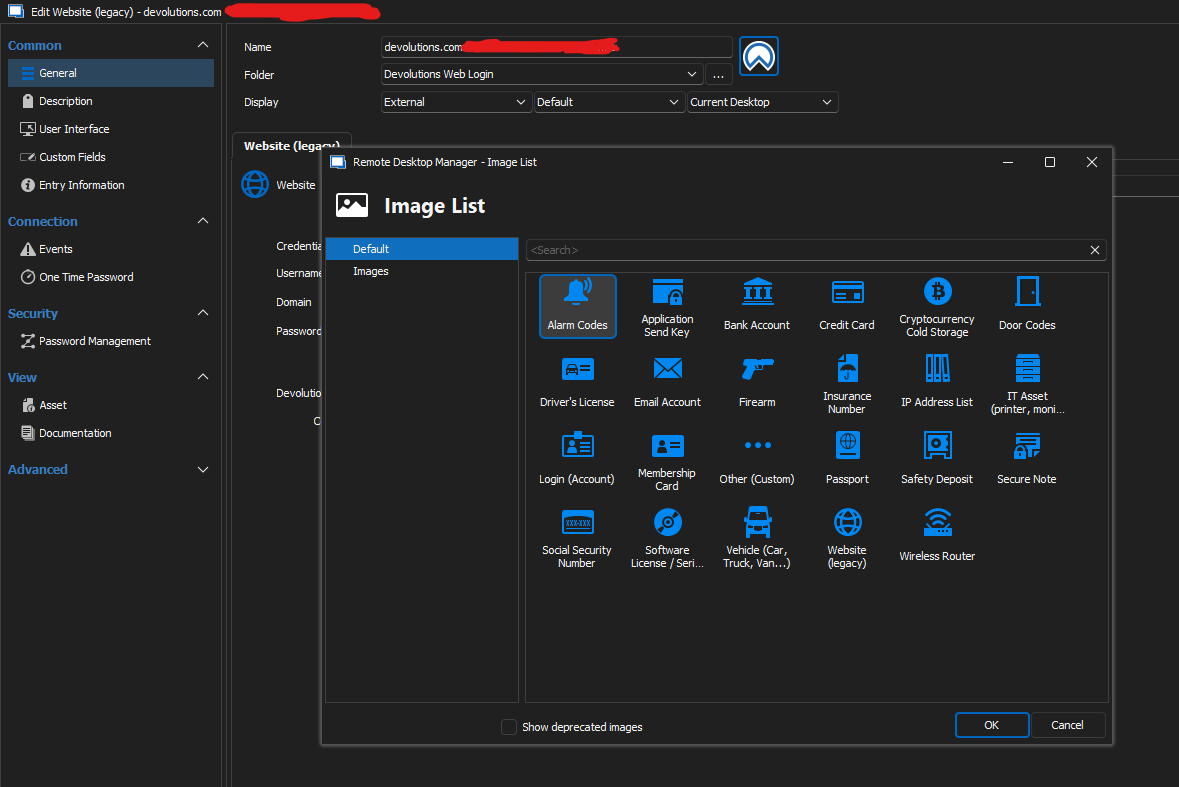
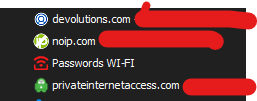
The custom icons that I have previously assign appear in the navigation tree:
I'm using Devolutions Hub Personal as Data Source and I have the latest version available: 2023.2.25.0 free edition
Can you help me?
Thank you very much.