
luggz
Grab 2FA token from Netwrix Password Secure for RDM entries
Hello,
thanks for the feedback and testing.
Netwrix has now also added a 2FA/OTP button to their own browser plugin.
So I am confident that there is something in their API for this.
Unfortunately, I'm not knowledgeable enough to find the exact requests.
Grab 2FA token from Netwrix Password Secure for RDM entries
Hello,
Thank you for your feedback.
RDM Version: 2024.3.18.0 64-bit
Operating System: Windows 11 Pro 23H2 (Build 22631.4460)
Data Source: Microsoft SQL Server
A Netwrix entry within RDM is configured.
This is an example of an RDM Azure AD entry:

The input of the username and password is working fine.
However, the input of the One-Time Password is not working.
Grab 2FA token from Netwrix Password Secure for RDM entries
Hello,
Is it possible for RDM to retrieve the 2FA token stored in a Netrix Password Secure entry and automatically paste it into the Microsoft Edge WebView within RDM?
I’m not sure how RDM currently interacts with the API to fetch the username and password, but could it also access and use the OTP/token in a similar way?
Best regards
Lucas
$PASSWORD$ not working
Hi,
thank you for the feedback. That was the problem, among others. I had also created an entry with a password directly stored in the entry, where I had the same problem. After your tip, the linked credential worked. However, the entry with the directly saved password still did not work. I don't know what was wrong with my entry where the password was directly stored. I deleted it and created a new one and now it works. Thanks for the help.
$PASSWORD$ not working
I would like to automatically log on to Cisco Small Business Switches. Unfortunately, I can't give the login data automatically. It always asks for the login data again after connecting.
In the properties of the entry, I can enter $USERNAME$ and $PASSWORD$ as a command after login.
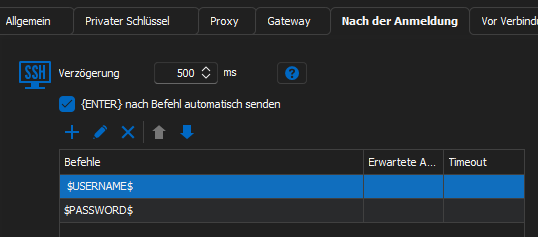
The $USERNAME$ is passed in the process. Instead of the password, however, $PASSWORD$ is entered as text instead of the actual password.
With a sqlite database, the whole thing works without problems. Unfortunately not with our RDM Enterprise SQL database.
The checkbox Allow password variable is set for the entry.
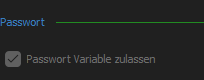
In addition, the check mark "Password variables for all entries" is set in the settings (checked as admin).

Are there any other approaches to narrow this down?
Add Mateso Passwordsafe as Password Storage
Yes exactly.
For example, if your Entry1 has the tag 0001, then it would be great if this is shown to me when I search for 0001 in the searchbox.
Add Mateso Passwordsafe as Password Storage
Hi Michaël,
thank you for your support.
We are now able to connect both applications.
Is it possible for you to expand the password search in the Remote Desktop Manager a little? Ideally, we would like to be able to filter passwords from the password safe through the tags of the passwords.
Add Mateso Passwordsafe as Password Storage
Hello,
We have managed to get in contact with their company but have had more pressing matters to attend to first.
Simply put, they have made some changes with how their API works and our integration only supports older Mateso servers and databases. Anything that is newly created will not work in RDM.
We will increase the priority of the ticket we created for this issue and will let you know once the API is updated.
Best Regards,
Hello Michaël,
do you have an update for us regarding this matter?
Right now we get an error in rdm that the login to the mateso server failed.
The Mateso/Netwrix Password Safe integration was a key feature, which is why we chose the Remote Desktop Manager.
Add Mateso Passwordsafe as Password Storage
Hello DLRG,
There indeed seems to be an issue with the current implementation of Mateso Password Safe in RDM as many users have reported it. However, with the change of management going from Mateso to Netwrix, we have lost contact with them for a while and we no longer have a working license and environment.
We have just recently managed to get in contact with them and scheduled a meeting. Following this, we will hopefully be able to get a working environment for us to test any changes that we are required to make. Once we have a proper Mateso environment up and running, we should be able to bring back our integration of Mateso Password Safe to a working status.
Best Regards,
Hello Michael,
is there an update regarding the integration of Mateso/Netwrix Password Safe with Remote Desktop Manager?
We would like to use both products in conjunction with each other. Are there still problems?