
stijn1
WireGuard VPN Add-on
Hi, thx for your reply.
I installed it directy from the url you provided. To be sure I reinstalled it and still the same problem.
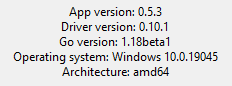
I just check with 2 collegues (1 on laptop, 1 on desktop) and they both have the same errors.
Might there be something missing from the conf files?
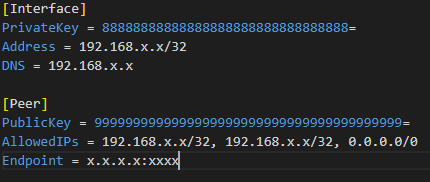
WireGuard VPN Add-on
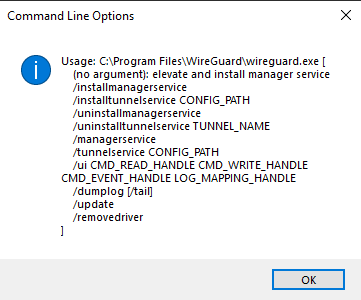
I'm getting the command line options (help) popup from wireguard.exe when I connect. It then does not create a tunnel although RMD thinks its 'connected'. When you close the connections you get the same popup.
It makes no difference if I choose a linked file or import the data.
I was running version 1.20. I now updated to 1.22 (enterprise) and now when I close connection I get access denied.
Running as admin makes no diference.
I then set Wireguard to always launch elevated. Connecting still the same, but when disconnecting I get: The specified service does not exist as an installed service
What's going wrong here?
@joergjordan I find it strange to when people reply in their native language while the entire topic is posted in English...
Dat kan ik ook wel doen, maar dan moet iedereen gokken welke taal dit is en het door Google Translate halen ;)
Too fast for OpenVPN add-on
Thx Etienne for the invite. I really appreciate you guys for making an effort in resolving this.
I've worked my way around this by not using a config file, but pasting all the info in RDM itself.
But I'm currently tight for time and will not be able to fit in a remote session.
Too fast for OpenVPN add-on
Hello,
The best way would be to check the "use authentication file" option:
This makes RDM temporarily create a file on disk with the credentials to connect with, then deletes them once they're done being used. This is the most reliable way to send OpenVPN GUI the credentials, as its command line takes the path of the authentication file and authenticates with the information contained within it.
Regards,
Hi, I'm experiencing the same problem. After one login OpenVPN Gui remembers the username. At the next attempt this field is ignored and the username is filled in the password field.
I have enabled automatic authentication and used the .ovpn filename als the login window title.
Using the Authentication file option results in the username/pass prompt popping up and then nothing happening.
Using latest Enterprise version and also latest OpenVPN GUI version.
I already tried adding the auth-nocache option in the ovpn file, without result.
P.S. I couldn't find any documentation on how to setup an OpenVPN GUI connection.