
Molensky
2026.3.x unable to review access requests
hi, I'm currently using 2026.3.10 on Windows 11. I had/have an issue I can't consistently reproduce (yet). It started after our migration from 2026.2 to 2026.3.
After the upgrade, I initially installed 2026.3.8 and in my dashboard I saw several access requests. But when I click to review, the list is empty.
Refreshing, (un)docking or restarting RDM doesn't work.
I saw 2026.3.10 was available. Upgrading the client did fix the issue...
...until this afternoon. In my dashboard I see again several access requests, but the list for review is empty again.
What did work this time was switching to another data source (same SQL source but admin-UPN) does give me back the list.
My daily-UPN should also have the right permissions, so switched back, still got the list and I'm able to approve/deny.
Even after restart of RDM, the list is available.
So, as I'm not sure why it doesn't display sometimes and when/why it does show, I can't give you exact steps to reproduce at the moment, but it happened twice.
Add columns to report "permissions"
Thanks, I hope it can be added.
Enforce message when requesting temporary access
Depending on the duration of the request, we have additional requirements.
A fixed message would also do the job. What to enter is defined in our procedures and we use the approver message to add clarification. (Or 'deny', educating those who repeatedly go off-script.)
I’m concerned that users will still provide only the bare minimum, as it’s already part of the procedure to enter a valid reason, and that requirement is often ignored. And personally, I prefer having a short recap when possible, rather than searching for that-one-document. As I mentioned, it would be a bonus.
NEW entries not accessible using existing temporary access via parent entry
I realized I hadn't responded yet, just to let you know, it works perfectly.
Thanks again for all your hard work and make it a beautiful 2026!
Add columns to report "permissions"
The current "permissions" report lists the view/edit/delete permissions. For our purpose, we're also interested in the 'view password', 'view sensitive' and 'connect' permissions.
Can this be found in a different report, or is it possible to add these/more columns to this report?
Enforce message when requesting temporary access
Now we have the authorization messages shown in the request report (Add authorization message to temporary access request report), we want to educate our users to enter a (valid) reason. Is it possible to make the request message mandatory? And as a bonus, add a custom tooltip, or similar, to tell users what we're expecting to see?
I'm thinking of a toggle to enforce the message in the vault security settings. One for the request and one for the approval/deny. And two textboxes to enter a help message to aid the requester and approver.
NEW entries not accessible using existing temporary access via parent entry
Current issue: When a user has temporary access via a parent entry, he or she can't use entries which are created after the granted date/time.
In our use case, the colleague has temporary permissions to create entries. After creation, he couldn't use the new entry :-D
Current solution/workaround: CTRL-F5 etc does not help. Only re-requesting temporary access.
Requested behavior: When a user has permissions through an existing temporary access, new entries should inherit the same.
Add authorization message to temporary access request report
Hi and thanks. I created the latest usage report and just what I needed.
Add authorization message to temporary access request report
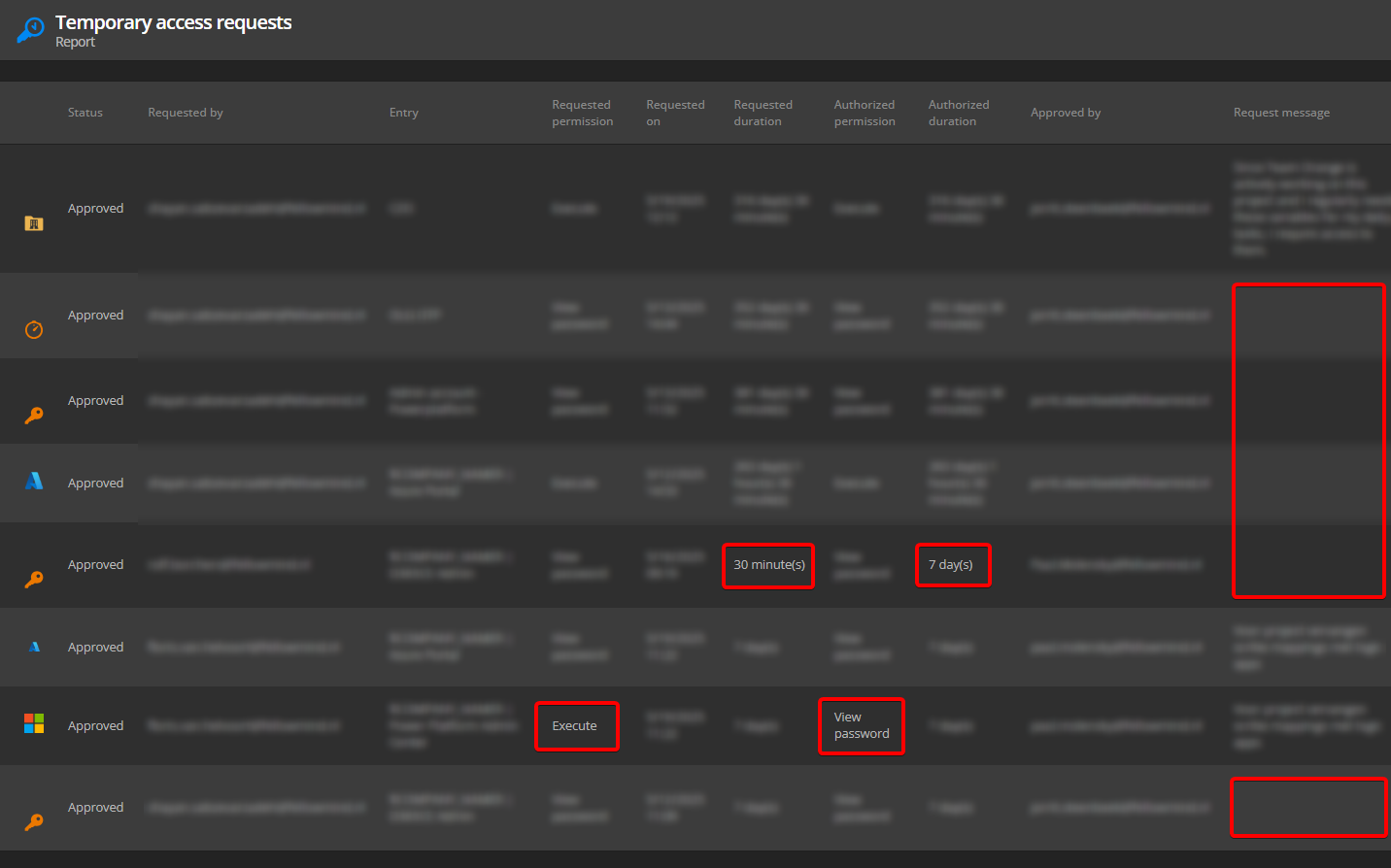
When auditing the access requests using the "temporay access request report", I sometimes need the details added by the approver. F.e. when the request justification was insufficient, the duration is changed by the approver or other relevant info to approve or deny.
Can that column be added to the report?
Current version: 2025.1.37.0
Add folder to access request report and view
Hi Hubert, do you have an update?
User specific OTP setting
Ignore my previous comment. After posting I saw 2024.3.12.0 was released yesterday.
And I noticed this issue mentioned in the notes, so I upgraded to x.12
Fixed OTP settings not being passed through specific settings
OTP is visible on the expected entries. (cheer)
User specific OTP setting
Hi Jonathan, I've upgraded to 2024.3.10.0.
2. When I link an entry to a credential with user specific settings, the user specific settings are ignored.
I see U/P for linked, user specific, entries. No OTP yet.
1. When I use user specific settings on any entry, I'm missing the option to override OTP settings. I can override credentials and select any U/P-type. Even when I select a "Linked (User vault)" with OTP-settings, the OTP remains empty on the entry.
No change in behavior.
User specific OTP setting
Having the linked credentials will be a huge improvement already.
User specific OTP setting
I have two requests:
When I use user specific settings on any entry, I'm missing the option to override OTP settings. I can override credentials and select any U/P-type. Even when I select a "Linked (User vault)" with OTP-settings, the OTP remains empty on the entry.
When I link an entry to a credential with user specific settings, the user specific settings are ignored.
I'll elaborate on both requests a bit more:
In our main vault we have:
a username entry
Title: "Named accounts"
U/P: empty
OTP: empty
one or more website entry
Credentials: "Linked (vault)" to the above "Named accounts"
OTP: "Current session's credentials"
So, in effect, no U/P or OTP available.
In my User vault I create:
a username entry
Title: "My account"
U/P: <my username and password>
OTP: <my OTP configuration>
Back to the main vault:
I select the credential entry "Named accounts" and use "user specific settings" to link "My account" to the credential.
I'm expecting to show the username, password and OTP from the linked "My account", but only the U/P is shown (view password option).
I select a website entry and the "view password" option is empty, even the username and password.
I could use "user specific settings" on every website entry, but as it applies to all entries and all team members, it's easier to only override the "Named accounts", then every other entry (website or otherwise).
RDM 2024.2.13.0 / Azure SQL DB
Add folder to access request report and view
Opened via Dashboard > Pending Access Requests:

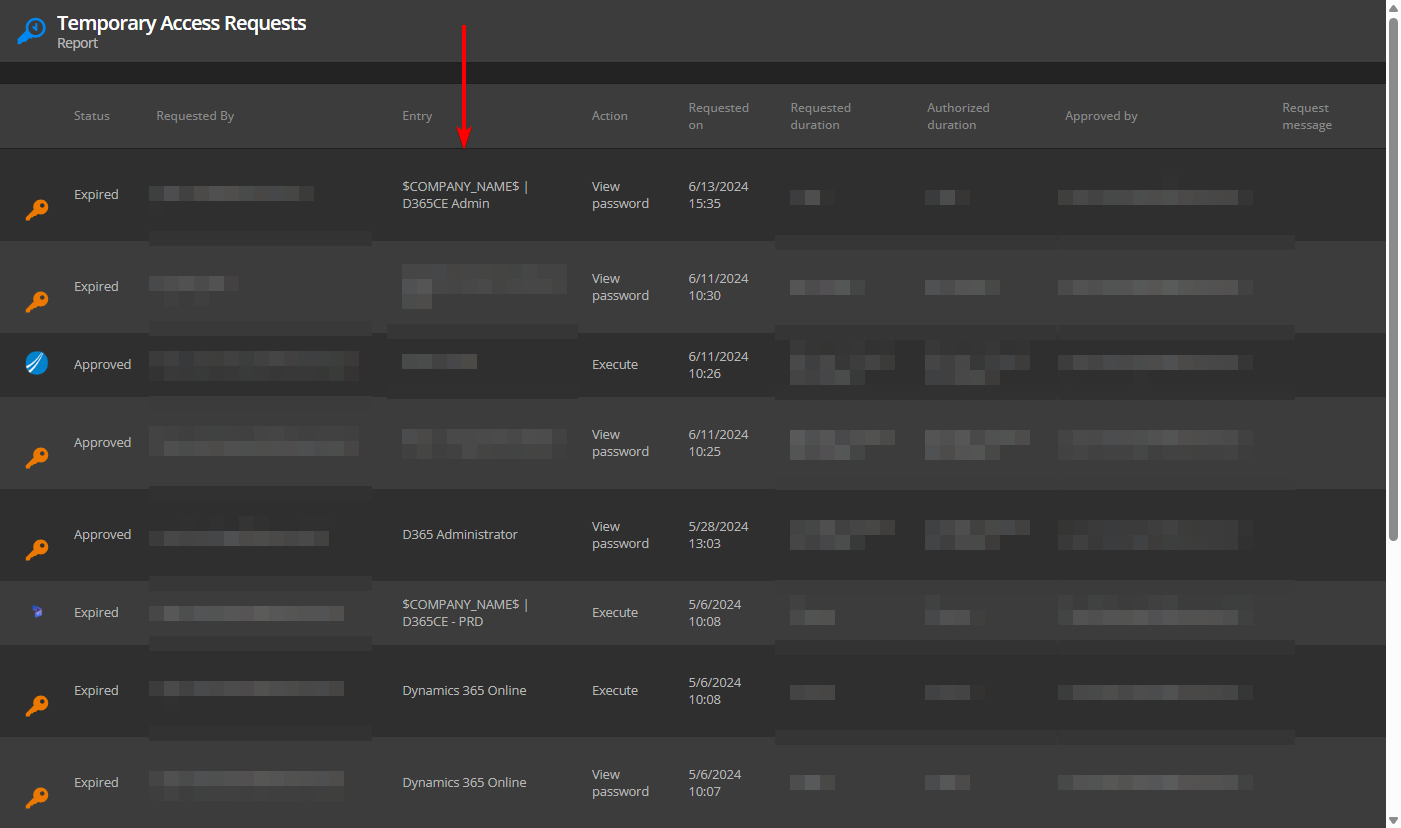
And report via Report > More Reports > Temporary Access Requests:
Add folder to access request report and view
When approving access requests or running a report, only the entry name is displayed, not the folder path.
Also, variables in the entry name aren't resolved. Which makes it hard to be fully confident to approve the request.
Is it possible to add at least the full folder path.
And it would help if variable values in the entry title are displayed.
Feature Request - Request/grant temporary access to all connections in a folder
I would like to vote for this feature, it would be handy for us as well, exactly for described scenario.