
Alexis De Jaeger
Get-RDMRepository : Object reference not set to an instance of an object.
Hello,
We are using a Devolutions Server as datasource.
I have update the PowerShell module and the issue is no longer present.
I thought the module was updated at the same time as the client.
Thank you for your help.
Best regards,
Alexis De Jaeger
Get-RDMRepository : Object reference not set to an instance of an object.
Hi,
I am getting the following error when running the command Get-RDMRepository:
> Get-RDMRepository
Get-RDMRepository: Object reference not set to an instance of an object.
Same result when running Get-RDMVault :
> Get-RDMVault
Get-RDMRepository: Object reference not set to an instance of an object.
Setup information:
PowerShell Version: 7.4.4
Devolutions.PowerShell Version: 2023.2.0.1
RDM Client Version: 2024.2.16.0 64-bit
.Net Version: 8.0.7
I cannot find any more recent updates for the client.
Could you help me solve this?
Best regards,
Alexis De Jaeger
Cisco Anyconnect freezing RDM client
Hi Etienne,
My apologies for the late response.
I am currently running version 2024.1.32.0 .
I would need to upgrade the server prior to being able to install newer version.
Should I proceed with the update and check for improvements?
Best regards,
Alexis De Jaeger
Cisco Anyconnect freezing RDM client
Hi,
I have been trying to setup the Cisco Anyconnect plugin to interact with the agent installed on my computer (Version 4.10.07061).
When connecting using the GUI, the connection is near instant.
When attempting the same command in a standard cli window (not administrator), it is also instant:
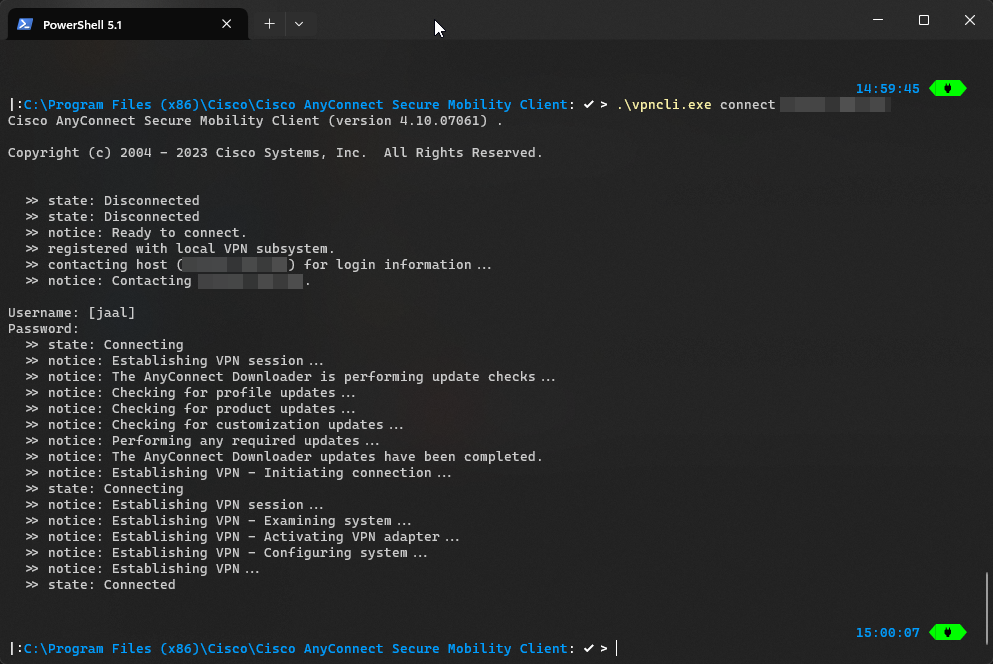
But when using the same settings through the Remote Desktop Manager Entry, upon opening the session, the entire application freezes for 30s - 1min before starting the command line window and filling in the credentials.
I was wondering if you might have any idea what could cause this delay/freeze?
RDM Version: 2024.1.32.0 64-bit
Cisco Anyconnect version: 4.10.07061
Best regards,
Alexis De Jaeger
ItGlue Integration - MFA push
Hi Zachary,
I am aware that a credential entry allows storing a MFA token within it's settings.
We store ours with their password within ItGlue. We've managed to use the 'ItGlue' credential entry to link existing sessions with those credentials. This allows us to only update the credentials in one place without having to verify every session that uses them.
ItGlue also allows to store MFA tokens and I was wondering if their was a way to also push those through the RDM ItGlue credential entry and link them to existing sessions?
Best regards,
Alexis De Jaeger
ItGlue Integration - MFA push
Hi,
I have successfully linked my ItGlue and am using the credentials that are referenced in there for my Remote Desktop Manager sessions.
But I was wondering if it was also possible to push the MFA token stored within ItGlue to RDM?
Best regards,
Alexis De Jaeger
Copy-RDMSession - WARNING: Invalid connection type
Hi Maxime,
Thank you for your answer.
Should I remove the 'RemoteDesktopManager' PowerShell module prior to installing it to avoir conflicts?
I have updated the script in accordance to your suggestion and will be testing it out later today.
Best regards,
Alexis De Jaeger
Copy-RDMSession - WARNING: Invalid connection type
Hi Maxime,
I was so focused on on the copy command that I failed to notice I was using the wrong command to apply changes...
I am currently running the 2022.3.1.2 version. Doesn't the PowerShell module update at the same time as the client?
I also need to change the path ('Group' property) of each folder (and in future scripts sessions) prior to moving it, as the 'Rootfolder' no longer exists. Which complicates the move a bit.
My apologies for any obvious questions.
Best regards,
Alexis De Jaeger
Copy-RDMSession - WARNING: Invalid connection type
Hi,
I am attempting to split our main vault into independant vault for each root folder.
This is the current script I have to copy the folder structure into the existing vaults:
# Recovering sessions.
Set-RDMCurrentRepository (Get-RDMRepository -Name 'Default')
$Sessions = Get-RDMSession
$RootFolders = ($Sessions | Where-Object{$_.Name -eq $_.Group -and $_.ConnectionType -eq "Group"}).Name
$Folders = $Sessions | Where-Object{$_.ConnectionType -eq "Group" -and $RootFolders -notcontains $_.Name}

# Sorting through the folders.
foreach($RFolder in $RootFolders){
    $ToCopy = $Folders | Where-Object{$_.Group -match "$RFolder\\"}

    # Preparing the sessions for copy.
    $Copy = foreach($Session in $ToCopy){
        $Temp = Copy-RDMSession -PSConnection $Session -IncludePasswordHistory
        $Temp.Group = $Temp.Group.Replace("$RFolder\",'')
        $Temp
    }

    # Moving to the vault.
    Set-RDMCurrentRepository $(Get-RDMRepository -Name $RFolder)

    # Creating the folder structure.
    $Copy | ForEach-Object{New-RDMSession $_}
    Write-Host "$($Copy.Count) folder(s) created."
    Write-Host "Folders copied for: $RFolder"
}
But when running the New-RDMSession command, I get the following warning:
WARNING: Invalid connection typeI've reread the information contained in Get-Help Copy-RDMSession -Full , but I cannot find the reason for the warning.
If you need any more information, feel free to ask.
Best regards,
Alexis De Jaeger
Permission inheritance on entire vault.
Hi Erica,
It does exactly what I wanted to do.
Thank you very much for your help.
Best regards,
Alexis De Jaeger
Permission inheritance on entire vault.
Hi,
We are trying to streamline permissions on our infrastructure by defining the groups permission on the root folders and letting all connections within a vault inherit those.
I was wondering if their was a simple way to identify if a session has fully inherited permissions or if some are custom?
The best 'brute force' approach I found was the following, but I am unsure if this might break the access to sessions:
# Recovering the sessions from within the vault with
# specific permissions
$Sessions = Get-RDMSession | ?{$_.Security.Permissions.Count -gt 0}

# Removing existing peremissions for the found sessions
foreach($Session in $Sessions){
  $Session.Security.Permissions.Clear()
  Set-RDMSession $Session
}
Would this be a viable approach or should I also modify other properties?
Best regards,
Alexis De Jaeger
Editing RootFolder Permissions
Hi,
We are currently updating the security of our Remote Desktop Manager.
In orde to do so, we would like to modify/replace the existing RootFolder-Permissions with predefined ones.
# 'Template_Vault' being a vault on which we defined our final permissions
Set-RDMCurrentRepository (Get-RDMRepository -Name 'Template_Vault')
# recovering existing permissions on the rootsession
$RootSessionSecurity = (Get-RDMRootSession).Security
# 'Vault 1' being a vault on which we wish to adapt the permissions
Set-RDMCurrentRepository (Get-RDMRepository -Name 'Vault 1')
# reovering existing rootsession
$Temp = Get-RDMRootSessions
# applying the template permissions onto the root folder
$Temp.Security = $RootSessionSecurity
# saving the changes made
Set-RDMRootSession $Temp
But when attempting to modify the existing permissions, I get the following error:
$Temp.Security = $TemplateRootFolderSecurity
InvalidOperation: 'Security' is a ReadOnly property.
I am assuming that this isn't the intended way through which permission changes can be made.
Could you guide me towards the correct approach?
These are the environment information:
PowerShell Version: 7.3.2
Module Version: 2022.3.1.2
DB Type: Devolutions Server
DB Version: 2022.3.5.0
Best regards,
Alexis De Jaeger
Azure Security Groups Synchronisation
Hi François,
Thank you for your reply.
After reading through the documentation, we realised we forgot to give the "Groups.Read.All" application permission.
We will request the corresponding change and hopefully we should be able to sync the groups over.
Best regards,
Alexis De Jaeger
Azure Security Groups Synchronisation
Hi,
We are currently in the process of redefining the access to the sub-containers of our vaults. In order to do so, we would like to use existing groups within our Azure Active Directory.
Is it possible to synchronize existing AAD groups just like we are currently using AAD users?
Best regards,
Alexis De Jaeger
Error attempting to start New-DsSession
Hi Richard,
Thank you for your reply.
I've made some other discoveries while trying to figure this out yetserday:

For clarification:
The first 2 lines are me attempting to reinstall the module, but it no longer seems possible
"CredentialManager" is a PowerShell module allowing the access to the Windows credential manager from PowerShell
The look of the shell is modified using "OhMyPosh", but it doesn't do anything other than visual changes
I can always manually remove the contents related to the module from : C:\Program Files\WindowsPowerShell\Modules , but I would rather not do so if possible.
Best regards,
Alexis De Jaeger
Error attempting to start New-DsSession
Hi Richard,
Thank you for your reply.
Our server is currently on version : 2022.6.2.0
While the PowerShell module I'm using is on version : 2022.2.6.1
There doesn't seem to be a direct correlation between the module and the server version.
How can I find which module and server version are compatible?
Best regards,
Alexis De Jaeger
Error attempting to start New-DsSession
Hi,
We're currently exploring the possibilities of the Devolutions.Server PowerShell module and we're encountering the following error:
$Cred = Get-Credetial
New-DSSession -Credential $cred -BaseUri <DLS_URL>
Exception: C:\Program Files\WindowsPowerShell\Modules\Devolutions.Server\2022.2.6.1\Private\OAuth (WIP)\Request-DSOAuthAccessToken.ps1:25
Line |
  25 |              throw 'Error while retreiving tokens.'
     |              ~~~~~~~~~~~~~~~~~~~~~~~~~~~~~~~~~~~~~~
     | Error while retreiving tokens.
<DLS_URL> would of course be our current DVLS server URL. I have verified this variable and I am using the URL we currently use for our RMD client configuration (which does work).
Regarding the credentials, I am using an local admin created within the DB and have confirmed his password using the RDM client.
PowerShell Version : 7.2.6
Devolutions.Server Version : 2022.2.6.1
I'm assuming I'm doing something wrong, but I cannot figure out what.
Best regads,
Alexis De Jaeger
Folder permissions & Vault permissions
Hi,
My apologies, I realise that the post above could be a bit more precise.
Our current folder structure would have user-specific rights on some folders. Those being "Home folders", a corresponding vault will be created.
Would it be possible to take the folder permissions and use them as the corresponding vault permissions?
I hope this clears it up a bit.
Best regards,
Alexis
Folder permissions & Vault permissions
Hi Érica,
Thank you for your reply.
I've attempted it with a test vault and test user.
I have given the standard user access to the vault in question, so he can now see the test vault.
But upon running:
Set-RDMCurrentRepository (Get-RDMRepository -Name "Test Vault")
$RootInfo = Get-RDMRootSession
I don't see any mentions of the user in question when verifying the contents of $RootInfo.Security.Permissions .
Thank you in advance for you reply.
Best regards,
Alexis De Jaeger
Folder permissions & Vault permissions
Hi Érica,
Thank you for your reply.
This does cover the folder permission edition/recovery, but is it possible to edit vault permissions with the "RemoteDesktopManager" PowerShell module?
Best regards,
Alexis De Jaeger
Folder permissions & Vault permissions
Hi,
I'm currently writing a script that would be used to separate the contents of a single vaut into multiple ones. (Code)
While creating the vaults, I don't seem to be able to define their permissions.
Ideally, I would also like to replicate the existing "Home Folder" permissions onto their respective vaults.
Can this be done with the standard "RemoteDesktopManager" PowerShell module or would it require using the "Devolutions.Server" PowerShell module?
Best regards,
Alexis De Jaeger
Set-RDMCurrentSession - Refreshing...
Hi Érica,
Sorry for the late update.
Wanting to implement a few additional features caused a few bugs, which basically resulted in having to rewrite 1/3 of the script :D
All testing so far has been successful. I'm quite pleasantly surprised at the speed at which the changes can be made, but this is only working with a test vault with only 11 entries.
We should have the necessary approvals to run it on the production vault during next week. But even then, I might separate the task into a few smaller batches.
If all that is successful and if it is approved, I will also try to implement the "move" into the script.
Thank you anyways for your help and feedback.
Best regards,
Alexis De Jaeger
New-RDMSession - ItGlue
Hi Jonathan,
I had already tried that, but to no avail:

I'm assuming the 2022.2.0.0 might be installed by default with the RDM client I have on this computer.
The next Minor version should allow me to remove it.
Thank you anyway for your swift reply :)
Best regards,
Alexis De Jaeger
New-RDMSession - ItGlue
Hi Jonathan,
Thank you for your reply.
It works perfectly! But I do have some issues with the module itself. I managed to install the new version, but I seem unable to uninstall version 2022.2.0.0 .
Can both version be kept on the same machine, or will this cause issues in the future?
Best regards,
Alexis De Jaeger
Set-RDMCurrentSession - Refreshing...
Hi Erica,
Thank you for your reply.
Regarding your points:
For the empty element, it's one of all elements in the $MainGroups variable that is empty, not an empty array. So I will use your statement now and will if that makes any impact:
Sadly, I don't really see why that would return an empty value. The new statement should only return valid "Home folders". I will be waiting for your feedback with the recent changes.
About the logs, once you'll be ready to use the -DontChangeID switch, then the logs will stick to the entry. Otherwise there is no method to copy the logs to a new entry using PowerShell or the UI.
We are aware of that option, but the goal in the current phase is to test out the performance of the PowerShell module. Considering the amount of date that needs to be moved around we will first proceed with a copy, as to keep our Default vault as backup in the worst case scenario. (We do have backups, but better safe than sorry :) ).
Once the copy will be tested out and evaluated, we will consider the move ("-DontChangeId") as keeping the logs would be interesting.
About using the Move to vaults feature, when selecting a folder, all its content will be moved as well. At least, using the script to create all vaults is a method to reduce the time to move the entries. And for the script you have created, I don't think there is a faster method as the one you actually use. If I ever find a way, I will let you know.
I won't deny being quite reassured hearing this, as I spent a considerable time researching and writing the script. But as stated above, we will first test the extent / reliability of the PowerShell module prior to applying it to our production Vault.
Would you have any suggestions regarding the execution of the script?
We planned to do so outside of workhours in order to minimise user interactions with the vault while the script is running.
Should we keep the Remote Desktop Manager client running while the script is running or should we just run it using the PowerShell module? (I would guess that would render the "Update-RDMUI" pointless, but I would like to minimise the impact on the vault/datasource while the script is running)
For the $Session variable, I understand and totally agree to first create the folder structure and then copy the sessions. The situation was related to entries that are located under a top level folder that was not included in the $Session variable. Those entries that are located under the Macros folder weren't copied in the Macros newly created vault. If your structure only contains folders under a top level, then this update has no effect.
Good point. We actually don't have that type of folder configuration within our default vault, but I do see why they would be missing. I'll update the script accordingly.
Best regards,
Alexis De Jaeger