
jeremy
Trying to use "copy" in Windows RDP session locks up RDM
I have Clipboard History turned off (Windows 11 laptop) but I do run AutoHotKey v2 which I think might have some hooks into the clipboard. That's a great find and such a quick turnaround, thank you!
Trying to use "copy" in Windows RDP session locks up RDM
I did go ahead and generate dump file too if you want it.
Trying to use "copy" in Windows RDP session locks up RDM
No worries, I'm not the only person here, I don't expect you to remember every problem I have. :) If you need anything else let me know, and thanks for looking into it!
Trying to use "copy" in Windows RDP session locks up RDM
Thanks, Richard. I'll reproduce and grab the dump file.
Mostly I am trying to copy text on the remote Windows server when this occurs. I'll do some more testing to see if it also happens when trying to copy files.
And I switched to FreeRDP a few months ago on your suggestion to work around a different issue I was having where I could not connect to more than one session at a time and you recommended I try a different back-end:
Maybe I should try going back to MS RDP, I'll try that too.
Trying to use "copy" in Windows RDP session locks up RDM
I am having a strange issue with RDM when connected to Windows servers (using "FreeRDP (latest)"). If I try to copy text (either with Ctrl-C or right-click/copy from the context menu), 9 out of 10 times RDM will completely freeze and stop responding. I have to kill the process through Task Manager on my laptop and then start it again and re-open all of my connections.
What could be causing this?
On RDP to Windows 11 machine Because of a protocol error (code: 0x115c), the remote session will be disconnected. Please try connecting to the remote computer again.
I got a brand new Surface Laptop from work (Windows 11 24H2 Build 26100.4061) and encountered the same issue with RDM 2025.1.38.0 64-bit.
I tried setting the RDP version to "RDP (FreeRDP Latest)" and that seems to have helped. I was able to remote into more than one Windows VM at a time without getting the error. Now I just have to change that setting on all of my connections. :)
On RDP to Windows 11 machine Because of a protocol error (code: 0x115c), the remote session will be disconnected. Please try connecting to the remote computer again.
Thanks Richard. If I have time next week I can experiment with the other RDP back-ends. But for now 2024.3 is working just fine.
On RDP to Windows 11 machine Because of a protocol error (code: 0x115c), the remote session will be disconnected. Please try connecting to the remote computer again.
My primary work machine is a Surface Pro 6 Core i7 w/16gb of RAM.
Now that you mention it, when I initially upgraded to 2025.1 it did say I needed .NET 9 so I installed that as well.
For now, I'm going back to 2024.3 since I need to be able to connect to more than one VM at a time. :) Thanks for your assistance, Richard!
On RDP to Windows 11 machine Because of a protocol error (code: 0x115c), the remote session will be disconnected. Please try connecting to the remote computer again.
Ok, did some more testing.
using "Latest" for RDP version (have never changed that)
tried disabling API hooking
No change. However, after re-upgrading to 2025.1.31.0 I was able to connect to one of my servers. But then was unable to connect to a second. If I logged out of the first server, I was then able to log into the second server. But then I tried connecting at the same time to the first server and it failed.
On a different Windows 11 PC (24H2) I was able to log into 3 VMs at the same time but then the 4th gave me the error.
Very weird.
On RDP to Windows 11 machine Because of a protocol error (code: 0x115c), the remote session will be disconnected. Please try connecting to the remote computer again.
It's a pop-up from RDM:
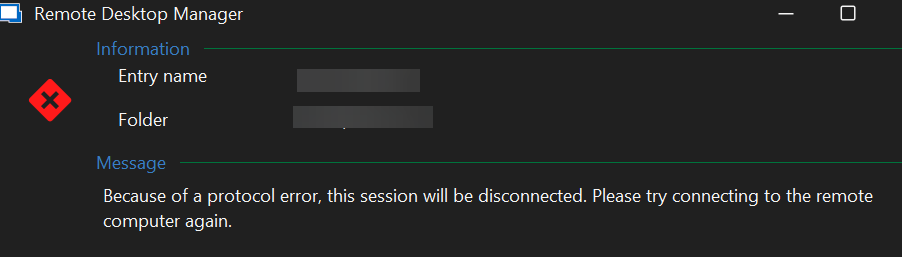
On RDP to Windows 11 machine Because of a protocol error (code: 0x115c), the remote session will be disconnected. Please try connecting to the remote computer again.
"Because of a protocol error, this session will be disconnected. Please try connecting to the remote computer again."
There's no code in the message like the OP.
On RDP to Windows 11 machine Because of a protocol error (code: 0x115c), the remote session will be disconnected. Please try connecting to the remote computer again.
Going back to RDM 2024.3.31.0 resolved the issue. I'm able to connect to my servers again.
On RDP to Windows 11 machine Because of a protocol error (code: 0x115c), the remote session will be disconnected. Please try connecting to the remote computer again.
mstsc.exe works just fine. I tried disabling those experience settings (along with visual styles and persistent bitmap caching) and it still didn't work, I get the protocol error right away.
The servers I am trying to connect to (unsuccessfully) are Windows Server 2019 (1809 17763.6893). This worked yesterday before I upgraded RDM so I may try and roll back to RDM 2024.3.31.0 and see if that helps.
On RDP to Windows 11 machine Because of a protocol error (code: 0x115c), the remote session will be disconnected. Please try connecting to the remote computer again.
I started getting this error today when connecting to a remote Windows server after upgrading to RDM 2025.1.31.0 64-bit. I can see the blue "preparing session" screen from the remote server briefly and then the connection closes and I get the "protocol error." This is on Windows 11 23H2 (22631.5189) with current cumulative updates.
I tried the suggestions here (https://docs.devolutions.net/rdm/kb/troubleshooting-articles/microsoft-rdp-protocol-error/) but none of them have helped. Disabling UDP per the KB article hasn't helped either.
Can't change port for sFTP session
It works now, thank you!
Can't change port for sFTP session
Great, I'll try it out. Thank you!
Linked Hosts no longer working in 2022.2.14?
I just upgraded to 2022.2.17 and this seems to be working again. Thank you!
Linked Hosts no longer working in 2022.2.14?
No worries, appreciate the fix!
Linked Hosts no longer working in 2022.2.14?
Woo hoo! Thank you!
Linked Hosts no longer working in 2022.2.14?
Thank you!
Linked Hosts no longer working in 2022.2.14?
I removed 2022.2.14 and re-installed 2022.1.27 and I'm able to connect again.
Linked Hosts no longer working in 2022.2.14?
Could there also be an issue with the custom port (4489)? My networking guys are reporting that they are seeing connections from my machine to the hosts on port 3389 instead of 4489 so the firewall is blocking the traffic. So maybe it's an issue with the non-default port plus the linked vault host?
Again, all of this was working fine last week. I'm going to see if I can downgrade RDM to the previous version.
Linked Hosts no longer working in 2022.2.14?
I just updated to 2022.2.14 this morning (free edition) and now I can't RDP into any of my servers ("an internal error has occured").
Most of my entries use Linked (Vault), which are the various proxy servers I connect through (on port 4489). If I turn off the linked host, switch to Custom, and put the same host into the Host field, it works and connects. But if I go back to Linked (Vault), it fails. This was working fine on Friday so I suspect it's something with the 2022.2.14 update?
In case this is related, if I try to export the entry to a .rdp file, the "full address" line is missing the host name and just has the 4489 port. But I haven't tried exporting these entries before so not sure if that usually happens if the entry has a linked host instead of a custom entry.

Here's what I see in the debug panel, if this helps:
Double click triggered
Double click node:<my entry name>
rdpClientAdvancedSettings4.AuthenticationLevel:0
Opening in Console / Admin mode
rdpClientAdvancedSettings6.EnableCredSspSupport:True
An internal error has occurred. | reason: 4 | extended: exDiscReasonNoInfo
RDP - Disconnect:4 / exDiscReasonNoInfoCan't change port for sFTP session
Excellent, thank you!
Can't change port for sFTP session
I upgraded and it's still happening. Doing some more testing, it looks like it only happens if I'm not using a "Custom" Host. If I used "Linked (Vault)" or "Inherited" the port changes back to 22 when the entry is saved. This same configuration works fine for an SSH Shell connection, just not sFTP.
