
marcocarrera
Documentation - image resizing
Hello,
This is something we should improve. I will create a ticket for that.
Thank you
Thanks David!
Documentation - image resizing
Is it possible to add the capability to "graphically" resize images in a document?
We use a lot documentation entries in RDM
We add many images from snipping tool (copy & paste).
Seems the images are showed at the maximun resolution possible.
We would like to resize the images, so, even if you look documentation at full screen, they are not huge.
Something Confluence does: Display files and images | Confluence Cloud | Atlassian Support
After an image or video is inserted, you can:
Resize it by dragging the handles on either side.
Set its width or height in pixels by entering a value in the toolbar
Thanks
Marco
Documentation editor - auto-save option
We would like to have an auto-save option at entry (documentation editor) level.
If the auto-save option is enabled, every X seconds the documentation is saved automatically.
This avoids potential information loss.
IP Adress Management / Password Overview
Hello to everybody,
In my opinion, the new entry type named IP Address List is a good start but it's far away to be considered a good IPAM replacement.
Some hints:
entry IP Address List can be used for subnet management
entry IP Address List should have these fields:
Subnet / Subnet Mask
Name
Description
VLAN indication
After IP address List is created, should be automatically generated X sub-entries type "IP Address" (X = number of IP within that subnet mask)
entry "IP Address" should have these fields:
Name
Description
Status (Free, Reserved, Assigned)
RIPE Status (ASSIGNED PA, NOT REGISTERED)
Note
Link to other RDM entries
Regards
Marco
Documentation - "block" entry when somebody is editing it
Hi Hubert,
really thanks.
I'm waiting your feedback when this feature will be added.
I think is what we are looking for,
Regards
Marco
Documentation - "block" entry when somebody is editing it
Good morning,
at the moment, it's possible for two different users edit, in the same moment, the documentation of the same entry.
Only the modifications done by the last user who has saved are saved.
The modifications done by the other user are lost.
My suggestion is implement a way to "block" the documentation of a specific entry when somebody is editing it.
Regards
Marco
Undock documentation - New documentation type entry
Perfect David!
Thanks
Marco
PS: anyway try to think about my idea to create a dedicated type entry.
At the moment we use a generic Information / Other entry type.
In our opinion is more useful add an entry for the documentation respect use the documentation tab of many entries (is more easy to show than explain).
The generic Information / Other entry type has some functionalities (e.g View Entry) that create only mess.
Undock documentation - New documentation type entry
Hi David,
it works! thanks
Just one question: is it possible to insert a button, into the documentation tab, that permit to undock the documentation?
It is much faster then you have suggested.
below my mokup
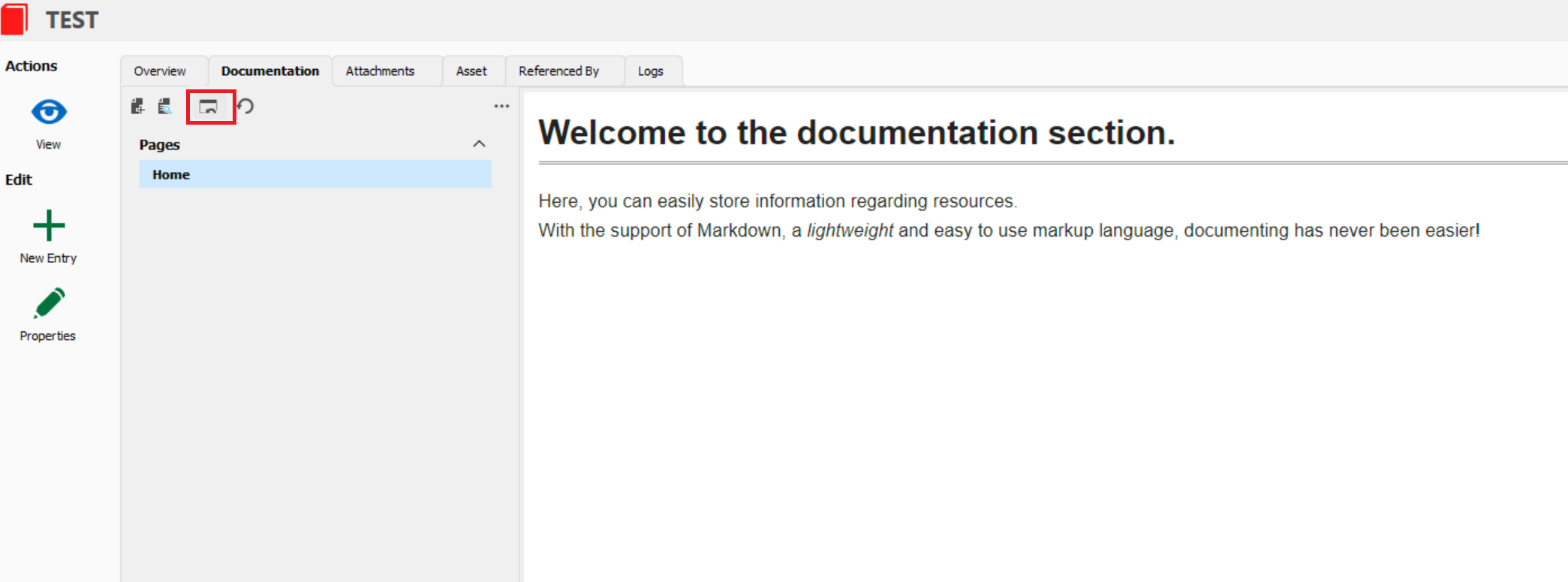
Thanks a lot
Undock documentation - New documentation type entry
Hi David,
thanks for your reply.
What do you think about create a new entry type, group Document, called "Documentation Devolution" or whatever you want?
Without the left bar (action and edit), without overview and without asset.
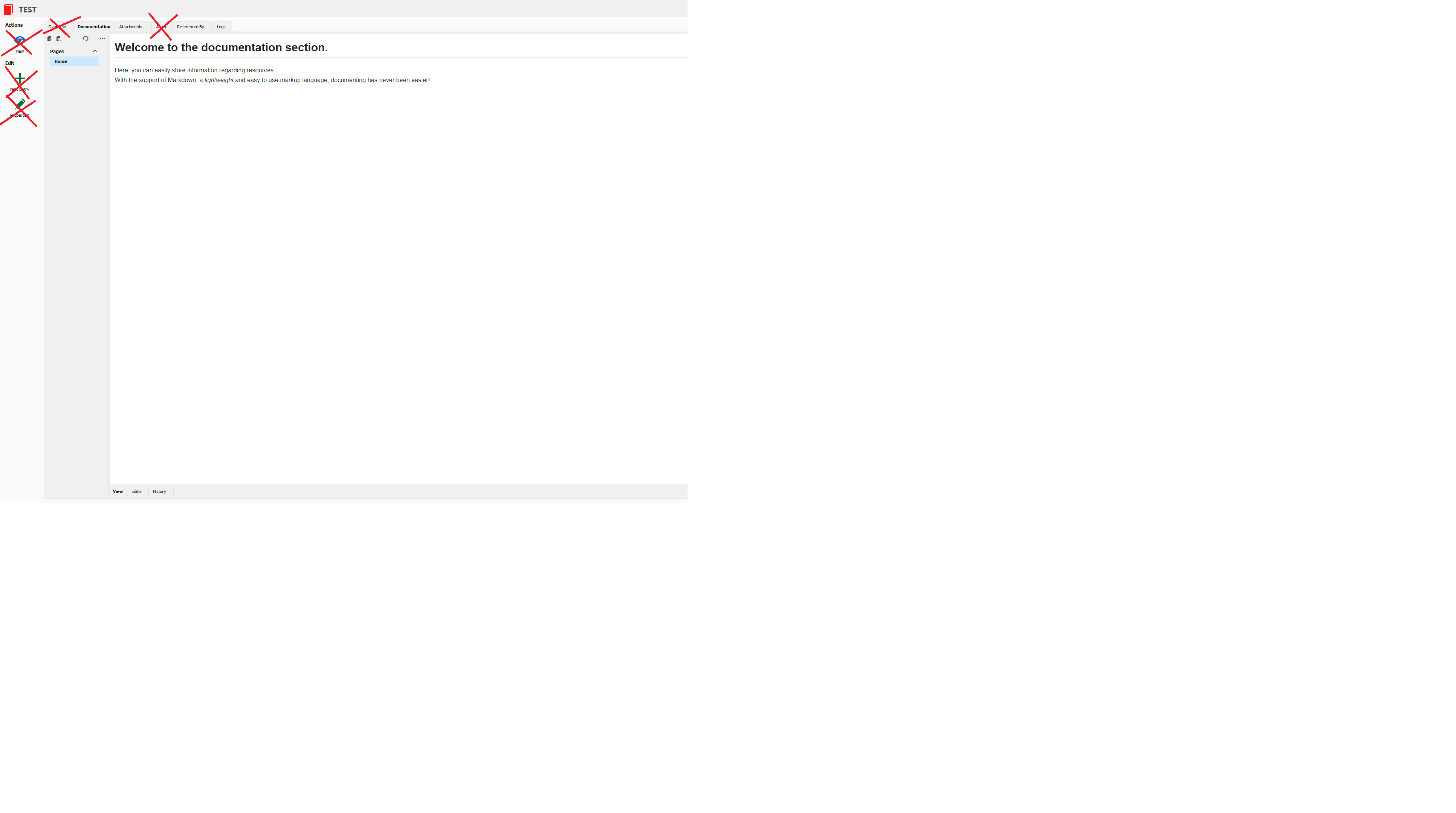
with the possibility to be opened in a separated tab and, when is opened in a separated tab, is still possible work with other entries
Regards
Marco
Undock documentation - New documentation type entry
Hi,
we suggest to add the possibility to undock documentation tab and keep it open even if another entry is selected.
Sometimes we need to keep the documentation open when we open another entry.
For instance, we want to open a SSH session and keep the documentation tab, with the list of the shell command, visible. In this way is much better make the copy and paste of the commands.
In this moment we continue to switch among SHELL and documentation tab.
It is really frustrating.
In general we suggest to transform the documentation as a dedicated type of entry respect now that is a "property" of another type of entry.
The documentation entry types existing at the moment, in our opinion, are useless.
Regards
Marco
Image paste in documentation / Link copy
Hi Hubert,
I did some tests again.
My scenario:
RDM: 2022.2.20.0 64-bit
DVLS: 2022.2.8.0
Something is changed.
With old versions (I don't remember which specific version, maybe 2022.1.X) the "documentation search form" didn't give answer when I was researching a keyword not present on documentation page title.
At the moment, the "documentation search form" answers with all pages, even if a page doesn't contain (in the title and/or in the object) the keyword
Image paste in documentation / Link copy
Hi Hubert,
thanks for your feedback.
Just one additional question: will you update / improve also the "Documentation Search form engine"?
At the moment, the researched text must be content in the documentation title.
It could be very useful if it will can be searched also inside the documentation
Regards
Marco
Documentation - different editor
Hi Hubert,
really thanks for your reply.
Just one thing.
At least, is it possible to see, in the "View page" of a document, the images attached using copy and paste from a windows file?
If a copy and paste an image from my desktop I see it on the "Editor page" but not in the "View Page".
Even if I reload the "Editor page" the image remains (so I don't thing is a graphical glitch)
Regards
Marco
Documentation - different editor
At the moment the Documentation editor has some limitations.
The biggest limitation is that is not possible copy and paste images from different sources (e.g word files).
At the moment, our documentation is based on word files (on a sharepoint library) and we want to move to a wiki style system.
Instead of implement a new system / platform (example confluence) we prefer to use what we already have,
Is it possible to implement an editor with the same functionalities of Confluence? (it keeps formatting and images with a copy and paste from word)?
Regards
Marco
Image paste in documentation / Link copy
Hello Marco,
We didn't get a chance to look into that yet, but we'll try to include it in our next roadmap.
Regards
Thanks Jonathan, please let us know when added in the roadmap
Regards
Marco
Export and Import RDM sessions - data inside "Documentation feature" lost
Really thanks Michael for your update.
We really appreciate this new feature.
Regards
Marco
Active VPN on running session
Really thanks Hubert,
I hope you can find useful my request.
If you have opened an internal ticket, I think the answer is yes.
Regards
Marco
Active VPN on running session
Hi Hubert,
you are right.
I never checked the "running sessions (global)": but always the "running sessions (local)":
Why the VPN is not showed in the local?
I ask you this because:
I work with group tab viewer as "active session viewer" (inside the vault view)
I do that because sometimes I have multiple sessions opened and the tab bar is not so good in order to manage them
I would like to have, in the group tab viewer also the VPN opened. But the group tab viewer works only with local running sessions.
Now you have more details in order to help us.
Regards
Marco
Export and Import RDM sessions - data inside "Documentation feature" lost
Hi Hubert,
thanks for your reply.
Regards
Marco
Export and Import RDM sessions - data inside "Documentation feature" lost
When an entry is exported, the data inside Documentation feature (Documentation (remotedesktopmanager.com)) are lost.
The data inside Documentation feature are also deleted in the original entry.
This request comes from ticket DEVO-40130
Rergards
Marco
Active VPN on running session
Hello,
Does it work for all type of VPN and if you close the VPN manually outside of RDM, do you get the same result?
Regards
If I close the VPN manually, outside RDM, RDM doesn't recognize that VPN has been closed. But it's not an issue for me.
In my humble opinion is more critical don't have the active VPN (lanched by RDM) in the running session (even if are "zombie" (open by RDM and closed manually)).
Anyway we always close , VPN launched by RDM, through RDM
Regards
Marco
Image paste in documentation / Link copy
Hello Ryan,
We haven't started working on the image pasting yet, but it's on our radar. We'll take a look at the viewer control we're using and come back to you as soon as we have an update on whether or not it supports images.
Regards
Hi Jonathan,
any update about image pasting?
It will increase a lot the adoption of RDM inside my company.
Regards
Marco
Active VPN on running session
Hi David,
when I launch a VPN connection through RDM, the VPN entry in the Navigation tab becomes "active" (green icon, and bold characters)
when I close a VPN connection through RDM, the VPN entry in the Navigation tab coming back to previous status (no longer "active")
VPN entries are the only entry that don't appears in the running session even if in the navigation tab are "active".
Regards
Marco
Active VPN on running session
In my opinion is very useful for me and my colleagues have the active VPNs (launched through RDM) in the running session.
At the moment we have more or less 100 VPN entries (Forticlient SSL) ihat we use to connect to our customers' infrastructures ..
Sometime I completely forget which VPN is active. If the VPN was in the running session, it's more easy to know which VPN is running and connect.
Regards
Marco