
dougp
save window size upon closing and use it when re-opening
Yes, it's set to last saved. Is there something I need to do to save the size settings or is it supposed to be automatic? I didn't see anything on any menu that allowed me to manually save the settings.
save window size upon closing and use it when re-opening
It's truly annoying to have to reset your screen size every freaking time you open remote desktop manager. I have a dual monitor and I like to have it expand slightly over both screens so I can have the server list on one screen and maximum display window on the other.
internal server error connecting to server using remote desktop
Problem is not affected by rebooting RDM.
Production machine, so rebooting for this kind of troubleshooting is not possible
Did not have any credentials saved for that machine.
If I can help with anything else let me know.
internal server error connecting to server using remote desktop
I did find something interesting. I didn't change to freeRDP yet. Trying to log in with administrator always fails, however if I try to log in with a different account it works. Knowing this if I set the profile to admin console then the administrator account logs in successfully. Hope this helps
internal server error connecting to server using remote desktop
Still does not work.
internal server error connecting to server using remote desktop
Spoke too soon. Testing the wrong server. Get the same error in all three possible modes. External does get this error result:
[Window Title]
Remote Desktop Connection
[Content]
An internal error has occurred.
[^] Hide details [OK]
[Expanded Information]
Error code: 0x0
Extended error code: 0x0
Timestamp (UTC): 09/04/25 06:32:12 PM
Press Ctrl+C to copy.
Now the only issue I see is that we get a certificate error message when connecting. Which we can and do safely ignore, since it's a wildcard certificate and RDP doesn't like the main certificate name which doesn't match the server. The wildcard is part of an alias.
internal server error connecting to server using remote desktop
Works correctly in External
internal server error connecting to server using remote desktop
Version 2025.2.23.0 64-bit
.Net 9.0.5
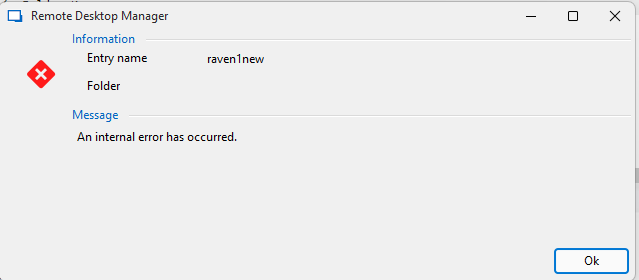
internal server error connecting to server using remote desktop
I have 3 identical servers. They are the farm servers for a remote desktop farm. When I try to connect to 2 of the servers I get an "internal error" message in remote desktop and nothing else. One server does however work. Not sure how to troubleshoot this.
I can connect to all of those servers through mstsc and using the same IP address.
VIM does not work as expected using ssh terminal under version 2025.2.13.1
You're going to have to be a lot more detailed in your instructions. Which Menu item, when sub menu pick. Screenshots would really help. I can't find any of the options you said I need to set. I found how to record a session but it only saves it as a media file and doesn't show anything useful.
VIM does not work as expected using ssh terminal under version 2025.2.13.1
It's a local data source. I'm connection to any one of my Redhat linux servers. They all do the same thing. I set the connection up using an SSH shell. I was using the most recent version of the application. I didn't try it with that particular version. I'm very busy at the moment. I'll try to get to testing this when I have a moment.
VIM does not work as expected using ssh terminal under version 2025.2.13.1
When I use vim and I copy a line of text (yy) and then paste it, it overwrites the second line rather than pushing it down and adding it as a new line. there may be other issues, but that makes this terminal unusable. I just installed 2024.3.16.0 and it works correctly there.
Open in last window size
I have two screens and I stretch it so that the connection list is on the left screen and the window area fills the right screen. If that helps.
Open in last window size
Version 2025.1.30.0 always opens in a standard size. So I have to resize it every time I open it to get it to the size that I like. Previous versions always kept the size from session to session. Please bring that back.
Modal Mode in Remote Desktop Manager
I realized that my version was getting out of date and the download and install didn't do anything. I've downloaded it through the browser and will try it again. I think it's best you just close this for now and I will re-submit if it continues to happen.
Modal Mode in Remote Desktop Manager
For some reason and under certain conditions, the remote desktop manager gets into Modal mode, So all other windows get hidden behind it. You've removed the option from the menu, but the only way to resolve this is to log off all of my sessions. We have a mixture of Linux (SSH) and Windows servers (RDP). I often have 8 or 9 windows open so it's really annoying to have to close all of them.
I thought it might have been when I detached a session, but lately I haven't been doing that and it still happens. Please try and fix this.
Remote desktop manager is set to modal and I can't turn it off
A while ago you took away the "always on top" option, and things worked fine for quite a while. Now for some reason my remote desktop manager is back in modal mode and there is no way to turn it off. Help!!
SSH client needs to support file transfers
Yes, that would be the sz and rz commands. Mostly the rz, but both would be nice. The way I've seen it used is the user asks for a transfer from a menu, it opens a file selection window on your local machine, you pick the files, and then click on okay and the rz command is raised and the files are transferred. but I'll leave it up to you to sort out the details. Also while you're at it it would be useful to have cut/copy/paste in the menu somewhere for ssh as well. the The ctrl-shift C is not intuitive for most users..
SSH client needs to support file transfers
Please add support for Z transfer and probably X transfer as well, to the ssh client. I end up having to use another tool for SSH because this feature is missing and it's really useful to have for updating files from our dev environment into our production server.