
kachijs
No keys available in the agent were accepted by the server (Yubico smartcard authentication macOS)
Hello! Just wanted to update this support ticket. Yesterday i updated my RDM to the latest version. I tried smart-card login with my yubico key and successfully got PIN popup. After entering correct PIN i was logged in to my remote ssh. This ticket can be closed as solved. Thanks!
No keys available in the agent were accepted by the server (Yubico smartcard authentication macOS)
Thanks for the info! I'll try with new version when it comes out.
This is also the reason I'm not seeing PIN popup window?
No keys available in the agent were accepted by the server (Yubico smartcard authentication macOS)
here are the logfiles from Windows machine. Same USB Yubico key, same SSH remote server. I see that in Windows case it shows Available smartcard keys: 5, but in macOS it lists only 1. In USB key i have 4 certificates: Authentication, Digital Signature, Key Management and Card Authentication.
Signature Algorithm says: sha256ECDSA
[14.09.2021 21:26:57] Devolutions Protocols version: 2021.6.16.1 Windows
[14.09.2021 21:26:57] Starting SSH, verbose level: 4
[14.09.2021 21:26:57] Setting up connection
[14.09.2021 21:26:57] Connecting to port: 22 (IP any)
[14.09.2021 21:26:57] SSH banner: SSH-2.0-OpenSSH_8.2p1 Ubuntu-4ubuntu0.2
[14.09.2021 21:26:57] Sending kex init
[14.09.2021 21:26:57] Received kex init
[14.09.2021 21:26:57] Selected algorithms: curve25519-sha256, ssh-ed25519, chacha20-poly1305@openssh.com, chacha20-poly1305@openssh.com, implicit by cipher, implicit by cipher, none, none
[14.09.2021 21:26:57] Sending Ed25519 kex init
[14.09.2021 21:26:57] Received Ed25519 kex reply
[14.09.2021 21:26:57] Successfully authentified server
[14.09.2021 21:26:57] Sending new keys message
[14.09.2021 21:26:57] Sending userauth service request
[14.09.2021 21:26:57] Received new keys message
[14.09.2021 21:26:57] Received extension info message
[14.09.2021 21:26:57] Server accepts public key types: ssh-ed25519,sk-ssh-ed25519@openssh.com,ssh-rsa,rsa-sha2-256,rsa-sha2-512,ssh-dss,ecdsa-sha2-nistp256,ecdsa-sha2-nistp384,ecdsa-sha2-nistp521,sk-ecdsa-sha2-nistp256@openssh.com
[14.09.2021 21:26:57] Received service accepted message
[14.09.2021 21:26:57] Trying smartcard authentication
[14.09.2021 21:26:57] manufacturerID[Yubico (www.yubico.com)         ] cryptokiVersion[2.40]
[14.09.2021 21:26:57] libraryDescription[PKCS#11 PIV Library (SP-800-73) ]
[14.09.2021 21:26:57] libraryVersion[2.20]
[14.09.2021 21:26:57] Adding PKCS11 provider: C:\Program Files\Yubico\Yubico PIV Tool\bin\libykcs11.dll
[14.09.2021 21:26:58] Available smartcard keys: 5
[14.09.2021 21:26:58] Sending userauth init request
[14.09.2021 21:26:58] Received userauth failure: publickey
[14.09.2021 21:26:58] Starting authentication by key
[14.09.2021 21:26:58] Validating public key: ecdsa-sha2-nistp256
[14.09.2021 21:26:58] Received userauth key ok
[14.09.2021 21:26:59] Sending userauth public key signature: ecdsa-sha2-nistp256
[14.09.2021 21:26:59] Received userauth success
[14.09.2021 21:26:59] User authenticated successfuly by smartcard
[14.09.2021 21:26:59] Sending session channel open request: 0/-
[14.09.2021 21:26:59] Received global request: hostkeys-00@openssh.com , no need to reply
[14.09.2021 21:26:59] Received debug message: /home/xxx/.ssh/authorized_keys:2: key options: agent-forwarding port-forwarding pty user-rc x11-forwarding
[14.09.2021 21:26:59] Received debug message: /home/xxx/.ssh/authorized_keys:2: key options: agent-forwarding port-forwarding pty user-rc x11-forwarding
[14.09.2021 21:26:59] Received channel open confirmation: 0/0 WS 200000/0 MPS 32000/32768
[14.09.2021 21:26:59] Sending pty request: 0/0 xterm-256color width = 234 height = 57
[14.09.2021 21:26:59] Received channel success: 0/0
[14.09.2021 21:26:59] Setting up LANG=en_US.UTF-8
[14.09.2021 21:26:59] Sending environment variable request: 0/0
[14.09.2021 21:26:59] Received channel success: 0/0
[14.09.2021 21:26:59] Sending shell request: 0/0
[14.09.2021 21:26:59] Received window adjust: 0/0 2097152
[14.09.2021 21:26:59] Received channel success: 0/0
[14.09.2021 21:26:59] New Data 475 bytes
[14.09.2021 21:26:59] New Data 288 bytes
[14.09.2021 21:27:00] New Data 82 bytesNo keys available in the agent were accepted by the server (Yubico smartcard authentication macOS)
I somehow missed this box. I entered the PIN but it does not authenticate me.
[9/14/2021 6:00:35 PM] Devolutions Protocols version: 2021.6.4.1 macOS
[9/14/2021 6:00:35 PM] Starting SSH, verbose level: 4
[9/14/2021 6:00:35 PM] Setting up connection
[9/14/2021 6:00:35 PM] Connecting to port: 22 (IP any)
[9/14/2021 6:00:35 PM] SSH banner: SSH-2.0-OpenSSH_8.2p1 Ubuntu-4ubuntu0.2

[9/14/2021 6:00:35 PM] Sending kex init
[9/14/2021 6:00:35 PM] Received kex init
[9/14/2021 6:00:35 PM] Selected algorithms: curve25519-sha256, ssh-ed25519, chacha20-poly1305@openssh.com, chacha20-poly1305@openssh.com, implicit by cipher, implicit by cipher, none, none
[9/14/2021 6:00:35 PM] Sending Ed25519 kex init
[9/14/2021 6:00:35 PM] Received Ed25519 kex reply
[9/14/2021 6:00:35 PM] Successfully authentified server
[9/14/2021 6:00:35 PM] Sending new keys message
[9/14/2021 6:00:35 PM] Sending userauth service request
[9/14/2021 6:00:35 PM] Received new keys message
[9/14/2021 6:00:35 PM] Received extension info message
[9/14/2021 6:00:35 PM] Server accepts public key types: ssh-ed25519,sk-ssh-ed25519@openssh.com,ssh-rsa,rsa-sha2-256,rsa-sha2-512,ssh-dss,ecdsa-sha2-nistp256,ecdsa-sha2-nistp384,ecdsa-sha2-nistp521,sk-ecdsa-sha2-nistp256@openssh.com
[9/14/2021 6:00:35 PM] Received service accepted message
[9/14/2021 6:00:35 PM] Trying smartcard authentication
[9/14/2021 6:00:35 PM] manufacturerID[Yubico (www.yubico.com)         ] cryptokiVersion[2.40]
[9/14/2021 6:00:35 PM] libraryDescription[PKCS#11 PIV Library (SP-800-73) ]
[9/14/2021 6:00:35 PM] libraryVersion[2.20]
[9/14/2021 6:00:35 PM] Adding PKCS11 provider: /usr/local/lib/libykcs11.2.2.0.dylib
[9/14/2021 6:00:36 PM] Available smartcard keys: 1
[9/14/2021 6:00:36 PM] Sending userauth init request
[9/14/2021 6:00:36 PM] Received userauth failure: publickey
[9/14/2021 6:00:36 PM] Starting authentication by key
[9/14/2021 6:00:36 PM] Validating public key: rsa-sha2-512
[9/14/2021 6:00:36 PM] Received userauth failure: publickey
[9/14/2021 6:00:36 PM] No keys available in the agent were accepted by the server
[9/14/2021 6:00:36 PM] No authentication method available
[9/14/2021 6:00:36 PM] The server does not accept interactive authentication
[9/14/2021 6:00:36 PM] The server does not accept password authentication
[9/14/2021 6:00:36 PM] Disconnection in progress
[9/14/2021 6:00:36 PM] DisconnectingNo keys available in the agent were accepted by the server (Yubico smartcard authentication macOS)
Here you go.
[9/14/2021 5:40:20 PM] Devolutions Protocols version: 2021.6.4.1 macOS
[9/14/2021 5:40:20 PM] Starting SSH, verbose level: 2
[9/14/2021 5:40:20 PM] Setting up connection
[9/14/2021 5:40:20 PM] Connecting to port: 22 (IP any)
[9/14/2021 5:40:20 PM] SSH banner: SSH-2.0-OpenSSH_8.2p1 Ubuntu-4ubuntu0.2

[9/14/2021 5:40:20 PM] Sending kex init
[9/14/2021 5:40:20 PM] Received kex init
[9/14/2021 5:40:20 PM] Selected algorithms: curve25519-sha256, ssh-ed25519, chacha20-poly1305@openssh.com, chacha20-poly1305@openssh.com, implicit by cipher, implicit by cipher, none, none
[9/14/2021 5:40:20 PM] Sending Ed25519 kex init
[9/14/2021 5:40:20 PM] Received Ed25519 kex reply
[9/14/2021 5:40:20 PM] Successfully authentified server
[9/14/2021 5:40:20 PM] Sending new keys message
[9/14/2021 5:40:20 PM] Sending userauth service request
[9/14/2021 5:40:20 PM] Received new keys message
[9/14/2021 5:40:20 PM] Received extension info message
[9/14/2021 5:40:20 PM] Server accepts public key types: ssh-ed25519,sk-ssh-ed25519@openssh.com,ssh-rsa,rsa-sha2-256,rsa-sha2-512,ssh-dss,ecdsa-sha2-nistp256,ecdsa-sha2-nistp384,ecdsa-sha2-nistp521,sk-ecdsa-sha2-nistp256@openssh.com
[9/14/2021 5:40:20 PM] Received service accepted message
[9/14/2021 5:40:20 PM] Trying smartcard authentication
[9/14/2021 5:40:20 PM] manufacturerID[Yubico (www.yubico.com)         ] cryptokiVersion[2.40]
[9/14/2021 5:40:20 PM] libraryDescription[PKCS#11 PIV Library (SP-800-73) ]
[9/14/2021 5:40:20 PM] libraryVersion[2.20]
[9/14/2021 5:40:20 PM] Adding PKCS11 provider: /usr/local/lib/libykcs11.2.2.0.dylib
[9/14/2021 5:40:20 PM] Available smartcard keys: 1
[9/14/2021 5:40:20 PM] Sending userauth init request
[9/14/2021 5:40:20 PM] Received userauth failure: publickey
[9/14/2021 5:40:20 PM] Starting authentication by key
[9/14/2021 5:40:20 PM] Validating public key: rsa-sha2-512
[9/14/2021 5:40:20 PM] Received userauth failure: publickey
[9/14/2021 5:40:20 PM] No keys available in the agent were accepted by the server
[9/14/2021 5:40:20 PM] No authentication method available
[9/14/2021 5:40:20 PM] The server does not accept interactive authentication
[9/14/2021 5:40:20 PM] The server does not accept password authentication
[9/14/2021 5:40:20 PM] Disconnection in progress
[9/14/2021 5:40:20 PM] DisconnectingNo keys available in the agent were accepted by the server (Yubico smartcard authentication macOS)
I bought a Yubico USB key and wanted to set up Smartcard PKCS authentication to remote SSH on my iMac. I installed Yubico Manager + Yubico PIV tools. Configured Smartcard PKCS library and checked Use Smartcard to my remote SSH connection. After I tried to connect instead of PIN box i got error.
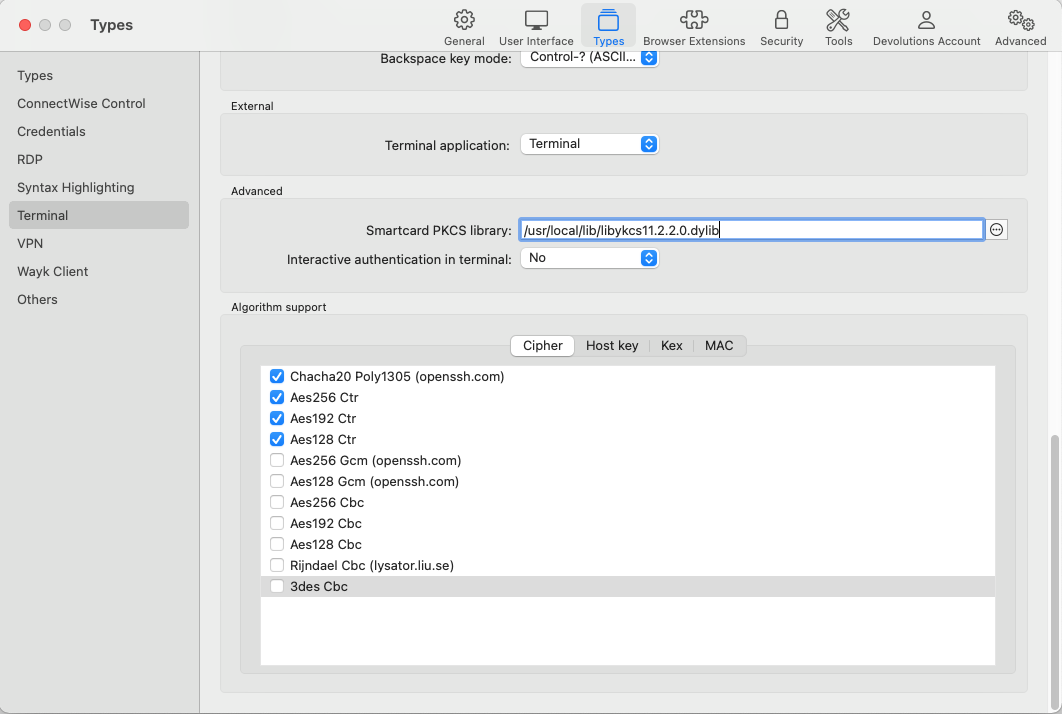
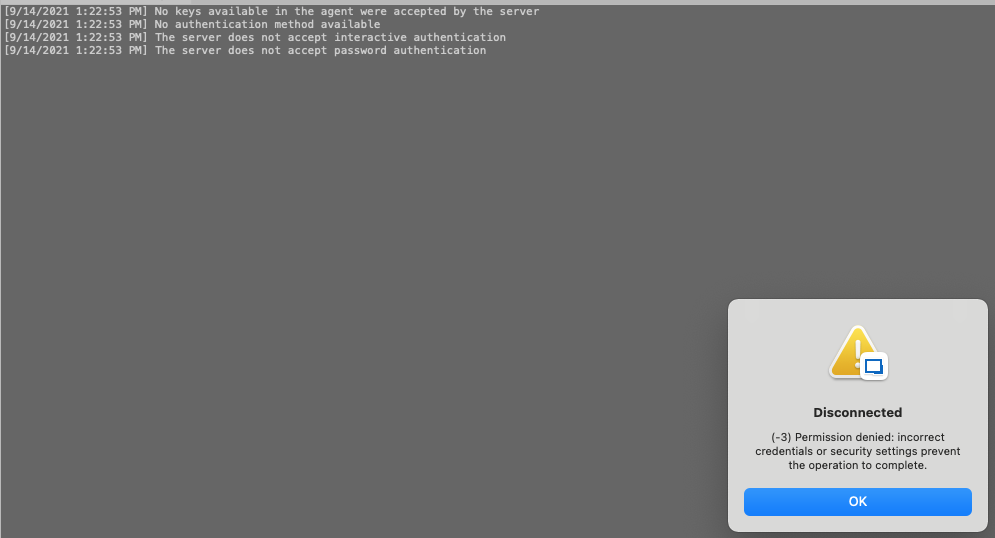
I then installed everything on Windows 10 machine and tried connecting to same remote SSH using the same Yubico USB key and got PIN popup box and successfully was able to log in.