No keys available in the agent were accepted by the server (Yubico smartcard authentication macOS)
No keys available in the agent were accepted by the server (Yubico smartcard authentication macOS)

I bought a Yubico USB key and wanted to set up Smartcard PKCS authentication to remote SSH on my iMac. I installed Yubico Manager + Yubico PIV tools. Configured Smartcard PKCS library and checked Use Smartcard to my remote SSH connection. After I tried to connect instead of PIN box i got error. 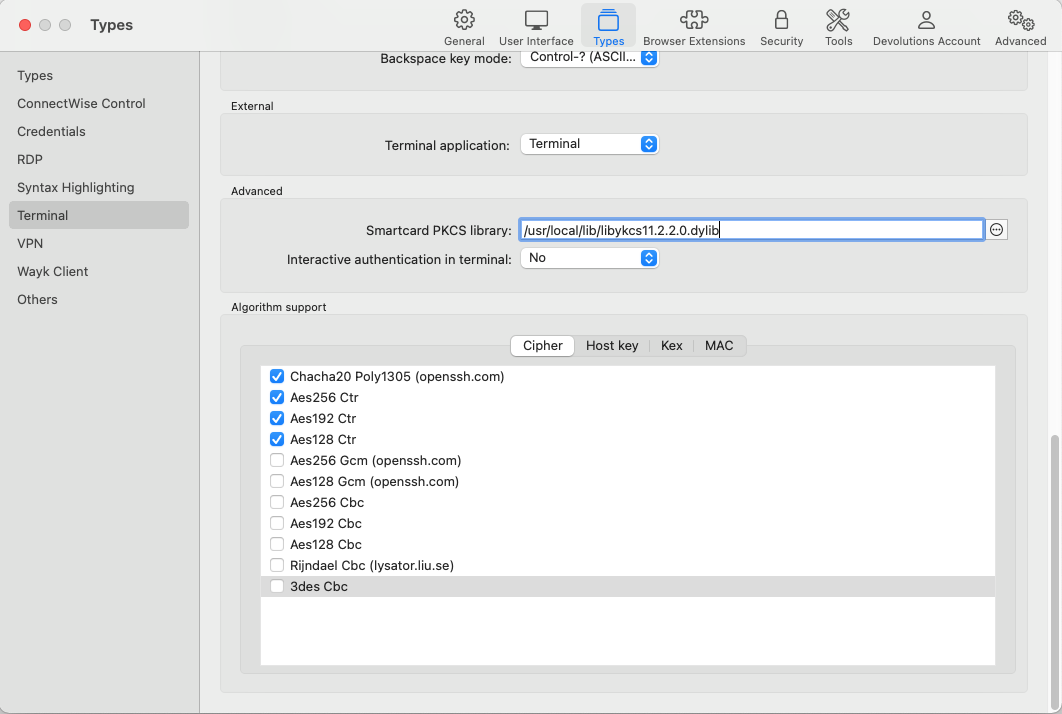
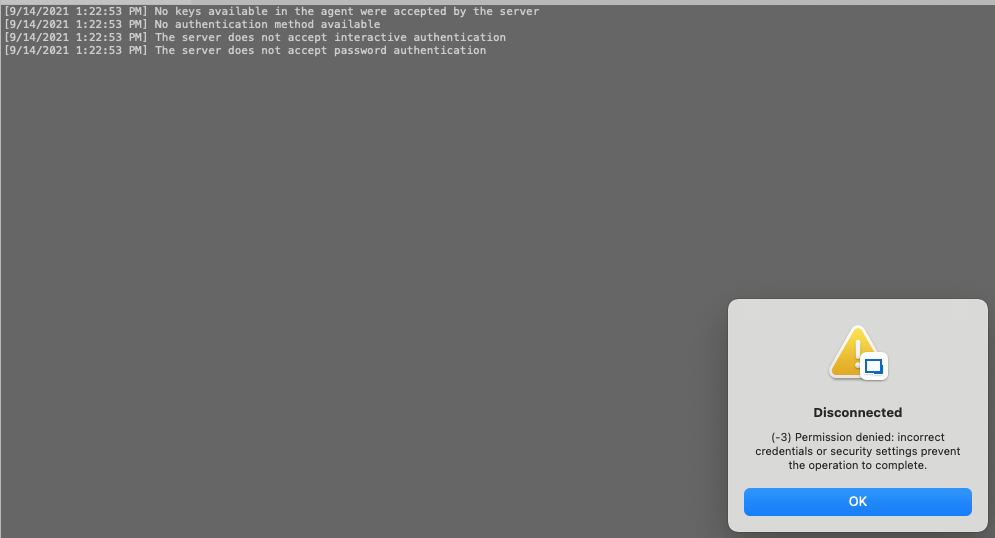
I then installed everything on Windows 10 machine and tried connecting to same remote SSH using the same Yubico USB key and got PIN popup box and successfully was able to log in.
Screen Shot 2021-09-14 at 13.26.17.png
Screen Shot 2021-09-14 at 13.22.58.png
All Comments (19)
Hi,
Could you enable Session Logs, reproduce the error, and provide the log file generated? You can enable Session Logs under Help -> Session Logs: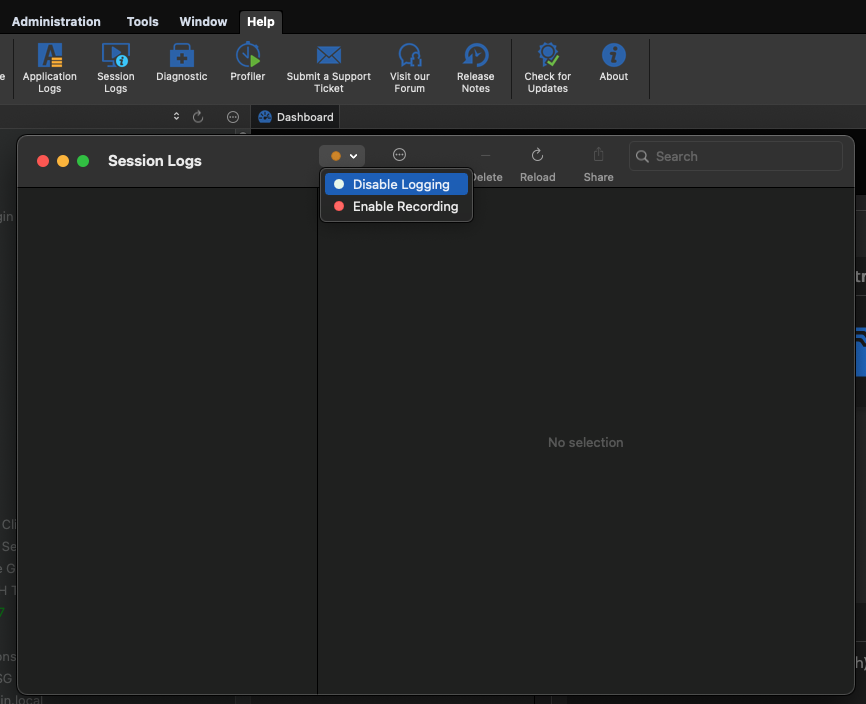
Best regards,
Xavier Fortin
SessionLogs.png
Here you go.
[9/14/2021 5:40:20 PM] Devolutions Protocols version: 2021.6.4.1 macOS
[9/14/2021 5:40:20 PM] Starting SSH, verbose level: 2
[9/14/2021 5:40:20 PM] Setting up connection
[9/14/2021 5:40:20 PM] Connecting to port: 22 (IP any)
[9/14/2021 5:40:20 PM] SSH banner: SSH-2.0-OpenSSH_8.2p1 Ubuntu-4ubuntu0.2

[9/14/2021 5:40:20 PM] Sending kex init
[9/14/2021 5:40:20 PM] Received kex init
[9/14/2021 5:40:20 PM] Selected algorithms: curve25519-sha256, ssh-ed25519, chacha20-poly1305@openssh.com, chacha20-poly1305@openssh.com, implicit by cipher, implicit by cipher, none, none
[9/14/2021 5:40:20 PM] Sending Ed25519 kex init
[9/14/2021 5:40:20 PM] Received Ed25519 kex reply
[9/14/2021 5:40:20 PM] Successfully authentified server
[9/14/2021 5:40:20 PM] Sending new keys message
[9/14/2021 5:40:20 PM] Sending userauth service request
[9/14/2021 5:40:20 PM] Received new keys message
[9/14/2021 5:40:20 PM] Received extension info message
[9/14/2021 5:40:20 PM] Server accepts public key types: ssh-ed25519,sk-ssh-ed25519@openssh.com,ssh-rsa,rsa-sha2-256,rsa-sha2-512,ssh-dss,ecdsa-sha2-nistp256,ecdsa-sha2-nistp384,ecdsa-sha2-nistp521,sk-ecdsa-sha2-nistp256@openssh.com
[9/14/2021 5:40:20 PM] Received service accepted message
[9/14/2021 5:40:20 PM] Trying smartcard authentication
[9/14/2021 5:40:20 PM] manufacturerID[Yubico (www.yubico.com)         ] cryptokiVersion[2.40]
[9/14/2021 5:40:20 PM] libraryDescription[PKCS#11 PIV Library (SP-800-73) ]
[9/14/2021 5:40:20 PM] libraryVersion[2.20]
[9/14/2021 5:40:20 PM] Adding PKCS11 provider: /usr/local/lib/libykcs11.2.2.0.dylib
[9/14/2021 5:40:20 PM] Available smartcard keys: 1
[9/14/2021 5:40:20 PM] Sending userauth init request
[9/14/2021 5:40:20 PM] Received userauth failure: publickey
[9/14/2021 5:40:20 PM] Starting authentication by key
[9/14/2021 5:40:20 PM] Validating public key: rsa-sha2-512
[9/14/2021 5:40:20 PM] Received userauth failure: publickey
[9/14/2021 5:40:20 PM] No keys available in the agent were accepted by the server
[9/14/2021 5:40:20 PM] No authentication method available
[9/14/2021 5:40:20 PM] The server does not accept interactive authentication
[9/14/2021 5:40:20 PM] The server does not accept password authentication
[9/14/2021 5:40:20 PM] Disconnection in progress
[9/14/2021 5:40:20 PM] Disconnecting
And what happens if you enter your pin directly in the session (in the PIN field just under the "Use smartcard" checkbox) instead of expecting the prompt. Does it work then?
Best regards,
Xavier Fortin
I somehow missed this box. I entered the PIN but it does not authenticate me.
[9/14/2021 6:00:35 PM] Devolutions Protocols version: 2021.6.4.1 macOS
[9/14/2021 6:00:35 PM] Starting SSH, verbose level: 4
[9/14/2021 6:00:35 PM] Setting up connection
[9/14/2021 6:00:35 PM] Connecting to port: 22 (IP any)
[9/14/2021 6:00:35 PM] SSH banner: SSH-2.0-OpenSSH_8.2p1 Ubuntu-4ubuntu0.2

[9/14/2021 6:00:35 PM] Sending kex init
[9/14/2021 6:00:35 PM] Received kex init
[9/14/2021 6:00:35 PM] Selected algorithms: curve25519-sha256, ssh-ed25519, chacha20-poly1305@openssh.com, chacha20-poly1305@openssh.com, implicit by cipher, implicit by cipher, none, none
[9/14/2021 6:00:35 PM] Sending Ed25519 kex init
[9/14/2021 6:00:35 PM] Received Ed25519 kex reply
[9/14/2021 6:00:35 PM] Successfully authentified server
[9/14/2021 6:00:35 PM] Sending new keys message
[9/14/2021 6:00:35 PM] Sending userauth service request
[9/14/2021 6:00:35 PM] Received new keys message
[9/14/2021 6:00:35 PM] Received extension info message
[9/14/2021 6:00:35 PM] Server accepts public key types: ssh-ed25519,sk-ssh-ed25519@openssh.com,ssh-rsa,rsa-sha2-256,rsa-sha2-512,ssh-dss,ecdsa-sha2-nistp256,ecdsa-sha2-nistp384,ecdsa-sha2-nistp521,sk-ecdsa-sha2-nistp256@openssh.com
[9/14/2021 6:00:35 PM] Received service accepted message
[9/14/2021 6:00:35 PM] Trying smartcard authentication
[9/14/2021 6:00:35 PM] manufacturerID[Yubico (www.yubico.com)         ] cryptokiVersion[2.40]
[9/14/2021 6:00:35 PM] libraryDescription[PKCS#11 PIV Library (SP-800-73) ]
[9/14/2021 6:00:35 PM] libraryVersion[2.20]
[9/14/2021 6:00:35 PM] Adding PKCS11 provider: /usr/local/lib/libykcs11.2.2.0.dylib
[9/14/2021 6:00:36 PM] Available smartcard keys: 1
[9/14/2021 6:00:36 PM] Sending userauth init request
[9/14/2021 6:00:36 PM] Received userauth failure: publickey
[9/14/2021 6:00:36 PM] Starting authentication by key
[9/14/2021 6:00:36 PM] Validating public key: rsa-sha2-512
[9/14/2021 6:00:36 PM] Received userauth failure: publickey
[9/14/2021 6:00:36 PM] No keys available in the agent were accepted by the server
[9/14/2021 6:00:36 PM] No authentication method available
[9/14/2021 6:00:36 PM] The server does not accept interactive authentication
[9/14/2021 6:00:36 PM] The server does not accept password authentication
[9/14/2021 6:00:36 PM] Disconnection in progress
[9/14/2021 6:00:36 PM] Disconnecting
Hi,
The log itself seems to indicate that the private key on the Yubikey is not authorized by the server. Could you provide us with the log but with RDM Windows. The Windows version of the client does not have a Session Logs window, so you will need to configure the log directly in the session itself under the Logs tab.
Also, is your key ECDSA?
Best regards,
Xavier Fortin
here are the logfiles from Windows machine. Same USB Yubico key, same SSH remote server. I see that in Windows case it shows Available smartcard keys: 5, but in macOS it lists only 1. In USB key i have 4 certificates: Authentication, Digital Signature, Key Management and Card Authentication.
Signature Algorithm says: sha256ECDSA
[14.09.2021 21:26:57] Devolutions Protocols version: 2021.6.16.1 Windows
[14.09.2021 21:26:57] Starting SSH, verbose level: 4
[14.09.2021 21:26:57] Setting up connection
[14.09.2021 21:26:57] Connecting to port: 22 (IP any)
[14.09.2021 21:26:57] SSH banner: SSH-2.0-OpenSSH_8.2p1 Ubuntu-4ubuntu0.2
[14.09.2021 21:26:57] Sending kex init
[14.09.2021 21:26:57] Received kex init
[14.09.2021 21:26:57] Selected algorithms: curve25519-sha256, ssh-ed25519, chacha20-poly1305@openssh.com, chacha20-poly1305@openssh.com, implicit by cipher, implicit by cipher, none, none
[14.09.2021 21:26:57] Sending Ed25519 kex init
[14.09.2021 21:26:57] Received Ed25519 kex reply
[14.09.2021 21:26:57] Successfully authentified server
[14.09.2021 21:26:57] Sending new keys message
[14.09.2021 21:26:57] Sending userauth service request
[14.09.2021 21:26:57] Received new keys message
[14.09.2021 21:26:57] Received extension info message
[14.09.2021 21:26:57] Server accepts public key types: ssh-ed25519,sk-ssh-ed25519@openssh.com,ssh-rsa,rsa-sha2-256,rsa-sha2-512,ssh-dss,ecdsa-sha2-nistp256,ecdsa-sha2-nistp384,ecdsa-sha2-nistp521,sk-ecdsa-sha2-nistp256@openssh.com
[14.09.2021 21:26:57] Received service accepted message
[14.09.2021 21:26:57] Trying smartcard authentication
[14.09.2021 21:26:57] manufacturerID[Yubico (www.yubico.com)         ] cryptokiVersion[2.40]
[14.09.2021 21:26:57] libraryDescription[PKCS#11 PIV Library (SP-800-73) ]
[14.09.2021 21:26:57] libraryVersion[2.20]
[14.09.2021 21:26:57] Adding PKCS11 provider: C:\Program Files\Yubico\Yubico PIV Tool\bin\libykcs11.dll
[14.09.2021 21:26:58] Available smartcard keys: 5
[14.09.2021 21:26:58] Sending userauth init request
[14.09.2021 21:26:58] Received userauth failure: publickey
[14.09.2021 21:26:58] Starting authentication by key
[14.09.2021 21:26:58] Validating public key: ecdsa-sha2-nistp256
[14.09.2021 21:26:58] Received userauth key ok
[14.09.2021 21:26:59] Sending userauth public key signature: ecdsa-sha2-nistp256
[14.09.2021 21:26:59] Received userauth success
[14.09.2021 21:26:59] User authenticated successfuly by smartcard
[14.09.2021 21:26:59] Sending session channel open request: 0/-
[14.09.2021 21:26:59] Received global request: hostkeys-00@openssh.com , no need to reply
[14.09.2021 21:26:59] Received debug message: /home/xxx/.ssh/authorized_keys:2: key options: agent-forwarding port-forwarding pty user-rc x11-forwarding
[14.09.2021 21:26:59] Received debug message: /home/xxx/.ssh/authorized_keys:2: key options: agent-forwarding port-forwarding pty user-rc x11-forwarding
[14.09.2021 21:26:59] Received channel open confirmation: 0/0 WS 200000/0 MPS 32000/32768
[14.09.2021 21:26:59] Sending pty request: 0/0 xterm-256color width = 234 height = 57
[14.09.2021 21:26:59] Received channel success: 0/0
[14.09.2021 21:26:59] Setting up LANG=en_US.UTF-8
[14.09.2021 21:26:59] Sending environment variable request: 0/0
[14.09.2021 21:26:59] Received channel success: 0/0
[14.09.2021 21:26:59] Sending shell request: 0/0
[14.09.2021 21:26:59] Received window adjust: 0/0 2097152
[14.09.2021 21:26:59] Received channel success: 0/0
[14.09.2021 21:26:59] New Data 475 bytes
[14.09.2021 21:26:59] New Data 288 bytes
[14.09.2021 21:27:00] New Data 82 bytes
Hi,
Up to now, we were not supporting ECDSA signature in RDM Mac. The next version (2021.2.0.0) should support it though. When it get releases (in the coming weeks) could you try it again to make sure it works correctly?
Best regards,
Xavier Fortin
Thanks for the info! I'll try with new version when it comes out.
This is also the reason I'm not seeing PIN popup window?
Most likely yes, since we don't find a "valid" key, we won't prompt. But if you're still having issue when the fix is available, please, do tell us.
Best regards,
Xavier Fortin
Hello! Just wanted to update this support ticket. Yesterday i updated my RDM to the latest version. I tried smart-card login with my yubico key and successfully got PIN popup. After entering correct PIN i was logged in to my remote ssh. This ticket can be closed as solved. Thanks!
Glad to hear it!
Do not hesitate if you have any other issues or questions.
Best regards,
Xavier Fortin
Hello,
I refresh the problem.
I am using Yubikey NFC key with SK keys on macOS.
Using a standard terminal, everything works fine and I log in without a problem.
To use the key I have to touch it, I don't know how I can force terminal interaction during login.
LOG:
[04.05.2023 13:56:27] Devolutions Protocols version: 2023.3.17.1 macOS
[04.05.2023 13:56:27] Starting SSH, verbose level: 2
[04.05.2023 13:56:27] Setting up connection
[04.05.2023 13:56:27] Connecting to port: 3322 (IP any)
[04.05.2023 13:56:27] SSH banner: SSH-2.0-OpenSSH_8.9p1 Ubuntu-3ubuntu0.1

[04.05.2023 13:56:27] Sending kex init
[04.05.2023 13:56:27] Received kex init
[04.05.2023 13:56:27] Selected algorithms: curve25519-sha256, ssh-ed25519, chacha20-poly1305@openssh.com, chacha20-poly1305@openssh.com, implicit by cipher, implicit by cipher, none, none
[04.05.2023 13:56:27] Sending Ed25519 kex init
[04.05.2023 13:56:27] Received Ed25519 kex reply
[04.05.2023 13:56:27] Successfully authentified server
[04.05.2023 13:56:27] Sending new keys message
[04.05.2023 13:56:27] Received new keys message
[04.05.2023 13:56:27] Sending userauth service request
[04.05.2023 13:56:27] Received extension info message
[04.05.2023 13:56:27] Server accepts public key types: ssh-ed25519,sk-ssh-ed25519@openssh.com,ssh-rsa,rsa-sha2-256,rsa-sha2-512,ssh-dss,ecdsa-sha2-nistp256,ecdsa-sha2-nistp384,ecdsa-sha2-nistp521,sk-ecdsa-sha2-nistp256@openssh.com,webauthn-sk-ecdsa-sha2-nistp256@openssh.com
[04.05.2023 13:56:27] Received service accepted message
[04.05.2023 13:56:27] Using provided key data
[04.05.2023 13:56:27] Unknown key type: sk-ssh-ed25519@openssh.com
[04.05.2023 13:56:27] Error parsing private key
[(-7) Invalid arguments: this is generally the result of a bug, but it can also be the result of incorrect user inputs.]
[04.05.2023 13:56:27] Unable to use the key
[04.05.2023 13:56:27] Trying smartcard authentication
[04.05.2023 13:56:28] manufacturerID[OpenSC Project                  ] cryptokiVersion[2.20]
[04.05.2023 13:56:28] libraryDescription[OpenSC smartcard framework      ]
[04.05.2023 13:56:28] libraryVersion[0.23]
[04.05.2023 13:56:28] Adding PKCS11 provider: /Library/OpenSC/lib/opensc-pkcs11.so
[04.05.2023 13:56:30] Available smartcard keys: 1
[04.05.2023 13:56:30] Sending userauth init request
[04.05.2023 13:56:30] Received userauth failure: publickey
[04.05.2023 13:56:30] Starting authentication by key
[04.05.2023 13:56:30] Validating public key: rsa-sha2-512
[04.05.2023 13:56:30] Received userauth failure: publickey
[04.05.2023 13:56:30] Key not accepted accepted by server
[04.05.2023 13:56:30] No authentication method available
[04.05.2023 13:56:30] The server does not accept interactive authentication
[04.05.2023 13:56:30] The server does not accept password authentication
[04.05.2023 13:56:30] Disconnection in progress
[04.05.2023 13:56:30] Bytes sent: 1412, Bytes received: 1777
[04.05.2023 13:56:30] Packets sent: 6, Packets received: 7
[04.05.2023 13:56:30] Kex completed: 1
[04.05.2023 13:56:30] Disconnecting
Hi pesiv13,
There is probably a bug. Could you answer a few questions for us?
What is your Yubikey model?
At the moment, we only support PIV with Yubikey. Is your Yubikey configured differently? With FIDO 2 for instance?
What is the type of the private key in the Yubikey certificate?
Best regards,
Xavier Fortin
What is your Yubikey model?
YubiKey 5C NFC Firmware: 5.4.3
What is the type of the private key in the Yubikey certificate?
Key: ed25519_sk
Key generated using openssl tool in the new sk key standard, slot PIV.
From my observations, I have no interaction resulting from the need to touch the key to authorize the use of the key
Hi,
Ah! This explains, we do not support ed25519_sk yet. I'm opening a ticket for this. Just to make it clear, this is a bit tricky to implement and we do not know yet how it is going to be done, we therefore don't know when this will be available.
Best regards,
Xavier Fortin
If you will be testing it I can help with testing.
How do you create a task for it provide a link so that I can be up to date on the topic.
Hi,
We will post back in this thread when a fix is available, or if any more information are needed.
Best regards,
Xavier Fortin
Hello,
I also want to use your nice tool with a YubiKey and ed25519-sk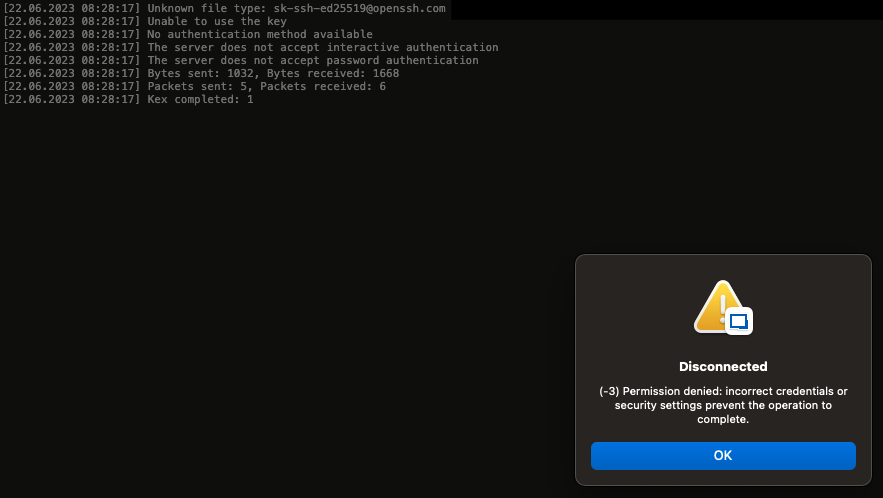
Bildschirmfoto 2023-06-22 um 08.28.30.png
Hi,
The ticket is still opened, I will get back in touch with the dev assigned to it.
Best regards,
Xavier Fortin