
parsious
Batch session creation
Dear brain trust,
Ok so i have an issue that i am hoping you can help with
the company i work for is in the process of merging with another company and as part of that we now find out team managing a boatload of new devices (approx 400 could be more i haven't actually counted them all yet looked )
is there a way to bulk add sessions with the exact same properties other than name and ip or am i best to just export one session and then add the rest in json then import the new sessions ? assuming that would work
Regards
Josh
Corporate whipping boy
session log questions
Hi thanks for that this worked as advised its a bit of a ham-fisted way of doing what other systems do but this was the last pain point for our team and the variable feature is nice and it dose allow for more customization of the logging structure
session log questions
We use RDM to manage all the core devices in the network as such we are planning to use session logs
as it stands it seems that you have to enable session logging in each session and you have to give each session a file name this is all well and good but i can see a coupple of ways to improve the system
in the log tab of the session it would be nice to either specify a log name or have the system create a log file at session start with a date stamp if it dose not exist or append to the file if it dose this would allow for a lot easier searching for things in the logs
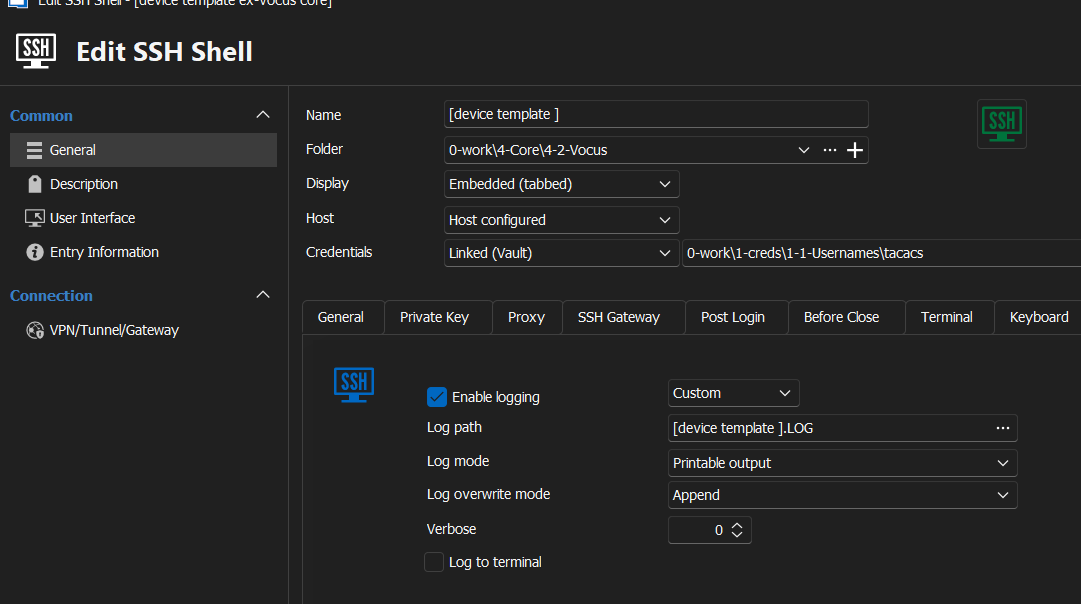
the way I see it it would add additional options to the log tab in the session properties
1, an additional option to the log overwrite drop down called something like Append to date stamped file
2, an option to use the session name for the logfile name and have that file either placed in the globally define path or the specified path
then when you start a session if there is a file date stamped for today it appends if not it opens a new file with the current date stamp
SFTP issues from SSH session
That seems to be the only war I have found.... But honestly unless you have som weird tunneling requirements like we do on our core routers it's probably best to just build a scp or sftp session rather than use the ssh shell session.... You get a full range of navigation options in those.... And on my home network it works well... The issue I was facing is that the session options gor scp and sftp are different to the ssh shell ones and I couldn't get the session right to jump through the hoops we have
add custom buttons/folders to the session toolbar
never mind found the macro bar and figured it out from that would still be nice to allow for a nested dropdown as if this works as expected i qill likely have 30 or more macros built up for things i do every day
add custom buttons/folders to the session toolbar
Hey team it would be great to be able to add a custome folder or button to the session tool bar to quick access terminal command scripts
ideally it would link to the a current data source folder with perhaps an option in a unique script folder to add it .. IDK
would speed up a lot of workflows
SFTP issues from SSH session
sweet thanks for that i was dreading having to change 200 odd sessions manually .. and honestly i would likey not change them at all till i needed to get files of a device
thanks a bunch for the advice ill look at it soon
SFTP issues from SSH session
is there a global setting that i can use to set this across all sessions or do i need to change it on each session
i had a look and i cant seem to find anything
SFTP issues from SSH session
thanks ... that got it sorted
after turning it on and off it a few times and restarting twice
SFTP issues from SSH session
hi team,
we use RDM to support network infrastuctrure
the ssh sessions are working wekk but i am having issues with the sftp connection
in my home network where i test things before I i roll them out to the company i have run into the following issue
when i open a ssh shell to the device in question (in this case a Juniper ex2300) and open the sftp tab i can see folders but no files

however here at home i can open a SFTP session to that device using the unbuilt SFTP session type and i can see files

so for testing, i will call the SFTP optin within the SSH session the SSH Session and the native SFTP session ill call native
1, if i use the SSH session to add a new folder - the new folder will show up in both the ssh and native sessions
2, if i use the ssh session to upload a file - the file shows as completed but it dose not show up in the SSH session tho i can see it in the native session
3 if i use the native session to upload a file it shows completed - again the file only shows up in the native session
now at home this is no great issue as i can run native SSH sessions to the network devices to pull any logs i need , but in the corprate network i am unable to connect to the devices with a native SFTP session as the SFTP session dose not have the same SSH gateway options as the SSH session and i cant seem to find any combination of building a manual ssh gateway that works
the best solution for me would be if we could answer why the SFTP session from inside the SSH shell is not displaying files while it clearly reads directory names and can write new files
any thoughts ?
Regards
Joshua