
robertwagensveld2
Timeout error
Oh, that's good to know. I was not aware of that. We'll update the server soon then. We were still using 2022.3
Thanks a lot!
Timeout error

Hi there, I am trying out connecting to our RDM server via Powershell. It seems to work for a moment, but then the connection errors out. Any idea what might cause this?
RDM forgets internal datasource after adding datasource
Hi Simon,
That's the last line.
We use an Enterprise datasource. The credentials are retrieved from a Keeper instance.
RDM forgets internal datasource after adding datasource
Our internal datasource is always forgotten upon restart (RDM Enterprise)
remotedesktopmanager
(RemoteDesktopManager:112252): Gtk-CRITICAL **: 11:45:30.691: gtk_widget_grab_default: assertion 'gtk_widget_get_can_default (widget)' failed
Exception of type 'Devolutions.RemoteDesktopManager.Business.TryGoOfflineException' was thrown.
Maybe the permissions of some folder are wrong?
What should be the correct permissions of the user on the .rdm folder in home, for example?
Access Denied when editing connections via powershell
#Creates a server entry in RDM, and links it to a credential entry if needed.
param(
[Parameter(Mandatory=$True)][PSCredential]$credential, [Parameter(Mandatory=$True)]$hostname, [Parameter(Mandatory=$True)]$DataSourceID,
[Parameter(Mandatory=$True)]$TemplateID, [Parameter(Mandatory=$True)]$ServerGroup, [Parameter(Mandatory=$True)]$EntryType
)
Import-Module "C:\Program Files (x86)\Devolutions\Remote Desktop Manager\RemoteDesktopManager.PowerShellModule.psd1"
$DataSourceID = "<ID>"
$TemplateID = "3c143929-486e-4406-8d29-88c3266639d4"
$ServerGroup = "<main group name>\Other (Keeper Migrated)"
$EntryType = "RDPConfigured"
#Set data source in RDM
Set-RDMCurrentDataSource -ID $DataSourceID -Username $credential.UserName -Password $credential.Password
Update-RDMUI
#Create entry in RDM
Write-Output "Creating entry in Remote Desktop Manager. You still need to drag it manually to the right folder and assign the service account credential to it.".
$RDMEntry = New-RDMSession -Name $Hostname -Host $Hostname -TemplateID $TemplateID -Group $ServerGroup -Type $EntryType
Set-RDMSession $RDMEntry
Access Denied when editing connections via powershell
We are using the latest available version of Enterprise Devolutions server (both client and server). Data source type is thus Enterprise server using Keeper as the password/credential database.
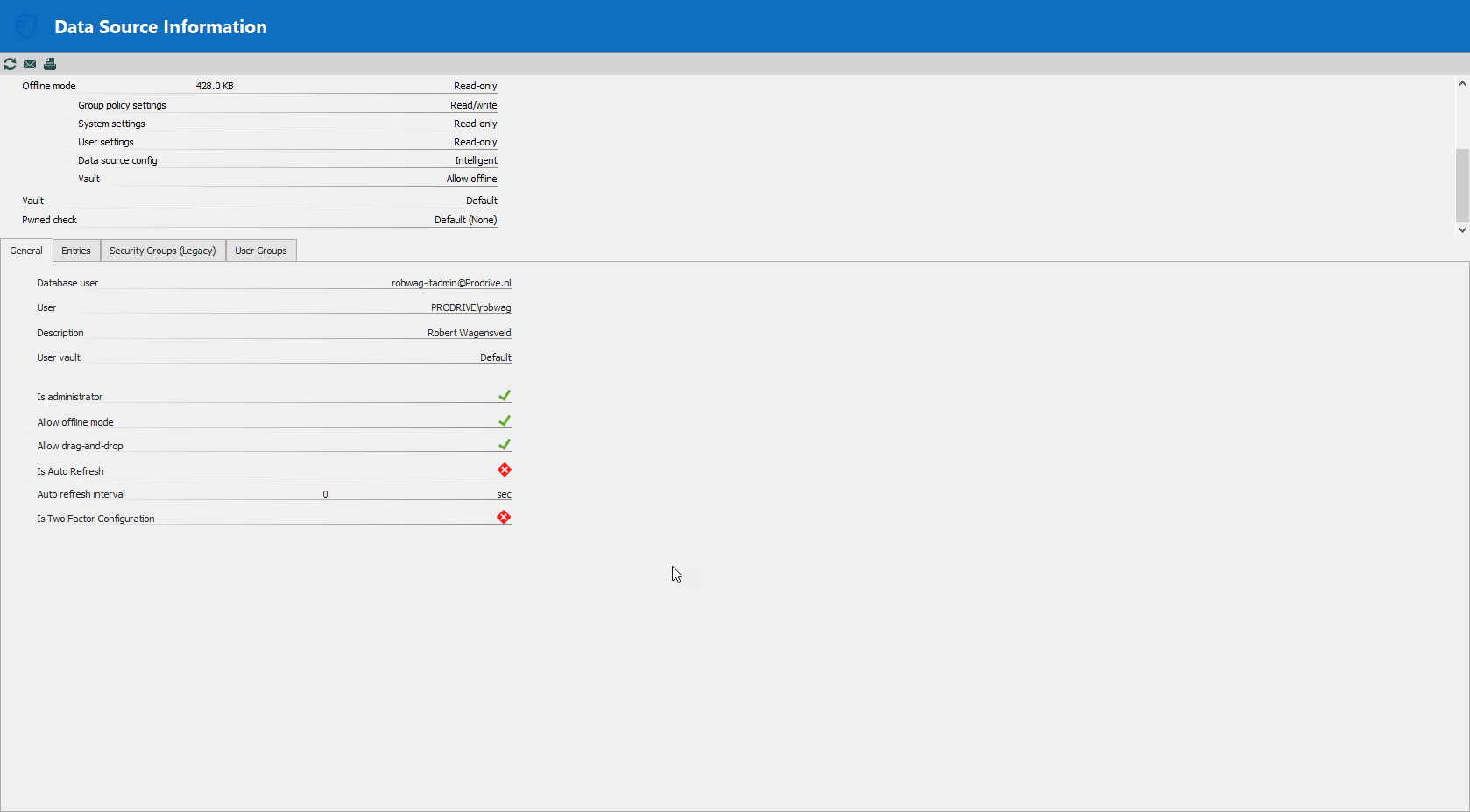
Access Denied when editing connections via powershell
I'm having exactly the same issue, but this time a cache refresh does not help. The user account I'm using is also admin on the vault...And I'm using the cmdlet mentioned above.
Installing RDM on an unsupported distro
Jup, this is the version (attachment)
Installing RDM on an unsupported distro
This is the error when starting up on Debian Buster, is it similar?
remotedesktopmanager
Unhandled Exception:
System.TypeInitializationException: The type initializer for 'GLib.Marshaller' threw an exception. ---> System.TypeInitializationException: The type initializer for 'Sys' threw an exception. ---> System.EntryPointNotFoundException: SystemNative_LChflagsCanSetHiddenFlag assembly:<unknown assembly> type:<unknown type> member:(null)
at (wrapper managed-to-native) Interop+Sys.LChflagsCanSetHiddenFlag()
at Interop+Sys..cctor () [0x00000] in <d13c8b563008422a8c5aaec0a74089cc>:0
--- End of inner exception stack trace ---
at System.IO.FileSystem.FileExists (System.ReadOnlySpan`1[T] fullPath, System.Int32 fileType, Interop+ErrorInfo& errorInfo) [0x00007] in <d13c8b563008422a8c5aaec0a74089cc>:0
at System.IO.FileSystem.FileExists (System.ReadOnlySpan`1[T] fullPath) [0x00006] in <d13c8b563008422a8c5aaec0a74089cc>:0
at System.IO.File.Exists (System.String path) [0x00043] in <d13c8b563008422a8c5aaec0a74089cc>:0
at System.TimeZoneInfo.TryLoadTzFile (System.String tzFilePath, System.Byte[]& rawData, System.String& id) [0x00000] in <d13c8b563008422a8c5aaec0a74089cc>:0
at System.TimeZoneInfo.TryGetLocalTzFile (System.Byte[]& rawData, System.String& id) [0x0000f] in <d13c8b563008422a8c5aaec0a74089cc>:0
at System.TimeZoneInfo.GetLocalTimeZoneFromTzFile () [0x00000] in <d13c8b563008422a8c5aaec0a74089cc>:0
at System.TimeZoneInfo.GetLocalTimeZone (System.TimeZoneInfo+CachedData cachedData) [0x00000] in <d13c8b563008422a8c5aaec0a74089cc>:0
at System.TimeZoneInfo+CachedData.CreateLocal () [0x00018] in <d13c8b563008422a8c5aaec0a74089cc>:0
at System.TimeZoneInfo+CachedData.get_Local () [0x0000c] in <d13c8b563008422a8c5aaec0a74089cc>:0
at System.TimeZoneInfo.get_Local () [0x00000] in <d13c8b563008422a8c5aaec0a74089cc>:0
at System.CurrentSystemTimeZone..ctor () [0x00011] in <d13c8b563008422a8c5aaec0a74089cc>:0
at System.TimeZone.get_CurrentTimeZone () [0x00024] in <d13c8b563008422a8c5aaec0a74089cc>:0
at GLib.Marshaller..cctor () [0x00096] in <5a34df7d261240358d61453b6bc52857>:0
--- End of inner exception stack trace ---
at GLib.Global.set_ProgramName (System.String value) [0x00000] in <5a34df7d261240358d61453b6bc52857>:0
at Gtk.Application.SetPrgname () [0x00015] in <c2feb1c5d39a4660b3f5c10dab7825eb>:0
at Gtk.Application.Init () [0x00000] in <c2feb1c5d39a4660b3f5c10dab7825eb>:0
at Devolutions.RemoteDesktopManager.Program.Main (System.String[] args) [0x00000] in <41d0bbf81af6425aab6daf6143f93fec>:0
[ERROR] FATAL UNHANDLED EXCEPTION: System.TypeInitializationException: The type initializer for 'GLib.Marshaller' threw an exception. ---> System.TypeInitializationException: The type initializer for 'Sys' threw an exception. ---> System.EntryPointNotFoundException: SystemNative_LChflagsCanSetHiddenFlag assembly:<unknown assembly> type:<unknown type> member:(null)
at (wrapper managed-to-native) Interop+Sys.LChflagsCanSetHiddenFlag()
at Interop+Sys..cctor () [0x00000] in <d13c8b563008422a8c5aaec0a74089cc>:0
--- End of inner exception stack trace ---
at System.IO.FileSystem.FileExists (System.ReadOnlySpan`1[T] fullPath, System.Int32 fileType, Interop+ErrorInfo& errorInfo) [0x00007] in <d13c8b563008422a8c5aaec0a74089cc>:0
at System.IO.FileSystem.FileExists (System.ReadOnlySpan`1[T] fullPath) [0x00006] in <d13c8b563008422a8c5aaec0a74089cc>:0
at System.IO.File.Exists (System.String path) [0x00043] in <d13c8b563008422a8c5aaec0a74089cc>:0
at System.TimeZoneInfo.TryLoadTzFile (System.String tzFilePath, System.Byte[]& rawData, System.String& id) [0x00000] in <d13c8b563008422a8c5aaec0a74089cc>:0
at System.TimeZoneInfo.TryGetLocalTzFile (System.Byte[]& rawData, System.String& id) [0x0000f] in <d13c8b563008422a8c5aaec0a74089cc>:0
at System.TimeZoneInfo.GetLocalTimeZoneFromTzFile () [0x00000] in <d13c8b563008422a8c5aaec0a74089cc>:0
at System.TimeZoneInfo.GetLocalTimeZone (System.TimeZoneInfo+CachedData cachedData) [0x00000] in <d13c8b563008422a8c5aaec0a74089cc>:0
at System.TimeZoneInfo+CachedData.CreateLocal () [0x00018] in <d13c8b563008422a8c5aaec0a74089cc>:0
at System.TimeZoneInfo+CachedData.get_Local () [0x0000c] in <d13c8b563008422a8c5aaec0a74089cc>:0
at System.TimeZoneInfo.get_Local () [0x00000] in <d13c8b563008422a8c5aaec0a74089cc>:0
at System.CurrentSystemTimeZone..ctor () [0x00011] in <d13c8b563008422a8c5aaec0a74089cc>:0
at System.TimeZone.get_CurrentTimeZone () [0x00024] in <d13c8b563008422a8c5aaec0a74089cc>:0
at GLib.Marshaller..cctor () [0x00096] in <5a34df7d261240358d61453b6bc52857>:0
--- End of inner exception stack trace ---
at GLib.Global.set_ProgramName (System.String value) [0x00000] in <5a34df7d261240358d61453b6bc52857>:0
at Gtk.Application.SetPrgname () [0x00015] in <c2feb1c5d39a4660b3f5c10dab7825eb>:0
at Gtk.Application.Init () [0x00000] in <c2feb1c5d39a4660b3f5c10dab7825eb>:0
Embedding license key in RDM debian package
Thanks! I think that can be arranged via our configuration system.
Embedding license key in RDM debian package
Is it possible? Is there some file on the installation that determines what license key is used? Maybe it can be included in a postinst script?
I was looking in /usr/lib/devolutions/RemoteDesktopManager but I can't find anything related to licensing, only DLL files.