
areiter
DVLS grinds to a halt when a user opens DPM
Hi!
We use RDM and DVLS, but are interested in using DPM as well.
over the past yearr I've tried the workspace app every now and then, however, when I (or any other user) open it and connect to our DVLS data source, the DVLS server experiences a peak in CPU and RAM usage, and stops responding for a few seconds.
This causes all our RDM users to receive the message that the server is not available, and whether they want to go offline.
What could be the possible cause for this?
Thanks in advance, best regards,
Andreas
Custom/German Dictionary for DVLS Password Generator's Passphrase Mode
Thank you François!
Custom/German Dictionary for DVLS Password Generator's Passphrase Mode
Hello there!
We have a few users who use the DVLS web interface, and my request is practically the same for DVLS as I had for RDM here:
It would be great if we could have an option to import a custom dictionary for our organisation - or, if that is not possible, if you could add a German dictionary to the DVLS Password Generator's "Passphrase" Mode.
Thank you, best wishes,
Andreas
add custom (e.g., German) dictionary for passphrases mode in RDM password generator
Thank you Jafran!
I can't wait to tell my users these excellent news!
best regards and many thanks!
add custom (e.g., German) dictionary for passphrases mode in RDM password generator
Hello there!
In RDM's Password Generator I can currently choose between English and French Dictionaries for Password Generation when using the passphrases mode. As some of my colleagues are not all that proficient in English, and even less so in French, is there a way to import another (e.g., German) dictionary?
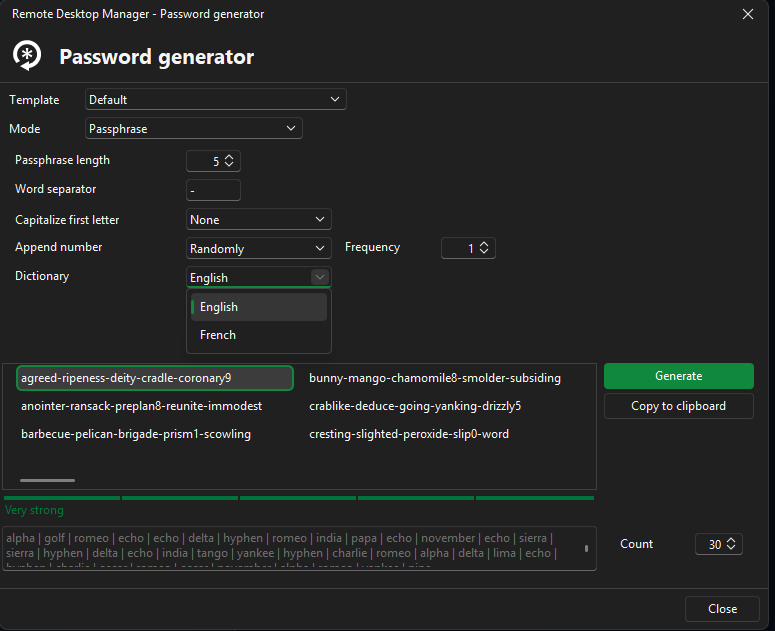
This would make our life much easier.
Thank you and best wishes,
A.Reiter
Typing Passwords (via soft-Keyboard?) into applications where the clipboard is disabled
Excellent news, thank you!
best regards,
Andreas
Typing Passwords (via soft-Keyboard?) into applications where the clipboard is disabled
I've just realised/seen that there is a "Auto-Type" Button in RDM, however it does nothing as far as I can tell....
all the best,
Typing Passwords (via soft-Keyboard?) into applications where the clipboard is disabled
Hi!
We are long-term DVLS & RDM-Users who are updating our priviledged access solution towards using Privileged Access Workstations via Citrix instead of RDM (for reasons).
Our former RD-Farm had the clipboard function disabled, but because we used RDM and Launcher we could let RDM type in our Passwords via the "Type Clipboard" feature.
Using Citrix now, this no longer works since the citrix workspace App is outside of RDM.
It would be awesome if we could just push a button and have our credentials (or clipboard content) be typed out by the workspace app.
I've heard other password managers call this feature "Auto-Type", though that is a bit bigger than what I have in mind.
Or is there a similar feature we could use?
Thank you,
best regards!
Hint in RDM/web vault if an RDP Connection Entry was created by LDAPs Synchronizer
Hi Yannick, that looks indeed like a viable solution!
I'll keep it in mind for when we have to touch the sync the next time, as I think this would probably create duplicate entries if I tried it right now
Thanks,
Andreas Reiter
Hint in RDM/web vault if an RDP Connection Entry was created by LDAPs Synchronizer
At the moment there is no way to tell if an RDP Entry was created manually or automatically by a LDAP synchronizer.
Can you add some sort of informational text or label to tell those entries apart?
Some Background:
Since the LDAP Synchronizer was broken a while ago we resorted to manually recreating the AD's OU structure.
Now that the synchronizer is working again, we have two entries for each server which was manually created before. Our users have added the old, manually created RDP entries to their favorites.
In order to switch back to the synchronizer-created entries, the manually created ones have to be removed, which causes those connections to be removed from the favorites as well.
As we didn't think of the favorites issue before deleting the manually created RDP entries, some of my users are rather unhappy about having to rebuild their favorites without warning....
best regards,
Andreas Reiter
MobaXTerm Session with SSH KEY
I have seen this is implemented in RDM v2023.1.22 and went like "AWESOME feature" ... so I've tried to connect with my saved credentials to an SSH server using the MobaXterm entry type and my credentials in my private user vault, but it wouldn't open... after five or 10 seconds of seeing the prompt the session is stopped....
anyhow, I love seeing MobaXterm and Devolutions working together!
best regards,
Andreas
New Data source in RDM + Launcher - Username cannot be left empty
Hello!
We've discovered what the issue was: we tried only using the username, not the UPN name (username@domain.TLD) which was required for O365/Azure Auth by RDM/Launcher
Another issue that occurred was that the license for launcher was somehow unassigned from the user.
After correcting both of these issues creating a datasource now works fine!
Thanks for your help!
best regards,
Andreas
RDM 2022.1.23 - Filter loses focus to dashboard while typing?
Heyo,
I've just seen that https://forum.devolutions.net/topics/37250/search-field-losing-active-state exists, which seems to be a duplicate of my request - I've subscribed to notifications on this thread, sorry for the double post!
best,
Andreas
RDM 2022.1.23 - Filter loses focus to dashboard while typing?
Hi!
We have encountered a problem ever since we moved to the most recent version of RDM (2022.1.23.0) with Devolutions Server v2022.1.10.0 as its data source.
When we enter a search string in the bottom left filter input box, at some point while typing (typically after 3 to 4 characters) focus is lost and any subsequently typed text does not appear in the filter box.
Current workaround: When we press the "Tab"-key, the dashboard opens in the right-hand window pane. When I disable the dashboard by clicking on on the View-Layout-Dashboard ribbon button, the filter field never loses focus.
Did anyone else encounter this behaviour?
best regards,
Andreas
New Data source in RDM + Launcher - Username cannot be left empty
Hi! Thanks for the quick reply!
The Accounts are Office 365/ Azure AD Accounts in Administration - Users.
I cannot find any relevant error messages in the DVLS logs, apart from entries in the Reports - Login Attempt Listing stating "no access to application" (Kein Zugang zur Anwendung)...
Another issue I noted here is that in most, if not all, log reports, the date column is not filled.... could this be an issue with the german translation we are using?
Best regards,
Andreas
New Data source in RDM + Launcher - Username cannot be left empty
Hi!
We are using DVLS 2022.1.10, Launcher 2022.1.23, RDM 2022.1.23.
In both Devolutions Launcher and RDM we experience the issue that when we try to add a new (DVLS) datasource we must fill out the username field, but when we do O365 auth fails.
our workaround in RDM at the moment is that we export the data source config (with blank username field) from another installation, and import that.
but this is not working for our Launcher users, meaning that they cannot use Launcher.
Has anyone else experienced this problem?
best wishes,
Andreas