
Joao Prates
Import mRemoteNG with PuTTY session attribute
Cool, thanks.
Can't save algorithm support on centralized vault
Just FYI we ran the upgrade to 2020.3.17 and all is working fine now.
Cheers,
-jprates
Can't save algorithm support on centralized vault
Thanks, that explains it.
I will pass this url to my colleague DVLS admin to take this issue from here on.
Much appreciated for your quick support.
Cheers,
-jprates
Can't save algorithm support on centralized vault
Coincidentally it asked me for an update today, which I complied to and upgraded:

Can't save algorithm support on centralized vault
Hi Erica,
Thanks for chiming in.
I''ll have to wait for my vault admin for that info, but meanwhile when I connect via web browser to the url used on our data source host field I can read in the footer:

It reads 2020.3.8.0.
Is this info helpful somehow?
Can't save algorithm support on centralized vault
Hi,
We tried to follow this article of yours to solve a SSH algorithm compatibility issue we had on some SSH sessions.
While on local data source the instructions work well and we are able to include the Kex and MAC algorithms we need, we can't seem to be able to do it on our centralized data source.
We change the combo box to "Custom", make the selections we need on Kex and MAC, press OK, press OK on main properties window, and all seems fine:

... but if we open it again, its back on Default, it did not save our custom settings at all:

What could possibly be happening here?
What setting do we have wrong on our central data source that is preventing our changes from sticking as applied?
I'll open a support ticket for this, I'm just using the forum as it is easier to create a post to explain it and later reference it.
TIA,
-jprates
Import mRemoteNG with PuTTY session attribute
Appreciated.
Import mRemoteNG with PuTTY session attribute
Hi,
On the other thread, what we fixed was the password not importing correctly.
Yes, that was the first of two issues the OP had, but you never answered the second issue, i.e. import mRemoteNG to SSH directly:
Also, once imported (many of them are SSH connections) i see they are configured as putty.
Is there any way we can change the configuration to use the internal ssh shell instead of putty for all ?
James also stated on this exact post that, and I quote:
I forgot to mention that our engineering department will change how entries from mRemoteNG are imported in RDM. After this change, the entries will be imported as SSH Shell entries by default.
While your're in the "open ticket mode", do open another ticket for the current import from mRemoteNG which not only imports the sessions as PuTTY but also keeps references to PuTTY sessions on windows registry, instead of creating self contained sessions.
When we import something, we don't want RDM to keep references to the external environment, and certainly not to windows registry.
Luckily for me I did a backup of PuTTY sessions from registry before deleting all PuTTY sessions, and could restore them back.
Had i trusted the import done with RDM was well done and self-contained, and I would have lost my settings.
I had already put forward this bug in my original post:
Connections were all imported as PuTTY type sessions, and upon clicking them it was the external PuTTY that was called;
I experimented deleting one of the PUTTY sessions, and sure the color background got black, proving the RMD session was not self contained;
Import mRemoteNG with PuTTY session attribute
Thanks for your answer.
Unfortunately I could see no effect whatsoever after applying the "edit - special action" convert to embedded PuTTY:

apparently nothing changed:

It's still using a PuTTY defined registry session just as in the original pre-edit session.
I wonder what, if anything, did change in the process of conversion to embedded PuTTY.
Ideally the mRemoteNG sessions would have been imported/converted to SSH sessions in the first place.
I even found this 2 year's old thread where you mentioned next versions would do that, but it seems 2 years later RDM is still importing to PuTTY.
Did I import it wrongly?
Is there a special option to import from mRemoteNG to SSH directly without going through PuTTY?
I'm on this version by the way:

Import mRemoteNG with PuTTY session attribute
Greetings all,
First off, thanks for the forum capability and support online, this is really a great feature, kudos for that from a new user.
Now, to my "problem" and request for assistance:
I have several mRemote connections created that I'd like to import to RDM with the minimum trouble possible.
Let me try to explain my particular use case of mRemoteNG so that you can better understand it and offer the best path for import:
Each mRemoteNG session uses one PuTTY session, as shown in the picture below:
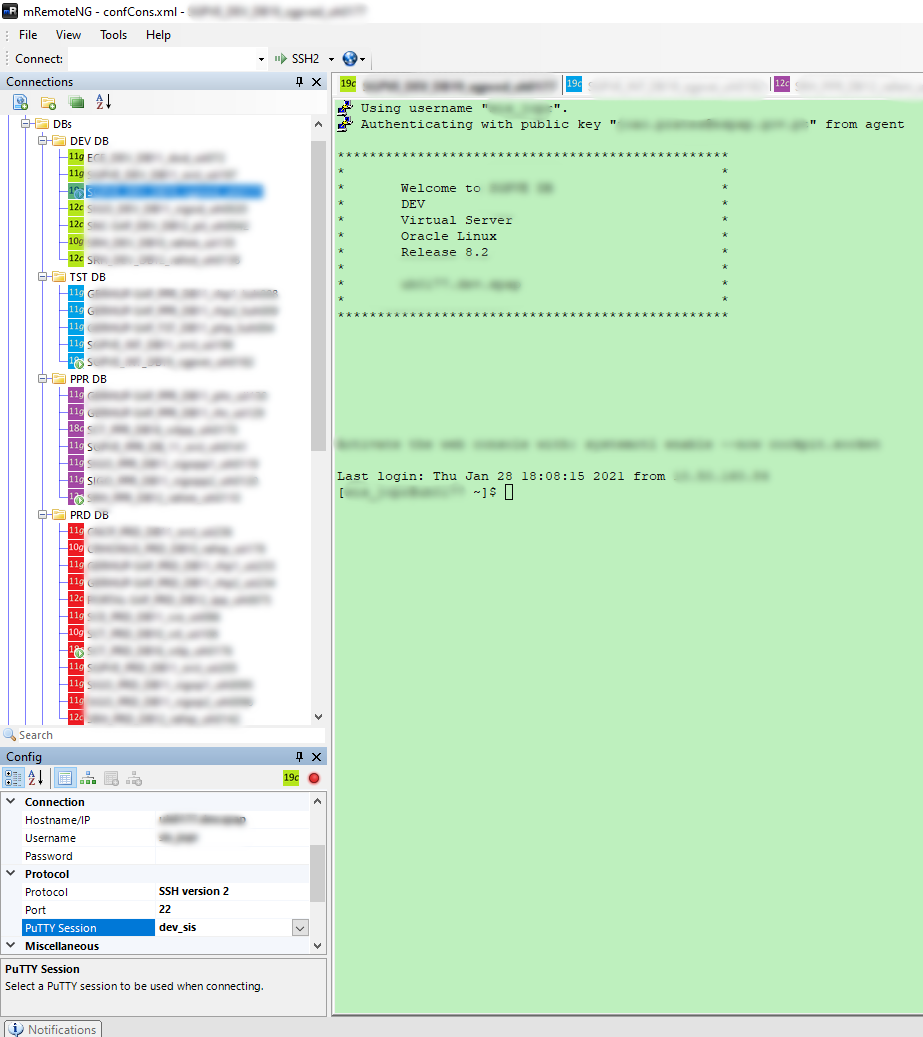
The PuTTY Session has several attributes not set on mRemoteNG that make my life easier, namely:
Separate color scheme for visual cues on what type of env I'm connected to, i.e. DEV, PRD, etc.;
Choice of private key appropriate for that particular session, along with SSH authentication options such as agent forwarding;
With this setup on mRemoteNG I don't need anything to log into my servers but for a double click on the server node.
Now I've tried to import the mRemoteNG xml file and it worked, kind of, but far from ideal:
Connections were all imported as PuTTY type sessions, and upon clicking them it was the external PuTTY that was called;
I experimented deleting one of the PUTTY sessions, and sure the color background got black, proving the RMD session was not self contained;
I also tried to "special edit" the imported PuTTY session, converting it to SSH, but then all color and authentication metadata was lost in the process.
So, what is the correct import path you recommend me following, in order to really full import the sessions without relying on external PuTTY, while keeping all needed session attributes?
Cheers,
-jprates