
chris747
[BUG] RDM asks for SSH key password in a loop, even if correct
I reproduced it on a virtual machine with the provided portable version. To mitigate the hassle for you, here is the full setup:
Extract attached ZIP with binaries wherever you want
There is also a CUSTOM folder which contains:
The database file Connections.db, copy that to %LocalAppData%\Devolutions\RemoteDesktopManager
3 private ssh keys, password is always 0000
Install also fully putty suite for pageant https://the.earth.li/~sgtatham/putty/latest/w64/putty-64bit-0.83-installer.msi (taken from https://www.chiark.greenend.org.uk/~sgtatham/putty/latest.html)
And it should reproduce the issue, if not so tell me.
Setup: https://drive.google.com/file/d/1ata21Gtbt1n89mlTSy1C6J14RVreRh6h/view?usp=sharing
[BUG] RDM asks for SSH key password in a loop, even if correct
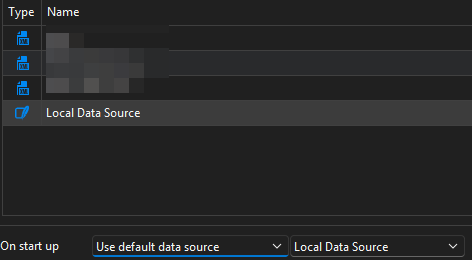
The start up local data source is the default SQL lite with 4 ssh private keys in it, additionally there are 3 XML sources (irrelevant) with no keys.
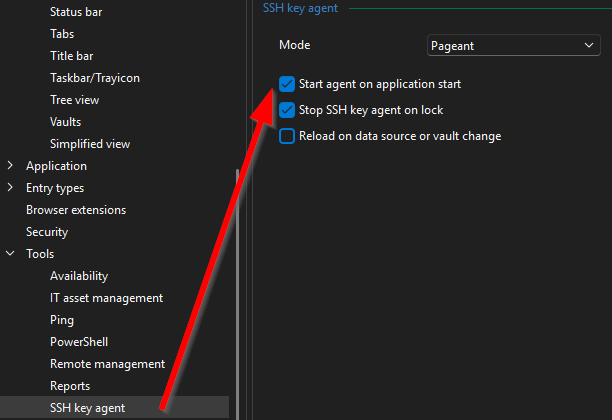
Agent is set to start on startup:
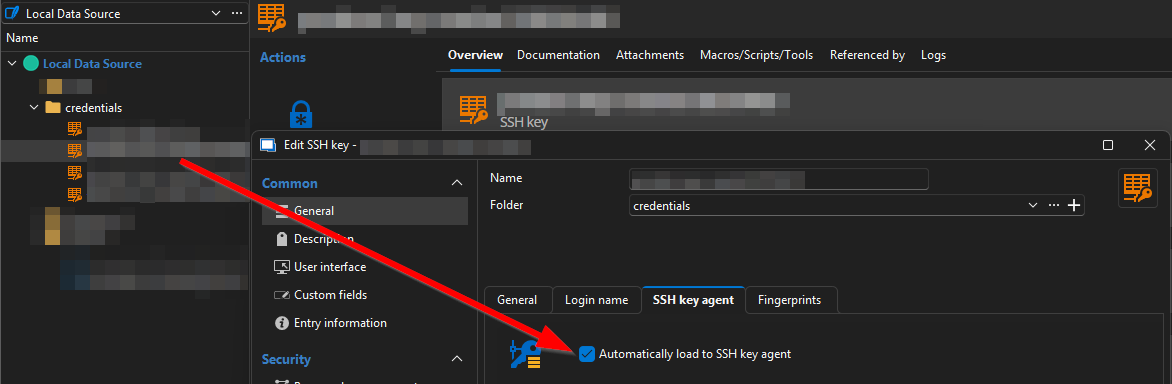
Keys are set to be loaded, note that they are linked to its *.ppk files on the local disk, not imported:
[BUG] RDM asks for SSH key password in a loop, even if correct
Hello,
we are using the RDM SSH key agent (Pageant mode) to load ssh keys from the Local Data Source into the agent on startup.
The keys reference ssh private key files on the disk of the user.
When RDM is started it asks as normal for the passwords of each key which has the checkbox ticked to be loaded on startup into agent.
And then the bug occurs, when the last password was entered correctly without error RDM asks again for the first key.
This goes again and again. If you abort the loop by pressing [X] on the password enter field you see that all keys are already loaded into the key agent.
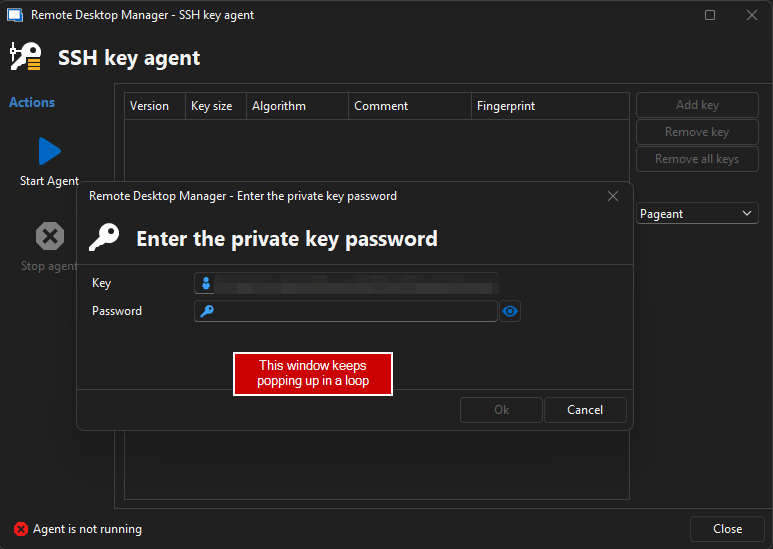
The bug is 100% reproduceable and horrible annoying, could you please fix this ASAP.
Best reagrds,
~
Version: 2025.1.29.0 64-bit
Add support for 'openssh-config' in RDM when using pageant
I got the RDM key agent in mode OpenSSH running - but the error message (from above) is misleading!
First, i had the "OpenSSH Authentication Agent" Windows Service disabled. I expected a error message telling me exactly this.
Second, setting the Startup Type to "Manual" is not enough, the service must run before you press the "Start Agent" Button inside RDM. Why not start the service if it is not running or at least tell the user to start it? The button "Start Agent" in fact does not start any service, it just seems to add the keys to the already running OpenSSH Service.
I had appreciated better error messages.
After testing both agent modes i can say:
If RDM agent uses OpenSSH, you are able to connect via
ssh <ip>but not using puttyIf RDM agent uses pageant, you are able to connect via putty but not using
ssh <ip>
Could you please add a option like "Share keys of pageant with openssh instances" in RDM which defines a --openssh-config file which we then can add in our .ssh\config file (ref)? That's the only way to get both external ssh impls running, openssh and putty.
Add support for 'openssh-config' in RDM when using pageant
Hello,
within RDM every connection has the possibility to check "Use SSH authentication agent" and it uses the keys of pageant just fine.
But when you open a shell outside of RDM and call ssh <ip>, which uses openssh under the hood, no key from the RDM pageant instance is used.
I tried starting the RDM OpenSSH key agent, instead of pageant, but nothing is shown expect:
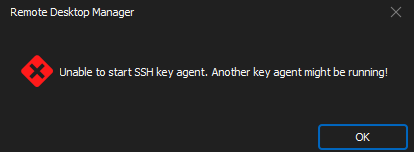
And No, i do not have any other SSH key agent running and have OpenSSH client (OpenSSH_for_Windows_8.1p1, LibreSSL 3.0.2) correct installed.
There is a option on the command line of pageant to define a --openssh-config file, which then can be used by openssh, but i could not find a way to define the command line arg inside RDM.
Best regards
~
$DYNAMIC_PORT$ is overwritten
You are right @Jonathan, the dynamic and destination port are in fact different things. My description was incorrect. I modified the scenario a bit, see the first post again.
There is no dynamic port assigned in the explained scenario, it's always the port from the website.
We would like to always open the same website, let's say localhost:1234, but also have a dynamic port created for the tunnel.
It should be possible to pass the dynamic port to a Events -> After Open -> Command line. For example this line:
cmd.exe /k echo $DYNAMIC_PORT$
The example should start cmd and print something like: 52495 or 43495 or 53456, but never 1234.
Private Keys from Datasources except the default one are not added on startup to key agent
Each Private Key entry has a option called:
[X] General -> Advanced -> Automatically load to key agent
In addition it is possible to auto start the key agent and load all keys:
[X] Options -> Key Agent -> Start agent on application start
This feature does not work for Private Key entries which are not located in the Datasource, which is the default one on startup of RDM.
If this is not a bug and intended, there should be at least a option under Options -> Key Agent to tell RDM to load all Private Keys from all Datasources on start/(-up).
$DYNAMIC_PORT$ is overwritten
I already mentioned the Before/After action(s) which can technically do everything what you can imagine. A script triggered e.g. requires the dynamic port but the URL is still a static port.
$DYNAMIC_PORT$ is overwritten
Yes there is a reason why the website isn't configured like http://localhost:$DYNAMIC_PORT$. The variable can also be used in other sections of the entry and thus the URL may does not need to contain the dynamic port anymore. -> Before/After action(s).
$DYNAMIC_PORT$ is overwritten
The variable $DYNAMIC_PORT$ of a "Web Browser (http/https)" entry is overwritten if the "Website" under "General > General" contains a hardcoded port.
Scenario:
Create a new "Web Browser (http/https)" entry
Enter website: https://localhost:1234
Switch to "VPN/SSH/Gateway" and setup: "Open: Always connect" + "Type: Configure -> SSH"
Switch to tab "Settings" and define under "Outgoing Tunnel Settings" Mode: Local, [x] Use dynamic port, Source+Destination: 127.0.0.1, Destination port: 4321
Result:
$DYNAMIC_PORT$ is overwritten by the port we defined for the website and thus equal to 1234, instead of a random dynamic port - viewable via "Events" > "After Open" > "Message Prompt".
Expected:
$DYNAMIC_PORT$ should resolve to a random port, independent of the entered website url.
Additional info:
If the website does not contain a hardcoded port, the variable $DYNAMIC_PORT$ is set correct, but this behavior seems wrong to me as the description says:
"Returns the dynamic port used when the entry uses an SSH VPN with a dynamic port set up"
Improve startup time on windows
Hi James,
thanks for the tip. The application is installed, not portable. Unfortunately running the *.bat file didn't changed much.
I saw some warnings about "Failed to load dependency xy", full output: https://pastebin.com/dt3vW167 but I think this is the normal behavior.
What's the 'to expect' startup time of RDM if there is nearly nothing configured on your system?
Are there any other things which may slow down the application?
Best regards,
Chris
Improve startup time on windows
Are there any options to speed up the startup time of the Remote Desktop Manager on Windows 64x?
It takes by default about 15-20sec until the application is ready.
That may sound not much, but it feels like 1 Minute if you compare it with a double click onto a *.rdp shortcut on your desktop.
Best Regards
Chris