
spyvou
Force Application close to all users
Yes that's exactly what we are looking for. Hope to hear from you soon.
Best Regards
Spyros
Force Application close to all users
Hey Hubert,
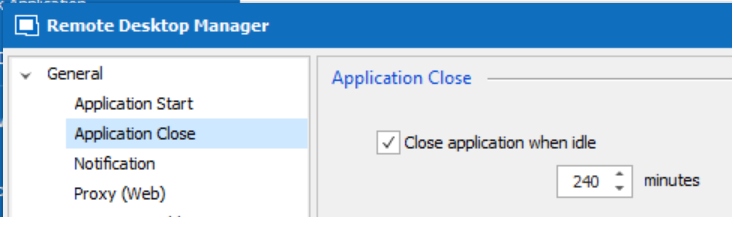
Just to clarify what we want is a gpo to set close application when idle as show in attached picture.
Best Regards,
Spyros
Force Application close to all users
Hello Hubert,
Any news on this issue? Is case still open?
Regards
Force Application close to all users
Hello, some users have local datasource.
Regards
Force Application close to all users
Hello,
Thank you, we will add this to our todo list, as it's currently not possible to do this.
At the moment, you could use the system setting to disconnect from the datasource on idle, and there is also the lock on idle feature available.
Regards,
Hello Hubert,
Did you manage to create a GPO setting to force the application to close after idle timeout?
Best Regards
Force Application close to all users
Hello Hubert, thanks for your prompt response.
Are these two options you suggesting controlled by GPO or even some registry setting? We just dont want someone to "accidently" forget to enable them.
Regards
Force Application close to all users
Hello to all,
Is there a way to force the application to close after idle timeout, to all users of Remote Desktop Manager. I cant find any GPO setting relative to that.
Regards