Force Application close to all users

Hello to all,
Is there a way to force the application to close after idle timeout, to all users of Remote Desktop Manager. I cant find any GPO setting relative to that.
Regards
All Comments (14)
Hello,
Thank you, we will add this to our todo list, as it's currently not possible to do this.
At the moment, you could use the system setting to disconnect from the datasource on idle, and there is also the lock on idle feature available.
Regards,
Hubert Mireault
Hello Hubert, thanks for your prompt response.
Are these two options you suggesting controlled by GPO or even some registry setting? We just dont want someone to "accidently" forget to enable them.
Regards
Hello,
you find the mentioned settings in Administration => System Settings => Applications
Regards,
Min
To add on to what Min said, the logoff settings are in the System Settings, which means they will be automatically applied to all of your users connecting to this datasource. As a note, the logoff setting will only work as expected if your users don't save the password of the datasource in their configuration.
As for the lock settings, it's done on a per-user basis in File>Options>Security, there is no GPO for this one. They will also need to configure a password on RDM (or use their windows login).
Regards,
Hubert Mireault
Hello,
Thank you, we will add this to our todo list, as it's currently not possible to do this.
At the moment, you could use the system setting to disconnect from the datasource on idle, and there is also the lock on idle feature available.
Regards,
Hello Hubert,
Did you manage to create a GPO setting to force the application to close after idle timeout?
Best Regards
Hello,
We still have our ticket opened for this. We will augment priority.
Did the other features (disconnect datasource, lock) not work for your case by the way?
Regards,
Hubert Mireault
Hello, some users have local datasource.
Regards
Thanks for the information, that makes sense.
We will update this thread once we have an update on the GPO.
Regards,
Hubert Mireault
Hello Hubert,
Any news on this issue? Is case still open?
Regards
Hello,
Unfortunately, no update on this, but our ticket is still open. There's a lot of challenges with implementing this if we want to close RDM in a "clean" way, and since we haven't gotten many demands for this, we haven't yet prioritized it.
Regards,
Hubert Mireault
Hey Hubert,
Just to clarify what we want is a gpo to set close application when idle as show in attached picture.
Best Regards,
Spyros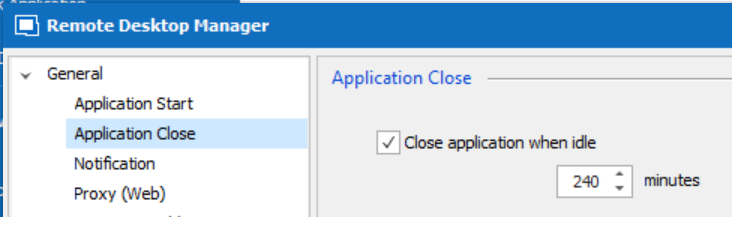
closeapplication.png
Thank you for the clarification, I didn't remember we already had this option in File>Options. If this one works for you and you simply want a GPO to force it to your users, I think it should be much simpler than what I had in mind. I will raise the priority, and we will try to have it for RDM 2023.1.
Regards,
Hubert Mireault
Yes that's exactly what we are looking for. Hope to hear from you soon.
Best Regards
Spyros
Hello,
We've added the GPO to close Remote Desktop Manager after a certain amount of idle time (ForceCloseOnIdle), this will be available with the upcoming version 2023.1
Regards,
Jafran Majeau