
christopher_muncan
Expiring Password Credentials
thank you for this. Yeah it would be a useful feature to prevent accidentally locking out your account if you know how long your password is good for.
Expiring Password Credentials
I just tried setting that the password expires yesterday but it is still allowing me to use the credential & current password.
Expiring Password Credentials
I have just set this now with the expiry of "tomorrow" and I will see what happens with it. My only concern with this type of a solution is that you have to set the new entry for when it expires. So it could very well be right on the right track, but some slight modification in that you just tell it that each new password is valid for say 12 hours and after that point, the password would get wiped out
Expiring Password Credentials
We have a requirement where our passwords are generated for us every 12 hours. Unfortunately they have locked down the API to CyberArk so we cannot even use that feature to get the new password each time. What I did though was just manually create a username/password credential and each day I go in and update the password that I manually get from CyberArk. What I am hoping for though was for there to be some option in the credentials that says your password expires after x hours/days/etc. Would this be something that is possible to add to the Password Management section of the credential to have something like "Password Expires After [x] hours"? Then if the credential is used again after say 12 hours, the password will be invalid and the user will be prompted for a new one?
Again, not sure if something like that would be possible, but this would fix many issues and unnecessary lockouts when attempting to use the credential after CyberArk has changed the password on us.
Am thinking something like the screenshot:

Mouse Cursor when Typing not displaying properly
James, great and fantastic news...the Version 1903 was just rolled out last night to our company machines. After it was installed, the cursor is now displaying as expected!
Mouse Cursor when Typing not displaying properly
HI James, unfortunately my machine is company owned and managed. Even with local admin rights, I do not have permissions to perform any updates manually.
Mouse Cursor when Typing not displaying properly
WINVER for my machine where I am running RDM

Here's WINVER for one of the servers in question

Mouse Cursor when Typing not displaying properly
Hi James, sorry you must have misinterpreted my comment. When I use the "external" mode, it works fine regardless of the RDP type I use.
The issue is not resolved yet though within RDM itself because when I use embedded mode, the typing cursor still shows up as those little dots and not the expected "i".
Personally there is no point in using RDM if all it is going to do for me is open up external RDP windows. That is what I am avoiding by using your RDM...I want to use the embedded mode to have the tabbed RDP sessions but to have the typing cursor to show the correct "i". It seems to me like it is a potential issue with the scaling? I don't know, just spitballing here.
Mouse Cursor when Typing not displaying properly
ah, ok I did that and when I use external it works and displays the cursor correctly. In fact, I even tried this with the latest RDP protocol, not FreeRDP, and that worked also.
I do not think that this option is viable though, because the main reason for using RDM is for the ability of having all of the RDP sessions in 1 managed window where I can hotkey between the sessions. If I end up using external, then the only thing that the tool is managing are the connections but not really giving me any benefit.
Mouse Cursor when Typing not displaying properly
after selecting either of these options, I can no longer connect to the servers. I get this error message:

Mouse Cursor when Typing not displaying properly

I've installed RDCM and here's a similar screenshot showing the same issue:

same issue even with RDCM. But when using native MSTSC, it is working just fine
Mouse Cursor when Typing not displaying properly
I am using the most recent version of RDM the Free edition (v4.0.30319).
I am using a RDP (Microsoft Remote Desktop) session and it seems to happen when working with Windows Server 2008 & 2012. When I connect to my home computer which is running Win10, everything is fine. It just seems to be the Windows Server series. I can confirm that it is doing this for at least these:
Windows Server 2012 Datacenter
Windows Server 2016 Standard Edition
Again, my Windows 10 connections are all fine, just the Windows Server 2012 & 2016 are having the issue.
Mouse Cursor when Typing not displaying properly
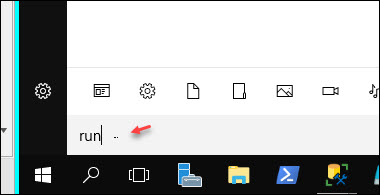
when connected using smart sizing, well I've tried all various methods, the big "i" cursor when typing does not display correctly. The only thing that shows are 2 little "dots/bars" for the bottom of the cursor.
See the screenshot which shows this.


how can this be fixed? I've tried various settings in the sizing mode and aside from opening the connection externally (which I don't want to do)the cursor shows as those little dashes