Mouse Cursor when Typing not displaying properly

when connected using smart sizing, well I've tried all various methods, the big "i" cursor when typing does not display correctly. The only thing that shows are 2 little "dots/bars" for the bottom of the cursor.
See the screenshot which shows this.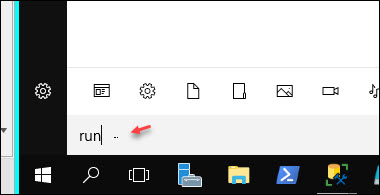


how can this be fixed? I've tried various settings in the sizing mode and aside from opening the connection externally (which I don't want to do)the cursor shows as those little dashes
2020-08-24_15-58-34.jpg
All Comments (16)
Hello Christopher,
Thank you for contacting us on that matter!
Which version of RDM and what type of Data Source you are currently using? Are you on the Free or the Enterprise Edition of RDM?
Also, are you experiencing this issue with all of your remote hosts or only a select few? If only some of them have this issue, could you please tell me their OS?
Best regards,
James Lafleur
I am using the most recent version of RDM the Free edition (v4.0.30319).
I am using a RDP (Microsoft Remote Desktop) session and it seems to happen when working with Windows Server 2008 & 2012. When I connect to my home computer which is running Win10, everything is fine. It just seems to be the Windows Server series. I can confirm that it is doing this for at least these:
Windows Server 2012 Datacenter
Windows Server 2016 Standard Edition
Again, my Windows 10 connections are all fine, just the Windows Server 2012 & 2016 are having the issue.
Hello Christopher,
Thank you for your quick reply!
That being said, would it be possible for you to provide me a screenshot of your Help -> About window?
Also, I am curious to see if this issue could be caused by the ActiveX we are using to launch RDP connection in embedded mode. For this reason, would it be possible for you to install RDC Manager, as a test, and see if the same issue occurs when you connect to your remote hosts? Since both products use the same ActiveX, it will allow us to confirm if this behavior is tied to it or not.
This application can be downloaded here: https://kb.devolutions.net/rdm_rdc_manager.html
Best regards,
James Lafleur

I've installed RDCM and here's a similar screenshot showing the same issue:
same issue even with RDCM. But when using native MSTSC, it is working just fine
Hello Christopher,
Thank you for your reply!
Would it be possible for you to go under File -> Options -> Types -> RDP and use the first dropdown menu next to "RDP" to select either "Free RDP Latest" or "Free RDP 7.0"?
While there is no guarantee that changing the RDP engine will solve this issue, this would be the only way to work around an issue tied to the RDP protocol used in embedded mode in the application.
Best regards,
James Lafleur
after selecting either of these options, I can no longer connect to the servers. I get this error message:
Hello Christopher,
Thank you for performing this test. In that case the last option available to you is to launch the RDP connection in external mode. To do so, you will need to go in the properties of your RDP entry, and change the display from "Embedded" to "external".
Best regards,
James Lafleur
ah, ok I did that and when I use external it works and displays the cursor correctly. In fact, I even tried this with the latest RDP protocol, not FreeRDP, and that worked also.
I do not think that this option is viable though, because the main reason for using RDM is for the ability of having all of the RDP sessions in 1 managed window where I can hotkey between the sessions. If I end up using external, then the only thing that the tool is managing are the connections but not really giving me any benefit.
Hello Christopher,
In that case. since the latest RDP protocol works for you, I would recommend that you use it to solve this issue in embedded mode.
Best regards,
James Lafleur
Hi James, sorry you must have misinterpreted my comment. When I use the "external" mode, it works fine regardless of the RDP type I use.
The issue is not resolved yet though within RDM itself because when I use embedded mode, the typing cursor still shows up as those little dots and not the expected "i".
Personally there is no point in using RDM if all it is going to do for me is open up external RDP windows. That is what I am avoiding by using your RDM...I want to use the embedded mode to have the tabbed RDP sessions but to have the typing cursor to show the correct "i". It seems to me like it is a potential issue with the scaling? I don't know, just spitballing here.
Hello Christopher,
Thank you for this clarification!
That being said, could you please run the "Winver" command on your Windows 10 workstation and provide me the result?
I will then be able to see if I am able to reproduce this issue on our end.
Best regards,
James Lafleur
WINVER for my machine where I am running RDM
Here's WINVER for one of the servers in question
Hello Christopher,
Perfect! Would it be possible for you to update your Windows 10 to the latest version and see if this issue still occurs?
Best regards,
James Lafleur
HI James, unfortunately my machine is company owned and managed. Even with local admin rights, I do not have permissions to perform any updates manually.
James, great and fantastic news...the Version 1903 was just rolled out last night to our company machines. After it was installed, the cursor is now displaying as expected!
Hello Christopher,
That is fantastic news indeed! I am glad to see that it worked.
Do not hesitate to contact us again if you require further assistance.
Best regards,
James Lafleur