
gingershamen
ssh sessions and username/password options
Thanks Xavier, this is a step in the right direction, however it looks a bit different in my Windows client:
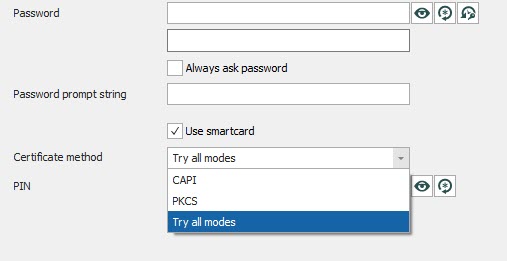
CAPI (Microsoft's Cryptography API) and PKCS both seem to relate to PIV smartcard functionality. Whilst it looks possible to use SSH with PIV, we use OpenPGP for our SSH connections, and they seem to work a bit differently.
ssh sessions and username/password options
Hi Xavier,
Yes, that's correct. Here's some info on how it works:
The Authentication subkey of an OpenPGP key is used as an SSH key to authenticate against a server. Keys stored on YubiKey are non-exportable; all signing and encryption operations happen on the card, rather than in OS memory. When logging into an SSH enabled server with any standard SSH client, the user will be required to use their YubiKey to send a One-Time Password (OTP) along with their account username and password (though I don't use a password). The SSH Server, upon validating the SSH user and password, will pass the OTP provided by the YubiKey to the Yubico authentication server. Upon validation of the OTP, the user will be able to login to the SSH server and proceed as normal.
We manage a lot of Linux servers and are able to use YubiKey with PuTTy, but I like RDM's SSH client and it would be good to have everything in one place.
I'd be happy to act as a guinea pig for testing if you'd be interested in adding this functionality to RDM?
ssh sessions and username/password options
Hi Xavier, I'd also like to use my Yubikey for SSH and the steps above don't seem to work.
I can connect without a password by only specifying the username (general > username) and a private key (private key > private key type: file) plus a passphrase (private key > passphrase: Always prompt for passphrase).
However, instead of using a private key file, I'd like to use the Yubikey which stores the private key securely in a way which is irretrievable.
The main problem is that I don't see a suitable option under the "Private Key" settings. Has anyone got this working?