ssh sessions and username/password options

I have a couple of questions regarding session entries.
1) Is it possible to create an SSH session without a username and/or password provided? I'm looking to setup the RDMequivalent to: ssh hostname, not ssh user@hostname.If I leave username and password blank, it doesn't work. It's seems to be trying to pass $null values as user and password values.
2) Is it possible to create an SSH session that works with a Yubikey? I have a Yubikey that uses a passphrase + yubikey output. I would like to know how to have RDM specify the user and the passphrase, then wait for me to hit my Yubikey (which will append my generated code and a Carriage Return).
All Comments (13)
Hi Tom,
1) The simpler answer is no, the username is required for the connection. Can you describe to me your user case? What is it you are trying to accomplish?
If you want to open the session with custom credentials, you can use the Right Click -> Open with Parameters -> Open (Select Credentials)... -> Custom to fill custom credentials when launching an entry.
If it is because you have multiple user using the same data source, you can also make them edit there user specific settings to override the credentials of the session. The user specific settings can be changed through the Right Click -> Edit -> User Specific Settings option. There will be an Override Credentials check box.
2) Most likely, though admittedly we did not test this specific case. Our test were mainly with Google Auth. I can't think of a reason why it would not work though.
For it to work, you'd need to set the SSH Shell -> Advanced -> "Interactive authentication in terminal option" to True. After enabling this option, if you still want the password autofill to work, you'd have to set the SSH Shell -> Terminal -> "Password prompt string" to the expected Password label (often something like "Password:").
Please, tell me if you need more help.
Best regards,
Xavier Fortin
For #1, I basically want to leave the username and password empty and just enter my credentials at the remote shell. That isn't possible now?
I don's specify a user/pass for any of my RDP sessions and they work just fine. I also don't recall having this issue on the Windows version of RDM. Sometime I want to login using my account, and sometimes I want to login using the administrator/root account.
For #2 I would like to specify my username and the static portion of my password then have it wait at the remote prompt for me to send the code from my yubikey.
Hi Tom,
1) No, at this moment this is not possible. I can make it so that if you leave the username field empty, you will be prompted for it in a dialog window. Would this be alright with you?
2) As explained in my previous post, I believe it should work. Though, the username field must be filled. Have you tried to follow the instructions I've laid out?
Best regards,
Xavier Fortin
1) That might be an acceptable alternative. Another might be to allow RDM to use a local terminal for SSH in the way that the Windows version allowed you to use Putty. Would that allow for the entering of your credentials in the remote shell, as opposed to using dialog boxes from RDM?
2) I couldn't get this to work properly. Perhaps I am doing it incorrectly. Would you happen to have an KB article that shows an example of this sort of thing?
Hi Tom,
1) With how the SSH Terminal is done at the moment, this would still requires us to implement the user authentication part. The SSH Terminal component is only an SSH terminal, it has no local mode.
2) Well, as I mentioned, we did not test on a server with Yubikey auth. What is the behavior your are observing?
I can show you how I'm setup on my side. Firstly, because of point 1) the username is required. So is the password if "Always ask password" isn't checked:
Secondly, we need the "Password prompt string" to do the autofill. This is the label that would be shown when come the time to authenticate using the standard method through the Terminal app:
Thirdly, and most importantly, "Interactive authentication in terminal" must be set to True. This is what allows the 2FA authentication to appear in the terminal:
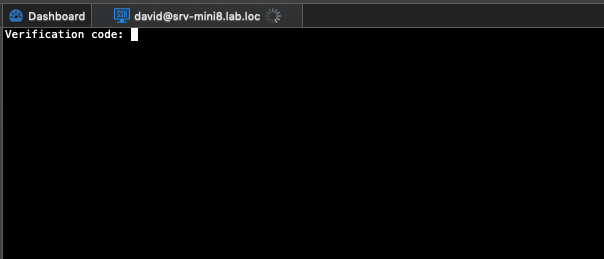
Finally, when I launch my session, I get the 2FA prompt as such:
Entering my Google Auth key then connect me properly. I'd expect something similar for Yubikeys.
Best regards,



Xavier Fortin
VerificationCode.png
Advanced.png
Terminal.png
General.png
Hi Xavier, I'd also like to use my Yubikey for SSH and the steps above don't seem to work.
I can connect without a password by only specifying the username (general > username) and a private key (private key > private key type: file) plus a passphrase (private key > passphrase: Always prompt for passphrase).
However, instead of using a private key file, I'd like to use the Yubikey which stores the private key securely in a way which is irretrievable.
The main problem is that I don't see a suitable option under the "Private Key" settings. Has anyone got this working?
Hi,
Your Yubikey actually contains your private key data? if so, it is not supported for now. We'd would need to add an option to prompt for the private key.
Best regards,
Xavier Fortin
Hi Xavier,
Yes, that's correct. Here's some info on how it works:
The Authentication subkey of an OpenPGP key is used as an SSH key to authenticate against a server. Keys stored on YubiKey are non-exportable; all signing and encryption operations happen on the card, rather than in OS memory. When logging into an SSH enabled server with any standard SSH client, the user will be required to use their YubiKey to send a One-Time Password (OTP) along with their account username and password (though I don't use a password). The SSH Server, upon validating the SSH user and password, will pass the OTP provided by the YubiKey to the Yubico authentication server. Upon validation of the OTP, the user will be able to login to the SSH server and proceed as normal.
We manage a lot of Linux servers and are able to use YubiKey with PuTTy, but I like RDM's SSH client and it would be good to have everything in one place.
I'd be happy to act as a guinea pig for testing if you'd be interested in adding this functionality to RDM?
Hi,
This looks like it will need some configuration on our side. Thanks for the detailed explanation!
We'll keep you posted on our progress.
Best regards,
Xavier Fortin
Hi gingershamen,
It's been a while, but we believe we might have the feature you want. In SSH sessions, there is now a new settings called "Use smartcard" that we believe should do what you want: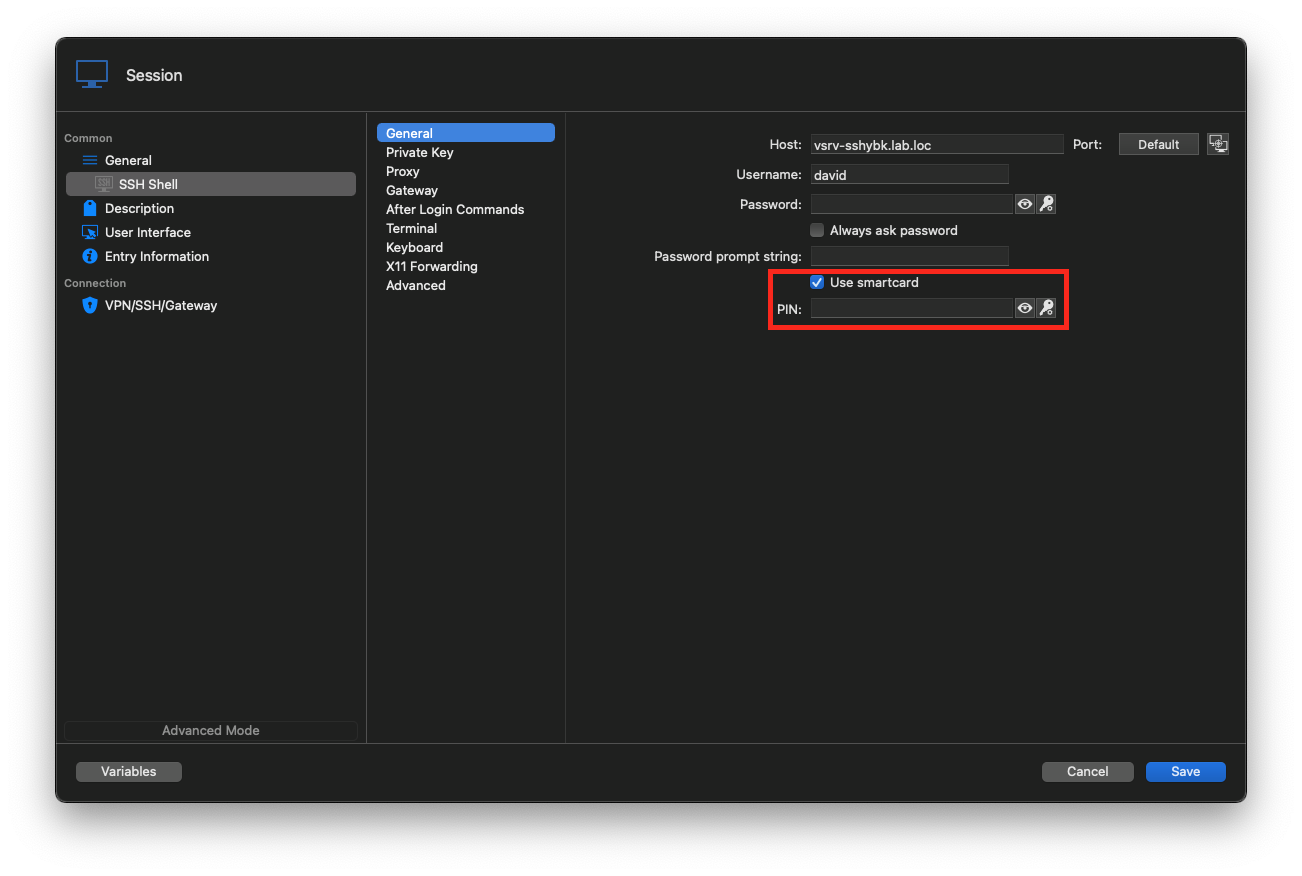
You just need to check it and optionally enter your pin (if you don't you will be prompted for it in the terminal).
Launching the session should then connect without additional input from you.
You can download it here (or here for the free version).
Best regards,
Xavier Fortin
UseSmartcard.png
Thanks Xavier, this is a step in the right direction, however it looks a bit different in my Windows client: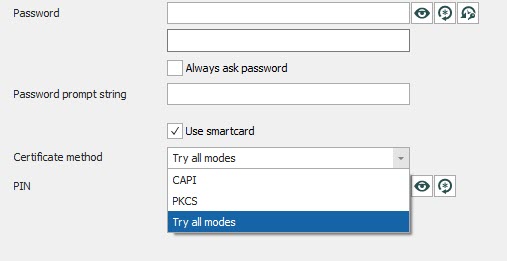
CAPI (Microsoft's Cryptography API) and PKCS both seem to relate to PIV smartcard functionality. Whilst it looks possible to use SSH with PIV, we use OpenPGP for our SSH connections, and they seem to work a bit differently.
2021-03-31_17-53-06.jpg
Hi,
I'll have to get in touch with the engineer working on our SSH module. I'll get back in touch with you when I have more info.
Best regards,
Xavier Fortin
Hi,
Just to make sure, have you made it work in RDM Mac? If so, using CAPI in Windows should also works (we do not support CAPI in RDM Mac, this is the reason why we do not show the pop up).
Best regards,
EDIT: Previously I said that PKCS is not supported in Mac, but CAPI is the method that is not supported in Mac.
Xavier Fortin