
tbflyer
Freezing issues with RDM 2024.3.10.0
Still having freezing issues even after removing the local appdata information. Is this ever going to be fixed?? On version 2024.3.27.0
one other thing.
I had done the following as part of troubleshooting
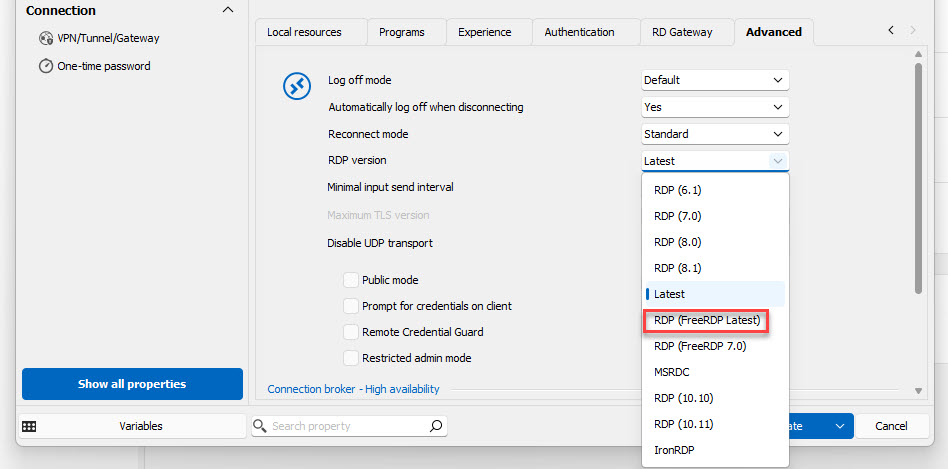
I changed all RDP connections as shown below and the issue continued.
when we finally got to the point that we were ready to kill the app data, they also had me change all of them to Latest (not the freerdp option) thus using mstsc.
perhaps making sure that you are using the microsoft rdp is also key after you have cleared all cache
That is what mine is by default and still has the problem. I am using the Portable version now and had no issues yesterday once I started using it. Will see how today goes but it seems more stable than the installed version.
part of me wonders if setting to freeRDP, closing the app
deleting all app data again and then reseting them all ack to latest might give it the kick it needs
Freezing issues with RDM 2024.3.10.0
Still having freezing issues even after removing the local appdata information. Is this ever going to be fixed?? On version 2024.3.27.0
one other thing.
I had done the following as part of troubleshooting
I changed all RDP connections as shown below and the issue continued.
when we finally got to the point that we were ready to kill the app data, they also had me change all of them to Latest (not the freerdp option) thus using mstsc.
perhaps making sure that you are using the microsoft rdp is also key after you have cleared all cache
Freezing issues with RDM 2024.3.10.0
Just an update for you all.
since I followed these instructions
"Hello tbflyer,
Sure, this is how you can reset the configuration of RDM and also clear the cache.
1. Close Remote Desktop Manager.
2. Go to the following directory: %localappdata%\Devolutions
3. Rename the RemoteDesktopManager folder to RemoteDesktopManager.old.
4. Launch RDM again.
Please note that resetting the configuration will remove all your data source information, and you will need to enter it again.
If you use a Local data source, note that the Connection.db file should be moved from the .old to the new one.
After step four, you have to:
Restart RDM
Close RDM
Go back to %localappdata%\Devolutions
move your Connection.db from RemoteDesktopManager.old to the RemoteDesktopManager folder.
Start RDM
Best regards,"
and forced all RDP sessions from "FreeRDP" to MSTSC (Latest in the menu) all freezes have stopped
My co-worker did the same things and has also, no longer, had any freezes
Freezing issues with RDM 2024.3.10.0
Hello tbflyer,
Sure, this is how you can reset the configuration of RDM and also clear the cache.
1. Close Remote Desktop Manager.
2. Go to the following directory: %localappdata%\Devolutions
3. Rename the RemoteDesktopManager folder to RemoteDesktopManager.old.
4. Launch RDM again.
Please note that resetting the configuration will remove all your data source information, and you will need to enter it again.
If you use a Local data source, note that the Connection.db file should be moved from the .old to the new one.
After step four, you have to:
Restart RDM
Close RDM
Go back to %localappdata%\Devolutions
move your Connection.db from RemoteDesktopManager.old to the RemoteDesktopManager folder.
Start RDM
Best regards,
Thank you
That did the trick for him. I also had him make sure that all RDP instances were set to the MSTSC option from FreeRDP.
Freezing issues with RDM 2024.3.10.0
Hello sirfene,
I also answered in the internal case you have with us.
Best regards,
Patrick
just to let you know I still have not had any freezes since the deletion of the cache and the resetting of the RDP function back to mstsc (away from freerdp)
can you remind me and let everyone know how to delete that stuff?
My co-worker wants to try it for his freeze issues
Freezing issues with RDM 2024.3.10.0
Hello,
After a session with tbflyer, It looks like this issue is related to the cache of RDM.
To check if this is the case, I suggest doing a portable version of RDM on the latest version and try to reproduce this issue.
To do so, you will need to do the following:
(Close RDM)
1- Download the .zip file below:
https://remotedesktopmanager.com/home/thankyou/rdmbin
2- Create a new folder on your Desktop
3- Extract the content of the .zip file into the folder created at #2
4- Go to this folder once the .zip file has been extracted and run remotedesktopmanager.exe
5- Connect to your data source
Best regards,
Update.
After clearing the entire cache (if you could list the instructions here for everyone) I did not have freezes till next day. after you then had me change back to mstsc instead of freeRDP the freezes have stopped completely. I have not had a freeze since 11/27.
now keep in mind the freezes initially started before I ever changed to freerdp, to maybe both the chache deletion needs to happen in conjunction with moving away from frerdp
Freezing issues with RDM 2024.3.10.0
Hi
I still get the issue even with the recommended setting. I have this issue with RDP and SSH session.
The tool is pretty much unusable at this point, and it was working very well before.
Thanks
Same, here, and frankly this is still better than other tools, otherwise I would have given up by now.
Freezing issues with RDM 2024.3.10.0
Hello,
@tbflyer are you using Windows Insider Preview build? If so, you can refer to these posts on our forum from Marc-Andre and Maurice.
https://forum.devolutions.net/topics/43176/my-rdm-crashes#199830
https://forum.devolutions.net/topics/30298/windows-insider-preview-builds
If not, please open a case at service@devolutions.net with a reference to this forum's thread and we will send you a link to investigate your issue in a support session.
Thank you for your collaboration.
Best regards,
No I am not, I use windows 11 on my company machine. I have also heard from others who are seeing the same issues with Devolutions.
Freezing issues with RDM 2024.3.10.0
if you can, please post the full uninstall process including cleaning up anything that is left behind.
I will try a complete clean install and see if that helps.
I see no other options without a deeper dive from Devolutions
Freezing issues with RDM 2024.3.10.0
Sadly this is simply a non-functioning product at this point. I love what it does, but in the last hour I have had it freeze 10 times when I run a copy process.
unless there can be a fix, My organization will need to move on to something stable, even if it does not do what this does.
Freezing issues with RDM 2024.3.10.0
Hello tbflyer,
Thank you for this feedback.
We are still investigating this issue.
Since this is related to the clipboard, could you also check the clipboard diagnostic and send us the result?
https://docs.devolutions.net/rdm/kb/troubleshooting-articles/clipboard-diagnostic/
Is the clipboard diagnostic also making your RMD freeze?
Best regards,
Finally got back to this. the diagnostics show me no information. running the diagnostic has not frozen though yet
I will see if I can make it happen. it is no doubt the copy operation that if freezing it though. it has happened 4 times today.
interestingly, until I close the session my machine is all but stuck.
Freezing issues with RDM 2024.3.10.0
every freeze instance in the last week starts with a copy to the clip board from within the rdp
it has happened 4 times today.
Freezing issues with RDM 2024.3.10.0
I uploaded the file requested
Freezing issues with RDM 2024.3.10.0
No one else experiencing freezes related to Edge WebView proccesses?
actually what do I need to look for when it freezes
another interesting note.
I am running a powershell in an RDP and while script was running devolutions froze
not only that, until I closed it via task manager, I could not type at all, edge, google, word document, txt file.
I am going to send the new log files
Freezing issues with RDM 2024.3.10.0
and now it is not happening
this is just so random
Freezing issues with RDM 2024.3.10.0
Hello All,
Thank you for those tests.
Can you follow the steps in this documentation:
You can use the secure link below to send us the logs;
https://devolutions.sharefile.com/filedrop
Simply name your file “<your name>-FM-43042” to quickly identify it.
Make sure that this test is done when the session is embedded in RDM, and you use FreeRDP.
Best regards,
I will work on this today
I have actually made it happen 3 times so far trying to copy from an RDP session (right click and ctrl-c)
Freezing issues with RDM 2024.3.10.0
here is the logs from the most recent freeze just around 330
[10/10/2024 3:30:11 PM - 2024.3.13.0 - 64-bit] Error silent: [Devolutions.Sessions][Error][2024-10-10 15:30:11Z] failed to set clipboard data
System.ComponentModel.Win32Exception (0x80004005): The operation completed successfully.
[10/10/2024 3:30:11 PM - 2024.3.13.0 - 64-bit] Error silent: [Devolutions.Sessions][Error][2024-10-10 15:30:11Z] failed to set clipboard data
System.ComponentModel.Win32Exception (0x80004005): The operation completed successfully.
[10/10/2024 3:30:11 PM - 2024.3.13.0 - 64-bit] Error silent: [Devolutions.Sessions][Error][2024-10-10 15:30:11Z] failed to set clipboard data
System.ComponentModel.Win32Exception (0x80004005): The operation completed successfully.
[10/10/2024 3:30:11 PM - 2024.3.13.0 - 64-bit] Error silent: [Devolutions.Sessions][Error][2024-10-10 15:30:11Z] failed to set clipboard data
System.ComponentModel.Win32Exception (0x80004005): The operation completed successfully.
[10/10/2024 3:36:00 PM - 2024.3.13.0 - 64-bit] Error silent: [PipeClientTransport][Error][2024-10-10 15:35:54Z] System.OperationCanceledException: The operation was canceled.
at System.Threading.CancellationToken.ThrowOperationCanceledException()
at System.Threading.CancellationToken.ThrowIfCancellationRequested()
at System.IO.Pipes.NamedPipeClientStream.ConnectInternal(Int32 timeout, CancellationToken cancellationToken, Int32 startTime)
at System.Threading.ExecutionContext.RunFromThreadPoolDispatchLoop(Thread threadPoolThread, ExecutionContext executionContext, ContextCallback callback, Object state)
--- End of stack trace from previous location ---
at System.Threading.ExecutionContext.RunFromThreadPoolDispatchLoop(Thread threadPoolThread, ExecutionContext executionContext, ContextCallback callback, Object state)
at System.Threading.Tasks.Task.ExecuteWithThreadLocal(Task& currentTaskSlot, Thread threadPoolThread)
--- End of stack trace from previous location ---
at Devolutions.Ipc.Network.Transport.Client.PipeClientTransport.ConnectAsync(String pipeName, CancellationToken cancellationToken)
[10/10/2024 3:36:01 PM - 2024.3.13.0 - 64-bit] Error silent: System.NullReferenceException: Object reference not set to an instance of an object.
at Devolutions.RemoteDesktopManager.RemoteDesktopManagerCommunicator.Open(String[] parameters)
Freezing issues with RDM 2024.3.10.0
Hello Steven,
Could you share your application logs from RDM under Help -> Application logs?
Could you also check the event viewer to see if anything is related?
Best regards,
There is seemingly no correlation to anything in the Help-> Application Logs. The last messages listed occurred weeks ago.
Also, I've not noted anything related from the event viewer either when these issues occur.
The next time it happens I'll be sure to check these locations again though.
I will do the same
Freezing issues with RDM 2024.3.10.0
Hello,
Thank you for your feedback.
It appears that the issue is related to Windows RDP. I recommend trying a workaround for your RDP session.
Could you please change the RDP version to FreeRDP or IronRDP in your session properties?
Please let us know if this resolves the issue.
Best regards,
FreeRDP is it
Lets see how this works out.
Freezing issues with RDM 2024.3.10.0
The issue also happens when not using RDM. So I guess it needs to be reported upstream to Microsoft. The connection is still up and accepting input, but you cannot see what's going on.
[Window Title]
Remote Desktop Connection
[Content]
Your connection quality is good and UDP is enabled.
[^] Hide details [OK]
[Expanded Information]
Timestamp (UTC): 10/07/24 10:57:25 AM
Activity ID: 45b37f8a-4b93-4314-a436-71bf94440300
[Client details]
Client version: 10.0.22621.4036 (x64)
Local OS: Windows 10 Enterprise x64 (10.0, Build 22631)
[Network details]
Transport protocol: UDP
Round-trip time: 4 ms
Available bandwidth: Greater than 176 Mbps
Frame rate: 0 FPS
[Remote computer details]
Remote session type: Remote desktop
Gateway name: Not in use
Gateway logon method: Not in use
Remote computer: redacted
How did you test this?
thank you in advance
Freezing issues with RDM 2024.3.10.0
We are experiencing freezes seemingly related to website entries (although we're not completely sure) but without being able to properly reproduce it.
When a colleagues RDM was frozen I could enter the task manager of the RDS server he was using RDM thru, and see a bunch of Edge WebView procceses and the RDM task itself being "not responding" - when I forcefully closed all the webview proccesses (related to his user), RDM unfroze and started functioning again. Has anyone else experienced this?
Version 2024.3.12.0.
This interesting, I will have a look the next time this happens.
also someone mentioned windows update, sadly this have been happening for several months if not more so hard to go back and determine.
Freezing issues with RDM 2024.3.10.0
Thank you sir
There does not seem to be any "trigger" that I can determine, though most of the time it is while I am working within the rdp connection itself. the most I have let it sit is just a few minutes, since it usually is right in the middle of doing something.
The local data source is the default
C:\Users\jshea\AppData\Local\Devolutions\RemoteDesktopManager\Connections.db
this has been going on for several months though I have just been basically living with it, hoping that the next update would fix it.
and there are lulls in when it happens. It can go several days without an issue and then happen a few times a day.
I even uninstalled it completely and reinstalled it.
Freezing issues with RDM 2024.3.10.0
This has been happening through several updates, and it continues. Today I have had to end the program in task manager 2 times, and it averages about 8 times a week.
is there a Log that I need to look at when this happens?