
an33
Smart Folder always sorted below normal folders, regardless of Sort Priority
Hello both of you,
Thank you for your replies and for letting me know that this has changed in the latest version. This is a really useful improvement for us.
Best regards
Latest SQL Server version supported by Devolutions Server 2025.3.22
Hi,
We are currently planning upgrades for both our SQL Server and Devolutions Server environment.
Could you let us know what the latest Microsoft SQL Server version that is officially supported with Devolutions Server 2025.3.22. Is SQL 2025 already working with this version?
We need to verify this for the transition period before we complete the upgrade of Devolutions Server itself.
Thanks!
Best regards,
Are major releases of RDM / DVLS always in the same months?
Hi Alexis,
Thanks for the clarification.
We really appreciate the introduction of the Extended Maintenance channel. It is already a great improvement for enterprise environments where major releases need to be tested before being deployed broadly.
As a possible next step, is Devolutions considering something similar to an LTS release in the future? For example, a major version that would continue receiving security updates and critical fixes for a defined period, such as 12 months, even when newer major versions are released.
Especially with the rapid development of new vulnerabilities and exploits, continuous security coverage is very important. At the same time, changes introduced with major releases need to be properly tested and validated before we can roll them out to all users.
An LTS-style version would therefore be an even further improvement on the Extended Maintenance concept and would make long-term upgrade planning significantly easier.
Best regards,
Are major releases of RDM / DVLS always in the same months?
Hi everyone,
We're planning our internal update cycle for Remote Desktop Manager and Devolutions Server and want to use the Extended Maintenance channel.
Since Extended Maintenance only gets security updates until the next major release comes out, we'd like to plan our major upgrades around the release schedule.
Are major releases (e.g. 2026.1, 2026.2, 2026.3) always published in roughly the same months each year?
Is there a roadmap or release calendar for upcoming major releases?
Thanks in advance!
Smart Folder always sorted below normal folders, regardless of Sort Priority
Hi everyone,
We have a question about folder sorting in Remote Desktop Manager.
Our folder structure looks like this:
Folder
 ├─ SubFolder (Normal Folder) – Sort Priority 0
 ├─ SubFolder (Normal Folder) – Sort Priority 0
 ├─ SubFolder (Normal Folder) – Sort Priority 0
 └─ SubFolder (Smart Folder)  – Sort Priority 4
Even with Sort Priority 4 on the Smart Folder and 0 on the normal folders, the Smart Folder still shows up below the normal folders.
Are we missing a setting, or are Smart Folders always sorted below normal folders by design? If there's a way to move a Smart Folder above normal folders on the same level, any hints would help.
RDM Version: 2026.3.18
Thanks in advance!
Show password expiration notifications (bell icon) to non-admin users
Hello,
We heavily use the Notifications feature (bell icon) in Remote Desktop Manager to see which passwords will expire soon.
Is it possible to grant the permission to see these notifications to users who are not administrators in RDM? If so, how can this be configured?
Environment:
Remote Desktop Manager Enterprise
Devolutions Server
Thank you in advance for your help.
Best regards
Extended Maintenance release including features from 2026.3.3
Hi, thank you for the fast reply!
Extended Maintenance release including features from 2026.3.3
Hi,
Do you already know when the next Extended Maintenance version of Devolutions Server and Remote Desktop Manager will be available that includes the features introduced in version 2026.3.3?
One of these features was implemented following a request from our side, which we really appreciate.
It would now be interesting for us to know when these features are expected to become available in an Extended Maintenance release as well.
Thanks!
Best practices for Devolutions Server & Gateway deployment
+1 for the opinion of the original creator of this thread.
We also see that a lot of customers do not want to allow incoming traffic from the internet.
Outbound only connections from the customer would enable us to get a lot more acceptance from customers.
And there are remote access solutions that do it this way:
outbound only connections from the customer
outbound only connections from the MSP
Central server in between
Best practice for sharing linked credentials across multiple vaults
Hello,
We are using Remote Desktop Manager 2025.3.32.0 with Devolutions Server 2025.3.22.0.
We want to maintain shared credentials in one central place and link them to entries in several different vaults using "Linked (external vault)". Because of our permission structure, many users don't have View permissions in the vault where the credentials currently are, so the linked credentials don't work for them.
Our idea is to create a dedicated credentials vault and give every user who needs these credentials View permission on the vault and the credential entries.
Questions:
Is a dedicated credentials vault the recommended best practice for this, or would you recommend keeping the credentials in an existing vault and adjusting the permissions there?
Do users need the "View Password" permission to connect with linked credentials, or is "View" enough, so they can use the credentials without seeing the password?
Is there any other way to share credentials across vaults without giving users access to the source vault? We checked the System Vault, but it doesn't seem to support credential entries.
Thanks in advance!
Best regards
Show Check-Out Status inside Smart Folders in RDM
Hello again,
We were able to test the feature using the Stable Version 2026.1.24 together with RDM Version 2026.3.3, and we noticed the following issues:
The right-click Check-Out and Check-In functionality for "Check in other users" is not working.
The "Check in other users" option was not visible, even though the user is a member of the "Check in (force)" group in Devolutions Server under Administration > System Permissions, after adding the user manually to Administration > System permissions > Check in (force) the option was visible for him.
Could you please let us know whether these issues are caused by an incompatibility between the two versions, or if they are known bugs?
It would be important for us to understand whether this functionality is expected to be available and fully supported in future releases.
Thank you for your support.
Best regards
Show Check-Out Status inside Smart Folders in RDM
Hello Carl,
Thank you for your response. We look forward to your update.
Best regards
Show Check-Out Status inside Smart Folders in RDM
Hello again,
I have one quick question: Do you know when this feature will be available in the stable version of Devolutions Server / Remote Desktop Manager?
We would very much like to implement it in our production environment and would appreciate any information you can provide.
Thank you in advance for your response.
Best regards,
Cisco Secure Client Auto-Upgrade Causes First VPN Connection Attempt to Fail
Hello,
Thank you for the request. We'll have to analyse how the program currently works to see how feasible this is. Some VPN executables don't stay opened after establishing connection, as it might be a service or a different executable that will maintain the VPN connection, meaning the executable will always close and we may not be able to detect whether it was from a successful connection or from a failed one (thus needing us to retry).
I've opened a ticket for this.
Regards,
@Hubert Mireault
Hi Hubert,
thank you for creating a ticket. I recently remembered this topic and wanted to check whether there have been any updates since then.
Have you learned anything new regarding the feasibility of this feature, or is there any progress you can share?
Best regards
Show Check-Out Status inside Smart Folders in RDM
Hello,
thank you very much for the fast response and implementation.
That helps us a lot!
Best regards
Show Check-Out Status inside Smart Folders in RDM
Hello,
Yes, of course we are aware that it would be better to split this across multiple vaults. However, we are facing the issue that entries such as our jump host credentials cannot be made available across multiple vaults, including visibility of the check-out status.
If there is no better solution for the topic mentioned above, I would kindly ask you to convert this into a feature request as suggested.
Best regards
Show Check-Out Status inside Smart Folders in RDM
Hi everyone,
We use Remote Desktop Manager (RDM) together with Devolutions Server and rely heavily on shortcuts within RDM.
The background: for each customer we have linked VMs (jump hosts) that have all the necessary tools installed. On top of that, we make extensive use of the automatic check-out feature, so we can immediately see which jump hosts are already in use (occupied).
This generally works very well. However, due to the growing number of customers and jump hosts, we now have a very large number of entries, which is starting to have a negative impact on performance.
We've therefore been thinking about maintaining the VMs in only one central location in RDM and displaying them elsewhere using Smart Folders (or possibly something else that fits better). This works, but unfortunately the check-out status is not shown inside the Smart Folder (the red marking that indicates an entry is checked out, which for us means "occupied").
My questions:
Would it be possible for future RDM versions to also display the check-out status within Smart Folders?
Or are there better/alternative solutions to achieve this?
Thanks in advance for any suggestions.
Best regards
Cisco Secure Client Auto-Upgrade Causes First VPN Connection Attempt to Fail
Hello,
we noticed a usability issue when using the Cisco VPN extension in Remote Desktop Manager.
When a user starts a VPN connection through RDM and the VPN gateway initiates a Cisco Secure Client upgrade, the Cisco client restarts during the connection process. As a result, the first connection attempt fails.
After the upgrade has completed, the user simply has to start the VPN connection again and everything works as expected.
Would it be possible to add an automatic retry mechanism for this scenario?
For example, if the VPN process terminates during connection establishment, RDM could wait a few seconds and automatically perform a second connection attempt. This would make the update process much more seamless and would avoid confusion for users who currently see the first attempt fail without realizing that the VPN client was upgraded in the background.
We have reproduced this behaviour multiple times and Devolutions Support confirmed it and suggested creating a feature request.
Thanks for considering it.
Question about next stable / extended maintenance release for Devolutions Server
Hi,
thank you we will do that.
Best regards
Question about next stable / extended maintenance release for Devolutions Server
Hello,
we are currently preparing an upgrade of our Devolutions Server environment and are deciding which version path we should take.
We would like to ask if there is already any information on when the stable / extended maintenance release of the 2026.x.x version will be available.
At the moment, we are unsure whether we should:
proceed with the currently available version (2025.3.16.0), or
wait for the stable 2026.x.xx.x release
Since we are currently in the middle of our upgrade planning, this information would help us decide on the best path forward.
We are currently on Server Version 2024.1.13.0
Thanks in advance.
Cleanup IIS Logs
Dear Support Team,
I noticed that on our Devolutions Server, a large amount of storage space is being used due to IIS Logs located under the following path:
C:\inetpub\logs\Log Files\W3SVC1
These are text files in .log format.
We already have Cleanup Logs enabled, as described here:
https://docs.devolutions.net/de/server/web-interface/administration/logs/cleanup-logs/
If I understand correctly, this cleanup feature applies only to database logs. Is there also a way to free up disk space by managing or deleting these IIS log files after a certain age? For example, can log files older than a configurable threshold be deleted automatically, or is manual deletion not recommended?
Kind regards
Link entry missing permissions?
Hi,
which permissions need to be assigned so that users can link entries from one folder to another in Remote Desktop Manager?
The Edit permissions are already in place, but the following error message still appears:
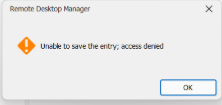
We couldn’t find anything specific in the Vault/System Permissions.
I’d appreciate your support in clarifying which permissions are required.
Thanks a lot!
BG
Delayed RDP Session Initialization via RDM on Windows 11 24H2
Hello,
sorry for the late reply!
We have finally fixed the issue via a setting in VMWare VSphere:
Disabling 3D acceleration for the virtual graphics card.
This is okay for us since we do not need the 3D acceleration but it really seems to be an issue regarding 24H2.
But thank you for the continuous support in that matter.
Best regards
Selective Override of “Automatic Check-in After” Setting for Specific Entries
Dear Support Team,
We are currently using the Automatic Check-in After feature under Administration → System Settings → Vault → Automatic Check-in After in Remote Desktop Manager. This functionality works very well for our general use cases, as it ensures entries are not unnecessarily locked in case a user forgets to check them back in or closes RDM before doing so.
However, we now have an additional use case where it would be beneficial if certain entries were not automatically checked back in after the specified timeout. In general, the goal is to have a visual indication that a particular entry is currently in use by a specific person.
Are there any options available to override this setting for specific entries or folders, or is there an alternative approach that you would recommend to achieve this?
Thank you in advance for your support.
Kind regards
Delayed RDP Session Initialization via RDM on Windows 11 24H2
Hello,
thank you for the continuous support, here you have the output of "winver".
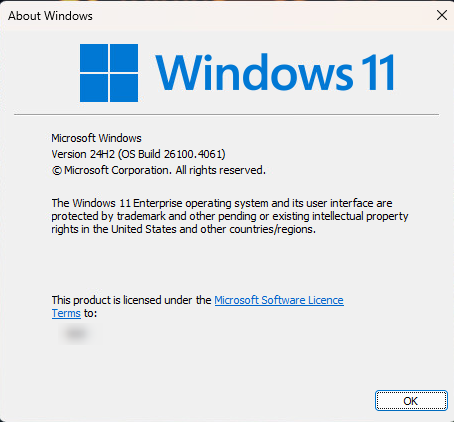
Best regards