
clark
Need help with Hyper-V Dashboard
Hi James & Patrick. I just installed 2023.2.11.0, and it looks like the Hyper-V dashboard is fixed in this release. Looking at the release notes, maybe it was related to this "Fixed session tools credentials denied" ? At any rate it seems to be working again, so thanks for fixing that!
Documentation Tab - available offline?
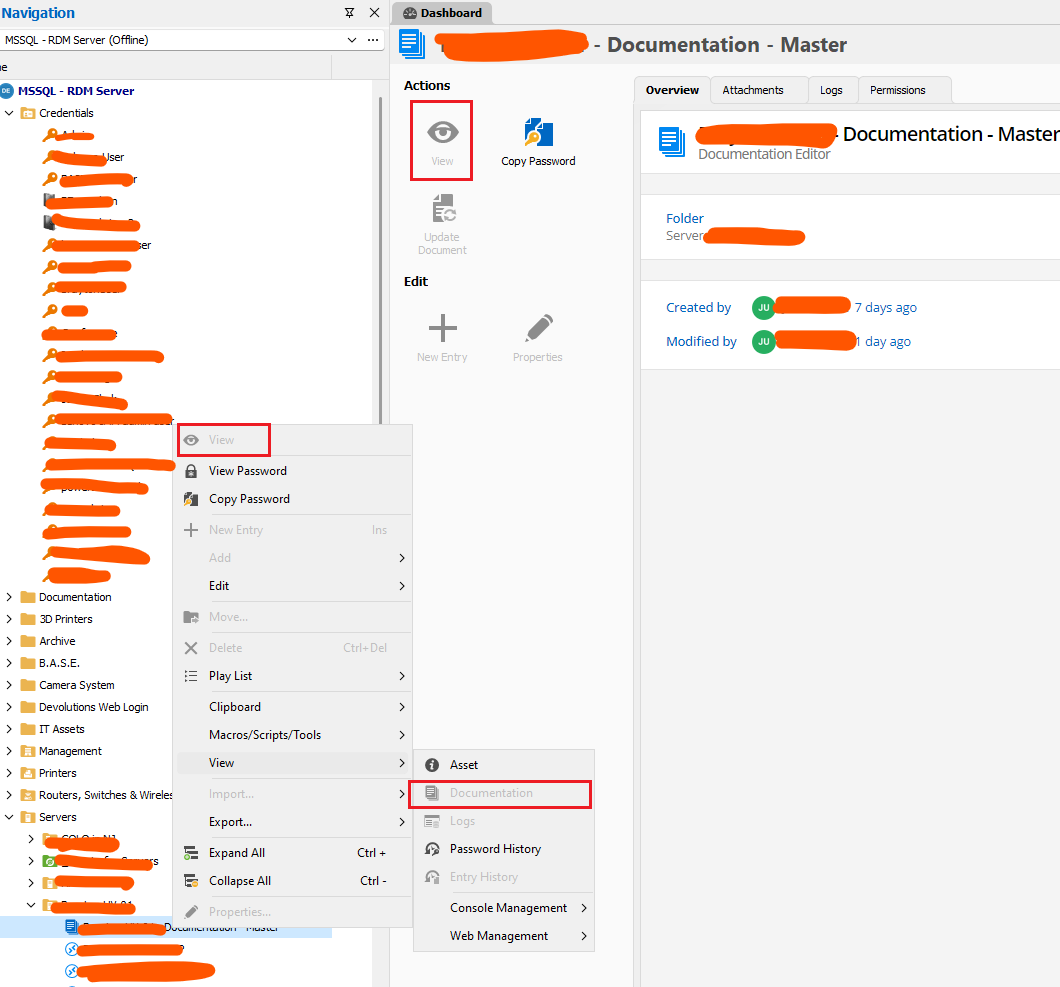
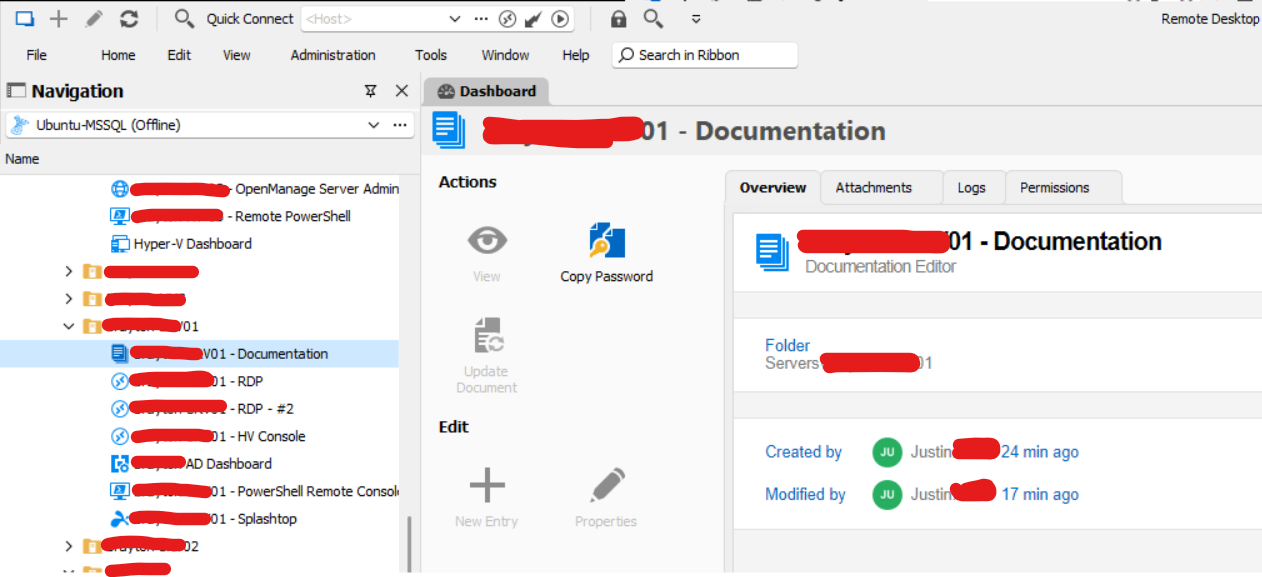
Hi Stéfane. This is great! The tab is visible when offline just as we had hoped. If I may, I think there may still be one tiny bug. We are also experimenting with the Documentation entry type. As shown above, when offline the "View" button is disabled, as are any options in the right-click menu to open up that Documentation entry. This issue remains, however, there is good news! If we simply double-click the Documentation entry it opens right up, even when offline. So, it looks like it's still not working, but it actually is. We jsut need to sovle the View button being disabled.
We're very happy we can begin using this feature. As you can imagine, the times when you might need your documentation the most are potentially those same times when the network might be down, and you cannot reach your data source. Knowing we can access our notes for the network and servers, even when offline, is huge for us. Thank you so much for impletmenting this feature.
If you are able to fix the disabled View button, even better, but it's working now and that's all that matters!
Need help with Hyper-V Dashboard
Thanks Patrick. We can get by, as we have been, by using RDP to connect into a server with the full Windows GUI installed, and run the built-in Hyper-V manager from there to adminster our headless Hyper-V servers. Not a big deal, just missing the convenience of the Hyper-V dashboard.
Thanks for all your help on this. Please let us know if the fix, once available, is planned for a specific version. Otherwise we'll just keep an eye on the release notes.
Thanks again,
-Justin
Need help with Hyper-V Dashboard
Hi Patrick. The good news is that worked. The Hyper-V dashboard works properly in the portable version you linked, 2022.3.35.0. Not sure what has occurred in the updates since then, but this gives us a starting point. Please let me know what is next. We're happy to help debug if you like. For reference, we have only two users on the datasource so it's very easy to do things like you described above. We can always work from a local copy of the vault if needed.
Thanks,
-Justin
Documentation Tab - available offline?
Thanks so much Stéfane. This is making more sense now. I figured we must be doing something wrong. If possible we'd love to know when to expect that next minor revision. We've been waiting for this feature (mostly patiently!) for a long time. I noticed this morning you went live with 2023.2.9.
Thanks again.
Justin
Documentation Tab - available offline?
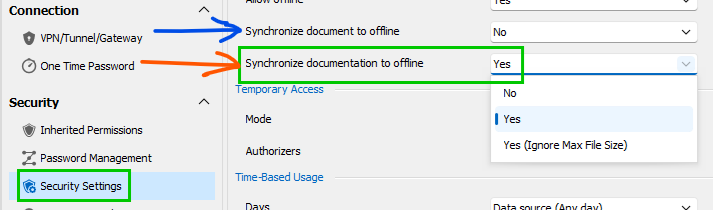
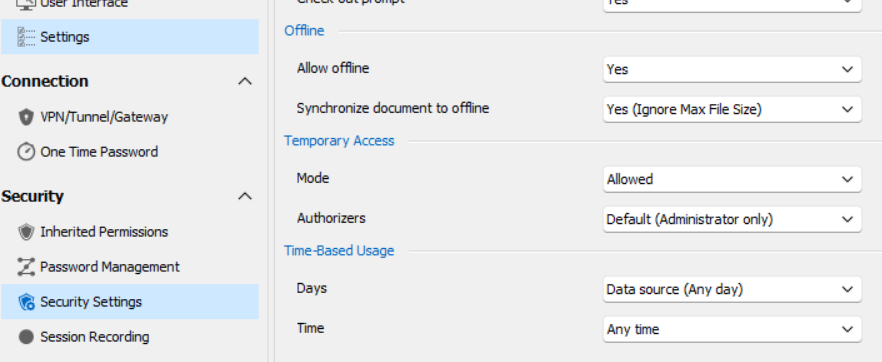
I think we discovered a clue here! In Erica's screenshots, shes highlighted in gree an option to sunc "Documentation" as well as one for "Documents". I did not even notice we only have "Documents" in v. 2023.2.9. Looks like you are running a different codebase than we have! We have the blue arrow, NOT the orange arrow.
See below:
Erica's screenshot:
Our screenshot:
Need help with Hyper-V Dashboard
Thanks for looking into this. Just for an update, this morning our team upgraded to RDM v 2023.2.9.0 64-bit, and this issue with the empty Hyper-V Dashboard remains. Looking forward to what you discover in the lab.
I enabled the debug log, and I see these messages showing access denied. However, clicking the "Open Hypervisor Host" button opens the RDP conection with no issues using the same credentials.
--- [BEGIN LOG] ---
Silent: System.UnauthorizedAccessException: Access is denied.
at System.Runtime.InteropServices.Marshal.ThrowExceptionForHRInternal(Int32 errorCode, IntPtr errorInfo)
at System.Management.ManagementScope.InitializeGuts(Object o)
at System.Management.ManagementScope.Initialize()
at Devolutions.RemoteManagement.Execution.WmiExecutionContext.Connect()
at Devolutions.RemoteManagement.Execution.ExecutionContextFactory.ConnectToHyperVWithVersionCheck(WmiExecutionContext context)
at Devolutions.RemoteManagement.Execution.ExecutionContextFactory.GetOrCreateExecutionContext[T](Object key, Func`1 createFunc, Action`1 overrideConnectFunc)
Local command executed - HyperV-GetTargetComputers - Error - 35 ms
Silent: System.UnauthorizedAccessException: Access is denied.
at System.Runtime.InteropServices.Marshal.ThrowExceptionForHRInternal(Int32 errorCode, IntPtr errorInfo)
at System.Management.ManagementScope.InitializeGuts(Object o)
at System.Management.ManagementScope.Initialize()
at Devolutions.RemoteManagement.Execution.WmiExecutionContext.Connect()
at Devolutions.RemoteManagement.Execution.ExecutionContextFactory.ConnectToHyperVWithVersionCheck(WmiExecutionContext context)
at Devolutions.RemoteManagement.Execution.ExecutionContextFactory.GetOrCreateExecutionContext[T](Object key, Func`1 createFunc, Action`1 overrideConnectFunc)
at Devolutions.RemoteManagement.Execution.ExecutionContextFactory.CreateWmiHyperVExecutionContext(ConnectionContext context, RemoteManagementHyperVVersion hyperVVersion)
at Devolutions.RemoteManagement.Commands.HyperVGetTargetComputersCommand.Execute(ConnectionContext context, HyperVGetTargetComputersParameters parameters)
at Devolutions.RemoteDesktopManager.Business.RemoteCommandDispatcher.ExecuteCommand[T,U](String commandName, ConnectionContext context, U parameters, Boolean addEntryToProfiler)
at Devolutions.RemoteDesktopManager.Frames.Embedded.FreEmbeddedHyperVVirtualMachines.<RefreshHyperVVirtualMachines>b__91_0()
Thread : 19
----------------------------------------
19 - OfflineManager.SaveMeta...
19 - Expiration : 13 ms
19 - OfflineManager.SaveMeta : 13 ms
Documentation Tab - available offline?
OK, thanks so much for looking into this. Just to confirm what we are seeing, the Documentation tab still disappears when not connected to database, and the Documentation entry type becomes disabled when offline. It's difficult to avoid being in offline mode when the database is not available, as the app specifically requests going offline when the database is not reachable.
RDM v 2023.2.7.0 64-bit (Beta)
Datasource: (official) MSSQL database hosted on Ubuntu Linux
Vault settings as shown:
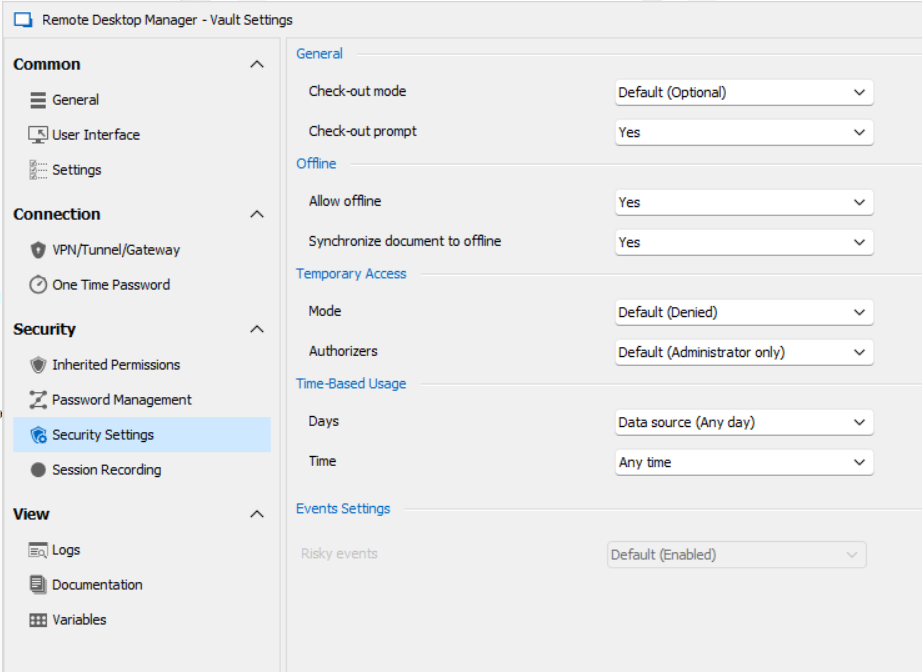
I ran the profiler as requested. I do see the following, which looks encouraging, however the Documentation tabs and Entry types are still unavailable when offline.
In your example, under "Sync to Offline, we see lines such as:
"Documentation - xyz"
I have a few embedded "documents" synced but no lines showing "Documentation". Maybe this is a clue, it's maybe not even trying to sync the documentation features for some reason, not tabs or entries.
Main thread (UI)
----------------------------------------
RefreshConnections...
LoadConnections UI - [Microsoft SQL Server : Ubuntu-MSSQL] - ReadOnly - 64-bit...
Engine.Clear - DisposeInternalList : 0 ms
HasSecurityChanged : 2 ms
HasChanged : 2 ms
Reload: True - HasSecurityChanged: True - HasChanged: True
Engine.Clear - DisposeInternalList - ClearRoot : 0 ms
LoadConnectionsFromDataSource...
LoadDataSourceSettingsFromDataSource...
GetDataSourceSettings : 18 ms
LoadDataSourceSettingsFromDataSource : 18 ms
GetConnections...
Database.GetConnections...
Reading connections from database : 103 ms
DecryptData : 3 ms - Count : 1091
DeserializeData : 32 ms - Count : 1091
Database.GetConnections : 143 ms
GetConnections : 143 ms
DoMergeConnections - ReadOnly...
Loop...
Migrate Connection : 6 ms
Loop : 8 ms
Merge Full List...
Offline : 6 ms
Merge Full List : 6 ms
DoMergeConnections - ReadOnly : 15 ms
LoadConnectionsFromDataSource : 229 ms
Load connection overrides...
Has changes : 2 ms
Load connection overrides : 2 ms
LoadConnections [Microsoft SQL Server : Ubuntu-MSSQL - Global Vault] - ReadOnly - 64-bit : 28 ms
FavoriteManager.LoadFolders : 7 ms
LoadConnections UI - [Microsoft SQL Server : Ubuntu-MSSQL] - ReadOnly - 64-bit : 289 ms
RefreshConnections : 289 ms
Connection States: Refresh...
GetOpenedConnections...
Opened - by process : 7 ms
GetOpenedConnections : 7 ms
Connection States: Refresh : 20 ms
TreeView.LoadConnectionList...
BeginUpdate...
LoadConnectionInTreeNode : 7 ms
PreCreateGroups : 0 ms - Run count : 1
BeginUpdate : 13 ms
TreeView.LoadConnectionList : 13 ms
Load Expand States...
Expanded: 4 - Nodes : 1091
Nodes...
Expand : 0 ms - Run count : 1
Collapse : 1 ms - Run count : 38
Nodes : 1 ms
Load Expand States : 1 ms
SelectionChanged - Default...
RootDashboardOverviewManager.LoadRootDashboardOverView - Quick Load : 75 ms
SelectionChanged - Default : 92 ms
Thread : 7
----------------------------------------
7 - OfflineManager.SaveMeta...
7 - SaveSecurityInfo...
7 - 88da250b-06fb-4b9c-9b4b-5ffecf085aa2
7 - SaveSecurityInfo : 8 ms
7 - Repository : 3 ms
7 - Expiration : 11 ms
7 - DataSourceSettings : 12 ms
7 - OfflineManager.SaveMeta : 35 ms
Thread : 10
----------------------------------------
10 - Sync to Offline... - Count : 1091
10 - Document - Synchronized - [filename obscured] (- 1 Bytes)
10 - Document - Synchronized - [filename obscured].pdf (50.1 KB)
10 - Document - Synchronized - [filename obscured] (- 1 Bytes)
10 - Document - Synchronized - [filename obscured].docx (- 1 Bytes)
10 - Document - Root setting : Yes
10 - Document - Max size : 100 MB
10 - Document - Total count : 4
10 - Document - Size : 617.3 KB
10 - Document - Synchronized Count : 4 (0)
10 - Sync to Offline : 61 ms - Count : 1091
10 - Sync to Offline : 5 ms - Count : 4
10 - Sync to Offline : 146 ms
Thread : 13
----------------------------------------
13 - OfflineManager.SaveMeta...
13 - Expiration : 16 ms
13 - OfflineManager.SaveMeta : 16 ms
Thread : 16
----------------------------------------
16 - OfflineManager.SaveMeta...
16 - SaveSecurityInfo...
16 - 88da250b-06fb-4b9c-9b4b-5ffecf085aa2
16 - SaveSecurityInfo : 27 ms
16 - Repository : 3 ms
16 - Expiration : 11 ms
16 - DataSourceSettings : 2 ms
16 - OfflineManager.SaveMeta : 44 ms
Documentation Tab - available offline?
OK I partially figured this out. It was not obvious to me until reading through the release notes what this actually means.
I was expecting the Documentation "tab" to become available offline, but that is not the case. What we do have now is a new entry type called "Documentation Editor". It adds the same markdown-style documentation section, but it's a discreet entry in your tree. You would need to cut/paste any existing documentation from your tabs and save it into this new entry type. This is fine.
However, I still see a problem. If I have the new documentation entry open in view mode (so I can see the text in it), and I go offline, it remains available. Great.
If I am offline, I cannot open or view the documentation entry. The action buttons for View, etc. are disabled when offline.
Maybe I'm still missing something?
Hi Erica. I was thrilled to see this in my email this morning. I've upgraded to 2023.2.7, latest available to download from the website as of today. I enabled the oflline feature in the vault settings exactly as you have shown. Sadly, so far the Documentation tab still disappears when I switch to offline mode. Is there something I am missing? Is there some action to prompt the information to actually "sync" before it becomes available offline? If it matters, our database is hosted in MSSQL on a Linux host.
Thanks,
Justin
Documentation Tab - available offline?
Hi Erica. I was thrilled to see this in my email this morning. I've upgraded to 2023.2.7, latest available to download from the website as of today. I enabled the oflline feature in the vault settings exactly as you have shown. Sadly, so far the Documentation tab still disappears when I switch to offline mode. Is there something I am missing? Is there some action to prompt the information to actually "sync" before it becomes available offline? If it matters, our database is hosted in MSSQL on a Linux host.
Thanks,
Justin
Need help with Hyper-V Dashboard
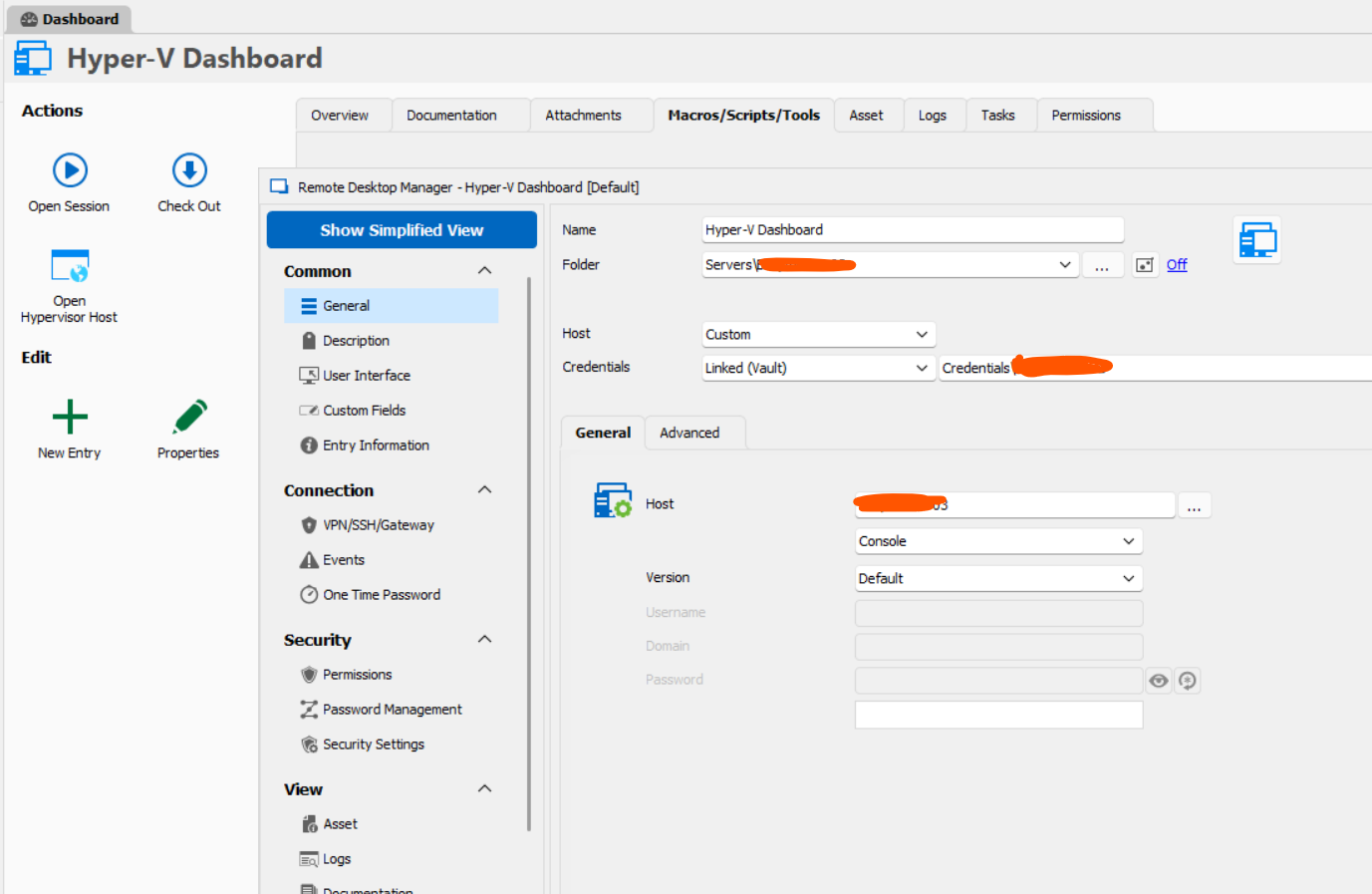
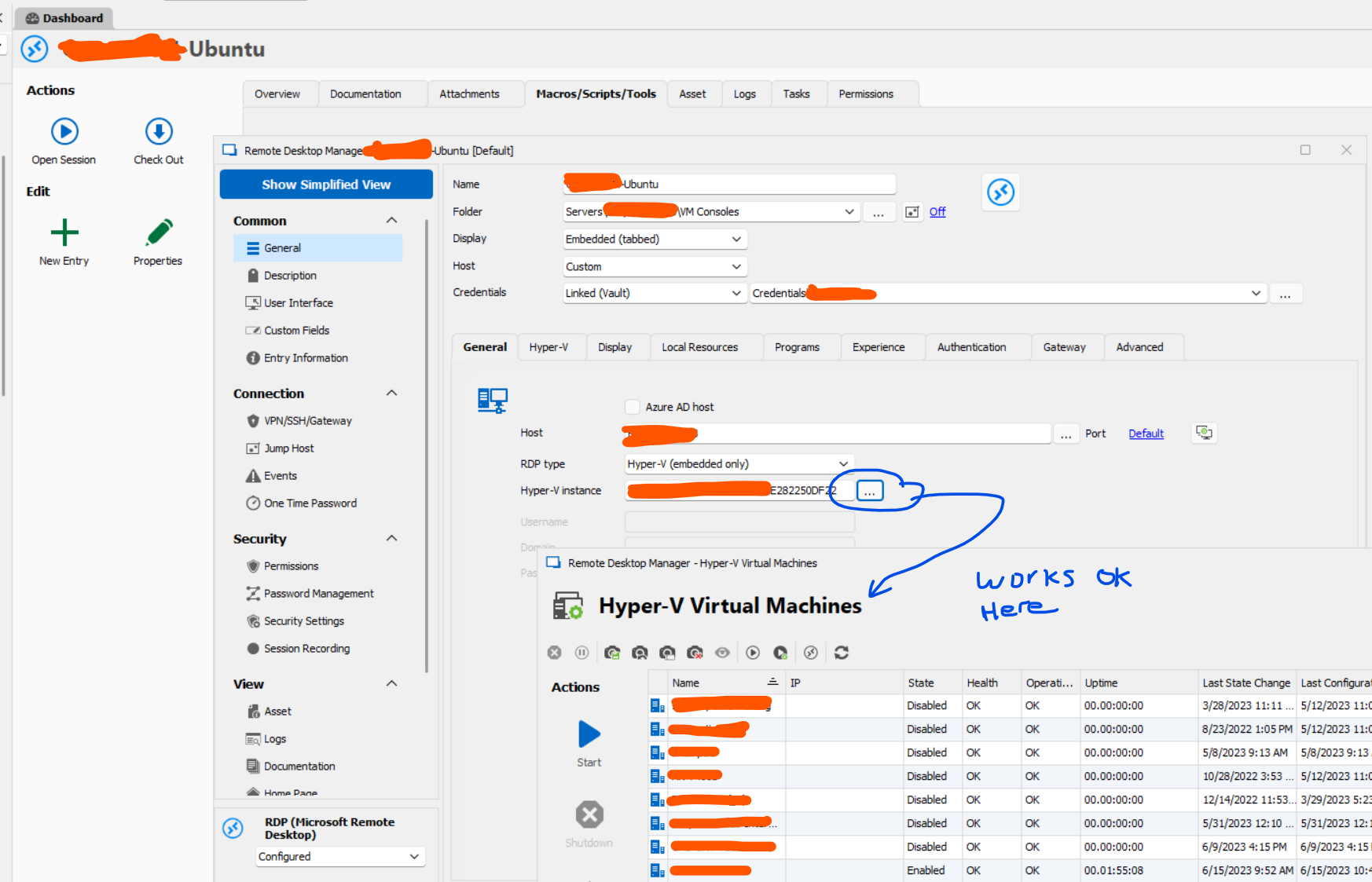
For a long time I was successfully using the Hyper-V Dashboard feature in RDM to administer VMs on our Hyper-V servers. At some point the dashboard stopped working. When launched the dashboard page simply remains empty, and the VMs never populate the list. I'm trying to troubleshoot what's wrong. I've followed the advice to configure the credentials under the management tools section, but still no success. I can create entries directly into the Hyper-V consoles of the VMs with no trouble (Remote desktop entry- Hyper-V type -> configure host and VM instance). This even will launch what is essentially the dashboard window to choose the VM for that entry! However, setting up the dashboard itself is something I cannot figure out. What's concerning is I've managed to lock my admin account in Active Directory many times trying to figure this out, even though the credentials are stored in my vault and are 100% correct. I think there is some kind of authentication issue happening but I'm lost as to what is misconfigured here. Is anyone able to step me through the correct configuration of the Hyper-V dashboard? It seems so simple but I'm obviously not understanding this.
The VM Chooser window when setting up a Hyper-V Console works great, as shown below, however the Hyper-V dashboard (which seems to be essentially the same thing, just standalone) does not authenticate properly or has some other problem.
Empty dashboard:

Basic settings:
Hyper-V machine list and controls seem to work fine in the chooser window, shown below:
Documentation Tab - available offline?
Hi Erica, me again... Installed 2023.1 today and the documentation tab is still not available on offline mode. Is there a setting we need to enable? I went through the options but didn't find anything.
Thanks again!
Documentation Tab - available offline?
Hi again... Sorry to be a pest but is there any update on this offline documentation feature? Hopefully it's still on the roadmap.
Thank you!
Documentation Tab - available offline?
Hi Erica. Thanks so much for that update. I'm sure it's hard to predict when this feature will be ready, but I can assure you we are very excited to have this feature available. If there is a beta testing option, we would be happy to help out by testing it. Whenever there are any updates on the roadmap to this feature, we wold love to hear it. Generally speaking, any offline document or informational feature would be a very welcome addition. Currently the only truly offline text based entry that isn't a sync to a local file if the secure note, which is a little clumsy for documenting critical server info, etc. Anyway thanks for keeping us informed!
Documentation Tab - available offline?
Hi Erica. Just checking in to see if this feature is still on track for the fall release. Any idea when we might see 2022.3? We are anxiously awaiting this feature. Thanks!
Documentation Tab - available offline?
Hi Erica,
Do you know if there's any progress on the Documentation tab being available in offline mode in future releases?
Thanks!