Documentation Tab - available offline?

Hi
I'm trying to have the "Documentation" Tab available when a user is in offline mode.
Server version = 2021.2.14.0
Database version = 733
Client version = 2021.2.29.0
On the top level of my tree I have set (Security Settings / Offline / Synchronize documents to to offline = Yes)
I can see the client is showing "downloading documents" for a few seconds in the status bar.
But when I switch to offline mode the "Documentation Tab" is removed.
I also tried the "ignore max file size" option, but that did not change anything
Is something missing in my the configuration, or is the "Synchronize documents to to offline" option not what I think it is ?
Hope someone can point me in the right direction. Thanks.
All Comments (29)
Hello,
The Synchronize document to offline option is for all document entry types or attachments tied to entries.
The Documentation tab isn't available on offline mode. Please see this online help page about it.
https://help.remotedesktopmanager.com/commands_documentation.html
Let me verify with our engineering team and I will get back to you.
Best regards,
Érica Poirier
Ok, sorry then I have misunderstood the offline Documentation options.
Thanks for clarifying.
Hello,
Thank you for your feedback.
A ticket has been submitted to our engineering team to have the Documentation tab available in offline mode. Once an update will be available, we will update this thread.
Thank you for your patience.
Best regards,
Érica Poirier
Hi Erica,
Do you know if there's any progress on the Documentation tab being available in offline mode in future releases?
Thanks!
Hi Clark,
The improvement to have the Documentation tab being available in offline mode should be implemented in version 2022.3 planned for this fall.
Best regards,
Érica Poirier
Hi Erica. Just checking in to see if this feature is still on track for the fall release. Any idea when we might see 2022.3? We are anxiously awaiting this feature. Thanks!
Hi Clark,
This feature is still on development. I will keep you updated on the progression of this improvement if it will be in version 2022.3.
For your information, 2022.3 version is planned to be released in November.
Thank you for your patience.
Best regards,
Érica Poirier
I can see that version 2022.3.16 is released, but my documentation tab still disappears when going offline.
Hello,
We have postponed this improvement as it cause performance issue. Once this performance problem will be solved, we will post it here.
Thank you for your patience.
Best regards,
Érica Poirier
Hi Erica. Thanks so much for that update. I'm sure it's hard to predict when this feature will be ready, but I can assure you we are very excited to have this feature available. If there is a beta testing option, we would be happy to help out by testing it. Whenever there are any updates on the roadmap to this feature, we wold love to hear it. Generally speaking, any offline document or informational feature would be a very welcome addition. Currently the only truly offline text based entry that isn't a sync to a local file if the secure note, which is a little clumsy for documenting critical server info, etc. Anyway thanks for keeping us informed!
Hi again... Sorry to be a pest but is there any update on this offline documentation feature? Hopefully it's still on the roadmap.
Thank you!
Hello,
No worries. We understand that this is a wanted feature.
This feature will be available in version 2023.1 that should be released in March.
Best regards,
Érica Poirier
Hi Erica, me again... Installed 2023.1 today and the documentation tab is still not available on offline mode. Is there a setting we need to enable? I went through the options but didn't find anything.
Thanks again!
Hi Clark,
We are sorry to mention that the Documentation tab is still not available even if it was planned for 2023.1 version.
We fully understand that the community is thrilled about this feature. Our engineering team is working hard to enable this feature without impacting RDM performance. When they deem the impact to be minimal and satisfactory by their standards, we will notify you right here.
Thank you for your patience.
Best regards,
Érica Poirier
Hi!
My team is also desperately waiting for this feature. We've been using RDM extensively the past year and this has been the most complained aspect of the tool. We do a lot of remote support and having to disconnect the VPN to consult the customers documentation is a real deal breaker.
Maybe there could be a checkbox to enable it, even with performance impact and let your customers decide if that impact is acceptable when compared to the burden of having to disconnect the VPN.
What we are seeing are technicians avoiding to use the tool and copying user information to other tools on their machines witch beats the main purpose for us using the tool, customer data security...
Hello,
Thank you for your feedback.
Your patience has been paid off as the Documentation tab is now available in offline mode in version 2023.2 that will be officially released on June 20th.
The feature can be enabled in the Security Settings of the Vault Settings.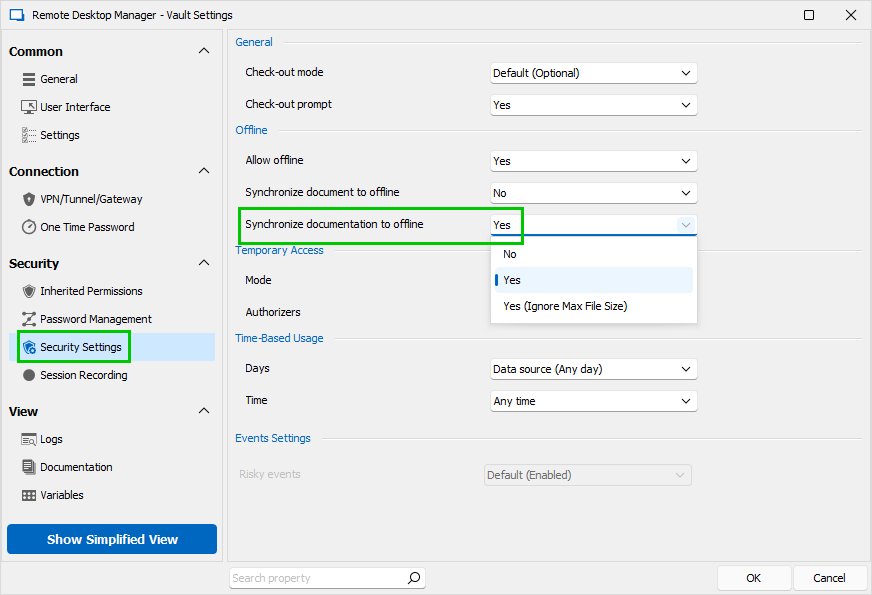
The RDM 2023.2.8 is already available as a beta version on our download web page.
https://devolutions.net/remote-desktop-manager/home/download
https://forum.devolutions.net/topics/39574/remote-desktop-manager-20232--beta#176910
Let us know if you have further questions about this.
Best regards,
Érica Poirier
1e22e5f1-1ae4-4af4-bd9f-d7df20fff12e.png
Hi Erica. I was thrilled to see this in my email this morning. I've upgraded to 2023.2.7, latest available to download from the website as of today. I enabled the oflline feature in the vault settings exactly as you have shown. Sadly, so far the Documentation tab still disappears when I switch to offline mode. Is there something I am missing? Is there some action to prompt the information to actually "sync" before it becomes available offline? If it matters, our database is hosted in MSSQL on a Linux host.
Thanks,
Justin
OK I partially figured this out. It was not obvious to me until reading through the release notes what this actually means.
I was expecting the Documentation "tab" to become available offline, but that is not the case. What we do have now is a new entry type called "Documentation Editor". It adds the same markdown-style documentation section, but it's a discreet entry in your tree. You would need to cut/paste any existing documentation from your tabs and save it into this new entry type. This is fine.
However, I still see a problem. If I have the new documentation entry open in view mode (so I can see the text in it), and I go offline, it remains available. Great.
If I am offline, I cannot open or view the documentation entry. The action buttons for View, etc. are disabled when offline.
Maybe I'm still missing something?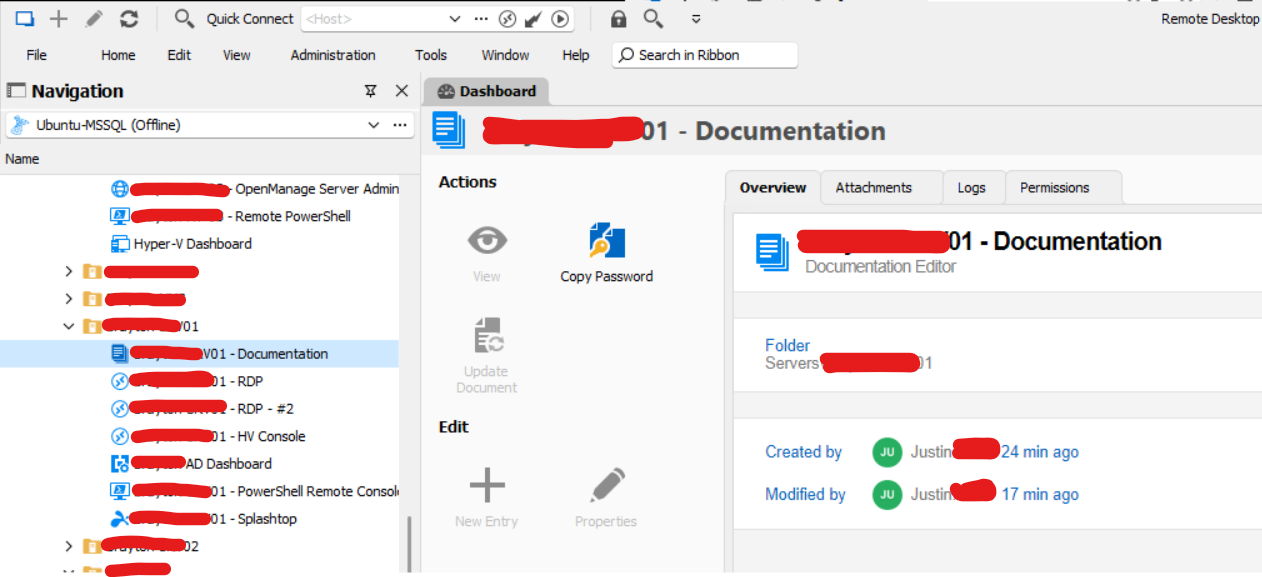
Hi Erica. I was thrilled to see this in my email this morning. I've upgraded to 2023.2.7, latest available to download from the website as of today. I enabled the oflline feature in the vault settings exactly as you have shown. Sadly, so far the Documentation tab still disappears when I switch to offline mode. Is there something I am missing? Is there some action to prompt the information to actually "sync" before it becomes available offline? If it matters, our database is hosted in MSSQL on a Linux host.
Thanks,
Justin
9c5e9e39-758a-411a-894b-9622808df27b.png
@clark
Developer here, I will have a look next week.
Just to confirm, you are correct, with the beta (v2023.2) the Documentation tab should be available while offline (read-only) if configured correctly, of course.
Best regards,
Stéfane Lavergne
@clark,
It looks to be working correctly for me at least. Please keep in mind the offline cache needs time to synch, anything from a few milliseconds to a few seconds/minutes depending on the number of documents to synch. We "protect" from closing the app while the synch is in progress, but we did not protect the "Go Offline" click, I will log this.
If you start the Profiler (Help > Profiler), set the Profiler Level = 16385, CTRL + Refresh your Vault, you should see something like this, telling you the status of the synch:
Notice the second line, it synchronized my documentation page
Thread : 11
----------------------------------------
11 - Sync to Offline... - Count : 9
11 -     Documentation - Synchronized - rdp-parent002 - Documentation Name - (Home)
11 -     Documentation - Root setting : Yes
11 -     Documentation - Max size : 5 MB
11 -     Documentation - Size : 3.1 KB
11 -     Documentation Attachments - Size : 0 Byte
11 -     Documentation - Synchronized Count : 1 (0)
11 -     Documentation Attachments - Synchronized Count : 0 (0)
11 - Sync to Offline : 47 ms - Count : 9
Note: I just logged a bug, if you switch between session while in offline and the focus is on the documentation tab, the data is not loaded correctly, click on any other tab and back will resolve the UI issue.
Stéfane Lavergne
2023-06-19_8-25-52.mp4
OK, thanks so much for looking into this. Just to confirm what we are seeing, the Documentation tab still disappears when not connected to database, and the Documentation entry type becomes disabled when offline. It's difficult to avoid being in offline mode when the database is not available, as the app specifically requests going offline when the database is not reachable.
RDM v 2023.2.7.0 64-bit (Beta)
Datasource: (official) MSSQL database hosted on Ubuntu Linux
Vault settings as shown: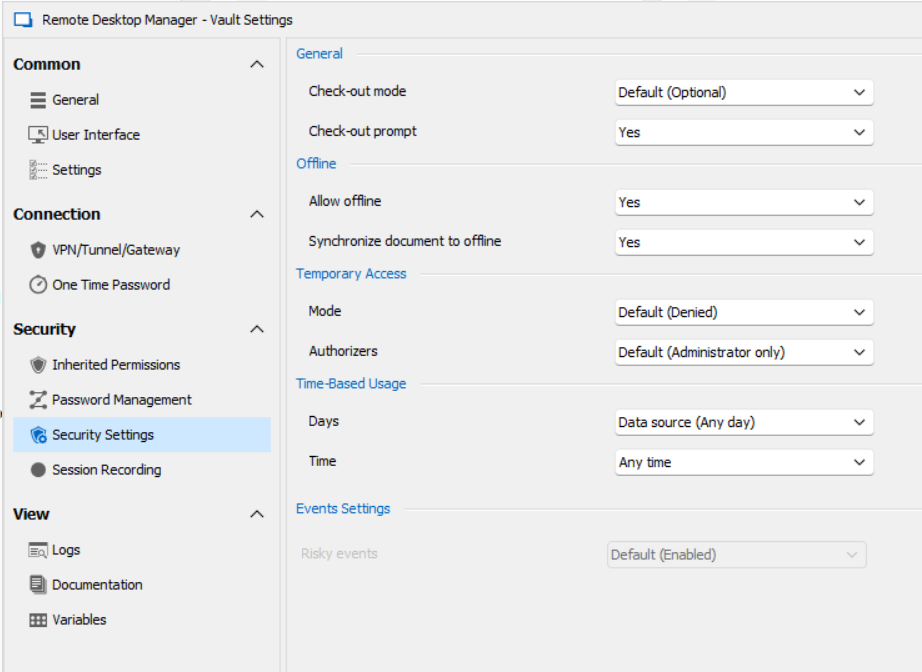
I ran the profiler as requested. I do see the following, which looks encouraging, however the Documentation tabs and Entry types are still unavailable when offline.
In your example, under "Sync to Offline, we see lines such as:
"Documentation - xyz"
I have a few embedded "documents" synced but no lines showing "Documentation". Maybe this is a clue, it's maybe not even trying to sync the documentation features for some reason, not tabs or entries.
Main thread (UI)
----------------------------------------
RefreshConnections...
LoadConnections UI - [Microsoft SQL Server : Ubuntu-MSSQL] - ReadOnly - 64-bit...
Engine.Clear - DisposeInternalList : 0 ms
HasSecurityChanged : 2 ms
HasChanged : 2 ms
Reload: True - HasSecurityChanged: True - HasChanged: True
Engine.Clear - DisposeInternalList - ClearRoot : 0 ms
LoadConnectionsFromDataSource...
LoadDataSourceSettingsFromDataSource...
GetDataSourceSettings : 18 ms
LoadDataSourceSettingsFromDataSource : 18 ms
GetConnections...
Database.GetConnections...
Reading connections from database : 103 ms
DecryptData : 3 ms - Count : 1091
DeserializeData : 32 ms - Count : 1091
Database.GetConnections : 143 ms
GetConnections : 143 ms
DoMergeConnections - ReadOnly...
Loop...
Migrate Connection : 6 ms
Loop : 8 ms
Merge Full List...
Offline : 6 ms
Merge Full List : 6 ms
DoMergeConnections - ReadOnly : 15 ms
LoadConnectionsFromDataSource : 229 ms
Load connection overrides...
Has changes : 2 ms
Load connection overrides : 2 ms
LoadConnections [Microsoft SQL Server : Ubuntu-MSSQL - Global Vault] - ReadOnly - 64-bit : 28 ms
FavoriteManager.LoadFolders : 7 ms
LoadConnections UI - [Microsoft SQL Server : Ubuntu-MSSQL] - ReadOnly - 64-bit : 289 ms
RefreshConnections : 289 ms
Connection States: Refresh...
GetOpenedConnections...
Opened - by process : 7 ms
GetOpenedConnections : 7 ms
Connection States: Refresh : 20 ms
TreeView.LoadConnectionList...
BeginUpdate...
LoadConnectionInTreeNode : 7 ms
PreCreateGroups : 0 ms - Run count : 1
BeginUpdate : 13 ms
TreeView.LoadConnectionList : 13 ms
Load Expand States...
Expanded: 4 - Nodes : 1091
Nodes...
Expand : 0 ms - Run count : 1
Collapse : 1 ms - Run count : 38
Nodes : 1 ms
Load Expand States : 1 ms
SelectionChanged - Default...
RootDashboardOverviewManager.LoadRootDashboardOverView - Quick Load : 75 ms
SelectionChanged - Default : 92 ms
Thread : 7
----------------------------------------
7 - OfflineManager.SaveMeta...
7 - SaveSecurityInfo...
7 - 88da250b-06fb-4b9c-9b4b-5ffecf085aa2
7 - SaveSecurityInfo : 8 ms
7 - Repository : 3 ms
7 - Expiration : 11 ms
7 - DataSourceSettings : 12 ms
7 - OfflineManager.SaveMeta : 35 ms
Thread : 10
----------------------------------------
10 - Sync to Offline... - Count : 1091
10 - Document - Synchronized - [filename obscured] (- 1 Bytes)
10 - Document - Synchronized - [filename obscured].pdf (50.1 KB)
10 - Document - Synchronized - [filename obscured] (- 1 Bytes)
10 - Document - Synchronized - [filename obscured].docx (- 1 Bytes)
10 - Document - Root setting : Yes
10 - Document - Max size : 100 MB
10 - Document - Total count : 4
10 - Document - Size : 617.3 KB
10 - Document - Synchronized Count : 4 (0)
10 - Sync to Offline : 61 ms - Count : 1091
10 - Sync to Offline : 5 ms - Count : 4
10 - Sync to Offline : 146 ms
Thread : 13
----------------------------------------
13 - OfflineManager.SaveMeta...
13 - Expiration : 16 ms
13 - OfflineManager.SaveMeta : 16 ms
Thread : 16
----------------------------------------
16 - OfflineManager.SaveMeta...
16 - SaveSecurityInfo...
16 - 88da250b-06fb-4b9c-9b4b-5ffecf085aa2
16 - SaveSecurityInfo : 27 ms
16 - Repository : 3 ms
16 - Expiration : 11 ms
16 - DataSourceSettings : 2 ms
16 - OfflineManager.SaveMeta : 44 ms
f83a8525-35fc-4cd9-a977-ace8ed974554.png
I think we discovered a clue here! In Erica's screenshots, shes highlighted in gree an option to sunc "Documentation" as well as one for "Documents". I did not even notice we only have "Documents" in v. 2023.2.9. Looks like you are running a different codebase than we have! We have the blue arrow, NOT the orange arrow.
See below:
Erica's screenshot: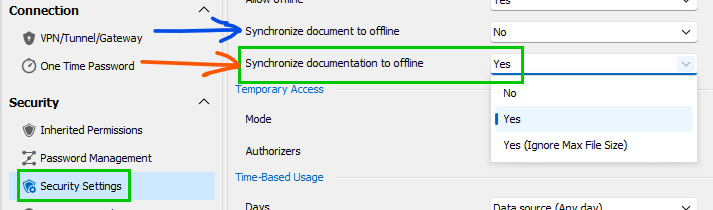
Our screenshot: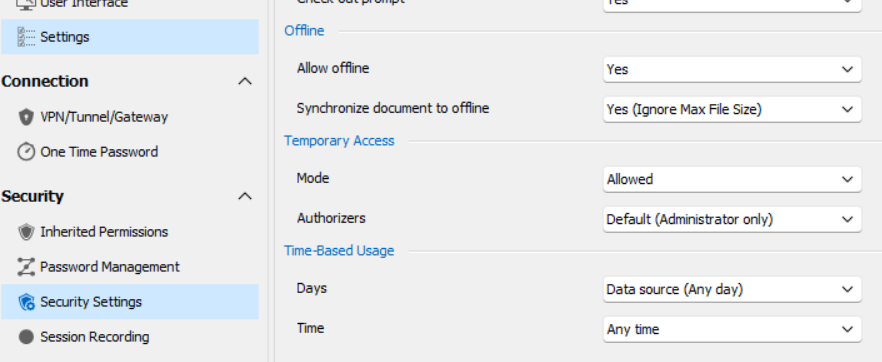
e128c52e-ed9c-4328-8ece-155a4f3375f8.png
7213f877-0bfd-4e30-aae5-47538071fdd5.png
Nice, that is what I was thinking this morning but I haven't had a chance to go look at the code yet.
We often hide features behind flags until they are tested & ready for client use. It looks like the flag is still being checked here, this would explain why you don't see the setting and nothing works as expected.
I will validate and get this fixed for the next release v2023.2.10
Sorry for the inconvenience and best regards,
Stéfane Lavergne
Thanks so much Stéfane. This is making more sense now. I figured we must be doing something wrong. If possible we'd love to know when to expect that next minor revision. We've been waiting for this feature (mostly patiently!) for a long time. I noticed this morning you went live with 2023.2.9.
Thanks again.
Justin
We should be releasing a new version with minor fixes every week if not sooner for the next 2-3 weeks as we stabilize the release (for fixes for issues just like this), I would guess a new release early/mid next week.
I will let you know once the fix is done internally so you have an idea.
Best regards,
Stéfane Lavergne
The fix has been implemented, the feature will be fully enabled in the next release.
Best regards,
Stéfane Lavergne
A new version has been released. All should be good.
Best regards,
Stéfane Lavergne
Hi Stéfane. This is great! The tab is visible when offline just as we had hoped. If I may, I think there may still be one tiny bug. We are also experimenting with the Documentation entry type. As shown above, when offline the "View" button is disabled, as are any options in the right-click menu to open up that Documentation entry. This issue remains, however, there is good news! If we simply double-click the Documentation entry it opens right up, even when offline. So, it looks like it's still not working, but it actually is. We jsut need to sovle the View button being disabled.
We're very happy we can begin using this feature. As you can imagine, the times when you might need your documentation the most are potentially those same times when the network might be down, and you cannot reach your data source. Knowing we can access our notes for the network and servers, even when offline, is huge for us. Thank you so much for impletmenting this feature.
If you are able to fix the disabled View button, even better, but it's working now and that's all that matters!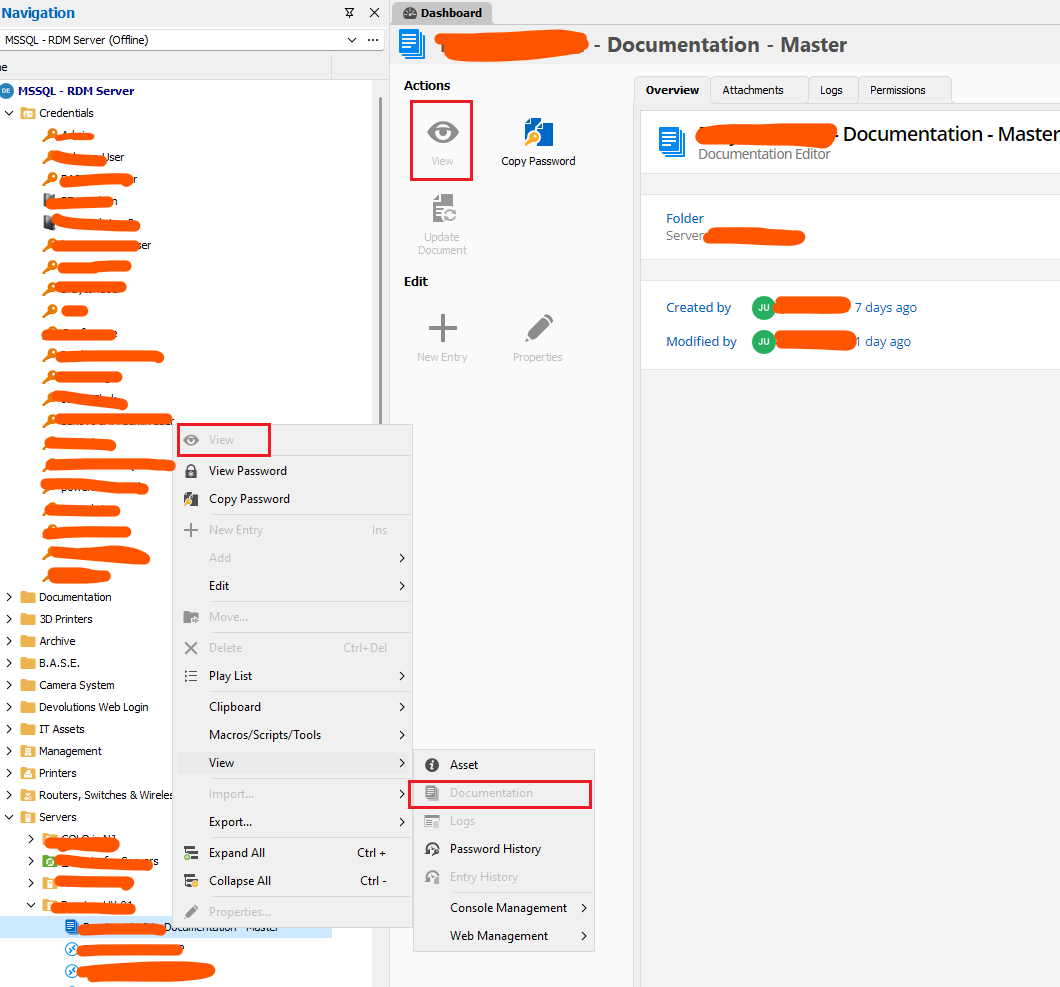
71ab1331-a58e-460d-9fd5-023bd8acf9b4.png
@clark,
I will have someone look at the View code to see why it gets disabled and fix it.
Side note, I did notice a bug the other day, if you close RDM, we block the close temporarily while we finish the offline sync. The issue is we don't do the same if you click the "Go Offline" button. I've logged it and will have a look and fix this issue as well. In the meantime, while testing, give RDM 1-3 seconds after your last action (add/edit/delete of a connection/document/documentation) before pressing the "Go Offline" button.
Best regards,
Stéfane Lavergne