
admins_rdm
Migrate RDM DB from on-prem SQL 2016 with AD logins to AzureSQL with EntraID
Hello,
Thanks for reaching out to Devolutions.
We have this article that can be useful https://docs.devolutions.net/rdm/kb/how-to-articles/sql-server-database-migration/.
Besides this, there might be a concern with user profiles if the usernames are different, and the authentication type that will likely change.
Long story short, some manual actions will be required in the database directly.
May I suggest opening a Support case on your behalf to stage a migration with you?
Let me know if I shall proceed or email us directly at service@devolutions.net.
Best regards,
Hello Abelisle,
As our migration involves different teams and several RDM DBs (not all the entries are in the same DBs), we are making some tests using the link you provided.
If we find we will need your assistance, we will proceed to open a support case.
Many thanks for your assistance.
Migrate RDM DB from on-prem SQL 2016 with AD logins to AzureSQL with EntraID
Good morning,
We are planning to migrate the on-prem SQL DBs to AzureSQL and want to know if there is a procedure/tool to help with this migration.
Actually we have a hybrid environment using ActiveDirectory joined computers and users that are linked to the correspondent EntraID (AzureAD) users.
The DB's need to be migrated to AzureSQL using EntraID only and we need to migrate the DB's and being able to keep special permissions as private vaults and maintaining the "User specific settings" on the entries.
Is there any procedure (either using PS or a tool) to migrate the DB's to AzureSQL while maintaining the above mentioned?
Thanks for your assistance.
Azure Bastion SSH connections not working as expected since version 2024.2.21.0
One of our teams have complained about Bastion SSH connections not working since version 2024.1.21.0.
It was working in previous version (2024.1.20.0).
Only SSH connections are failing, RDP are working as usual.
The Bastion connection is configured as below:
Connection
General
Subscription ID / Resource Group / Tenant ID filled
Azure Cloud: Default
Connection mode: TCP Tunnel
Authentication
Prompt for credentials (other settings are not set)
Proxy
Proxy type: None
Advanced
VPN reconnect mode: Default
After Execute Wait / Delay: -1
When trying to connect to SSH, connection seems to partially establish. It stucks at "connecting to port" not going further.
With version 2024.20.1.0 it worked, but in new versions (tested in 21.1 and 23.1) the issue is happening.
RDM v2024.1.12.0 64-bit + MS SQL Listener with 4 IP's, only one active. Connection timeout when trying to access DB
Hello Stephane,
As we are updating our software as it is published in your site, our InTune service has upgraded RDM to latest version: 2024.1.17.0 and some users have found that, even though the "MultiSubnetFailover" setting is appearing, they are not able to modify its value, neither able to modify ANY value.
Double clicking on the setting has no effect.
Could you check and see if this can be set as modifiable as some users do have the timeout but are not able to apply the setting?
Thanks for your prompt support.
RDM v2024.1.12.0 64-bit + MS SQL Listener with 4 IP's, only one active. Connection timeout when trying to access DB
Hi Stephane,
I can confirm that, after applying the configuration setting, RDM is working without problems.
We let 2 days of testing on several machines and they're working.
Thanks for your assistance!
RDM v2024.1.12.0 64-bit + MS SQL Listener with 4 IP's, only one active. Connection timeout when trying to access DB
Dear Stephane,
I have proceeded as you suggested and, at first time, software seemed to freeze. I opted to right click in the taskbar icon and select "Exit". After a while I received the exit confirmation window, replied "yes" and restarted again.
It lasted a bit (not much at all) and RDM seemed to be working.
Now my SQL server connection settings is like this:
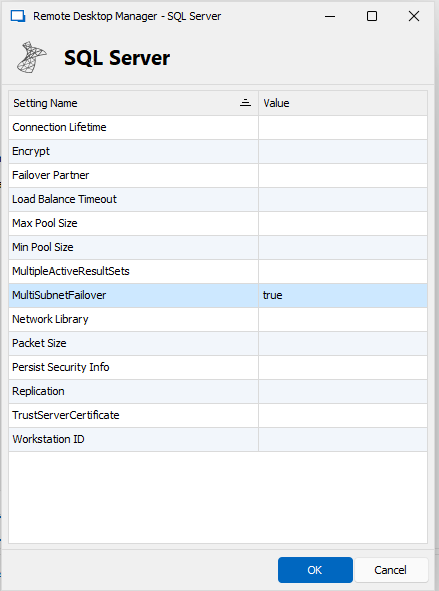
Will have a look during this week to see if this is working.
Thanks for your help!
RDM v2024.1.12.0 64-bit + MS SQL Listener with 4 IP's, only one active. Connection timeout when trying to access DB
Dear Stephane,
Thanks for your prompt reply. I have a problem, that is this setting is not appearing in the connection setup (see attached screenshot).
Also I saw that this issue is related to old versions of .NET Framework.
"This parameter is supported in newer versions of the SQLClient driver that is included with the .NET Framework 4 and with later versions of the .NET Framework, and is back ported to the .NET Framework 3.5."
As stated in the title, we're using the latest RDM version (2024.1.12.0) and .NET Framework 8
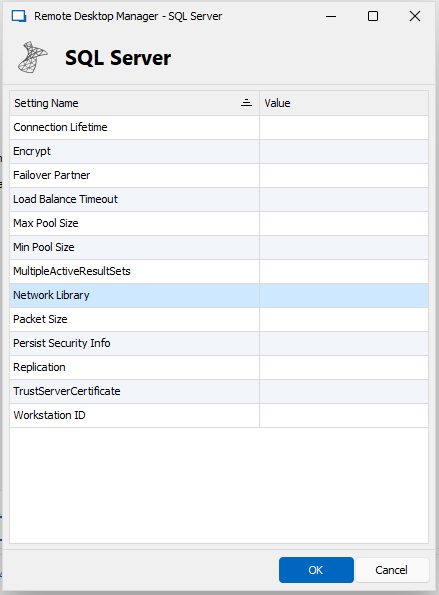
We also are testing connections to AzureSQL servers, but these ones are working fine.
Our SQL servers are not Windows 2012. They are Windows Server 2016 SP3.
NOTE:
Sorry, I think I misunderstood you. I have proceeded to modify one of the entries with the one you suggested.
RDM v2024.1.12.0 64-bit + MS SQL Listener with 4 IP's, only one active. Connection timeout when trying to access DB
We have upgraded from v2023.3.36.0 to v2024.1.12.0 using inTune (so this forced us to publish .NET 8 also in our Company Portal).
After software upgrade, users coming from different locations (network, VPN, W365, etc.) do have connection timeouts.
We believe this is due to .NET 4.7 being upgraded to .NET 8, as, with previous version we didn't had problems.
RDM connects through a SQL listener that has 4 IP's. 3 of them are OFF and only one is ON.
A workaround was to modify the DB connection and replace the listener FQDN with the working IP, but we need a fully working solution as the listener may switch to different IP's.
Does anyone else had the same problem?
Override Credentials in User Specific Settings keep getting lost
Good morning,
Same from my side. I'll provide with this new version to our affected team and get back if something's wrong.
Thanks and regards,
Ismael Valdivia - Cyber Security Administrator
Override Credentials in User Specific Settings keep getting lost
Hi there,
While trying to troubleshoot the same issue with one of our teams I found this thread.
We are experiencing the same behaviour, User Specific Settings disappear for some users using the same vault.
Our RDM infrastructure uses several SQL DB's, these DB's are managed by their corresponding Manager, so eveyr DB has his own DBAdmin and users.
Our Oracle team is experiencing the loss of the User Specific Settings as well.
This is our actual configuration:
One SQL listener that is using a HA SQL environment (servers are clustered).
RDM versions accessing the DB are: 2022.3.27.0 and 2022.3.31.0 (both 64bit). Last one was installed to check if the issue was still persisting... and it is.
# of users accessing the same DB: 40
# of entries in the DB: ~ 9000
Users affected: Admin users as well as normal users (do not have restricted nor read-only users)
PS script to modify User Specific Settings is used. This is manually triggered as you need to provide the username for the entries.
I also have requested the team manager to provide me with the activity log on the DB (that I'm still processing as this log has 22144 entries for 7 days).
We will need to solve this issue as well. Do you have any update/solution on this?
Thanks for your help and best regards,
Ismael Valdivia - Cyber Security Administrator