RDM v2024.1.12.0 64-bit + MS SQL Listener with 4 IP's, only one active. Connection timeout when trying to access DB
RDM v2024.1.12.0 64-bit + MS SQL Listener with 4 IP's, only one active. Connection timeout when trying to access DB

We have upgraded from v2023.3.36.0 to v2024.1.12.0 using inTune (so this forced us to publish .NET 8 also in our Company Portal).
After software upgrade, users coming from different locations (network, VPN, W365, etc.) do have connection timeouts.
We believe this is due to .NET 4.7 being upgraded to .NET 8, as, with previous version we didn't had problems.
RDM connects through a SQL listener that has 4 IP's. 3 of them are OFF and only one is ON.
A workaround was to modify the DB connection and replace the listener FQDN with the working IP, but we need a fully working solution as the listener may switch to different IP's.
Does anyone else had the same problem?
All Comments (9)
Very interesting, we have a few other clients stating connection issues. I think you might have discovered the root cause.
Could this be the solution? https://learn.microsoft.com/en-us/troubleshoot/sql/database-engine/availability-groups/listener-connection-times-out
To configure your RDM with the parameter:
File > Data Sources
Edit
Advanced (tab)
More Settings (button)
If you don't see
MultiSubnetFailoverin the listWithin the Setting Name column (double-click) on any value and replace it the value
MultiSubnetFailover
Now set the Value
trueSave
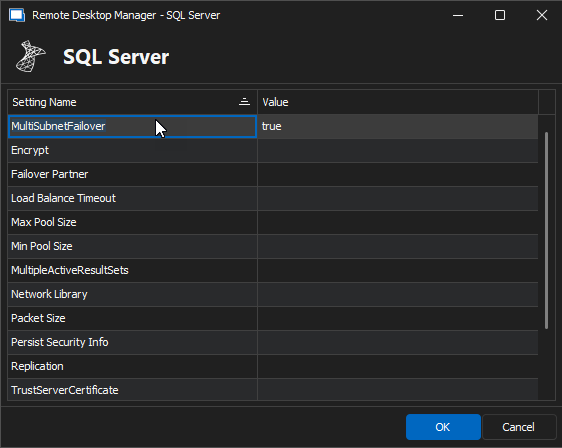
Does this resolve the issue for you?
Best regards,
Stéfane Lavergne